Выберите язык

UNM Undergraduate Application Form (Fillable PDF)

  1. Язык Английский
  2. Страна США
  3. Вид деятельности College Admissions
  4. Департамент Education
UNM Undergraduate Application Form (Fillable PDF)

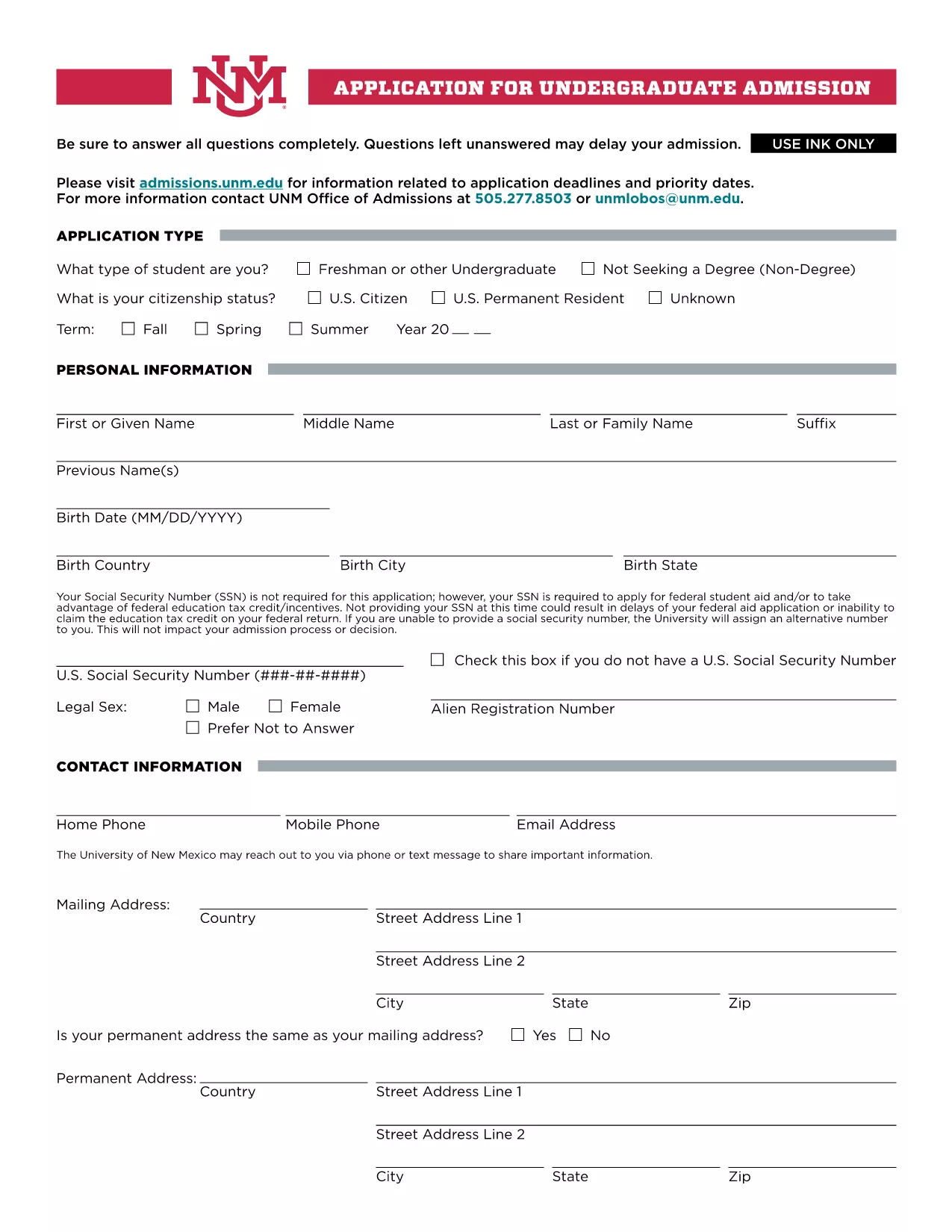
Welcome to the official landing page for the UNM Undergraduate Application Form. This fillable PDF lets prospective students apply to the University of New Mexico quickly, securely, and without the need for any additional software.

Our integrated Fill out this form button launches the Formize PDF Filler app directly in your browser, so you can complete every section, save your progress, and submit the application with just a few clicks.

Why Choose the Fillable UNM Application Form?

The fillable version offers several advantages over a static PDF:

  • Instant validation: The form checks required fields and formatting as you type.
  • Save & resume: You can pause, close your browser, and return later without losing data.
  • Environmentally friendly: No printing needed unless you choose to keep a hard copy.
  • Secure transmission: Your information is encrypted during the online submission.

How to Complete the Form Online

Follow these simple steps to fill out the UNM application:

  1. Click the Fill out this form button above.
  2. Wait a few seconds while the Formize PDF Filler loads.
  3. Enter your personal, academic, and residency information in the highlighted fields.
  4. Upload required documents (transcripts, test scores, etc.) using the attachment icons.
  5. Review each section, correct any validation warnings, and click Submit when you’re ready.

Common Mistakes to Avoid

  • Leaving the Social Security Number blank if you plan to apply for federal aid – the form will warn you.
  • Submitting outdated transcripts; always upload the most recent official copy.
  • Skipping the “Signature” field – the digital signature is required for processing.
  • Exceeding the file size limit for uploads; compress large PDFs before attaching.

Submission & Next Steps

After you submit, you will receive an automated confirmation email with a reference number. The UNM admissions office will review your application and contact you if additional information is needed. Keep an eye on your email and the UNM applicant portal for status updates.

Ready to start? Click the button below and let Formize handle the rest.

ЧАСТО ЗАДАВАЕМЫЕ ВОПРОСЫ
  • Do I need to provide my Social Security Number?

    The SSN is not required for the basic application, but it is mandatory if you plan to apply for federal student aid or claim education tax credits.

  • Can I save my progress and finish later?

    Yes. The Formize PDF Filler lets you save a draft in your browser. When you return, simply reload the form and continue where you left off.

  • What file formats are accepted for supporting documents?

    PDF, JPEG, and PNG files are accepted. Each file must be under 5 MB to ensure successful upload.

  • How do I know my application was received?

    After submission, you will receive an automatic confirmation email with a reference number. You can also check the status in the UNM applicant portal.

  • Is there a deadline for the undergraduate application?

    UNM’s regular admission deadline is March 1 for fall enrollment. Check the UNM admissions website for special program deadlines.

  • Can I print a hard copy after completing the form online?

    Absolutely. Once you finish, use the “Print” option in the Formize toolbar to generate a printable PDF version.

  • What should I do if I encounter an error while filling the form?

    Refresh the page and try again. If the problem persists, clear your browser cache or try a different browser.

  • Is there a fee to use the fillable PDF?

    No. The fillable UNM application form and the Formize PDF Filler are completely free to use.

КАК ПОЛЬЗОВАТЬСЯ

Как бесплатно заполнить UNM application form онлайн за 5 простых шагов:

  1. 1
    Open the Fillable Form
    Click the “Fill out this form” button on the page. The Formize PDF Filler will open in a new browser tab.
  2. 2
    Load the Form
    Wait a few seconds while the PDF loads. All fillable fields will be highlighted for easy entry.
  3. 3
    Enter Your Information
    Complete each section—personal data, academic history, residency, and any required test scores.
  4. 4
    Attach Supporting Documents
    Use the attachment icons to upload transcripts, test scores, and other required files.
  5. 5
    Review & Submit
    Double‑check all entries, resolve any validation warnings, then click the Submit button to send your application securely.
Приложение Formize PDF Filler
О ПРИЛОЖЕНИИ

Шаблон UNM application form

С традиционный набор функций для просмотра и заполнения PDF-документа в сочетании с преимуществами веб-приложения и адаптивной верстки вы сможете заполнить UNM application form за считанные минуты.

ФУНКЦИИ

Инструмент для запролнения PDF форм

Самый простой способ заполнить UNM application form онлайн

  • Быстрое заполнение UNM application form
    Ищете способ быстро заполнить UNM application form онлайн? С нашим бесплатным онлайн-инструментом вы узнаете, как редактировать заполнить этот PDF-документ менее чем за минуту.
  • Простой в использовании онлайн-редактор PDF
    Надоело распечатывать PDF-файлы, чтобы их можно было отредактировать перед повторным сканированием и отправкой обратно? Редактируйте документы PDF бесплатно онлайн. Используйте наш онлайн-редактор PDF, чтобы сэкономить время и бумагу.
  • Отличные инструменты, все платформы
    Хотите знать, как заполнить UNM application form на Mac или, может быть, как использовать бесплатный заполнитель PDF? Наши онлайн-инструменты PDF работают на всех платформах.
  • Безопасное хранение файлов
    Файлы заполненных "UNM application form" хранятся в защищенной базе данных, управляемой облачным хостингом Amazon. Вы можете удалить свои файлы из нашей системы в любое время. В любом случае эти файлы автоматически удаляются через 24 часа.
  • Чат с UNM application form
    Откройте чат с "UNM application form" в Chatize — бесплатном помощнике для чтения PDF-файлов. Задавайте вопросы и получайте ответы от "UNM application form". Просто нажмите кнопку Чат с документом выше.

Удалить данные о заполненной форме

Удалить данные о заполненной форме? В этом случае Ваш прогресс заполнения этой формы будет утерян.

Удалить сеанс редактирования

Удалить выбранный сеанс редактирования? В этом случае ваш прогресс в создании и редактировании формы будет утерян.