
Выберите язык

Georgia MV-300 – Request Cancellation of Temporary Operating Permit

  1. Страна США
  2. Язык Английский
  3. Департамент Georgia Department of Revenue
  4. Вид деятельности Регистрация ТС
Georgia MV-300 – Request Cancellation of Temporary Operating Permit

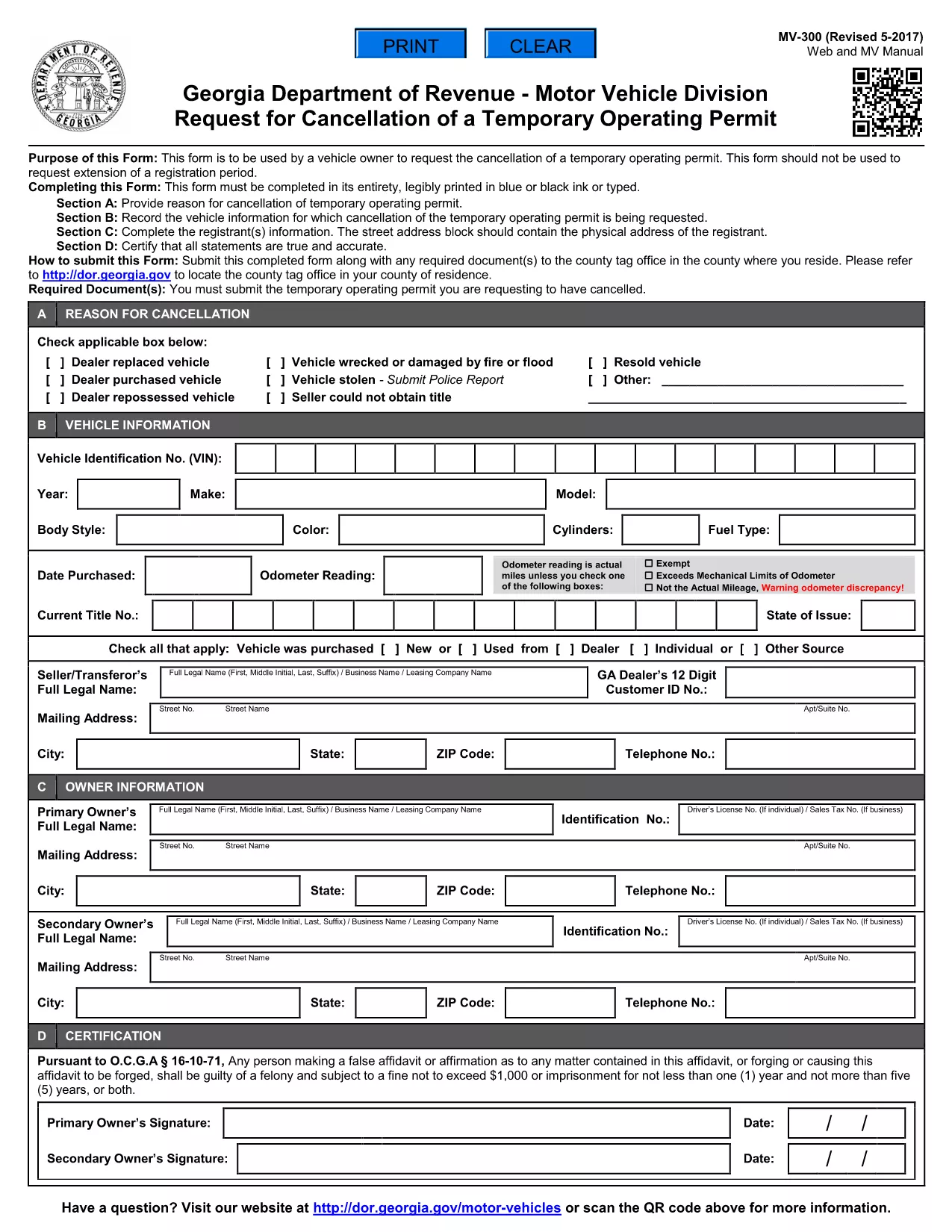
The MV-300 is the official Georgia Department of Revenue Motor Vehicle Division form used to request the cancellation of a temporary operating permit. Whether you’re a dealer, fleet manager, or private vehicle owner, you can now complete this form entirely online with Formize’s fillable PDF tool.

What Is the MV-300 Form?

The MV-300 serves a single purpose: to formally request the termination of a temporary operating permit issued by the Georgia Department of Revenue. It is not intended for extensions, renewals, or any other type of permit request.

How to Complete the MV-300 Online

Follow these simple steps to fill out the MV-300 without leaving your browser:

  • Click the "Fill out this form" button on this page.
  • Wait a few seconds while the Formize PDF Filler app loads the fillable version of the MV-300.
  • Enter the required information in each field (vehicle details, permit number, owner signature, etc.).
  • Review the completed form for accuracy.
  • Click Submit to download the finished PDF or to email it directly to the Motor Vehicle Division.

Common Mistakes to Avoid

  • Using the wrong form: MV-300 is only for cancellation, not for extensions.
  • Leaving required fields blank: Every field marked with an asterisk (*) must be completed.
  • Incorrect permit number: Verify the number on your temporary permit before entering it.
  • Missing signatures: Both the vehicle owner and the authorized dealer must sign.

Where to Submit the Completed Form

After you’ve filled out and saved the PDF, you have two submission options:

  • Mail: Send the printed form to the address listed on the form’s instructions.
  • Electronic: Email a scanned copy to mvforms@dor.ga.gov (if your local office accepts electronic submissions).

Need Help? Frequently Asked Questions

Below are answers to the most common questions about the MV-300.

ЧАСТО ЗАДАВАЕМЫЕ ВОПРОСЫ
  • Can I use the MV-300 to extend a temporary operating permit?

    No. The MV-300 is strictly for cancellation. For extensions, you must use the appropriate renewal form.

  • Do I need a notary for the MV-300?

    A notary is not required for the MV-300, but the signatures must be legible and match the names on the permit.

  • What if I lose my temporary operating permit?

    Contact the Georgia Department of Revenue for a replacement permit number before completing the MV-300.

  • Is there a filing fee for cancelling a temporary permit?

    There is no fee to submit the MV-300 cancellation request.

  • How long does it take for the cancellation to be processed?

    Processing typically takes 5‑7 business days after the department receives the completed form.

  • Can I fill out the MV-300 on a mobile device?

    Yes. The Formize PDF Filler works on smartphones and tablets, making it easy to complete the form anywhere.

КАК ПОЛЬЗОВАТЬСЯ

Как бесплатно заполнить MV-300 онлайн за 4 простых шагов:

  1. 1
    Open the Fillable Form
    Click the "Fill out this form" button on this page. The Formize PDF Filler will open in a new window.
  2. 2
    Enter Your Information
    Type directly into each field – vehicle details, permit number, owner contact info, and signatures.
  3. 3
    Review and Save
    Check that all required fields are completed, then click "Save" to download the finished PDF to your device.
  4. 4
    Submit to the Motor Vehicle Division
    Mail or email the completed PDF according to the instructions on the form.
Приложение Formize PDF Filler
О ПРИЛОЖЕНИИ

Формы регистрации транспортных средств

Если вы владеете или арендуете автомобиль, прицеп или лодку, вы должны выполнять определенные обязательства, чтобы ваше транспортное средство было юридически зарегистрировано и безопасно.

MV-300 — это одна из регистрационных форм транспортных средств, которые представляют собой документы, используемые для регистрации транспортного средства в соответствующем государственном или провинциальном органе власти. Эти формы обычно требуются, когда человек покупает новый или подержанный автомобиль или когда он переезжает в новый штат или провинцию на автомобиле.

Точные требования и формы, необходимые для регистрации транспортного средства, могут различаться в зависимости от местоположения, но, как правило, процесс включает предоставление информации о транспортном средстве, владельце и любых правах на транспортное средство.

После подачи регистрационных форм и сборов власти штата или провинции выдают свидетельство о регистрации или номерной знак владельцу транспортного средства. Эта регистрация позволяет легально эксплуатировать транспортное средство на дорогах общего пользования и автомагистралях.

ФУНКЦИИ

Инструмент для запролнения PDF форм

Самый простой способ заполнить MV-300 онлайн

  • Быстрое заполнение MV-300
    Ищете способ быстро заполнить MV-300 онлайн? С нашим бесплатным онлайн-инструментом вы узнаете, как редактировать заполнить этот PDF-документ менее чем за минуту.
  • Простой в использовании онлайн-редактор PDF
    Надоело распечатывать PDF-файлы, чтобы их можно было отредактировать перед повторным сканированием и отправкой обратно? Редактируйте документы PDF бесплатно онлайн. Используйте наш онлайн-редактор PDF, чтобы сэкономить время и бумагу.
  • Отличные инструменты, все платформы
    Хотите знать, как заполнить MV-300 на Mac или, может быть, как использовать бесплатный заполнитель PDF? Наши онлайн-инструменты PDF работают на всех платформах.
  • Безопасное хранение файлов
    Файлы заполненных "MV-300" хранятся в защищенной базе данных, управляемой облачным хостингом Amazon. Вы можете удалить свои файлы из нашей системы в любое время. В любом случае эти файлы автоматически удаляются через 24 часа.
  • Чат с MV-300
    Откройте чат с "MV-300" в Chatize — бесплатном помощнике для чтения PDF-файлов. Задавайте вопросы и получайте ответы от "MV-300". Просто нажмите кнопку Чат с документом выше.

Удалить данные о заполненной форме

Удалить данные о заполненной форме? В этом случае Ваш прогресс заполнения этой формы будет утерян.

Удалить сеанс редактирования

Удалить выбранный сеанс редактирования? В этом случае ваш прогресс в создании и редактировании формы будет утерян.