
Выберите язык

IRS Form 4810 – Fillable Prompt Assessment Request

  1. Страна США
  2. Язык Английский
  3. Вид деятельности Налоги
  4. Департамент IRS
IRS Form 4810 – Fillable Prompt Assessment Request

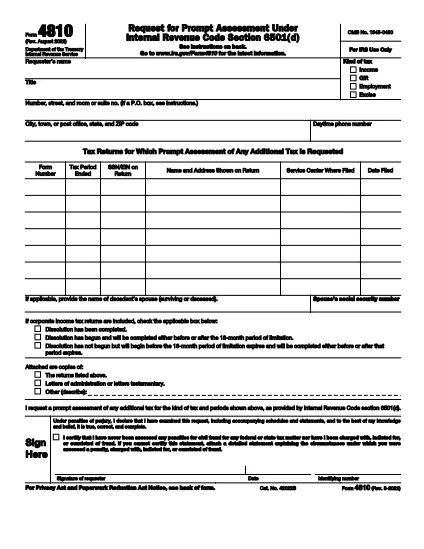
Form 4810, also known as the Prompt Assessment Request, lets taxpayers ask the Internal Revenue Service (IRS) for a faster determination of their tax liability. Whether you’re dealing with a complex audit, a disputed return, or need a quick ruling, the fillable PDF version on Formize makes the process simple and error‑free.

What Is IRS Form 4810?

Form 4810 is an official IRS document used to request a prompt assessment of tax. It requires detailed information about the taxpayer, the tax year in question, and the specific issue you want the IRS to address. The form also asks for supporting documentation and proof of authority if you’re filing on behalf of someone else.

How to Complete the Fillable PDF with Formize

Instead of downloading the PDF and opening it in a separate editor, you can fill it out directly on our page:

  1. Click the "Fill out this form" button on the page.
  2. Wait a few seconds while the Formize PDF Filler app loads.
  3. Enter your information in the highlighted fields. Navigation is keyboard‑friendly and auto‑saves as you go.
  4. Upload any required attachments (letters testamentary, prior notices, etc.).
  5. When finished, click Submit to download the completed PDF or to send it directly to the IRS via email.

Common Mistakes to Avoid on Form 4810

  • Missing authority documents: If you’re filing for another taxpayer, include letters testamentary or power of attorney.
  • Incorrect tax year: Double‑check the year you’re requesting assessment for; an error can delay processing.
  • Incomplete attachments: The IRS requires specific supporting documents; use the checklist on the form.
  • Illegible handwriting: With the fillable PDF, every entry is typed, eliminating this risk.

Where to Submit Your Completed Form

After you’ve saved the completed Form 4810, mail it to the address listed in the instructions, or fax it to the IRS office handling prompt assessments. Keep a copy for your records.

Need more help? Review the official IRS instructions for additional details.

ЧАСТО ЗАДАВАЕМЫЕ ВОПРОСЫ
  • Who can file IRS Form 4810?

    Any taxpayer, or a representative with proper authority (e.g., power of attorney), can request a prompt assessment using Form 4810.

  • Do I need to print the form after filling it online?

    No. The fillable PDF can be saved and submitted electronically, but the IRS still requires a hard copy for mailing in most cases.

  • What supporting documents are required?

    Typically you must include the tax return in question, any prior IRS notices, and proof of authority if filing for someone else.

  • How long does the IRS take to respond?

    A prompt assessment request is usually processed within 30 days, but timelines can vary based on case complexity.

  • Can I edit the form after I’ve saved it?

    Yes. Open the saved PDF in Formize again, make any changes, and re‑save before sending it to the IRS.

  • Is there a fee to file Form 4810?

    There is no filing fee for Form 4810 itself, but you may incur standard mailing costs.

КАК ПОЛЬЗОВАТЬСЯ

Как бесплатно заполнить IRS Form 4810 онлайн за 5 простых шагов:

  1. 1
    Open the Fillable Form
    Click the "Fill out this form" button on the page. The Formize PDF Filler will appear in your browser.
  2. 2
    Enter Your Information
    Type directly into each highlighted field. Use the Tab key to move quickly between sections.
  3. 3
    Attach Required Documents
    Upload letters testamentary, prior notices, or any supporting paperwork using the attachment area.
  4. 4
    Review and Save
    Check all entries for accuracy, then click "Save" to download the completed PDF to your computer.
  5. 5
    Submit to the IRS
    Mail or fax the saved PDF to the IRS address indicated in the form instructions.
Приложение Formize PDF Filler
О ПРИЛОЖЕНИИ

Федеральные налоговые формы

IRS Form 4810 — это одна из федеральных налоговых форм, которые представляют собой документы, используемые для отчетности и подачи федеральных подоходных налогов в Налоговое управление США (IRS). Эти формы используются отдельными лицами, предприятиями и организациями для сообщения о своих доходах, вычетах и ​​другой соответствующей информации, необходимой для расчета их федеральных налоговых обязательств.

Наиболее часто используемой формой федерального налога является Форма 1040, которая используется отдельными налогоплательщиками для отчетности по подоходному налогу с населения. Другие часто используемые формы включают Форма 1065 для партнерских отношений, Форма 1120 для корпораций и Форма 990 для организаций, освобожденных от налогов.

Федеральные налоговые формы обычно требуют от налогоплательщиков сообщать о различных источниках дохода, таких как заработная плата, оклады и чаевые, а также о доходах от инвестиций, сдачи в аренду недвижимости и других источников. Формы также позволяют налогоплательщикам требовать вычетов и кредитов на различные расходы, такие как благотворительные взносы, проценты по ипотеке и расходы на здравоохранение.

Важно точно и вовремя подавать федеральные налоговые формы, поскольку невыполнение этого требования может привести к штрафам и начислению процентов со стороны IRS.

ФУНКЦИИ

Инструмент для запролнения PDF форм

Самый простой способ заполнить IRS Form 4810 онлайн

  • Быстрое заполнение IRS Form 4810
    Ищете способ быстро заполнить IRS Form 4810 онлайн? С нашим бесплатным онлайн-инструментом вы узнаете, как редактировать заполнить этот PDF-документ менее чем за минуту.
  • Простой в использовании онлайн-редактор PDF
    Надоело распечатывать PDF-файлы, чтобы их можно было отредактировать перед повторным сканированием и отправкой обратно? Редактируйте документы PDF бесплатно онлайн. Используйте наш онлайн-редактор PDF, чтобы сэкономить время и бумагу.
  • Отличные инструменты, все платформы
    Хотите знать, как заполнить IRS Form 4810 на Mac или, может быть, как использовать бесплатный заполнитель PDF? Наши онлайн-инструменты PDF работают на всех платформах.
  • Безопасное хранение файлов
    Файлы заполненных "IRS Form 4810" хранятся в защищенной базе данных, управляемой облачным хостингом Amazon. Вы можете удалить свои файлы из нашей системы в любое время. В любом случае эти файлы автоматически удаляются через 24 часа.
  • Чат с IRS Form 4810
    Откройте чат с "IRS Form 4810" в Chatize — бесплатном помощнике для чтения PDF-файлов. Задавайте вопросы и получайте ответы от "IRS Form 4810". Просто нажмите кнопку Чат с документом выше.

Удалить данные о заполненной форме

Удалить данные о заполненной форме? В этом случае Ваш прогресс заполнения этой формы будет утерян.

Удалить сеанс редактирования

Удалить выбранный сеанс редактирования? В этом случае ваш прогресс в создании и редактировании формы будет утерян.