Выберите язык

Application Form Kaise Likhen – Complete Guide & Fillable PDF

  1. Язык Английский
  2. Страна США
  3. Вид деятельности Employment
  4. Департамент Labor Department
Application Form Kaise Likhen – Complete Guide & Fillable PDF

Writing an application form ("application form kaise likhen") can feel overwhelming, especially when you need a professional layout and the ability to edit it later. Using a fillable PDF eliminates the guesswork – you get a ready‑made template, clear fields, and the option to save or print instantly.

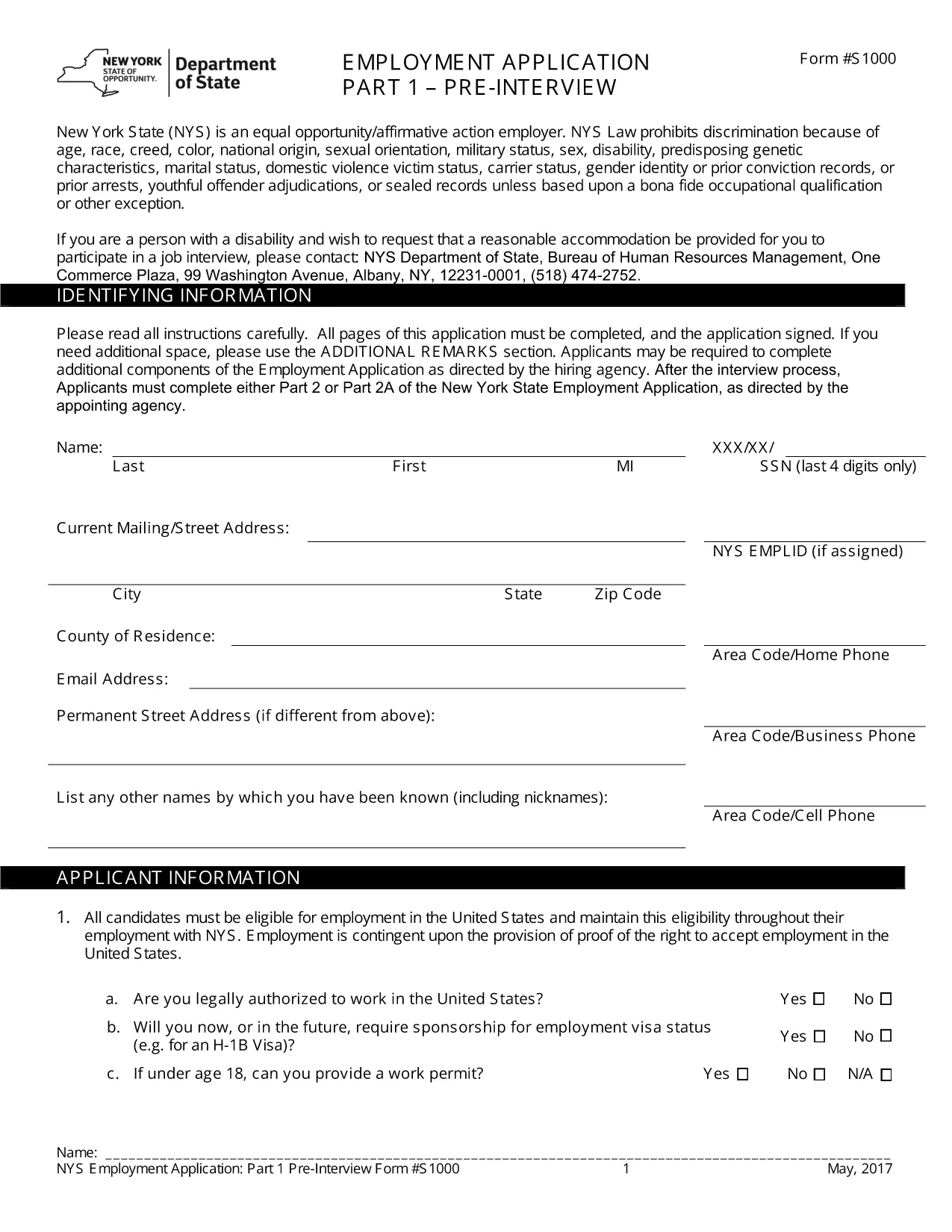
The PDF we provide is a standard Employment Application Form used across many U.S. companies. Although the form is in English, the same structure works for any type of application you need to create – job, scholarship, or government request. Follow the instructions below to complete it online, without downloading a separate editor.

Why a Fillable PDF Makes Writing Application Forms Easy

Pre‑designed layout: All required sections (personal details, work history, references) are already organized.

Editable fields: Click any box, type your answer, and move on. No printing, scanning, or re‑typing.

e‑Signature support: Add a legally binding signature directly in the browser.

Step‑by‑Step: Fill Out the Application Form Online

Use the Formize PDF Filler that appears when you click the button below. No extra software is needed.

Common Mistakes & Tips for a Perfect Application

1. Skipping required fields – The form highlights empty mandatory sections in red.

2. Typos in names or dates – Double‑check spelling before saving.

3. Incorrect contact information – Verify phone numbers and email addresses; employers often use these to contact you.

By following these tips, your application will look polished and professional, increasing your chances of success.

ЧАСТО ЗАДАВАЕМЫЕ ВОПРОСЫ
  • Do I need to download any software to fill the form?

    No. The Formize PDF Filler runs completely in your web browser, so you can fill the form on any device.

  • Can I save the form and finish it later?

    Yes. Use the "Save" button to download a copy of the partially completed PDF and reopen it later in Formize.

  • Is the form suitable for Hindi applications?

    The template is in English, but you can type Hindi text using any standard keyboard or input method.

  • What if I make a mistake after submitting?

    Contact the organization that received your form. Most accept a corrected PDF if you explain the error.

  • Is my personal data safe while using Formize?

    Formize uses SSL encryption and does not store your data after the session ends, ensuring privacy and security.

КАК ПОЛЬЗОВАТЬСЯ

Как бесплатно заполнить application form kaise likhen онлайн за 4 простых шагов:

  1. 1
    Open the Fillable Form
    Click the "Fill out this form" button on the page. The Formize PDF Filler will load in a new tab.
  2. 2
    Enter Your Information
    Tap each field, type your details (name, address, work history, etc.), and use the Tab key to move to the next section.
  3. 3
    Add Your e‑Signature
    When you reach the signature box, select "Add Signature" and draw or type your name.
  4. 4
    Review & Save
    Click "Review" to ensure all required fields are completed, then choose "Save" to download a copy or "Submit" to share.
Приложение Formize PDF Filler
О ПРИЛОЖЕНИИ

Шаблон application form kaise likhen

С традиционный набор функций для просмотра и заполнения PDF-документа в сочетании с преимуществами веб-приложения и адаптивной верстки вы сможете заполнить application form kaise likhen за считанные минуты.

ФУНКЦИИ

Инструмент для запролнения PDF форм

Самый простой способ заполнить application form kaise likhen онлайн

  • Быстрое заполнение application form kaise likhen
    Ищете способ быстро заполнить application form kaise likhen онлайн? С нашим бесплатным онлайн-инструментом вы узнаете, как редактировать заполнить этот PDF-документ менее чем за минуту.
  • Простой в использовании онлайн-редактор PDF
    Надоело распечатывать PDF-файлы, чтобы их можно было отредактировать перед повторным сканированием и отправкой обратно? Редактируйте документы PDF бесплатно онлайн. Используйте наш онлайн-редактор PDF, чтобы сэкономить время и бумагу.
  • Отличные инструменты, все платформы
    Хотите знать, как заполнить application form kaise likhen на Mac или, может быть, как использовать бесплатный заполнитель PDF? Наши онлайн-инструменты PDF работают на всех платформах.
  • Безопасное хранение файлов
    Файлы заполненных "application form kaise likhen" хранятся в защищенной базе данных, управляемой облачным хостингом Amazon. Вы можете удалить свои файлы из нашей системы в любое время. В любом случае эти файлы автоматически удаляются через 24 часа.
  • Чат с application form kaise likhen
    Откройте чат с "application form kaise likhen" в Chatize — бесплатном помощнике для чтения PDF-файлов. Задавайте вопросы и получайте ответы от "application form kaise likhen". Просто нажмите кнопку Чат с документом выше.

Удалить данные о заполненной форме

Удалить данные о заполненной форме? В этом случае Ваш прогресс заполнения этой формы будет утерян.

Удалить сеанс редактирования

Удалить выбранный сеанс редактирования? В этом случае ваш прогресс в создании и редактировании формы будет утерян.