Выберите язык

Free Fillable Legal Will Form Template

  1. Страна США
  2. Язык Английский
  3. Департамент Legal
  4. Вид деятельности Estate Planning
Free Fillable Legal Will Form Template

Planning for the future has never been easier. Our free fillable legal will form lets you create a binding Last Will and Testament in minutes—no printer, no fax, no attorney fees.

Why Use a Fillable Will Form?

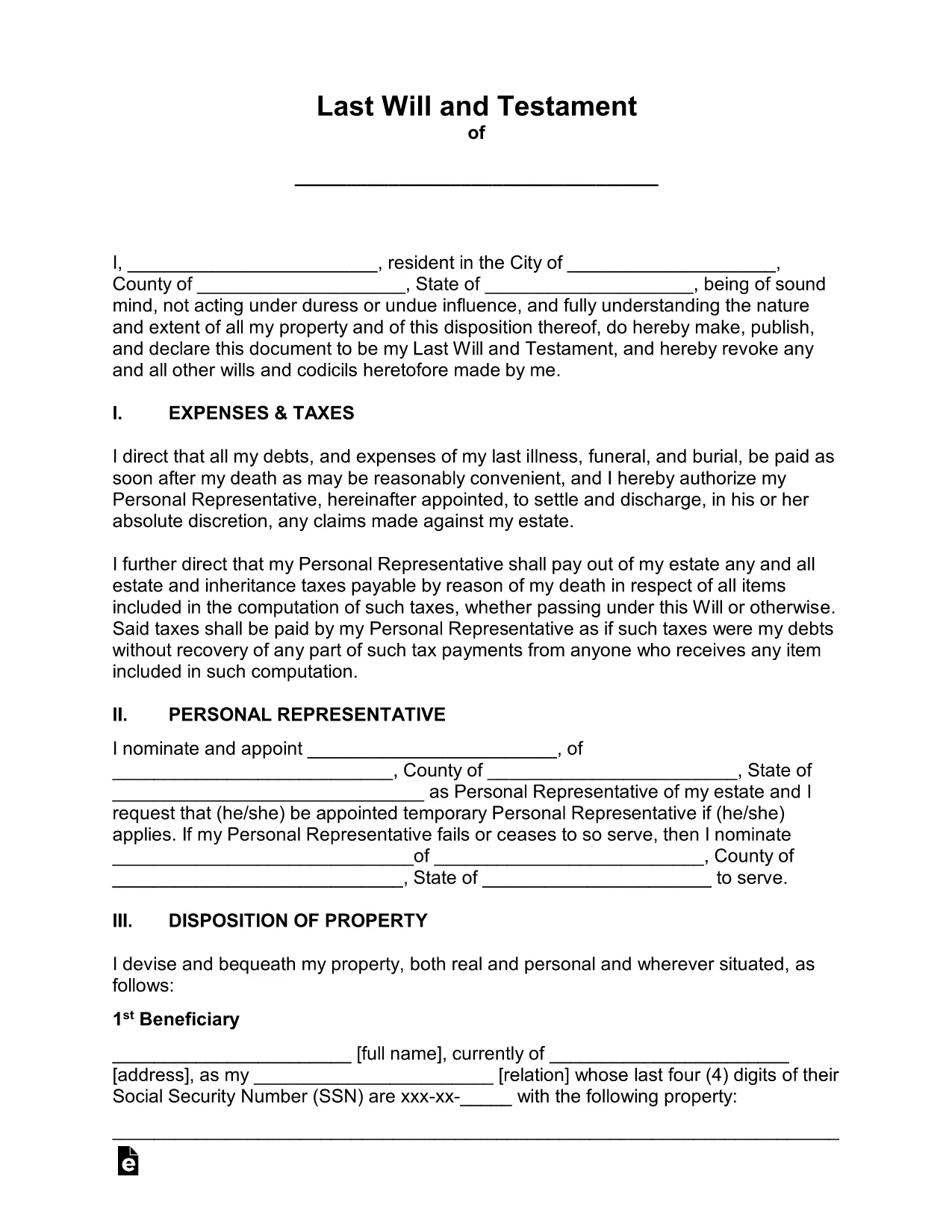
Traditional paper wills require careful handwriting, legible printing, and often a notary. A fillable PDF eliminates those hassles. You can type directly into each field, save changes, and securely store the document online. The form complies with U.S. estate‑planning standards, making it suitable for most states.

How to Complete the Legal Will Form Online

Simply click the "Fill out this form" button on this page. The Formize PDF Filler app will load in your browser, and you can start entering your information right away. No extra software download is needed.

Common Mistakes to Avoid When Drafting a Will

  • Leaving fields blank – every section should be completed or marked as "N/A".
  • Using vague language – be specific about assets, beneficiaries, and guardians.
  • Forgetting to sign and date – an unsigned will is not legally enforceable.
  • Not updating the will after major life events – revisit the form after marriage, divorce, birth, or purchase of significant assets.

Key Sections of the Will Template

The template includes:

  • Testator Information – your full legal name and address.
  • Executor Appointment – who will manage your estate.
  • Beneficiary Designations – how assets are distributed.
  • Guardian Selection – for minor children or dependents.
  • Signature & Witnesses – legal signing requirements.

When you finish, click Save to download a completed PDF, then print, sign, and store it in a safe place.

ЧАСТО ЗАДАВАЕМЫЕ ВОПРОСЫ
  • Is a fillable PDF will legally binding?

    Yes, as long as it is signed, dated, and witnessed according to your state’s requirements, a fillable PDF has the same legal effect as a handwritten will.

  • Do I need a notary for this will?

    Most states do not require a notary for a will, but they do require two disinterested witnesses. Check your local laws for any specific requirements.

  • Can I edit the form after I download it?

    After you download the completed PDF, you can reopen it in Formize’s editor to make further changes, but you’ll need to re‑sign any edited sections.

  • What if I have a large estate with many assets?

    The template includes sections for real property, personal belongings, financial accounts, and digital assets. You can add supplemental schedules if needed.

  • How should I store my finished will?

    Store the signed original in a fire‑proof safe, and give copies to your executor, a trusted family member, or your attorney. Keep a digital copy in a secure cloud service.

  • Is this form suitable for all U.S. states?

    The template follows general U.S. will‑making principles and works in most states. However, some states have unique provisions (e.g., community property). Review local statutes or consult an attorney if you have specific concerns.

КАК ПОЛЬЗОВАТЬСЯ

Как бесплатно заполнить legal will form онлайн за 5 простых шагов:

  1. 1
    Open the Fillable Form
    Click the "Fill out this form" button on the page. The Formize PDF Filler will launch directly in your browser.
  2. 2
    Wait for the Filler to Load
    A few seconds may pass while the app loads. Once ready, you’ll see editable fields highlighted in blue.
  3. 3
    Enter Your Information
    Type your personal details, executor name, beneficiaries, and any guardians into the appropriate sections.
  4. 4
    Review and Validate
    Double‑check each entry for accuracy. Use the built‑in validation to catch missed required fields.
  5. 5
    Sign & Download
    Add your electronic signature, have the required witnesses sign, then click "Download" to save the completed will to your device.
Приложение Formize PDF Filler
О ПРИЛОЖЕНИИ

Шаблон legal will form

С традиционный набор функций для просмотра и заполнения PDF-документа в сочетании с преимуществами веб-приложения и адаптивной верстки вы сможете заполнить legal will form за считанные минуты.

ФУНКЦИИ

Инструмент для запролнения PDF форм

Самый простой способ заполнить legal will form онлайн

  • Быстрое заполнение legal will form
    Ищете способ быстро заполнить legal will form онлайн? С нашим бесплатным онлайн-инструментом вы узнаете, как редактировать заполнить этот PDF-документ менее чем за минуту.
  • Простой в использовании онлайн-редактор PDF
    Надоело распечатывать PDF-файлы, чтобы их можно было отредактировать перед повторным сканированием и отправкой обратно? Редактируйте документы PDF бесплатно онлайн. Используйте наш онлайн-редактор PDF, чтобы сэкономить время и бумагу.
  • Отличные инструменты, все платформы
    Хотите знать, как заполнить legal will form на Mac или, может быть, как использовать бесплатный заполнитель PDF? Наши онлайн-инструменты PDF работают на всех платформах.
  • Безопасное хранение файлов
    Файлы заполненных "legal will form" хранятся в защищенной базе данных, управляемой облачным хостингом Amazon. Вы можете удалить свои файлы из нашей системы в любое время. В любом случае эти файлы автоматически удаляются через 24 часа.
  • Чат с legal will form
    Откройте чат с "legal will form" в Chatize — бесплатном помощнике для чтения PDF-файлов. Задавайте вопросы и получайте ответы от "legal will form". Просто нажмите кнопку Чат с документом выше.

Удалить данные о заполненной форме

Удалить данные о заполненной форме? В этом случае Ваш прогресс заполнения этой формы будет утерян.

Удалить сеанс редактирования

Удалить выбранный сеанс редактирования? В этом случае ваш прогресс в создании и редактировании формы будет утерян.