
Выберите язык

DS-11 U.S. Passport Application – Fillable PDF

  1. Язык Английский
  2. Страна США
  3. Вид деятельности Паспорт
DS-11 U.S. Passport Application – Fillable PDF

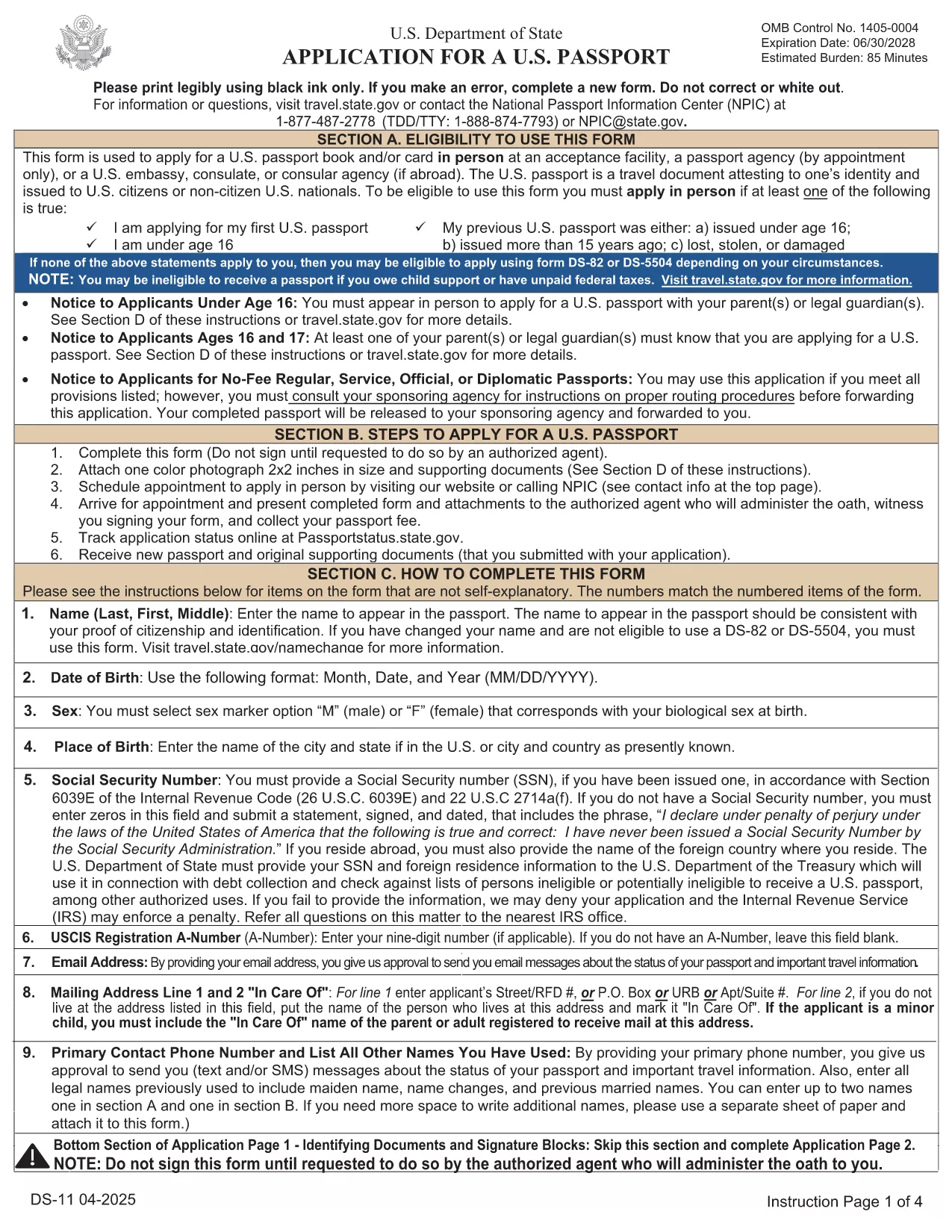
The DS-11 is the official application for first‑time U.S. passports, passports for minors, and replacement of lost or damaged passports. Using Formize’s built‑in PDF filler, you can complete the form online, avoid manual errors, and print a clean, one‑sided copy ready for submission.

What Is the DS-11 Form?

DS-11 is issued by the U.S. Department of State. It collects personal information, citizenship proof, and travel details. You must present the unsigned, completed form at a passport acceptance facility along with supporting documents.

How to Complete the DS-11 with Formize

Follow these simple steps to fill the form directly in your browser—no PDF editor required.

  • Click “Fill out this form” on the page.
  • Wait a few seconds while the Formize PDF Filler loads the official DS-11.
  • Enter your information in each field using the on‑screen keyboard.
  • Use the navigation arrows to move between pages.
  • When finished, click Print to produce a one‑sided copy.

Common Mistakes to Avoid

  • Using colored ink – print in black ink only.
  • Leaving any required box empty – the filler will highlight missing fields.
  • Signing the form before you reach the acceptance facility – sign only on the printed copy.
  • Altering a printed form by hand – any corrections require a new form.

Where to Submit Your Completed Form

Take the printed, unsigned DS-11, your proof of citizenship, a government‑issued photo ID, and a passport‑size photo to any passport acceptance facility (post offices, libraries, or designated clerks). If you need expedited service, schedule an appointment at a regional passport agency.

Download the Official Fillable PDF

For offline use, you can download the original PDF from the U.S. Department of State. The online filler provides the same official form, but the download link is included for reference.

Download DS-11 PDF (official)

ЧАСТО ЗАДАВАЕМЫЕ ВОПРОСЫ
  • Who must use the DS-11 form?

    First‑time applicants, minors under 16, and anyone replacing a lost, stolen, or damaged passport that is more than 5 years old must use DS‑11.

  • Can I submit a signed DS-11 online?

    No. The DS‑11 must be presented unsigned to a passport acceptance agent, who will witness your signature.

  • Do I need a passport photo?

    Yes. Provide one recent, 2×2 inch color photo that meets State Department requirements.

  • How long does processing take?

    Standard processing is 4‑6 weeks after the acceptance facility receives your application. Expedited service reduces this to 2‑3 weeks.

  • Is the Formize filler free?

    Formize offers a free online filler for the DS‑11. No download or software installation is required.

  • What documents accompany the DS‑11?

    You need proof of U.S. citizenship (birth certificate or naturalization certificate), a government‑issued photo ID, a passport‑size photo, and the applicable fee.

  • Can I correct errors after printing?

    If you discover an error, you must fill out a new DS‑11. Hand‑written corrections are not accepted.

КАК ПОЛЬЗОВАТЬСЯ

Как бесплатно заполнить DS-11 онлайн за 5 простых шагов:

  1. 1
    Open the Formizer Fillable DS-11
    Click the “Fill out this form” button on the page. The Formize PDF Filler will load the official DS-11 automatically.
  2. 2
    Enter Your Information
    Use the on‑screen fields to type your name, date of birth, address, and other required details. The filler validates each entry.
  3. 3
    Review and Print
    After completing all pages, click the Print button. Print a single‑sided copy on white paper using black ink.
  4. 4
    Sign at the Acceptance Facility
    Do NOT sign the printed form until you are in front of a passport acceptance agent.
  5. 5
    Submit Your Package
    Take the printed DS-11, your supporting documents, and payment to the nearest passport acceptance facility.
Приложение Formize PDF Filler
О ПРИЛОЖЕНИИ

Паспортные формы

DS-11 – это одна из форм паспорта, которые представляют собой документы, используемые для подачи заявления на получение паспорта, являющегося проездным документом, удостоверяющим личность и гражданство владельца и позволяющим им совершать международные поездки. Бланки паспортов могут различаться в зависимости от страны, выдавшей паспорт, но обычно они содержат личную информацию о заявителе, такую ​​как имя, дата и место рождения, а также информацию о родителях заявителя и любых предыдущих паспортах или проездных документах. .

В Соединенных Штатах наиболее распространены две формы паспорта: DS-11 и DS-82. Форма DS-11 используется для новых заявителей, несовершеннолетних или лиц, которые не имеют права использовать форму DS-82. Форма DS-82 используется для продления паспорта по почте для подходящих заявителей. Обе формы требуют, чтобы заявитель предоставил личную информацию и подтверждающую документацию, такую ​​как фотография в паспорте и подтверждение гражданства.

В других странах могут быть другие формы и требования к паспортам, но основной процесс обычно включает в себя заполнение заявления на получение паспорта, предоставление сопроводительной документации и посещение собеседования с паспортным работником в государственном учреждении или посольстве. Важно отметить, что процесс подачи заявления на получение паспорта может занять несколько недель или даже месяцев, поэтому рекомендуется подавать заявление заблаговременно до любой запланированной поездки.

ФУНКЦИИ

Инструмент для запролнения PDF форм

Самый простой способ заполнить DS-11 онлайн

  • Быстрое заполнение DS-11
    Ищете способ быстро заполнить DS-11 онлайн? С нашим бесплатным онлайн-инструментом вы узнаете, как редактировать заполнить этот PDF-документ менее чем за минуту.
  • Простой в использовании онлайн-редактор PDF
    Надоело распечатывать PDF-файлы, чтобы их можно было отредактировать перед повторным сканированием и отправкой обратно? Редактируйте документы PDF бесплатно онлайн. Используйте наш онлайн-редактор PDF, чтобы сэкономить время и бумагу.
  • Отличные инструменты, все платформы
    Хотите знать, как заполнить DS-11 на Mac или, может быть, как использовать бесплатный заполнитель PDF? Наши онлайн-инструменты PDF работают на всех платформах.
  • Безопасное хранение файлов
    Файлы заполненных "DS-11" хранятся в защищенной базе данных, управляемой облачным хостингом Amazon. Вы можете удалить свои файлы из нашей системы в любое время. В любом случае эти файлы автоматически удаляются через 24 часа.
  • Чат с DS-11
    Откройте чат с "DS-11" в Chatize — бесплатном помощнике для чтения PDF-файлов. Задавайте вопросы и получайте ответы от "DS-11". Просто нажмите кнопку Чат с документом выше.

Удалить данные о заполненной форме

Удалить данные о заполненной форме? В этом случае Ваш прогресс заполнения этой формы будет утерян.

Удалить сеанс редактирования

Удалить выбранный сеанс редактирования? В этом случае ваш прогресс в создании и редактировании формы будет утерян.