Выберите язык

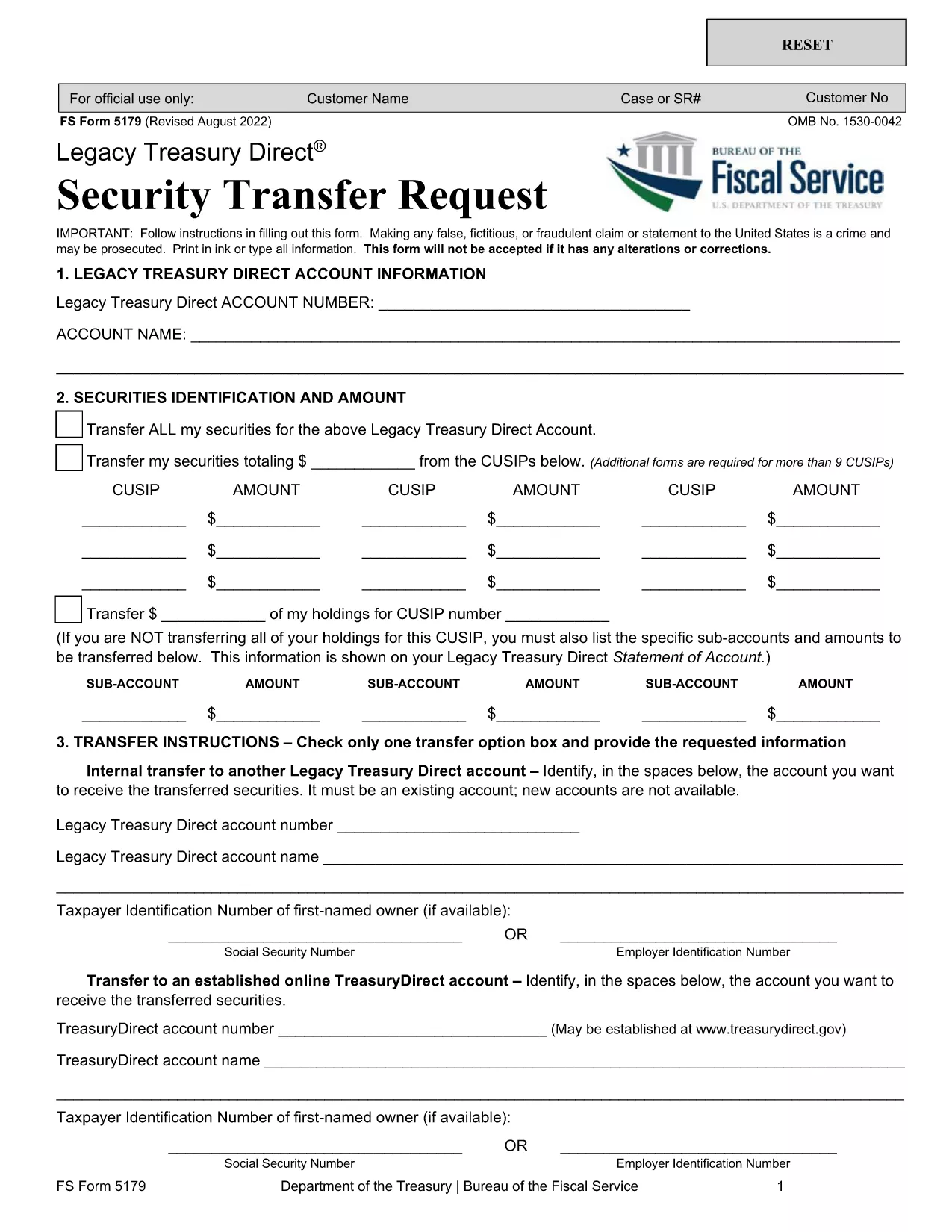
Form 5179 – Treasury Direct Security Transfer Request

  1. Страна США
  2. Язык Английский
  3. Департамент Treasury
  4. Вид деятельности Securities Transfer
Form 5179 – Treasury Direct Security Transfer Request

Form 5179 is the official Treasury Direct Security Transfer Request used to move Treasury securities from a legacy TreasuryDirect account to another account, a brokerage firm, or a financial institution. This fillable PDF lets you complete the form quickly, sign electronically, and submit it without printing.

What Is Form 5179 and When to Use It

The form captures essential details such as the owner’s account information, security identification numbers, quantity of securities, and the destination account. You’ll need Form 5179 whenever you want to:

  • Transfer Treasury bonds, notes, or bills from an old TreasuryDirect account.
  • Move securities to a new TreasuryDirect account.
  • Send securities to a broker, bank, or other financial institution.

How to Fill Out Form 5179 Online with Formize

Instead of downloading the PDF and opening a separate editor, simply click the “Fill out this form” button on this page. The Formize PDF Filler app loads in your browser, letting you complete every field, add signatures, and save a copy—all for free.

Common Mistakes to Avoid on Form 5179

  • Incorrect security identifiers: Double‑check the CUSIP or Treasury‑specific number.
  • Missing signatures: Both the account holder and the authorized representative must sign.
  • Wrong account numbers: Verify the destination account details before submitting.
  • Leaving optional fields blank: If a field is marked “optional,” you may leave it empty, but ensure required fields are fully completed.

Where to Submit Your Completed Form

After you finish the form in Formize, download the completed PDF and mail it to:

Bureau of the Public Debt
Treasury Direct – Security Transfer Unit
1500 Pennsylvania Avenue, NW
Washington, DC 20220
United States

Or follow any electronic submission instructions provided by your receiving institution.

ЧАСТО ЗАДАВАЕМЫЕ ВОПРОСЫ
  • What types of Treasury securities can I transfer with Form 5179?

    You can transfer Treasury bonds, notes, bills, and Treasury Inflation‑Protected Securities (TIPS) that are held in a legacy TreasuryDirect account.

  • Do I need a notary for the signatures on Form 5179?

    No. The Treasury Direct system accepts electronic signatures entered through the Formize filler, provided the signer is the account holder or an authorized representative.

  • Can I submit Form 5179 electronically?

    The Treasury still requires a paper copy for most transfers. However, you can create the PDF electronically, print it, and mail it. Some financial institutions may accept a scanned copy.

  • How long does the transfer process take after I mail the form?

    Typical processing time is 7‑10 business days once the Treasury receives the completed and signed form.

  • What should I do if I make a mistake after submitting the form?

    Contact the Bureau of the Public Debt at 1‑800‑722‑2678 as soon as possible. They will advise whether a corrected form can be submitted.

  • Is there a fee to use Form 5179?

    There is no fee from the Treasury for filing the transfer request. Your broker or financial institution may have its own processing fees.

  • Can I transfer securities to an account outside the United States?

    Form 5179 is intended for transfers to U.S. TreasuryDirect accounts or U.S. financial institutions. International transfers require a different procedure.

КАК ПОЛЬЗОВАТЬСЯ

Как бесплатно заполнить Form 5179 онлайн за 4 простых шагов:

  1. 1
    Open the Fillable Form
    Click the “Fill out this form” button on the page. The Formize PDF Filler app will launch in a new tab.
  2. 2
    Enter Your Information
    Complete each field – account numbers, security identifiers, transfer amount, and signatures – using your keyboard.
  3. 3
    Validate and Save
    When you finish, click “Validate” to check for missing or incorrect data, then press “Save” to download the completed PDF.
  4. 4
    Submit the Form
    Print the saved PDF (if required) and mail it to the Treasury Direct address, or follow any electronic submission instructions from your receiving institution.
Приложение Formize PDF Filler
О ПРИЛОЖЕНИИ

Шаблон Form 5179

С традиционный набор функций для просмотра и заполнения PDF-документа в сочетании с преимуществами веб-приложения и адаптивной верстки вы сможете заполнить Form 5179 за считанные минуты.

ФУНКЦИИ

Инструмент для запролнения PDF форм

Самый простой способ заполнить Form 5179 онлайн

  • Быстрое заполнение Form 5179
    Ищете способ быстро заполнить Form 5179 онлайн? С нашим бесплатным онлайн-инструментом вы узнаете, как редактировать заполнить этот PDF-документ менее чем за минуту.
  • Простой в использовании онлайн-редактор PDF
    Надоело распечатывать PDF-файлы, чтобы их можно было отредактировать перед повторным сканированием и отправкой обратно? Редактируйте документы PDF бесплатно онлайн. Используйте наш онлайн-редактор PDF, чтобы сэкономить время и бумагу.
  • Отличные инструменты, все платформы
    Хотите знать, как заполнить Form 5179 на Mac или, может быть, как использовать бесплатный заполнитель PDF? Наши онлайн-инструменты PDF работают на всех платформах.
  • Безопасное хранение файлов
    Файлы заполненных "Form 5179" хранятся в защищенной базе данных, управляемой облачным хостингом Amazon. Вы можете удалить свои файлы из нашей системы в любое время. В любом случае эти файлы автоматически удаляются через 24 часа.
  • Чат с Form 5179
    Откройте чат с "Form 5179" в Chatize — бесплатном помощнике для чтения PDF-файлов. Задавайте вопросы и получайте ответы от "Form 5179". Просто нажмите кнопку Чат с документом выше.

Удалить данные о заполненной форме

Удалить данные о заполненной форме? В этом случае Ваш прогресс заполнения этой формы будет утерян.

Удалить сеанс редактирования

Удалить выбранный сеанс редактирования? В этом случае ваш прогресс в создании и редактировании формы будет утерян.