Выберите язык

Form G-1450 – Authorization for Credit Card Transactions (Fillable PDF)

  1. Страна США
  2. Язык Английский
  3. Департамент Служба гражданства и иммиграции США
Form G-1450 – Authorization for Credit Card Transactions (Fillable PDF)

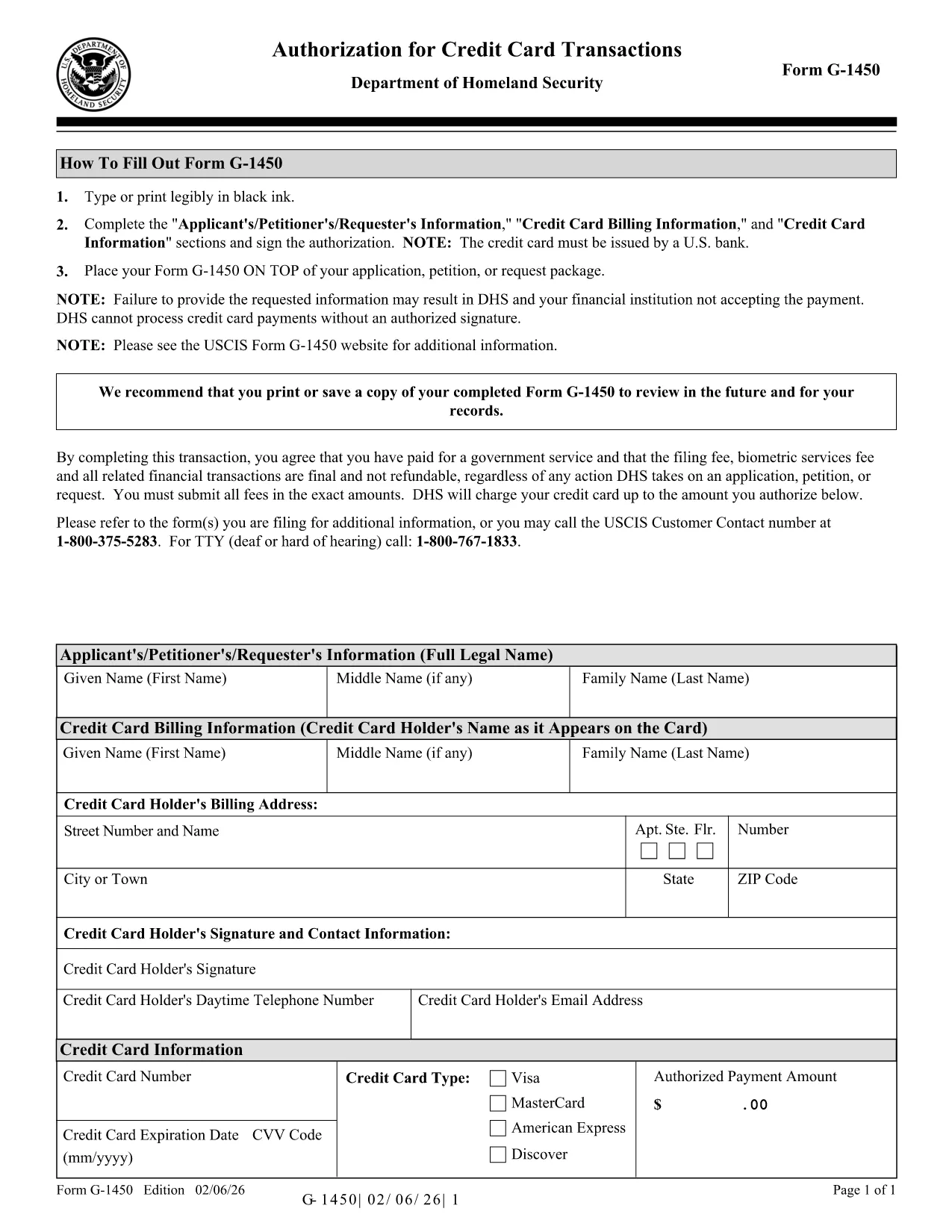
The Form G-1450 is the United States Citizenship and Immigration Services (USCIS) authorization you need when you want to pay filing fees by credit, debit, or prepaid card through the mail. This fillable PDF lets you enter all required information electronically, print a clean copy, and attach it to your application package.

What Is Form G-1450?

Form G-1450, "Authorization for Credit Card Transactions," captures the cardholder’s name, billing address, card number, expiration date, and a signature authorizing USCIS to charge the card for the requested filing fee. The latest edition (02/06/26) adds a CVV field for extra security, although the CVV is not required for USCIS processing.

How to Complete the Fillable PDF Online

Instead of downloading the file and opening a PDF editor, simply click the "Fill out this form" button on this page. The Formize PDF Filler app will load, and you can:

  • Enter your information directly into the fields.
  • Use the built‑in validation to avoid formatting errors.
  • Save a draft and return later if you need more time.
  • Print a PDF that is ready for mailing.

Common Mistakes & Tips for a Successful Submission

  • Do not use a foreign‑issued credit card. USCIS only accepts cards issued by U.S. banks.
  • Make sure the card number and expiration date are entered without spaces or dashes.
  • Even though the CVV field is optional, fill it in if you have it – it helps other DHS components verify the card.
  • Signature must be legible; use the mouse or touch screen to draw your signature, then print.
  • Check that the edition date (02/06/26) appears at the bottom of every page before mailing.

Where to Send Your Completed Form

Place the completed Form G-1450 on top of your application package and mail it to the USCIS Lockbox address indicated in the “Where to File” section of the specific form you are submitting. Do not send the form to a regional office or a USCIS field office.

Download the Official PDF

If you prefer a hard copy, you can download the official USCIS PDF directly from the government website.

Download Form G-1450 (PDF, 272 KB)

ЧАСТО ЗАДАВАЕМЫЕ ВОПРОСЫ
  • Can I use a credit card issued outside the United States?

    No. USCIS only accepts credit, debit, or prepaid cards issued by U.S. banks for Form G-1450.

  • Is the CVV field required?

    The CVV field is optional for USCIS processing, but filling it in can help other DHS components verify the card.

  • What should I do if I make a mistake after printing?

    Correct the error on the printed form, sign again, and include the corrected page with your original application. Do not submit a torn or altered PDF.

  • Do I need to attach a copy of my credit card?

    No. Do not attach the physical card or a photocopy. Only the completed Form G-1450 is required.

  • Can I submit Form G-1450 electronically?

    Form G-1450 is accepted only as a printed document attached to a paper filing. Online filings use Pay.gov instead.

  • How long is the Form G-1450 valid?

    The form is valid for the filing fee amount listed on the accompanying USCIS form. If fees change, you must use the most recent edition.

  • Where can I find the current filing fee schedule?

    Visit the USCIS Fee Schedule page on the official USCIS website for up‑to‑date fee amounts.

КАК ПОЛЬЗОВАТЬСЯ

Как бесплатно заполнить Form G-1450 онлайн за 5 простых шагов:

  1. 1
    Open the Online Filler
    Click the "Fill out this form" button on this page. The Formize PDF Filler app will launch in a new window.
  2. 2
    Enter Your Information
    Type your name, address, card details, and any optional fields directly into the fillable PDF fields.
  3. 3
    Add Your Signature
    Use the mouse or touch screen to draw your signature in the signature field. You can also upload an image of your signature.
  4. 4
    Review and Save
    Check all entries for accuracy, then click "Save" to download a completed PDF ready for printing.
  5. 5
    Print and Mail
    Print the completed form, place it on top of your USCIS application package, and mail it to the lockbox address shown on the form’s instructions.
Приложение Formize PDF Filler
О ПРИЛОЖЕНИИ

Шаблон Form G-1450

С традиционный набор функций для просмотра и заполнения PDF-документа в сочетании с преимуществами веб-приложения и адаптивной верстки вы сможете заполнить Form G-1450 за считанные минуты.

ФУНКЦИИ

Инструмент для запролнения PDF форм

Самый простой способ заполнить Form G-1450 онлайн

  • Быстрое заполнение Form G-1450
    Ищете способ быстро заполнить Form G-1450 онлайн? С нашим бесплатным онлайн-инструментом вы узнаете, как редактировать заполнить этот PDF-документ менее чем за минуту.
  • Простой в использовании онлайн-редактор PDF
    Надоело распечатывать PDF-файлы, чтобы их можно было отредактировать перед повторным сканированием и отправкой обратно? Редактируйте документы PDF бесплатно онлайн. Используйте наш онлайн-редактор PDF, чтобы сэкономить время и бумагу.
  • Отличные инструменты, все платформы
    Хотите знать, как заполнить Form G-1450 на Mac или, может быть, как использовать бесплатный заполнитель PDF? Наши онлайн-инструменты PDF работают на всех платформах.
  • Безопасное хранение файлов
    Файлы заполненных "Form G-1450" хранятся в защищенной базе данных, управляемой облачным хостингом Amazon. Вы можете удалить свои файлы из нашей системы в любое время. В любом случае эти файлы автоматически удаляются через 24 часа.
  • Чат с Form G-1450
    Откройте чат с "Form G-1450" в Chatize — бесплатном помощнике для чтения PDF-файлов. Задавайте вопросы и получайте ответы от "Form G-1450". Просто нажмите кнопку Чат с документом выше.

Удалить данные о заполненной форме

Удалить данные о заполненной форме? В этом случае Ваш прогресс заполнения этой формы будет утерян.

Удалить сеанс редактирования

Удалить выбранный сеанс редактирования? В этом случае ваш прогресс в создании и редактировании формы будет утерян.