Выберите язык

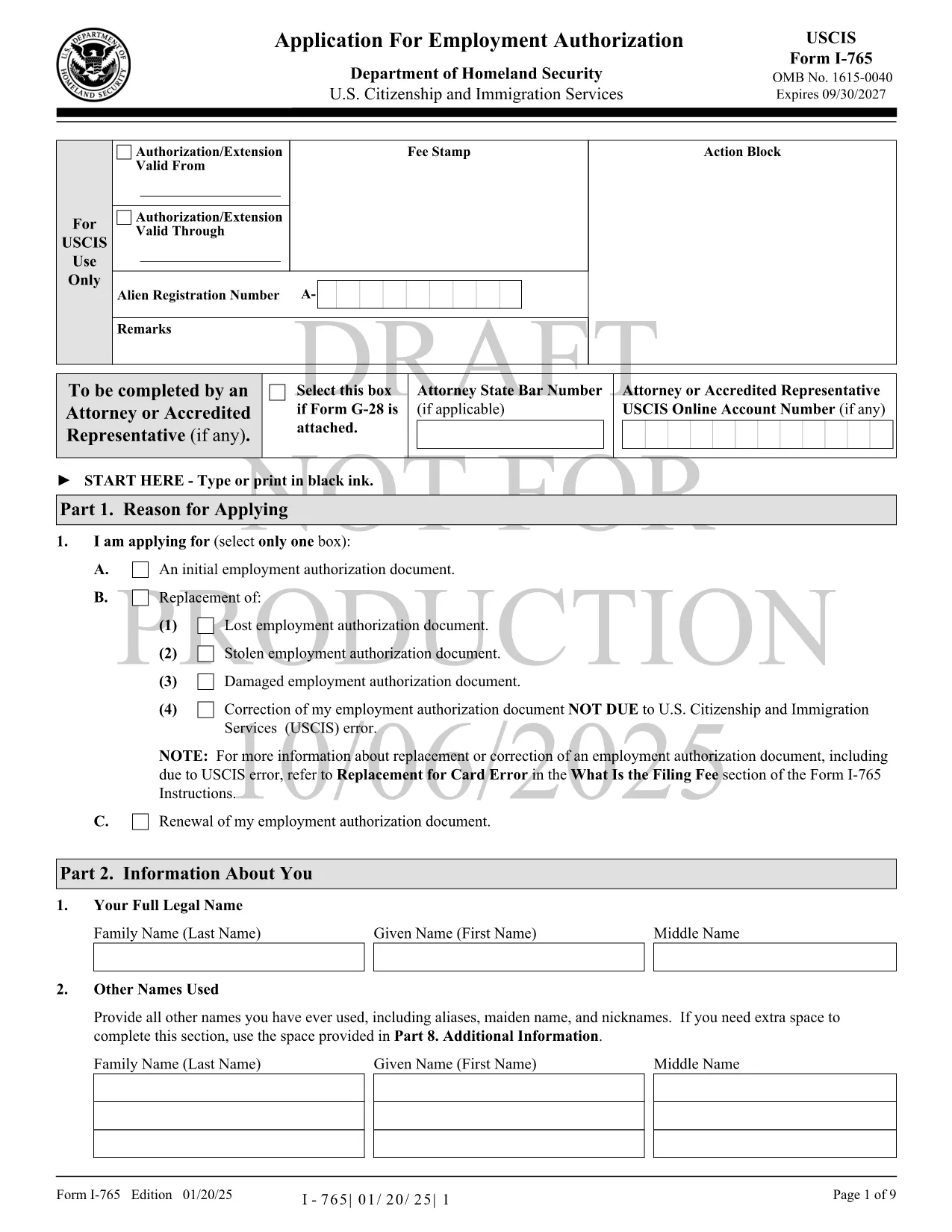
USCIS Form I-765 – Fillable PDF for Employment Authorization

  1. Язык Английский
  2. Страна США
  3. Вид деятельности Иммиграция
  4. Департамент USCIS
USCIS Form I-765 – Fillable PDF for Employment Authorization

The USCIS Form I-765, also known as the Application for Employment Authorization, is the key document you need to request an Employment Authorization Document (EAD). Whether you’re an asylum seeker, a DACA recipient, or a student on Optional Practical Training, a correctly completed I-765 can unlock your right to work in the United States.

What Is Form I-765 and Who Needs It?

Form I-765 is used by eligible non‑citizens to apply for a temporary work permit. Common categories include:

  • Asylees and refugees
  • F‑1 students seeking Optional Practical Training (OPT)
  • Adjustment‑of‑status applicants
  • Individuals with Deferred Action for Childhood Arrivals (DACA)

How to Complete the Fillable I-765 Online

Instead of downloading the PDF and editing it with a separate editor, simply click the "Fill out this form" button on this page. The Formize PDF Filler app will load the official fillable PDF directly in your browser. Follow these steps:

  1. Click Fill out this form to launch the online filler.
  2. Wait a few seconds while the fillable PDF loads.
  3. Enter your information in each field – the app auto‑saves as you type.
  4. Review the completed form for accuracy.
  5. Download the finished PDF or print it for mailing to USCIS.

Common Mistakes to Avoid on Form I-765

  • Incorrect filing fee amount – always check the latest USCIS fee schedule.
  • Missing signatures – an unsigned form will be rejected.
  • Using outdated form edition – our fillable PDF is the current version.
  • Providing unmounted or retouched photos – follow USCIS photo guidelines.

Where to Submit Your Completed I-765

After you’ve downloaded the completed PDF, mail it to the filing address that matches your eligibility category. USCIS provides a detailed Direct Filing Addresses page. If you prefer electronic filing, you can also submit through your USCIS online account where the same PDF can be uploaded.

Download the Official PDF

For reference or offline use, you can download the official USCIS Form I-765 PDF directly from the link below. The same file is used by the Formize filler, ensuring you always have the most up‑to‑date version.

Download USCIS Form I-765 (PDF)

ЧАСТО ЗАДАВАЕМЫЕ ВОПРОСЫ
  • Do I need to print the fillable PDF after completing it online?

    Yes. USCIS requires a printed, signed copy for most filing categories. You can also upload the PDF if you are filing electronically.

  • Can I save my progress and return later?

    The Formize filler auto‑saves locally in your browser. Use the "Save as Draft" button to download a copy and continue later.

  • What filing fee should I include with Form I-765?

    Check the latest fee on the USCIS website. Fees vary by eligibility category and are updated yearly.

  • How long does USCIS take to process an I-765?

    Processing times range from 3 to 7 months depending on the service center and your category. You can track status online with your receipt number.

  • Is the PDF provided here the official USCIS form?

    Yes. The download link points to the official USCIS‑published PDF, ensuring you have the current edition.

  • Can I submit the form without a photo?

    A passport‑style photo is required for most categories. Follow USCIS photo specifications to avoid delays.

  • What should I do if I make a mistake after submitting?

    File Form I-765 Supplement (if applicable) or submit a new application with the correct information, along with an explanation of the error.

КАК ПОЛЬЗОВАТЬСЯ

Как бесплатно заполнить USCIS Form I-765 онлайн за 5 простых шагов:

  1. 1
    Launch the Formize filler
    Click the "Fill out this form" button on the page. The fillable PDF loads instantly in your browser.
  2. 2
    Enter your information
    Fill each field with accurate data. The app auto‑saves so you won’t lose any entries.
  3. 3
    Review and verify
    Double‑check every section, especially your signature and fee amount, before finalizing.
  4. 4
    Download or print
    When you’re satisfied, click "Download PDF" to save a copy or print it for mailing to USCIS.
  5. 5
    Submit to USCIS
    Mail the completed form to the correct USCIS address for your category, or upload it via your USCIS online account.
Приложение Formize PDF Filler
О ПРИЛОЖЕНИИ

Шаблон USCIS Form I-765

С традиционный набор функций для просмотра и заполнения PDF-документа в сочетании с преимуществами веб-приложения и адаптивной верстки вы сможете заполнить USCIS Form I-765 за считанные минуты.

ФУНКЦИИ

Инструмент для запролнения PDF форм

Самый простой способ заполнить USCIS Form I-765 онлайн

  • Быстрое заполнение USCIS Form I-765
    Ищете способ быстро заполнить USCIS Form I-765 онлайн? С нашим бесплатным онлайн-инструментом вы узнаете, как редактировать заполнить этот PDF-документ менее чем за минуту.
  • Простой в использовании онлайн-редактор PDF
    Надоело распечатывать PDF-файлы, чтобы их можно было отредактировать перед повторным сканированием и отправкой обратно? Редактируйте документы PDF бесплатно онлайн. Используйте наш онлайн-редактор PDF, чтобы сэкономить время и бумагу.
  • Отличные инструменты, все платформы
    Хотите знать, как заполнить USCIS Form I-765 на Mac или, может быть, как использовать бесплатный заполнитель PDF? Наши онлайн-инструменты PDF работают на всех платформах.
  • Безопасное хранение файлов
    Файлы заполненных "USCIS Form I-765" хранятся в защищенной базе данных, управляемой облачным хостингом Amazon. Вы можете удалить свои файлы из нашей системы в любое время. В любом случае эти файлы автоматически удаляются через 24 часа.
  • Чат с USCIS Form I-765
    Откройте чат с "USCIS Form I-765" в Chatize — бесплатном помощнике для чтения PDF-файлов. Задавайте вопросы и получайте ответы от "USCIS Form I-765". Просто нажмите кнопку Чат с документом выше.

Удалить данные о заполненной форме

Удалить данные о заполненной форме? В этом случае Ваш прогресс заполнения этой формы будет утерян.

Удалить сеанс редактирования

Удалить выбранный сеанс редактирования? В этом случае ваш прогресс в создании и редактировании формы будет утерян.