
Выберите язык

Missouri Form 4601 – Fillable PDF for Military Personalized License Plates

  1. Язык Английский
  2. Страна США
  3. Вид деятельности Регистрация ТС
  4. Штат/Регион Миссури
Missouri Form 4601 – Fillable PDF for Military Personalized License Plates

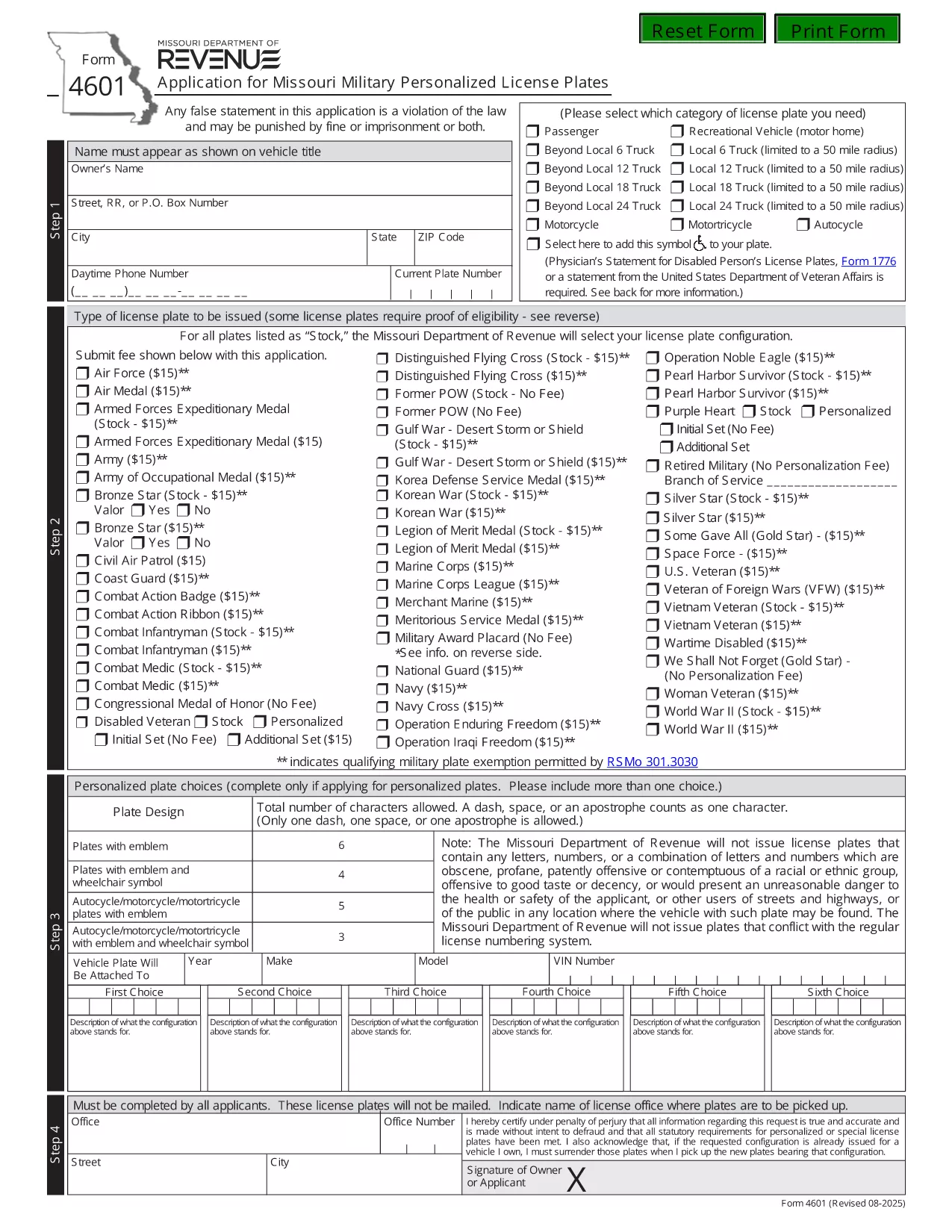
Form 4601 is the official Application for Missouri Military Personalized License Plates issued by the Missouri Department of Revenue. This fillable PDF lets eligible veterans, active‑duty service members, and qualified family members request a custom military‑themed plate for their vehicle.

What Is Form 4601?

Form 4601 collects personal information, vehicle details, and proof of military service. The form is required for any of the following plate designs:

  • U.S. Army, Navy, Air Force, Marine Corps, Coast Guard
  • Veterans of specific campaigns or decorations
  • Active‑duty personnel requesting a temporary plate

How to Complete the Fillable Form 4601 Online

With Formize’s PDF Filler you can fill out the form directly in your browser—no download, print, or third‑party editor needed.

  1. Click the "Fill out this form" button on this page.
  2. Wait a few seconds while the Formize PDF Filler loads the fillable version of Form 4601.
  3. Enter your information in each highlighted field. The filler automatically validates dates, ZIP codes, and required fields.
  4. Upload a scanned copy of your discharge papers or award certificate when prompted.
  5. Review the completed form, then click Submit to download the filled PDF or to email it directly to the Missouri Department of Revenue.

Common Mistakes to Avoid

  • Leaving the "Signature" field blank—use the electronic signature tool provided.
  • Entering an incorrect VIN; double‑check the 17‑character vehicle identification number.
  • Submitting an outdated or non‑honorable discharge document.
  • Choosing a plate configuration longer than six characters (or five with an emblem).

Where to Submit Your Application

After completing the fillable PDF, mail it with the $15 application fee to:

Motor Vehicle Bureau
301 West High Street – Room 370
PO Box 569
Jefferson City, MO 65105‑0569

Or bring the printed form to any Missouri license office. The Department will process the request within 6‑8 weeks.

Download the Official PDF

If you prefer the original, non‑fillable version, you can download it directly from the Missouri Department of Revenue:

Download Form 4601 (PDF)

Using Formize’s fillable version saves time, reduces errors, and keeps a digital copy for your records.

ЧАСТО ЗАДАВАЕМЫЕ ВОПРОСЫ
  • Who is eligible to use Form 4601?

    Veterans with an honorable discharge, active‑duty service members, and surviving spouses of eligible veterans may apply for a military personalized plate.

  • Is there a fee to submit Form 4601?

    Yes, a $15 application fee is required for each military plate request. The fee is paid to the Missouri Department of Revenue when you mail the form.

  • Can I submit Form 4601 electronically?

    The Missouri Department of Revenue currently requires a printed, signed PDF with the fee. However, you can fill it out online using Formize, then print and mail it.

  • How long does it take to receive the plates?

    Processing typically takes 6‑8 weeks after the Department receives your completed form and payment.

  • What proof of service do I need to attach?

    Attach a copy of your DD‑214, discharge certificate, or the official award documentation that qualifies you for the specific military plate.

  • What if my desired plate configuration is unavailable?

    You may submit up to three alternative configurations on the same form. If none are available, you can request a refund of the $15 fee.

  • Do I need to renew the military plate each year?

    Yes. Renewal requires the same $15 fee and a current proof of service if your status has changed.

КАК ПОЛЬЗОВАТЬСЯ

Как бесплатно заполнить Form 4601 онлайн за 3 простых шагов:

  1. 1
    Open the Fillable Form
    Click the "Fill out this form" button on the page. The Formize PDF Filler will open the fillable version of Form 4601 in your browser.
  2. 2
    Enter Your Information
    Complete each highlighted field—personal details, vehicle info, and military service proof. Use the upload button for your discharge documents.
  3. 3
    Validate and Submit
    Review the completed form for any errors. Click the Submit button to download the finished PDF or to email it directly to the Missouri Department of Revenue.
Приложение Formize PDF Filler
О ПРИЛОЖЕНИИ

Формы регистрации транспортных средств

Если вы владеете или арендуете автомобиль, прицеп или лодку, вы должны выполнять определенные обязательства, чтобы ваше транспортное средство было юридически зарегистрировано и безопасно.

Form 4601 — это одна из регистрационных форм транспортных средств, которые представляют собой документы, используемые для регистрации транспортного средства в соответствующем государственном или провинциальном органе власти. Эти формы обычно требуются, когда человек покупает новый или подержанный автомобиль или когда он переезжает в новый штат или провинцию на автомобиле.

Точные требования и формы, необходимые для регистрации транспортного средства, могут различаться в зависимости от местоположения, но, как правило, процесс включает предоставление информации о транспортном средстве, владельце и любых правах на транспортное средство.

После подачи регистрационных форм и сборов власти штата или провинции выдают свидетельство о регистрации или номерной знак владельцу транспортного средства. Эта регистрация позволяет легально эксплуатировать транспортное средство на дорогах общего пользования и автомагистралях.

ФУНКЦИИ

Инструмент для запролнения PDF форм

Самый простой способ заполнить Form 4601 онлайн

  • Быстрое заполнение Form 4601
    Ищете способ быстро заполнить Form 4601 онлайн? С нашим бесплатным онлайн-инструментом вы узнаете, как редактировать заполнить этот PDF-документ менее чем за минуту.
  • Простой в использовании онлайн-редактор PDF
    Надоело распечатывать PDF-файлы, чтобы их можно было отредактировать перед повторным сканированием и отправкой обратно? Редактируйте документы PDF бесплатно онлайн. Используйте наш онлайн-редактор PDF, чтобы сэкономить время и бумагу.
  • Отличные инструменты, все платформы
    Хотите знать, как заполнить Form 4601 на Mac или, может быть, как использовать бесплатный заполнитель PDF? Наши онлайн-инструменты PDF работают на всех платформах.
  • Безопасное хранение файлов
    Файлы заполненных "Form 4601" хранятся в защищенной базе данных, управляемой облачным хостингом Amazon. Вы можете удалить свои файлы из нашей системы в любое время. В любом случае эти файлы автоматически удаляются через 24 часа.
  • Чат с Form 4601
    Откройте чат с "Form 4601" в Chatize — бесплатном помощнике для чтения PDF-файлов. Задавайте вопросы и получайте ответы от "Form 4601". Просто нажмите кнопку Чат с документом выше.

Удалить данные о заполненной форме

Удалить данные о заполненной форме? В этом случае Ваш прогресс заполнения этой формы будет утерян.

Удалить сеанс редактирования

Удалить выбранный сеанс редактирования? В этом случае ваш прогресс в создании и редактировании формы будет утерян.