
Выберите язык

Pennsylvania Form MV-39 – Notification of Assignment/Correction of Vehicle Title

  1. Язык Английский
  2. Страна США
  3. Вид деятельности Регистрация ТС
  4. Штат/Регион Пенсильвания
Pennsylvania Form MV-39 – Notification of Assignment/Correction of Vehicle Title

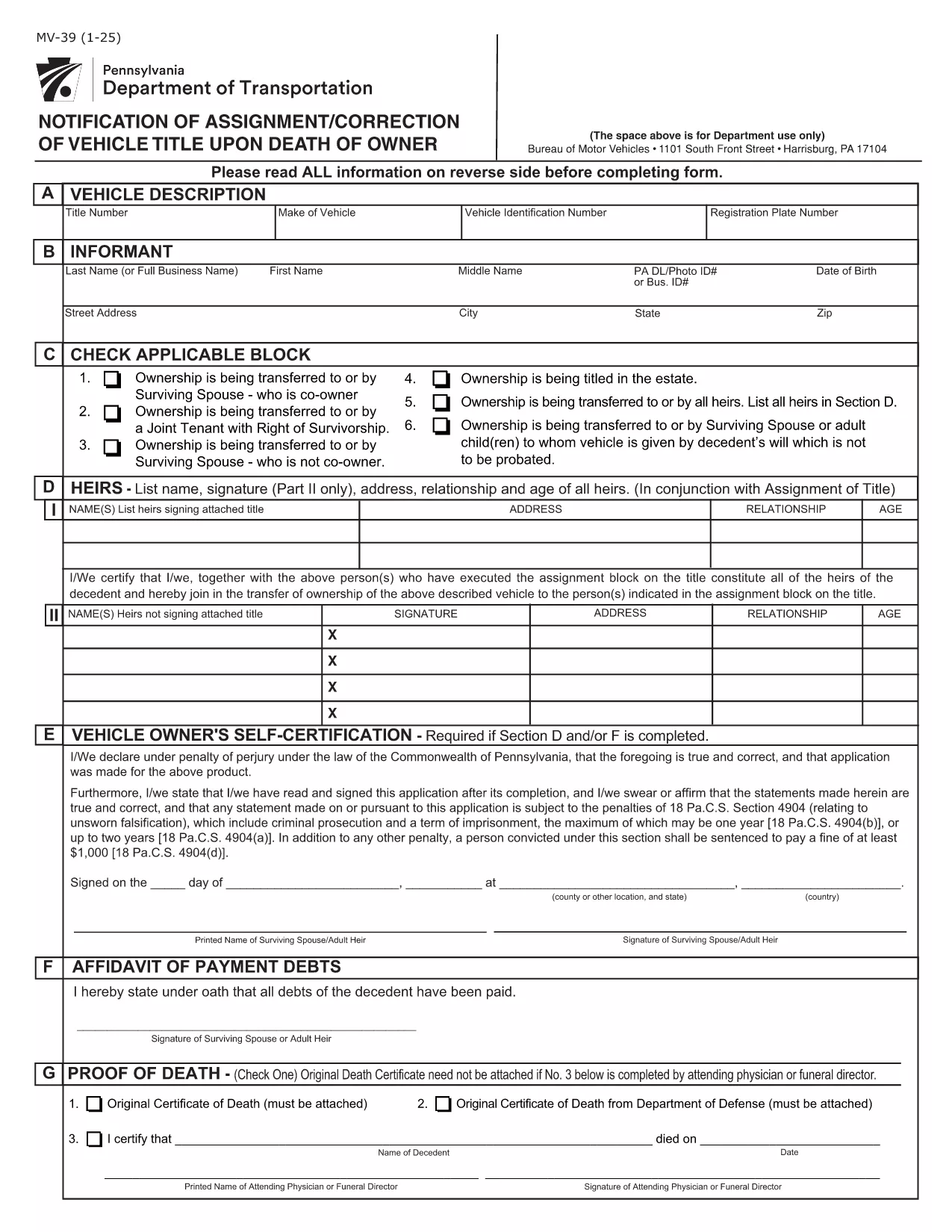
Form MV-39, titled “Notification of Assignment/Correction of Vehicle Title upon Death of Owner,” is required by the Pennsylvania Department of Transportation (PennDOT) whenever a vehicle title must be transferred after the owner’s death.

Our online fillable PDF lets you complete the form quickly without printing or using a separate PDF editor. Simply click the “Fill out this form” button, edit the fields, and download the finished document to submit to your local BMV office.

What Is Form MV-39?

This form notifies PennDOT of a change in ownership caused by the death of the original vehicle owner. It is used to assign the title to a surviving spouse, heir, or other qualified party and to correct any errors on the original title.

How to Complete Form MV-39 Online

Follow the step‑by‑step guide below to fill out the form directly in your browser using Formize’s PDF Filler.

  • Section A – Vehicle Information: Enter VIN, make, model, and year.
  • Section B – Owner’s Details: Provide the deceased owner’s name, Social Security Number, and date of death.
  • Section C – New Owner: List the name(s) of the surviving spouse, heir, or purchaser, along with their contact information.
  • Section G & H – Registration Intent: Indicate whether the vehicle will be re‑registered.
  • Section I – Signature: The new owner must sign and date the form.

Common Mistakes to Avoid

  • Leaving any required field blank – every section marked with an asterisk (*) is mandatory.
  • Using an illegible or mismatched VIN – copy it exactly as it appears on the current title.
  • Forgetting to attach a certified copy of the death certificate when required.
  • Signing the form with a pen before the PDF is fully completed – sign only after all information is entered.

Where to Submit the Completed Form

After saving the filled PDF, mail or deliver it to your nearest PennDOT Driver & Vehicle Services (DVS) office along with any supporting documents (e.g., death certificate, proof of relationship). Some offices also accept electronic submissions; check your local BMV’s website for details.

Frequently Asked Questions

Below are answers to the most common queries about Form MV-39.

ЧАСТО ЗАДАВАЕМЫЕ ВОПРОСЫ
  • Do I need to print Form MV-39 after filling it online?

    Most PennDOT offices require a hard copy with an original signature, so print the completed PDF, sign it, and mail or deliver it as instructed.

  • Can I submit Form MV-39 electronically?

    Some DVS locations accept electronic submissions. Check your local office’s website for specific instructions and accepted file formats.

  • What supporting documents are required?

    You’ll need a certified copy of the owner’s death certificate, proof of relationship (e.g., marriage certificate), and any existing title documents.

  • Is there a fee for filing Form MV-39?

    PennDOT does not charge a fee for the MV-39 notification itself, but standard title transfer fees may apply when the new title is issued.

  • What if I make a mistake after submitting?

    Contact your local PennDOT office immediately. They may require you to submit a corrected MV-39 or an additional affidavit.

  • How long does it take to process the form?

    Processing times vary by office, but expect 7‑10 business days from receipt of the completed form and required documents.

КАК ПОЛЬЗОВАТЬСЯ

Как бесплатно заполнить MV-39 онлайн за 4 простых шагов:

  1. 1
    Open the Fillable Form
    Click the “Fill out this form” button on the page. The Formize PDF Filler app will load the MV-39 document directly in your browser.
  2. 2
    Enter Required Information
    Complete each highlighted field (Sections A, B, C, G, H, and I). The filler validates entries in real time, so you’ll know immediately if something is missing.
  3. 3
    Review and Sign
    Double‑check all data for accuracy, then add your electronic signature in the designated signature box.
  4. 4
    Save and Submit
    Click “Save PDF” to download the completed form. Print it (if required) and submit it to your local PennDOT office with any supporting documents.
Приложение Formize PDF Filler
О ПРИЛОЖЕНИИ

Формы регистрации транспортных средств

Если вы владеете или арендуете автомобиль, прицеп или лодку, вы должны выполнять определенные обязательства, чтобы ваше транспортное средство было юридически зарегистрировано и безопасно.

MV-39 — это одна из регистрационных форм транспортных средств, которые представляют собой документы, используемые для регистрации транспортного средства в соответствующем государственном или провинциальном органе власти. Эти формы обычно требуются, когда человек покупает новый или подержанный автомобиль или когда он переезжает в новый штат или провинцию на автомобиле.

Точные требования и формы, необходимые для регистрации транспортного средства, могут различаться в зависимости от местоположения, но, как правило, процесс включает предоставление информации о транспортном средстве, владельце и любых правах на транспортное средство.

После подачи регистрационных форм и сборов власти штата или провинции выдают свидетельство о регистрации или номерной знак владельцу транспортного средства. Эта регистрация позволяет легально эксплуатировать транспортное средство на дорогах общего пользования и автомагистралях.

ФУНКЦИИ

Инструмент для запролнения PDF форм

Самый простой способ заполнить MV-39 онлайн

  • Быстрое заполнение MV-39
    Ищете способ быстро заполнить MV-39 онлайн? С нашим бесплатным онлайн-инструментом вы узнаете, как редактировать заполнить этот PDF-документ менее чем за минуту.
  • Простой в использовании онлайн-редактор PDF
    Надоело распечатывать PDF-файлы, чтобы их можно было отредактировать перед повторным сканированием и отправкой обратно? Редактируйте документы PDF бесплатно онлайн. Используйте наш онлайн-редактор PDF, чтобы сэкономить время и бумагу.
  • Отличные инструменты, все платформы
    Хотите знать, как заполнить MV-39 на Mac или, может быть, как использовать бесплатный заполнитель PDF? Наши онлайн-инструменты PDF работают на всех платформах.
  • Безопасное хранение файлов
    Файлы заполненных "MV-39" хранятся в защищенной базе данных, управляемой облачным хостингом Amazon. Вы можете удалить свои файлы из нашей системы в любое время. В любом случае эти файлы автоматически удаляются через 24 часа.
  • Чат с MV-39
    Откройте чат с "MV-39" в Chatize — бесплатном помощнике для чтения PDF-файлов. Задавайте вопросы и получайте ответы от "MV-39". Просто нажмите кнопку Чат с документом выше.

Удалить данные о заполненной форме

Удалить данные о заполненной форме? В этом случае Ваш прогресс заполнения этой формы будет утерян.

Удалить сеанс редактирования

Удалить выбранный сеанс редактирования? В этом случае ваш прогресс в создании и редактировании формы будет утерян.