Zvoľ jazyk

Application Form A – Inborn Errors of Metabolism

  1. Jazyk Angličtina
  2. Krajina Austrália
  3. Aktivita Health Assistance
  4. oddelenie Ministerstvo zdravotníctva a starostlivosti o rodinu
Application Form A – Inborn Errors of Metabolism

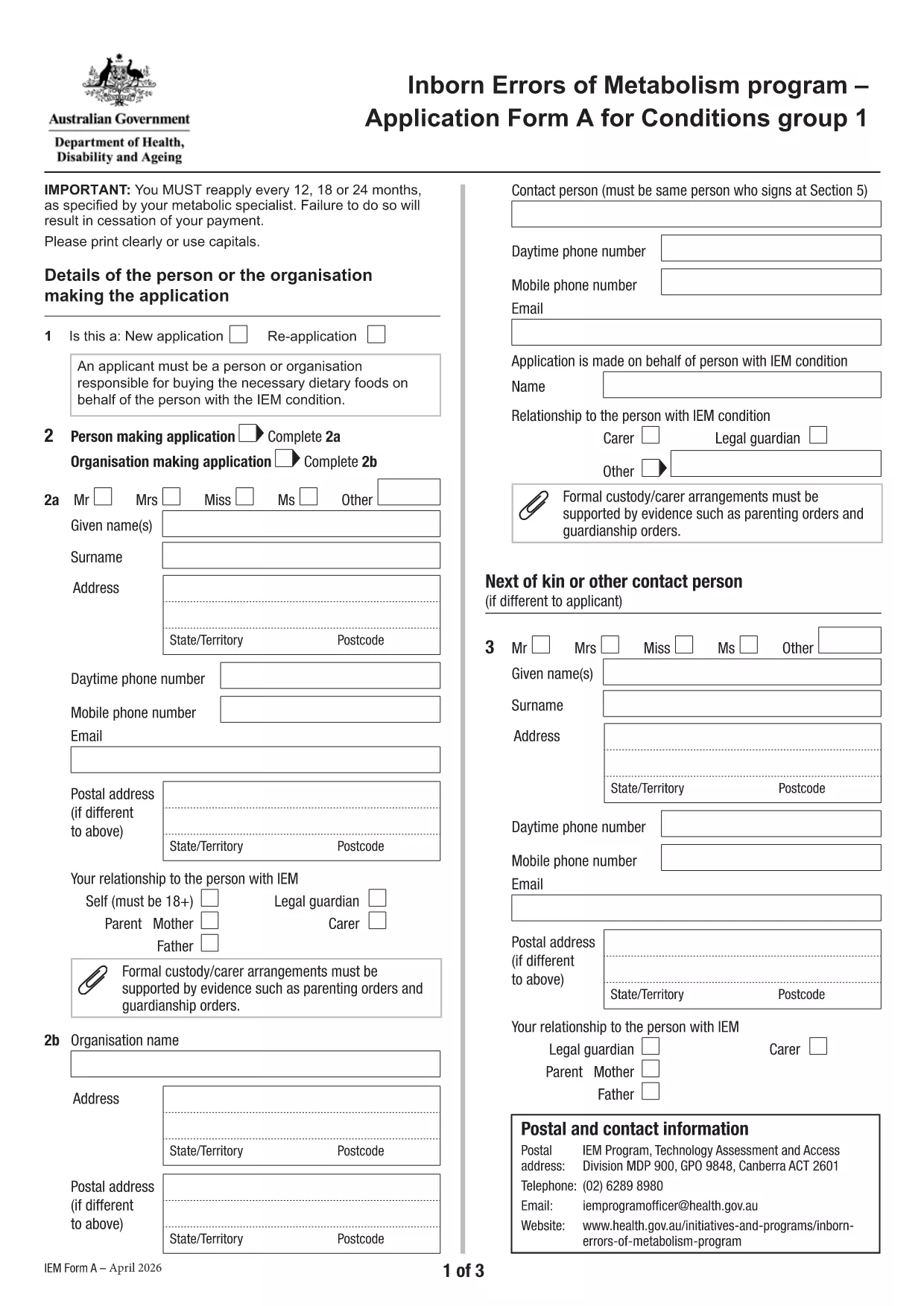
Application Form A is the official Australian Government form used to apply for financial assistance for individuals diagnosed with certain Inborn Errors of Metabolism, specifically dihydropteridine reductase (DHPR) deficiency, hyperphenylalaninemia, and phenylketonuria (PKU). The form must be completed and resubmitted every 12 months to maintain eligibility.

What is Application Form A?

This PDF form collects personal details, medical diagnosis, treatment information, and financial data required by the Department of Health’s Inborn Errors of Metabolism program. It is a fillable PDF, meaning you can type directly into the fields without printing.

Who needs to complete this form?

  • Individuals diagnosed with DHPR deficiency, hyperphenylalaninemia, or PKU.
  • Parents or legal guardians applying on behalf of a minor.
  • Anyone who has previously received assistance under the program and needs to renew their claim.

How to fill out Application Form A online

Instead of downloading the PDF and opening it in a separate editor, simply click the "Fill out this form" button on this page. The Formize PDF Filler app will load automatically, allowing you to complete the form directly in your browser.

Common mistakes to avoid

  • Leaving required fields blank – the form will not submit.
  • Providing outdated medical reports – attach the most recent diagnosis documents.
  • Using an unsupported browser – Chrome is recommended for best performance.
  • Submitting the form before the 12‑month renewal period – ensure you are within the eligibility window.

Where to submit the completed form

After you finish filling out the form, click the Submit button within the Formize interface. Your application will be securely transmitted to the Department of Health’s processing team. You will receive a confirmation email with a reference number for future inquiries.

Need more help? Review the FAQs below or contact your local health service for assistance.

FAQ
  • What conditions are covered by Application Form A?

    The form is only for DHPR deficiency, hyperphenylalaninemia, and phenylketonuria (PKU). Other metabolic conditions must use Application Form B.

  • How often must I re‑apply?

    You must reassess and submit a new Application Form A every 12 months to continue receiving assistance.

  • Can I fill out the form on a mobile device?

    Yes, the Formize PDF Filler works on most smartphones and tablets, though a larger screen (tablet or desktop) is recommended for easier navigation.

  • What if I make a mistake after submitting?

    Contact the Department of Health’s Inborn Errors of Metabolism program using the reference number from your confirmation email. They can guide you on how to correct the error.

  • Do I need to print the form after filling it online?

    No. The form is submitted electronically via Formize. Printing is only necessary if you want a hard copy for your records.

  • Which browsers are supported?

    Chrome is the recommended browser for optimal performance. Firefox, Edge, and Safari also work but may have limited functionality.

  • Is my personal and medical information secure?

    Yes. Formize uses SSL encryption, and the Department of Health follows strict privacy guidelines to protect your data.

  • Can I save my progress and finish later?

    The Formize platform allows you to save a draft. Click the "Save Draft" button before exiting and return using the same link.

AKO

Ako bezplatne vyplniť Application Form A online v 5 jednoduchých krokoch:

  1. 1
    Open the fillable form
    Click the "Fill out this form" button on the page. The Formize PDF Filler will open in a new tab.
  2. 2
    Enter your information
    Type directly into each field. Use the tab key to move quickly between sections.
  3. 3
    Attach supporting documents
    Upload recent medical reports and proof of identity using the attachment icons beside each required field.
  4. 4
    Review and submit
    Check all entries for accuracy, then click the "Submit" button. You will receive a confirmation email with a reference number.
  5. 5
    Save a copy
    After submission, download a PDF copy of the completed form for your records.
Aplikácia Formize PDF Filler
O

šablóny Application Form A

S tradičnou sadou funkcií na prezeranie a vypĺňanie dokumentu PDF v kombinácii s výhodami webovej aplikácie a responzívneho rozloženia môžete Application Form A dokončiť za pár minút.

VLASTNOSTI

PDF Filler

Najjednoduchší spôsob, ako vyplniť Application Form A online

  • Rýchlo vyplňte Application Form A
    Hľadáte spôsob, ako rýchlo vyplniť Application Form A online? S našou online bezplatnou výplňou formulárov PDF budete vedieť, ako upraviť a vyplniť tento dokument PDF za menej ako minútu.
  • Ľahko použiteľný online editor PDF
    Nebaví vás tlačiť súbory PDF, aby ste ich mohli upravovať pred opätovným naskenovaním a odoslaním späť? Upravujte dokumenty PDF zadarmo online. Použite náš online editor PDF, aby ste ušetrili čas a papier.
  • Skvelé nástroje, všetky platformy
    Zaujíma vás, ako vyplniť Application Form A na počítači Mac, alebo ako možno použiť bezplatný výplň PDF? Naše online nástroje PDF fungujú na všetkých platformách.
  • Bezpečné ukladanie súborov
    Dokončené súbory „Application Form A“ sú uložené v zabezpečenej databáze spravovanej hostingom Amazon Cloud. Svoje súbory môžete z nášho systému kedykoľvek odstrániť. V každom prípade sa tieto súbory automaticky vymažú po 24 hodinách.
  • Četovať s Application Form A
    Četujte s „Application Form A“ na Chatize, čo je bezplatný pomocník na čítanie súborov PDF. Pýtajte sa otázky a získajte odpovede z „Application Form A“. Stačí kliknúť na tlačidlo Rozhovor s dokumentom vyššie.

Odstrániť reláciu plnenia

Chcete odstrániť vybratú reláciu plnenia? V takom prípade sa stratí váš postup pri vypĺňaní formulára.

Odstrániť reláciu úprav

Chcete odstrániť vybratú reláciu úprav? V takom prípade sa stratí váš postup pri vytváraní a úprave formulára.