Zvoľ jazyk

QLS Form 23 (LPA) – Fillable Legal Notice Template

  1. Krajina Austrália
  2. Jazyk Angličtina
  3. oddelenie Queensland Law Society
  4. Aktivita Legal Forms
QLS Form 23 (LPA) – Fillable Legal Notice Template

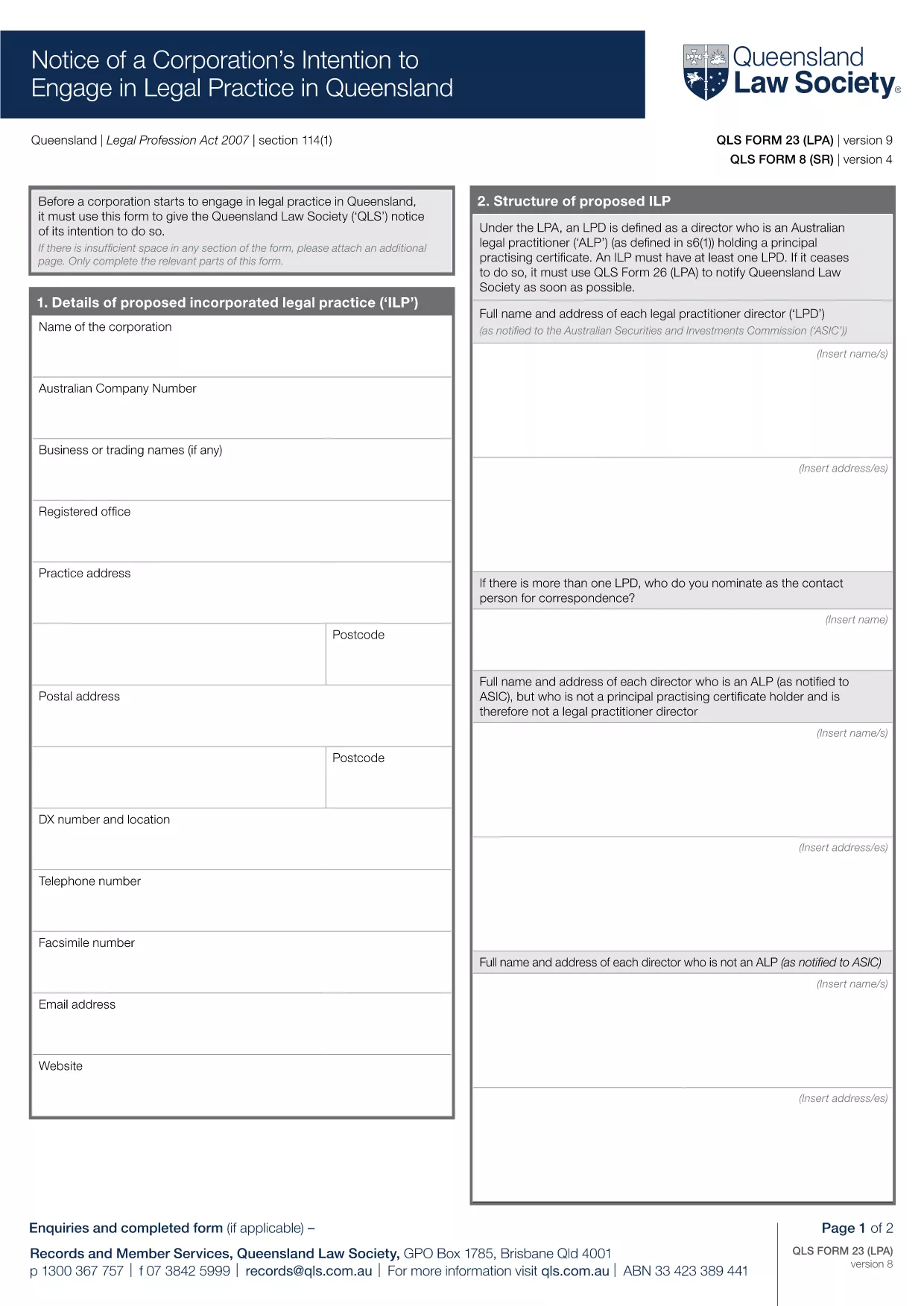
The QLS Form 23 (LPA) is the official notice required by the Queensland Law Society when a corporation intends to engage in legal practice in Queensland. This fillable PDF template lets you complete the form quickly, securely, and without any extra software.

What Is QLS Form 23 (LPA)?

Form 23, also known as the "Law Practice Application," informs the Queensland Law Society of a corporation’s intention to provide legal services. It includes details such as the corporation’s name, registered address, principal lawyers, and the scope of services.

How to Fill Out the Form Online

Instead of downloading the PDF and opening a separate editor, simply click the "Fill out this form" button on this page. The Formize PDF Filler app will load in your browser, allowing you to type directly into each field, add signatures, and save your progress.

Common Mistakes to Avoid

  • Leaving mandatory fields blank – the filler will highlight missing information before you can submit.
  • Using outdated contact details – double‑check phone numbers and email addresses.
  • Incorrect corporation registration number – verify against your ASIC records.

Where to Submit the Completed Form

After you finish, download the completed PDF and email it to forms@qls.com.au or upload it through the Queensland Law Society’s online portal. Keep a copy for your records.

Benefits of Using a Fillable PDF

• Instant validation of required fields
• No need for third‑party PDF editors
• Secure, cloud‑based saving with Formize
• Printable version ready for signature

Ready to get started? Click the button below, fill the form in minutes, and stay compliant with the Queensland Law Society.

FAQ
  • Do I need a PDF editor to complete QLS Form 23?

    No. The Formize PDF Filler runs in your browser, so you can fill the form without any extra software.

  • Is the form free to use?

    Yes. The fillable PDF is provided at no cost. You only need an internet connection to access the Formize app.

  • Can I save my progress and finish later?

    Absolutely. The Formize app lets you save a draft locally and reopen it later to continue editing.

  • What format should I use for my signature?

    You can draw a signature with your mouse or touchpad, or upload an image of your handwritten signature.

  • How do I know the form is accepted by the Queensland Law Society?

    QLS Form 23 (LPA) is the official template required by the Society. Submitting the completed PDF through their portal or email meets the compliance requirements.

  • What if I make a mistake after submitting?

    Contact the Queensland Law Society immediately. You can resend a corrected PDF, but be sure to reference your original submission.

  • Is my data safe while using Formize?

    Formize processes the PDF locally in your browser; no personal data is stored on external servers unless you choose to upload it.

AKO

Ako bezplatne vyplniť QLS Form 23 online v 5 jednoduchých krokoch:

  1. 1
    Open the Fillable Form
    Click the "Fill out this form" button on the page. The Formize PDF Filler will launch in your browser.
  2. 2
    Enter Your Information
    Type directly into each highlighted field. The app will automatically check for required entries.
  3. 3
    Add Signatures
    Use the built‑in signature tool to sign electronically, or print later for a wet signature.
  4. 4
    Save and Download
    When all fields are complete, click "Save" to download the finished PDF to your device.
  5. 5
    Submit to QLS
    Email the saved PDF to forms@qls.com.au or upload it via the Queensland Law Society portal.
Aplikácia Formize PDF Filler
O

šablóny QLS Form 23

S tradičnou sadou funkcií na prezeranie a vypĺňanie dokumentu PDF v kombinácii s výhodami webovej aplikácie a responzívneho rozloženia môžete QLS Form 23 dokončiť za pár minút.

VLASTNOSTI

PDF Filler

Najjednoduchší spôsob, ako vyplniť QLS Form 23 online

  • Rýchlo vyplňte QLS Form 23
    Hľadáte spôsob, ako rýchlo vyplniť QLS Form 23 online? S našou online bezplatnou výplňou formulárov PDF budete vedieť, ako upraviť a vyplniť tento dokument PDF za menej ako minútu.
  • Ľahko použiteľný online editor PDF
    Nebaví vás tlačiť súbory PDF, aby ste ich mohli upravovať pred opätovným naskenovaním a odoslaním späť? Upravujte dokumenty PDF zadarmo online. Použite náš online editor PDF, aby ste ušetrili čas a papier.
  • Skvelé nástroje, všetky platformy
    Zaujíma vás, ako vyplniť QLS Form 23 na počítači Mac, alebo ako možno použiť bezplatný výplň PDF? Naše online nástroje PDF fungujú na všetkých platformách.
  • Bezpečné ukladanie súborov
    Dokončené súbory „QLS Form 23“ sú uložené v zabezpečenej databáze spravovanej hostingom Amazon Cloud. Svoje súbory môžete z nášho systému kedykoľvek odstrániť. V každom prípade sa tieto súbory automaticky vymažú po 24 hodinách.
  • Četovať s QLS Form 23
    Četujte s „QLS Form 23“ na Chatize, čo je bezplatný pomocník na čítanie súborov PDF. Pýtajte sa otázky a získajte odpovede z „QLS Form 23“. Stačí kliknúť na tlačidlo Rozhovor s dokumentom vyššie.

Odstrániť reláciu plnenia

Chcete odstrániť vybratú reláciu plnenia? V takom prípade sa stratí váš postup pri vypĺňaní formulára.

Odstrániť reláciu úprav

Chcete odstrániť vybratú reláciu úprav? V takom prípade sa stratí váš postup pri vytváraní a úprave formulára.