Zvoľ jazyk

Queensland RTA Form 22 Rental Application (Fillable PDF)

  1. Jazyk Angličtina
  2. Krajina Austrália
  3. oddelenie Residential Tenancies Authority
  4. Aktivita Prenájom
Queensland RTA Form 22 Rental Application (Fillable PDF)

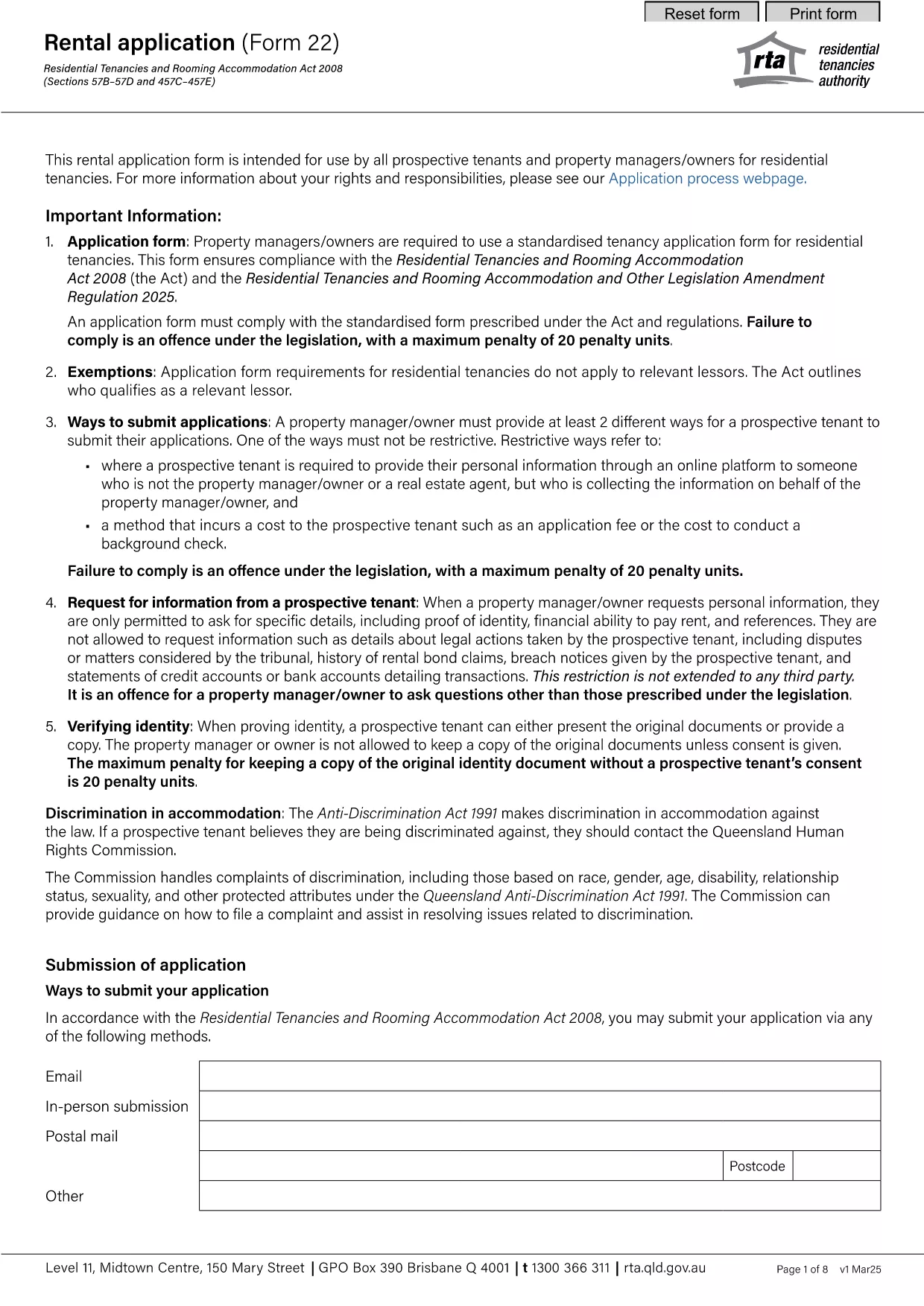
The Queensland Residential Tenancies Authority (RTA) Form 22 is the standard rental application used by prospective tenants and property managers across Queensland. This fillable PDF lets you complete the form quickly, save your data, and submit it directly to landlords or agents.

What is Form 22 and Who Needs It?

Form 22 collects essential information about the applicant, including personal details, rental history, employment, and references. It is required for:

  • New tenancy agreements
  • Renewals where a new application is requested
  • Any situation where a landlord or manager needs a verified tenant profile

How to Fill Out the RTA Form 22 Online

Instead of downloading the PDF and opening it in a separate editor, simply click the "Fill out this form" button on this page. The Formize PDF Filler app will load directly in your browser, allowing you to:

  1. Enter information into each field using your keyboard or mobile device.
  2. Save progress at any time and return later.
  3. Validate entries with built‑in checks (e.g., date format, required fields).
  4. Download a completed, signed PDF or email it straight to your landlord.

Common Mistakes to Avoid

  • Leaving required fields blank: The form will not submit until all mandatory sections are completed.
  • Incorrect date format: Use DD/MM/YYYY as shown in the example fields.
  • Mismatched contact details: Double‑check phone numbers and email addresses for accuracy.
  • Skipping reference checks: Provide full contact information for previous landlords; incomplete references can delay approval.

Download the Official PDF

If you prefer the traditional method, you can download the official RTA Form 22 PDF below. The file is the same version used by the Queensland Residential Tenancies Authority.

Download Form 22 – Rental Application (PDF)

Frequently Asked Questions

For quick answers to common queries, scroll down to the FAQ section or use the search box on the page.

FAQ
  • Is Form 22 mandatory for all rental applications in Queensland?

    Yes, the Residential Tenancies Authority requires Form 22 for most new tenancy agreements and for many renewals where a fresh application is requested.

  • Can I submit the form electronically?

    Absolutely. After completing the fillable PDF with Formize, you can download the signed version and email it directly to the landlord or agent.

  • What if I make a mistake after submitting?

    You can edit the saved PDF before sending it. If you’ve already sent it, ask the landlord to return the document for correction or submit a new completed form.

  • Do I need to provide references from previous landlords?

    Providing at least two recent rental references is standard practice and helps speed up the approval process.

  • Is there a fee to download or use Form 22?

    No, the PDF is provided free of charge by the Queensland Residential Tenancies Authority.

  • Can I fill out Form 22 on a mobile device?

    Yes, the Formize PDF Filler works on smartphones and tablets, allowing you to complete the form on the go.

  • What format should I use for dates?

    Enter dates in the DD/MM/YYYY format, as shown in the example fields on the form.

  • How long is the rental application valid?

    Typically, a completed Form 22 is valid for 30 days, after which a new application may be required.

AKO

Ako bezplatne vyplniť RTA Form 22 online v 5 jednoduchých krokoch:

  1. 1
    Click the Fill‑out Button
    Press the "Fill out this form" button on the page to launch the Formize PDF Filler in your browser.
  2. 2
    Wait for the Filler to Load
    The app loads within a few seconds. You’ll see a familiar PDF layout with editable fields.
  3. 3
    Enter Your Information
    Complete each section—personal details, rental history, employment, and references—using the on‑screen fields.
  4. 4
    Save or Download
    When finished, click "Save" to store a copy in your browser or "Download" to get a completed PDF file.
  5. 5
    Submit to Your Landlord
    Email the saved PDF, attach it to an online portal, or hand‑deliver the printed copy to the property manager.
Aplikácia Formize PDF Filler
O

Formuláre pre prenajímateľov a/alebo nájomcov na navrhovanie opatrení týkajúcich sa nájomných zmlúv.

RTA Form 22 je typ zmlúv o prenájme bytov, ktoré používa väčšina súkromných vlastníkov a bytových spoločenstiev.

Existuje množstvo záležitostí, pri ktorých musia prenajímatelia alebo nájomcovia dodržiavať určité pravidlá stanovené v predpisoch. V niektorých prípadoch môže byť potrebné, aby vyplnili formulár nazývaný „predpísaný formulár“, v ktorom sa navrhuje akcia, ktorá môže ovplyvniť druhú stranu nájomnej zmluvy.

Formuláre sa nazývajú predpísané formuláre, pretože znenie v nich bolo starostlivo navrhnuté, aby sa zabezpečilo, že osoba, ktorá vypĺňa formulár, a osoba, ktorej sa formulár doručuje, rozumie tomu, čo sa navrhuje a čo môže urobiť ako odpoveď. Neposkytnutie správneho formulára môže zrušiť platnosť navrhovanej akcie.

Nemôžete meniť znenie v týchto formulároch, pokiaľ to nie je uvedené vo formulári. Ak zmeníte znenie, formulár môže byť neplatný. Musíte tiež dodržať všetky výpovedné lehoty uvedené vo formulári.

VLASTNOSTI

PDF Filler

Najjednoduchší spôsob, ako vyplniť RTA Form 22 online

  • Rýchlo vyplňte RTA Form 22
    Hľadáte spôsob, ako rýchlo vyplniť RTA Form 22 online? S našou online bezplatnou výplňou formulárov PDF budete vedieť, ako upraviť a vyplniť tento dokument PDF za menej ako minútu.
  • Ľahko použiteľný online editor PDF
    Nebaví vás tlačiť súbory PDF, aby ste ich mohli upravovať pred opätovným naskenovaním a odoslaním späť? Upravujte dokumenty PDF zadarmo online. Použite náš online editor PDF, aby ste ušetrili čas a papier.
  • Skvelé nástroje, všetky platformy
    Zaujíma vás, ako vyplniť RTA Form 22 na počítači Mac, alebo ako možno použiť bezplatný výplň PDF? Naše online nástroje PDF fungujú na všetkých platformách.
  • Bezpečné ukladanie súborov
    Dokončené súbory „RTA Form 22“ sú uložené v zabezpečenej databáze spravovanej hostingom Amazon Cloud. Svoje súbory môžete z nášho systému kedykoľvek odstrániť. V každom prípade sa tieto súbory automaticky vymažú po 24 hodinách.
  • Četovať s RTA Form 22
    Četujte s „RTA Form 22“ na Chatize, čo je bezplatný pomocník na čítanie súborov PDF. Pýtajte sa otázky a získajte odpovede z „RTA Form 22“. Stačí kliknúť na tlačidlo Rozhovor s dokumentom vyššie.

Odstrániť reláciu plnenia

Chcete odstrániť vybratú reláciu plnenia? V takom prípade sa stratí váš postup pri vypĺňaní formulára.

Odstrániť reláciu úprav

Chcete odstrániť vybratú reláciu úprav? V takom prípade sa stratí váš postup pri vytváraní a úprave formulára.