
Zvoľ jazyk

Application Form No – Fillable PDF for NSW Transport

  1. Jazyk Angličtina
  2. Krajina Austrália
  3. oddelenie Transport for NSW
  4. Aktivita Registrácia vozidla
Application Form No – Fillable PDF for NSW Transport

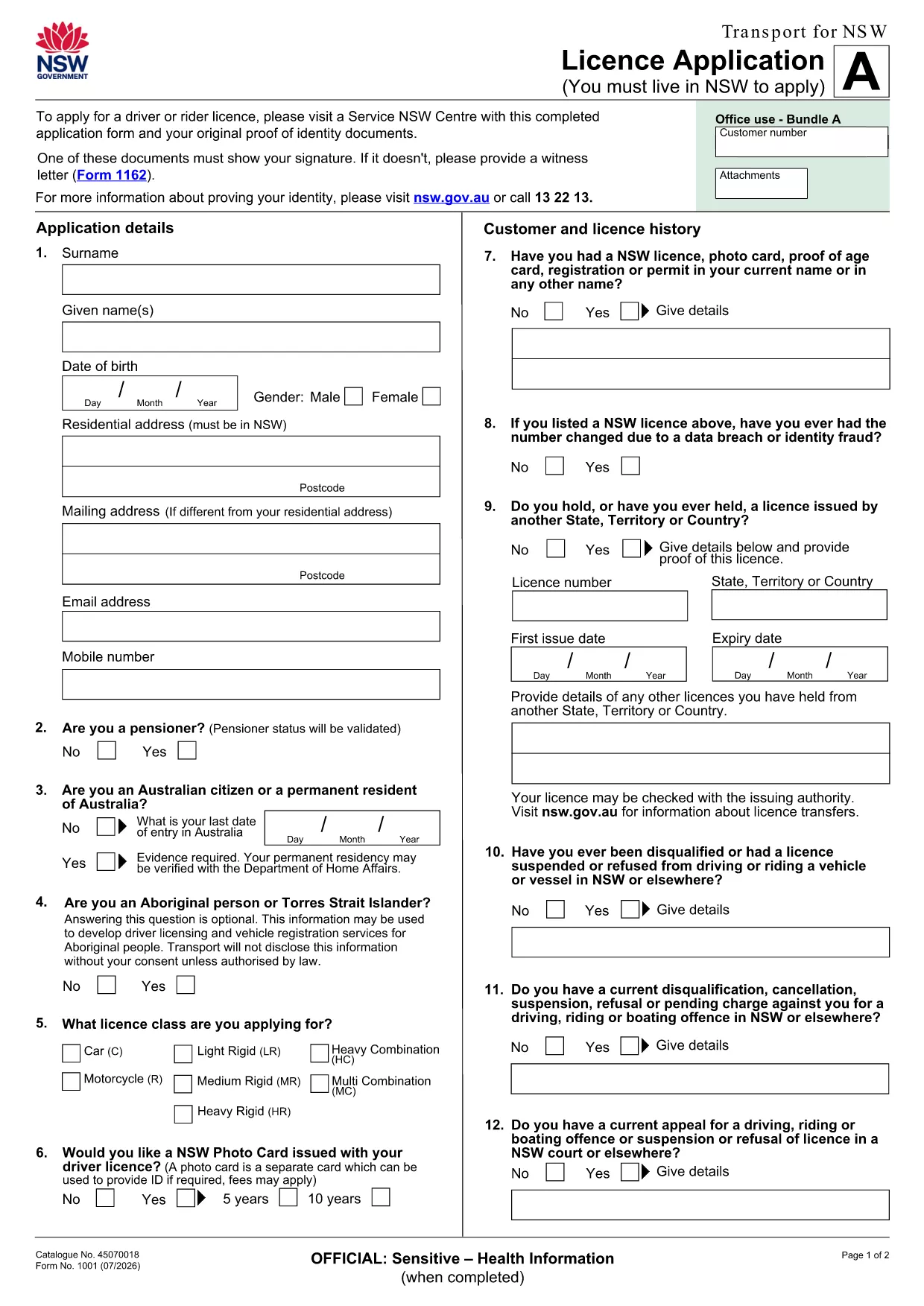
If you’re looking for the official Application Form No used by Transport for NSW, you’ve come to the right place. This page provides a direct link to the fillable PDF, step‑by‑step online instructions, and tips to ensure your submission is error‑free.

What is the Application Form No?

The Application Form No is the standard licence application used by the New South Wales transport authority. It collects personal details, licence preferences, and supporting documentation required for a new or renewed driver licence.

How to Fill the Form Online with Formize

Instead of downloading the PDF to a desktop editor, simply click the "Fill out this form" button on this page. The Formize PDF Filler app will load in your browser, letting you type directly into the fields, save progress, and export a completed PDF.

Key Sections and Required Information

  • Personal Details: Full name, address, date of birth, and contact numbers.
  • Licence Choice: Select the appropriate licence class and any endorsements.
  • Identity Verification: Upload a scanned ID or provide a reference number.
  • Signature: Use the digital signature tool in Formize to sign securely.

Common Mistakes to Avoid

  • Leaving required fields blank – the filler will highlight missing data before you submit.
  • Using non‑standard fonts or special characters in names – stick to plain text.
  • Uploading files that exceed the size limit (5 MB per file).
  • Forgetting to sign the form digitally; an unsigned form is rejected.

Download the Fillable PDF

The original, printable version of the form is available for download if you need a hard copy. Download the PDF

Ready to start? Click the button below, fill the form online, and submit it directly to Transport for NSW.

FAQ
  • Do I need Adobe Acrobat to fill this form?

    No. The Formize PDF Filler works in any modern browser, so you can complete the form without installing any software.

  • Can I print the filled form after completing it online?

    Yes. After you finish, click the "Download" button to save a PDF that you can print or email.

  • What if I make a mistake while filling the form?

    Use the "Undo" button or simply edit the field again. The filler saves changes in real time.

  • Is my personal data secure?

    Formize uses SSL encryption for all data transmitted between your browser and our servers. Your information is not stored longer than needed for the submission.

  • Do I still need to sign the form with a pen?

    A digital signature accepted by Transport for NSW is sufficient. Print‑and‑sign is only required if you choose to submit a hard copy.

  • Can I save the form and finish it later?

    Yes. Click "Save" to download a partially completed PDF, then reopen it later in Formize to continue.

  • What file formats are accepted for supporting documents?

    PDF, JPG, and PNG files up to 5 MB each are accepted.

AKO

Ako bezplatne vyplniť application form no online v 5 jednoduchých krokoch:

  1. 1
    Open the Form
    Click the "Fill out this form" button on this page. The Formize PDF Filler will open in a new browser tab.
  2. 2
    Enter Your Information
    Type directly into each highlighted field. Use the tab key to move quickly between sections.
  3. 3
    Add Supporting Documents
    Upload scanned copies of your ID or proof of address using the upload icons inside the form.
  4. 4
    Sign Digitally
    Select the signature field and draw or type your signature using the built‑in tool.
  5. 5
    Save and Submit
    Click "Save" to download a copy for your records, then press "Submit" to send the completed form to Transport for NSW.
Aplikácia Formize PDF Filler
O

Registračné formuláre vozidla

Ak vlastníte alebo si prenajímate motorové vozidlo, príves alebo loď, musíte splniť určité povinnosti, aby bolo vaše vozidlo legálne registrované a bezpečné.

application form no je jeden z registračných formulárov vozidla, čo sú dokumenty, ktoré sa používajú na registráciu motorového vozidla na príslušnom štátnom alebo provinčnom úrade. Tieto formuláre sa zvyčajne vyžadujú, keď si osoba kúpi nové alebo ojazdené vozidlo alebo keď sa s vozidlom presťahuje do nového štátu alebo provincie.

Presné požiadavky a formuláre potrebné na registráciu vozidla sa môžu líšiť podľa miesta, ale vo všeobecnosti tento proces zahŕňa poskytnutie informácií o vozidle, vlastníkovi a prípadných záložných právach k vozidlu.

Po predložení registračných formulárov a poplatkov vydá štátny alebo krajský úrad majiteľovi vozidla osvedčenie o evidencii alebo poznávaciu značku. Táto registrácia umožňuje legálne prevádzkovanie vozidla na verejných komunikáciách a diaľniciach.

VLASTNOSTI

PDF Filler

Najjednoduchší spôsob, ako vyplniť application form no online

  • Rýchlo vyplňte application form no
    Hľadáte spôsob, ako rýchlo vyplniť application form no online? S našou online bezplatnou výplňou formulárov PDF budete vedieť, ako upraviť a vyplniť tento dokument PDF za menej ako minútu.
  • Ľahko použiteľný online editor PDF
    Nebaví vás tlačiť súbory PDF, aby ste ich mohli upravovať pred opätovným naskenovaním a odoslaním späť? Upravujte dokumenty PDF zadarmo online. Použite náš online editor PDF, aby ste ušetrili čas a papier.
  • Skvelé nástroje, všetky platformy
    Zaujíma vás, ako vyplniť application form no na počítači Mac, alebo ako možno použiť bezplatný výplň PDF? Naše online nástroje PDF fungujú na všetkých platformách.
  • Bezpečné ukladanie súborov
    Dokončené súbory „application form no“ sú uložené v zabezpečenej databáze spravovanej hostingom Amazon Cloud. Svoje súbory môžete z nášho systému kedykoľvek odstrániť. V každom prípade sa tieto súbory automaticky vymažú po 24 hodinách.
  • Četovať s application form no
    Četujte s „application form no“ na Chatize, čo je bezplatný pomocník na čítanie súborov PDF. Pýtajte sa otázky a získajte odpovede z „application form no“. Stačí kliknúť na tlačidlo Rozhovor s dokumentom vyššie.

Odstrániť reláciu plnenia

Chcete odstrániť vybratú reláciu plnenia? V takom prípade sa stratí váš postup pri vypĺňaní formulára.

Odstrániť reláciu úprav

Chcete odstrániť vybratú reláciu úprav? V takom prípade sa stratí váš postup pri vytváraní a úprave formulára.