
Zvoľ jazyk

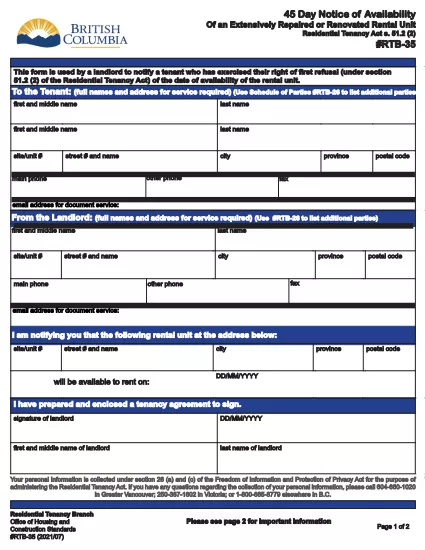
RTB‑35 45‑Day Notice of Availability (Fillable PDF)

  1. Krajina Kanada
  2. Jazyk Angličtina
  3. Aktivita Prenájom
  4. oddelenie Residential Tenancy Branch
RTB‑35 45‑Day Notice of Availability (Fillable PDF)

The RTB‑35 is the official 45‑Day Notice of Availability required by British Columbia’s Residential Tenancy Act. Landlords must give tenants at least 45 days’ notice before a rental unit becomes available for a new tenancy. This form ensures the notice is clear, legally compliant, and ready to be filed.

What Is the RTB‑35 Form?

RTB‑35 is a standardized, government‑approved PDF used by landlords across the province. It captures the date the unit will be available, the reason for vacancy, and the landlord’s contact information. Because it is a fillable PDF, you can complete it directly in your browser without printing a paper copy first.

When and Why You Need This Notice

  • When you plan to end a tenancy because the unit will be re‑rented or taken off the market.
  • When you are selling the property or converting it to another use.
  • To comply with the Residential Tenancy Act and avoid disputes or penalties.

How to Complete the RTB‑35 Online

Follow the simple steps below. The Formize PDF Filler loads the fillable version instantly, so you never need to download a separate editor.

Common Mistakes to Avoid

  • Providing a date that is less than 45 days from the notice date.
  • Leaving the “Reason for Vacancy” field blank.
  • Forgetting to sign the form before submitting to the tenant.

Download the Fillable PDF

Click the button below to open the RTB‑35 form in the Formize PDF Filler. When the app loads, you can fill, save, and print the notice in minutes.

Fill out this form

FAQ
  • What happens if I give less than 45 days’ notice?

    The notice will be considered invalid under the Residential Tenancy Act, and you may be required to continue the tenancy or face a dispute resolution claim.

  • Can I use a handwritten version of RTB‑35?

    Yes, but a fillable PDF is recommended because it reduces errors, ensures legibility, and creates a digital record.

  • Do I need to attach any supporting documents?

    Only if the reason for vacancy requires proof (e.g., a sale agreement). Otherwise, the RTB‑35 alone is sufficient.

  • Is the Formize PDF Filler free to use?

    Yes. You can fill, save, and download the form at no cost. No software installation is required.

  • Can I email the completed RTB‑35 to my tenant?

    Absolutely. Once you save the completed PDF, you can attach it to an email or upload it to a tenant portal.

  • Do I need to keep a copy of the notice?

    Keep a saved copy for your records for at least the length of the tenancy, as it may be requested during dispute resolution.

  • What if the tenant disputes the notice date?

    Provide the saved PDF with timestamps from the Formize app as evidence of when the notice was completed and sent.

AKO

Ako bezplatne vyplniť RTB-35 online v 5 jednoduchých krokoch:

  1. 1
    Open the Form
    Click the “Fill out this form” button above. The Formize PDF Filler app will load the RTB‑35 fillable PDF in a new tab.
  2. 2
    Enter Required Information
    Type the date the unit will be available, the reason for vacancy, and your contact details. All fields are interactive and save automatically.
  3. 3
    Review and Sign
    Check each section for accuracy, then add your electronic signature using the built‑in signature field.
  4. 4
    Save or Print
    When you’re finished, click “Save” to download a copy or “Print” to give a hard copy to your tenant.
  5. 5
    Submit to Tenant
    Deliver the completed notice by hand, email, or mail within the 45‑day window required by law.
Aplikácia Formize PDF Filler
O

Formuláre pre prenajímateľov a/alebo nájomcov na navrhovanie opatrení týkajúcich sa nájomných zmlúv.

RTB-35 je typ zmlúv o prenájme bytov, ktoré používa väčšina súkromných vlastníkov a bytových spoločenstiev.

Existuje množstvo záležitostí, pri ktorých musia prenajímatelia alebo nájomcovia dodržiavať určité pravidlá stanovené v predpisoch. V niektorých prípadoch môže byť potrebné, aby vyplnili formulár nazývaný „predpísaný formulár“, v ktorom sa navrhuje akcia, ktorá môže ovplyvniť druhú stranu nájomnej zmluvy.

Formuláre sa nazývajú predpísané formuláre, pretože znenie v nich bolo starostlivo navrhnuté, aby sa zabezpečilo, že osoba, ktorá vypĺňa formulár, a osoba, ktorej sa formulár doručuje, rozumie tomu, čo sa navrhuje a čo môže urobiť ako odpoveď. Neposkytnutie správneho formulára môže zrušiť platnosť navrhovanej akcie.

Nemôžete meniť znenie v týchto formulároch, pokiaľ to nie je uvedené vo formulári. Ak zmeníte znenie, formulár môže byť neplatný. Musíte tiež dodržať všetky výpovedné lehoty uvedené vo formulári.

VLASTNOSTI

PDF Filler

Najjednoduchší spôsob, ako vyplniť RTB-35 online

  • Rýchlo vyplňte RTB-35
    Hľadáte spôsob, ako rýchlo vyplniť RTB-35 online? S našou online bezplatnou výplňou formulárov PDF budete vedieť, ako upraviť a vyplniť tento dokument PDF za menej ako minútu.
  • Ľahko použiteľný online editor PDF
    Nebaví vás tlačiť súbory PDF, aby ste ich mohli upravovať pred opätovným naskenovaním a odoslaním späť? Upravujte dokumenty PDF zadarmo online. Použite náš online editor PDF, aby ste ušetrili čas a papier.
  • Skvelé nástroje, všetky platformy
    Zaujíma vás, ako vyplniť RTB-35 na počítači Mac, alebo ako možno použiť bezplatný výplň PDF? Naše online nástroje PDF fungujú na všetkých platformách.
  • Bezpečné ukladanie súborov
    Dokončené súbory „RTB-35“ sú uložené v zabezpečenej databáze spravovanej hostingom Amazon Cloud. Svoje súbory môžete z nášho systému kedykoľvek odstrániť. V každom prípade sa tieto súbory automaticky vymažú po 24 hodinách.
  • Četovať s RTB-35
    Četujte s „RTB-35“ na Chatize, čo je bezplatný pomocník na čítanie súborov PDF. Pýtajte sa otázky a získajte odpovede z „RTB-35“. Stačí kliknúť na tlačidlo Rozhovor s dokumentom vyššie.

Odstrániť reláciu plnenia

Chcete odstrániť vybratú reláciu plnenia? V takom prípade sa stratí váš postup pri vypĺňaní formulára.

Odstrániť reláciu úprav

Chcete odstrániť vybratú reláciu úprav? V takom prípade sa stratí váš postup pri vytváraní a úprave formulára.