
Zvoľ jazyk

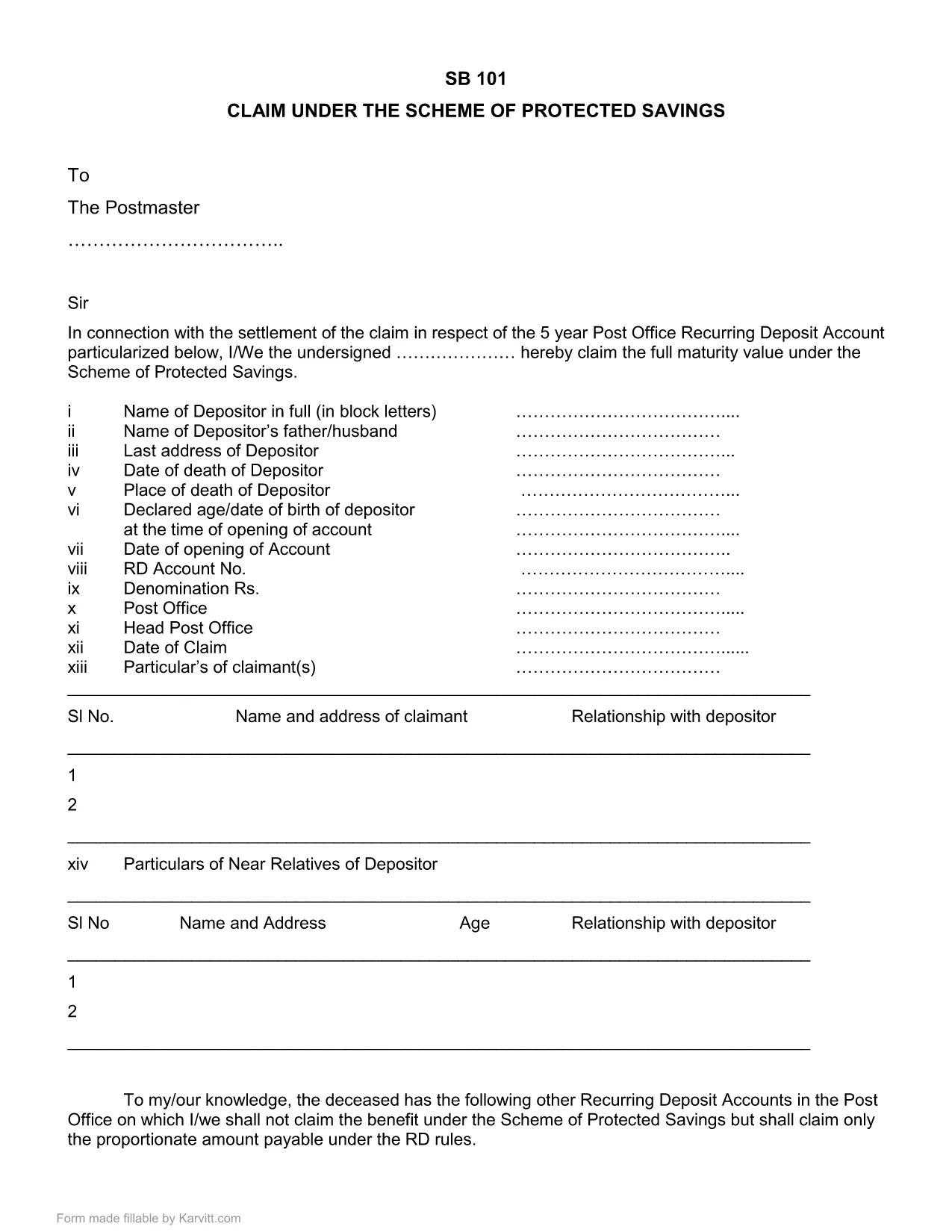
SB-101 India Fillable PDF – Claim Protected Savings

  1. Jazyk Angličtina
  2. Krajina India
  3. oddelenie Katedra pôšt
SB-101 India Fillable PDF – Claim Protected Savings

The SB-101 form is the official Post Office document used in India to claim benefits under the Scheme of Protected Savings. Whether you are a first‑time claimant or need to submit a renewal, a fillable PDF version saves you time and reduces errors.

What is Form SB-101?

SB-101 is issued by the Indian Post Office and is required to:

  • Validate your protected savings account.
  • Apply for interest benefits and withdrawals.
  • Update personal details linked to your savings scheme.

The form is recognized nationwide and must be completed in the exact format prescribed by the Post Office.

How to Fill SB-101 Online with Formize

Instead of downloading, printing, and scanning, use the Formize PDF Filler for a seamless experience:

  1. Click the "Fill out this form" button on this page.
  2. The Formize PDF Filler loads directly in your browser – no extra software needed.
  3. Enter your information in each highlighted field. The interface guides you through mandatory sections.
  4. When you finish, review the summary screen for any missing or incorrect entries.
  5. Save the completed form to your device or submit it electronically to your nearest Post Office.

Common Mistakes to Avoid When Completing SB-101

  • Incorrect Account Number: Double‑check the 12‑digit number printed on your passbook.
  • Missing Signature: The form is invalid without a clear, legible signature.
  • Outdated Address: Ensure the address matches the one on record with the Post Office.
  • Skipping Optional Fields: Even optional fields can help speed up verification if filled correctly.

Download & Save the Official SB-101 PDF

If you prefer a traditional approach, you can still download the official fillable PDF version below. The file retains the original layout and can be opened with any modern PDF reader.

Download SB-101 Fillable PDF (India)

Remember, using the Formize PDF Filler ensures your data is captured accurately and saves you a trip to the printer.

FAQ
  • What is the purpose of SB-101?

    SB-101 is used to claim benefits, update personal details, and manage withdrawals under the Scheme of Protected Savings offered by the Indian Post Office.

  • Can I fill SB-101 on a mobile device?

    Yes. The Formize PDF Filler works on all modern browsers, including mobile phones and tablets.

  • Do I need Adobe Acrobat to use the fillable PDF?

    No. While the PDF can be opened with Adobe Reader, the Formize online filler lets you complete the form without any additional software.

  • Is the downloaded PDF version still valid?

    Absolutely. The PDF retains the official layout and is accepted by all Post Office branches, provided it is fully completed and signed.

  • What should I do if I make a mistake?

    Use the Formize filler's reset option to clear fields, or download a fresh copy of the PDF and start over.

  • How long does it take to process SB-101 after submission?

    Processing time varies by branch, but most offices complete verification within 7‑10 business days.

AKO

Ako bezplatne vyplniť SB-101 India online v 5 jednoduchých krokoch:

  1. 1
    Click the Fill Out Button
    Press the "Fill out this form" button on the page to launch the Formize PDF Filler.
  2. 2
    Load the Formize PDF Filler
    The web‑based filler loads instantly in your browser—no downloads required.
  3. 3
    Enter Your Details
    Complete each highlighted field with accurate information. The filler highlights required sections.
  4. 4
    Review & Validate
    Check the summary view for any missing or incorrect entries before finalizing.
  5. 5
    Save or Submit
    Download the finished PDF to your device or submit it electronically to your local Post Office.
Aplikácia Formize PDF Filler
O

Oddelenie postov prihlášky

SB-101 India je jedna z oficiálnych foriem indického ministerstva príspevkov, ktorá ponúka rôzne formuláre žiadostí pre rôzne služby. Niektoré bežné formuláre žiadostí zahŕňajú:

Poštové životné poistenie: Tento formulár sa používa na prihlásenie sa na zmluvy o poštovom životnom poistení, ktoré ponúka Ministerstvo pôšt.

Sporiaci bankový účet: Tento formulár sa používa na otvorenie sporiaceho bankového účtu na pošte.

Peňažný príkaz: Tento formulár sa používa na odosielanie peňažných príkazov prostredníctvom poštovej služby.

Doporučená pošta: Tento formulár sa používa na odosielanie doporučených listov a balíkov prostredníctvom poštovej služby.

Rýchla pošta: Tento formulár sa používa na odosielanie balíkov a dokumentov prostredníctvom rýchlej pošty.

Schéma mesačného príjmu pošty: Tento formulár sa používa na otvorenie účtu schémy mesačného príjmu na pošte.

VLASTNOSTI

PDF Filler

Najjednoduchší spôsob, ako vyplniť SB-101 India online

  • Rýchlo vyplňte SB-101 India
    Hľadáte spôsob, ako rýchlo vyplniť SB-101 India online? S našou online bezplatnou výplňou formulárov PDF budete vedieť, ako upraviť a vyplniť tento dokument PDF za menej ako minútu.
  • Ľahko použiteľný online editor PDF
    Nebaví vás tlačiť súbory PDF, aby ste ich mohli upravovať pred opätovným naskenovaním a odoslaním späť? Upravujte dokumenty PDF zadarmo online. Použite náš online editor PDF, aby ste ušetrili čas a papier.
  • Skvelé nástroje, všetky platformy
    Zaujíma vás, ako vyplniť SB-101 India na počítači Mac, alebo ako možno použiť bezplatný výplň PDF? Naše online nástroje PDF fungujú na všetkých platformách.
  • Bezpečné ukladanie súborov
    Dokončené súbory „SB-101 India“ sú uložené v zabezpečenej databáze spravovanej hostingom Amazon Cloud. Svoje súbory môžete z nášho systému kedykoľvek odstrániť. V každom prípade sa tieto súbory automaticky vymažú po 24 hodinách.
  • Četovať s SB-101 India
    Četujte s „SB-101 India“ na Chatize, čo je bezplatný pomocník na čítanie súborov PDF. Pýtajte sa otázky a získajte odpovede z „SB-101 India“. Stačí kliknúť na tlačidlo Rozhovor s dokumentom vyššie.

Odstrániť reláciu plnenia

Chcete odstrániť vybratú reláciu plnenia? V takom prípade sa stratí váš postup pri vypĺňaní formulára.

Odstrániť reláciu úprav

Chcete odstrániť vybratú reláciu úprav? V takom prípade sa stratí váš postup pri vytváraní a úprave formulára.