
Zvoľ jazyk

IRS Form 12203 – Request for Appeals Review (Fillable PDF)

  1. Krajina USA
  2. Jazyk Angličtina
  3. Aktivita dane
  4. oddelenie Internal Revenue Service
IRS Form 12203 – Request for Appeals Review (Fillable PDF)

If you received an IRS audit letter and disagree with the proposed adjustments of $25,000 or less, IRS Form 12203 is the official request to have your case reviewed by the Independent Office of Appeals. On Formize.com you can open the form as a fillable PDF, complete it online, and submit it without any extra software.

What Is IRS Form 12203?

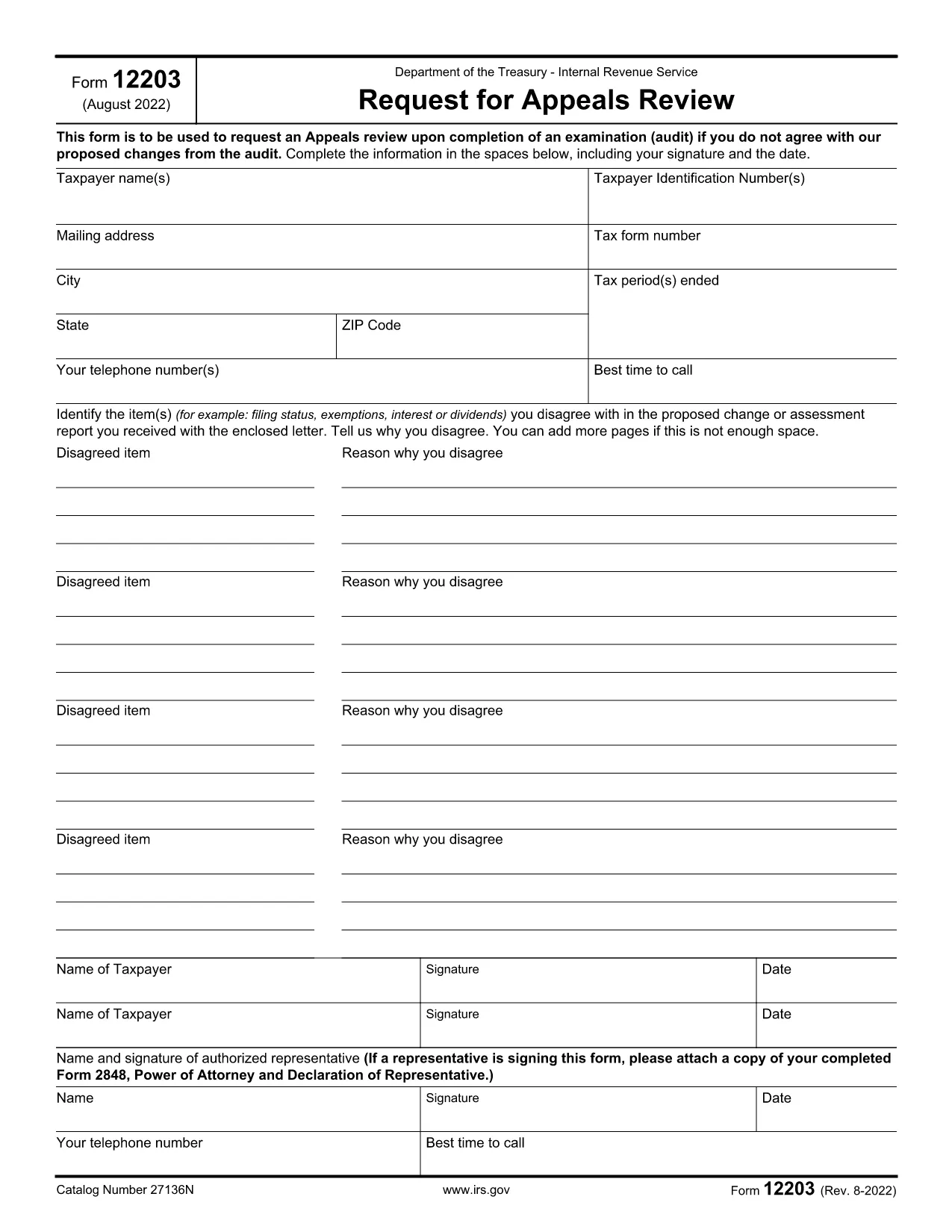
Form 12203, titled Request for Appeals Review, is a one‑page document used by taxpayers to ask the IRS Appeals Office to reconsider audit findings. It is designed for “small‑case” disputes, meaning the total amount in controversy does not exceed $25,000.

When Can You Use Form 12203?

  • After the audit is complete and you have received an audit letter.
  • The disputed amount is $25,000 or less for each tax year.
  • You want to appeal without first filing a formal written protest.

How to Complete the Fillable PDF Online

Instead of downloading the PDF and editing it with a separate editor, simply click the "Fill out this form" button on this page. The Formize PDF Filler app will load, letting you type directly into each field.

  1. Click "Fill out this form" – the fillable version opens in your browser.
  2. Enter your taxpayer information exactly as it appears on your tax return or audit letter.
  3. List each disagreed item (up to four) with a brief explanation and supporting facts.
  4. Sign electronically and provide a contact phone number.
  5. Download the completed PDF or submit it directly to the IRS using the instructions on the final page.

Common Mistakes to Avoid

  • Using the wrong form: Form 12203 is only for cases ≤ $25,000. Larger disputes require Form 12204.
  • Leaving fields blank: Incomplete taxpayer information can delay processing.
  • Not attaching supporting documentation: Include any relevant statements, receipts, or legal citations.
  • Misspelling names or SSNs: Errors cause the IRS to reject the appeal.

By following these steps and double‑checking your entries, you’ll increase the chance that the Appeals Office reviews your case promptly.

FAQ
  • What is the purpose of IRS Form 12203?

    Form 12203 is used to request a review by the IRS Independent Office of Appeals when you disagree with audit adjustments of $25,000 or less.

  • Can I use Form 12203 for a case larger than $25,000?

    No. For disputes over $25,000 you must file Form 12204 (Request for Appeals Review – Large Case).

  • Do I need a tax professional to fill out Form 12203?

    You can complete the form yourself, but a qualified tax professional can help ensure accuracy and provide supporting documentation.

  • How many items can I list on the form?

    You can list up to four disagreed items directly on the form. Additional items can be attached as supplemental pages.

  • What happens after I submit Form 12203?

    The Appeals Office will review your request, may contact you for clarification, and will issue a decision in writing.

  • Is the fillable PDF on Formize secure?

    Yes. Formize uses SSL encryption, and the PDF is processed locally in your browser, so your personal data stays private.

  • Can I save my progress and finish later?

    Absolutely. The Formize filler lets you download a partially completed PDF to resume editing at any time.

  • Where do I send the completed Form 12203?

    Follow the mailing address listed in the form’s instructions, which is usually the Appeals Office address for your region.

AKO

Ako bezplatne vyplniť IRS Form 12203 online v 5 jednoduchých krokoch:

  1. 1
    Open the Fillable Form
    Click the "Fill out this form" button on the page. The Formize PDF Filler loads instantly in your browser.
  2. 2
    Enter Taxpayer Information
    Type your name, SSN/ITIN/EIN, mailing address, and phone number exactly as they appear on your tax return or audit letter.
  3. 3
    List Disagreed Items
    For each item you contest, provide a concise description, the amount in dispute, and the reason you disagree.
  4. 4
    Sign and Review
    Add your electronic signature, review all entries for accuracy, and make sure any supporting documents are attached.
  5. 5
    Download or Submit
    Save the completed PDF to your computer or follow the on‑screen instructions to submit it directly to the IRS.
Aplikácia Formize PDF Filler
O

Daňové formuláre

IRS Form 12203 je jedným z daňových formulárov, ktoré sú dokumentmi používanými na oznamovanie informácií súvisiacich s daňami príslušnému daňovému úradu. Existujú rôzne typy daňových formulárov vrátane federálnych, štátnych a miestnych daňových formulárov, ktoré sa môžu líšiť v závislosti od okolností a miesta daňovníka.

VLASTNOSTI

PDF Filler

Najjednoduchší spôsob, ako vyplniť IRS Form 12203 online

  • Rýchlo vyplňte IRS Form 12203
    Hľadáte spôsob, ako rýchlo vyplniť IRS Form 12203 online? S našou online bezplatnou výplňou formulárov PDF budete vedieť, ako upraviť a vyplniť tento dokument PDF za menej ako minútu.
  • Ľahko použiteľný online editor PDF
    Nebaví vás tlačiť súbory PDF, aby ste ich mohli upravovať pred opätovným naskenovaním a odoslaním späť? Upravujte dokumenty PDF zadarmo online. Použite náš online editor PDF, aby ste ušetrili čas a papier.
  • Skvelé nástroje, všetky platformy
    Zaujíma vás, ako vyplniť IRS Form 12203 na počítači Mac, alebo ako možno použiť bezplatný výplň PDF? Naše online nástroje PDF fungujú na všetkých platformách.
  • Bezpečné ukladanie súborov
    Dokončené súbory „IRS Form 12203“ sú uložené v zabezpečenej databáze spravovanej hostingom Amazon Cloud. Svoje súbory môžete z nášho systému kedykoľvek odstrániť. V každom prípade sa tieto súbory automaticky vymažú po 24 hodinách.
  • Četovať s IRS Form 12203
    Četujte s „IRS Form 12203“ na Chatize, čo je bezplatný pomocník na čítanie súborov PDF. Pýtajte sa otázky a získajte odpovede z „IRS Form 12203“. Stačí kliknúť na tlačidlo Rozhovor s dokumentom vyššie.

Odstrániť reláciu plnenia

Chcete odstrániť vybratú reláciu plnenia? V takom prípade sa stratí váš postup pri vypĺňaní formulára.

Odstrániť reláciu úprav

Chcete odstrániť vybratú reláciu úprav? V takom prípade sa stratí váš postup pri vytváraní a úprave formulára.