
Zvoľ jazyk

IRS Form 14335 – VITA/TCE Grant Contact Information (Fillable PDF)

  1. Krajina USA
  2. Jazyk Angličtina
  3. Aktivita dane
  4. oddelenie Internal Revenue Service
IRS Form 14335 – VITA/TCE Grant Contact Information (Fillable PDF)

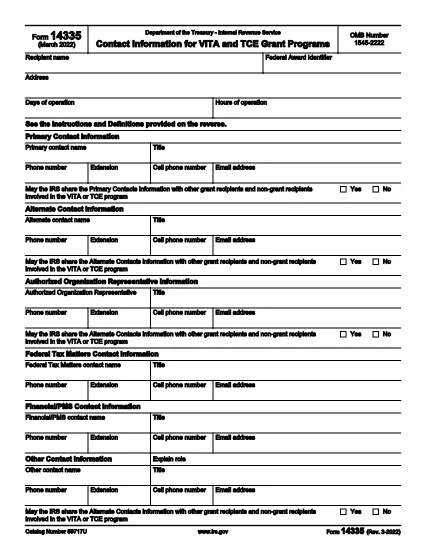
Form 14335 is the official IRS document used by VITA (Volunteer Income Tax Assistance) and TCE (Tax Counseling for the Elderly) grant programs to collect contact information for individuals who can answer questions about the grant. This fillable PDF lets you enter the required details quickly, save a copy for your records, and submit the form electronically.

What Is IRS Form 14335?

The form requests the names, phone numbers, email addresses, and mailing addresses of a primary contact and at least one alternate contact. It also includes a brief definition of each contact’s role and a certification section for the grant recipient.

How to Fill Out Form 14335 Online

Instead of downloading the PDF and opening a separate editor, simply click the "Fill out this form" button on this page. The Formize PDF Filler app will load directly in your browser, providing a seamless, fillable experience.

  • Step 1: Click the button and wait for the filler to appear.
  • Step 2: Complete each field—required fields are marked with an asterisk.
  • Step 3: Review your entries for accuracy.
  • Step 4: Click Save to download a copy or Submit if the grant program offers direct upload.

Common Mistakes to Avoid

  • Leaving the alternate contact section blank – the IRS requires at least one backup contact.
  • Using outdated phone numbers or email addresses.
  • Forgetting to sign the certification section; an unsigned form will be rejected.
  • Entering information that does not match the grant award documentation.

Where to Submit the Completed Form

After filling out Form 14335, follow the instructions provided in your grant award letter. Typically you will either:

  1. Email the PDF to the designated grant administrator.
  2. Upload it through the grant’s online portal.
  3. Mail a printed copy to the address listed in the award notice.

Download the Fillable PDF

If you prefer to work offline, you can still download the official IRS PDF version below. The file is the same document that powers the online filler.

Download IRS Form 14335 (PDF)

FAQ
  • What is the purpose of IRS Form 14335?

    Form 14335 collects contact details for individuals who can answer questions about a VITA or TCE grant. It ensures the IRS can reach the right people if clarification is needed.

  • Do I need to provide both a primary and an alternate contact?

    Yes. The IRS requires at least one primary contact and one alternate contact to guarantee continuity of communication.

  • Can I fill out Form 14335 on a mobile device?

    Absolutely. The Formize PDF Filler is responsive and works on smartphones, tablets, and desktop browsers.

  • Is there a filing fee for Form 14335?

    No. Form 14335 is a free, government‑provided document used solely for grant‑related contact information.

  • What should I do if I make a mistake after submitting?

    Contact the grant administrator immediately and provide a corrected version of the form. Keep a signed copy for your records.

  • Do I need to print and mail the form?

    Only if the grant award instructions specify a paper submission. Many programs now accept an electronic PDF upload or email.

  • How long should I keep a copy of the completed form?

    Retain the signed PDF for at least three years, the same period required for most tax‑related records.

  • Is the PDF downloadable if I prefer offline editing?

    Yes. Use the direct download link at the bottom of the page to obtain the official IRS PDF.

AKO

Ako bezplatne vyplniť Form 14335 online v 5 jednoduchých krokoch:

  1. 1
    Click the Fill Out Button
    Press the “Fill out this form” button on this page. The Formize PDF Filler will open in a new browser window.
  2. 2
    Wait for the Filler to Load
    A short loading indicator will appear while the fillable version of Form 14335 is prepared.
  3. 3
    Enter Your Information
    Complete each required field. Use the tab key or click to move between sections.
  4. 4
    Save or Submit
    When finished, click “Save” to download a copy for your records, or click “Submit” if the grant program allows direct upload.
  5. 5
    Confirm Submission
    Check your email for a confirmation message or follow the grant’s instructions to ensure the form was received.
Aplikácia Formize PDF Filler
O

Federálne daňové formuláre

Form 14335 je jeden z federálnych daňových formulárov, ktoré sú dokumentmi, ktoré sa používajú na nahlásenie a zaúčtovanie federálnych daní z príjmu úradu Internal Revenue Service (IRS) v Spojených štátoch. Tieto formuláre používajú jednotlivci, podniky a organizácie na nahlásenie svojich príjmov, zrážok a iných relevantných informácií potrebných na výpočet ich federálnej daňovej povinnosti.

Najbežnejšie používaným federálnym daňovým formulárom je Formulár 1040, ktorý používajú jednotliví daňoví poplatníci na nahlásenie svojej dane z príjmu fyzických osôb. Medzi ďalšie bežne používané formuláre patrí formulár 1065 pre partnerstvá, Formulár 1120 pre korporácie a Formulár 990 pre organizácie oslobodené od dane.

Federálne daňové formuláre zvyčajne vyžadujú, aby daňovníci nahlásili rôzne zdroje príjmu, ako sú mzdy, platy a prepitné, ako aj príjmy z investícií, prenájmu nehnuteľností a iných zdrojov. Formuláre tiež umožňujú daňovníkom uplatniť si odpočty a kredity na rôzne výdavky, ako sú charitatívne príspevky, úroky z hypotéky a výdavky na zdravotnú starostlivosť.

Je dôležité podávať federálne daňové formuláre presne a včas, pretože ak tak neurobíte, môže to mať za následok pokuty a úroky zo strany IRS.

VLASTNOSTI

PDF Filler

Najjednoduchší spôsob, ako vyplniť Form 14335 online

  • Rýchlo vyplňte Form 14335
    Hľadáte spôsob, ako rýchlo vyplniť Form 14335 online? S našou online bezplatnou výplňou formulárov PDF budete vedieť, ako upraviť a vyplniť tento dokument PDF za menej ako minútu.
  • Ľahko použiteľný online editor PDF
    Nebaví vás tlačiť súbory PDF, aby ste ich mohli upravovať pred opätovným naskenovaním a odoslaním späť? Upravujte dokumenty PDF zadarmo online. Použite náš online editor PDF, aby ste ušetrili čas a papier.
  • Skvelé nástroje, všetky platformy
    Zaujíma vás, ako vyplniť Form 14335 na počítači Mac, alebo ako možno použiť bezplatný výplň PDF? Naše online nástroje PDF fungujú na všetkých platformách.
  • Bezpečné ukladanie súborov
    Dokončené súbory „Form 14335“ sú uložené v zabezpečenej databáze spravovanej hostingom Amazon Cloud. Svoje súbory môžete z nášho systému kedykoľvek odstrániť. V každom prípade sa tieto súbory automaticky vymažú po 24 hodinách.
  • Četovať s Form 14335
    Četujte s „Form 14335“ na Chatize, čo je bezplatný pomocník na čítanie súborov PDF. Pýtajte sa otázky a získajte odpovede z „Form 14335“. Stačí kliknúť na tlačidlo Rozhovor s dokumentom vyššie.

Odstrániť reláciu plnenia

Chcete odstrániť vybratú reláciu plnenia? V takom prípade sa stratí váš postup pri vypĺňaní formulára.

Odstrániť reláciu úprav

Chcete odstrániť vybratú reláciu úprav? V takom prípade sa stratí váš postup pri vytváraní a úprave formulára.