
Zvoľ jazyk

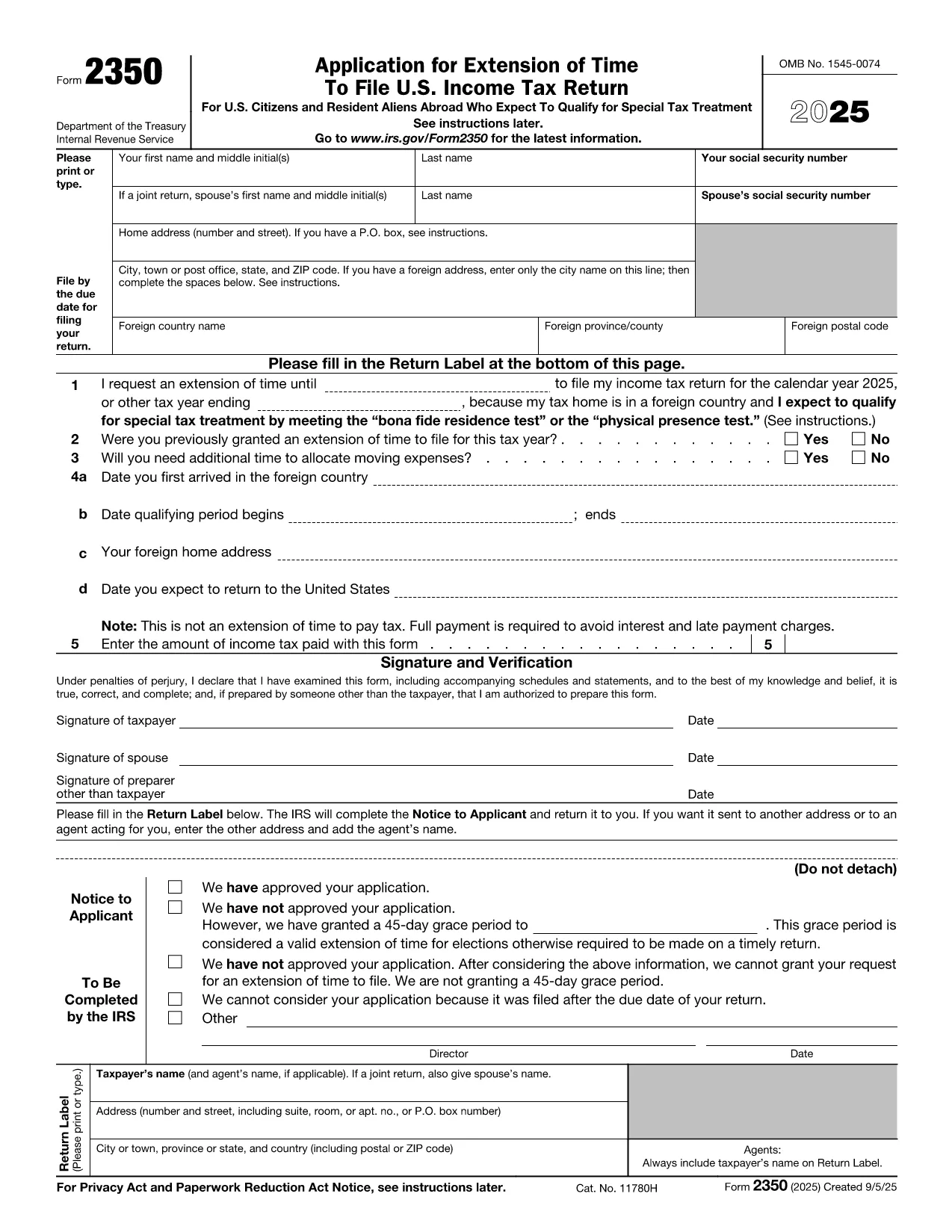
IRS Form 2350 – Fillable PDF for Tax Extension Abroad

  1. Krajina USA
  2. Jazyk Angličtina
  3. Aktivita dane
  4. oddelenie Internal Revenue Service
IRS Form 2350 – Fillable PDF for Tax Extension Abroad

U.S. citizens and resident aliens who live outside the United States often need extra time to meet the presence requirements for the foreign earned income exclusion or foreign housing exclusion. IRS Form 2350 is the official request for a two‑month filing extension when you are abroad.

When to Use Form 2350

File Form 2350 if you:

  • Expect to claim the foreign earned income exclusion (Form 2555) or foreign housing exclusion.
  • Need additional time to meet the bona fide residence test or the physical presence test.
  • Require extra days to allocate moving expenses.

How to Complete the Fillable PDF

Our online Formize fillable PDF loads instantly – just click the "Fill out this form" button and the Formize PDF Filler app will appear. Follow these steps:

  • Enter your personal information (name, SSN, home and foreign addresses).
  • Specify the date you need the extension for (Line 1).
  • Answer whether you have previously received an extension (Line 2).
  • Provide the qualifying period dates for the bona fide residence or physical presence test (Lines 4a‑4b).
  • Indicate any payment you are sending with the extension request (Line 5).
  • Sign and date the form electronically.

Common Mistakes to Avoid

  • Wrong qualifying dates: The extension date must be 12 months + 30 days from the start of your qualifying period.
  • Missing foreign address details: Include city, country, province/state, and postal code.
  • Forgetting the payment: The extension does not extend the payment deadline. Include any tax due to avoid interest.
  • Incorrect signatures: Both spouses must sign on a joint return.

Where to Submit Your Extension Request

After filling out the form, you can:

  • Mail the completed PDF to the IRS address listed in the instructions.
  • Bring it to a local IRS representative office.
  • Keep a digital copy for your records and attach it to an electronic filing if you later e‑file your return.

Need the official PDF? Download Form 2350 (PDF) directly from the IRS.

FAQ
  • What is the purpose of IRS Form 2350?

    Form 2350 requests a two‑month extension to file your U.S. individual income tax return when you are living abroad and need extra time to meet the foreign earned income or housing exclusion tests.

  • Who must file Form 2350?

    U.S. citizens or resident aliens abroad who expect to claim the foreign earned income exclusion (Form 2555) or foreign housing exclusion and need more time to meet the qualifying tests.

  • Does Form 2350 extend the payment deadline?

    No. The extension only applies to filing the return. Any tax due must still be paid by the original filing deadline to avoid interest and penalties.

  • Can I file Form 2350 electronically?

    The IRS does not accept an electronic submission for Form 2350. You must mail the completed form or deliver it to a local IRS office.

  • What is the difference between the bona fide residence test and the physical presence test?

    The bona fide residence test requires you to be a resident of a foreign country for an uninterrupted period that includes an entire tax year. The physical presence test requires you to be physically present in a foreign country for at least 330 full days in any 12‑month period.

  • How long is the extension granted by Form 2350?

    Typically, the IRS grants a two‑month extension, but you can request additional days for moving expenses, up to a total of 12 months + 30 days from the start of your qualifying period.

  • What happens if I miss the extended filing deadline?

    If you miss the extension deadline, the IRS may assess a failure‑to‑file penalty and continue to charge interest on any unpaid tax.

  • Do I need to attach Form 2555 with my Form 2350?

    No. Form 2555 is filed with your tax return after the extension is granted. Form 2350 only requests more time to file.

AKO

Ako bezplatne vyplniť IRS Form 2350 online v 7 jednoduchých krokoch:

  1. 1
    Open the Fillable Form
    Click the “Fill out this form” button on the page. The Formize PDF Filler app loads directly in your browser.
  2. 2
    Enter Personal Information
    Type your name, Social Security number, home address, and foreign address exactly as they appear on your tax documents.
  3. 3
    Set the Extension Date
    In Line 1, enter the date that is 12 months + 30 days after the first day of your qualifying period (or add 90 days if you have moving expenses).
  4. 4
    Answer Eligibility Questions
    Complete Lines 2‑4, indicating prior extensions, moving expenses, and the dates you arrived in and will leave the foreign country.
  5. 5
    Include Your Payment (If Any)
    Enter the amount of tax you are sending with the extension request on Line 5. Remember the extension does not postpone payment.
  6. 6
    Sign Electronically
    Use the built‑in signature field to sign. If filing jointly, both spouses must sign.
  7. 7
    Save and Submit
    Save the completed PDF, print it, and mail it to the IRS address provided in the instructions, or keep a digital copy for your records.
Aplikácia Formize PDF Filler
O

Daňové formuláre

IRS Form 2350 je jedným z daňových formulárov, ktoré sú dokumentmi používanými na nahlásenie príjmu, zrážok a daňovej povinnosti príslušnému daňovému úradu. Tieto formuláre sú nevyhnutnou súčasťou procesu podávania daňových priznaní a používajú sa na zabezpečenie toho, aby jednotlivci a podniky dodržiavali daňové zákony a presne vypočítali svoje daňové povinnosti.

Konkrétne požadované daňové formuláre sa môžu líšiť v závislosti od faktorov, ako je stav podania jednotlivca, zdroje príjmu a daňové zákony krajiny. Tu sú však niektoré bežné typy daňových formulárov:

Formuláre dane z príjmu fyzických osôb: Tieto formuláre, ako napríklad séria 1040 v Spojených štátoch, sa používajú fyzické osoby, aby nahlásili svoje príjmy, uplatnili si odpočty a dobropisy a vypočítali svoju daňovú povinnosť.

Formuláre na daň z podnikania: Firmy vrátane fyzických osôb, partnerstiev, korporácií a samostatne zárobkovo činných osôb môžu musieť vyplniť rôzne formuláre na nahlásenie svojich príjmov, výdavkov a dlžných daní. Príklady zahŕňajú výkaz C (zisk alebo strata z podnikania) a formulár 1120 (priznanie k dani z príjmov amerických korporácií).

Formuláre o dani zo zamestnania: Zamestnávatelia sú povinní hlásiť mzdy zamestnancov a zrážať a odvádzať dane zo mzdy. Na tento účel sa používajú formuláre ako W-2 (Výkaz miezd a daní) a 941 (Štvrťročné federálne daňové priznanie zamestnávateľa).

Formuláre investičného a dôchodkového účtu: Tieto formuláre sa používajú na vykazovanie investičných príjmov, kapitálových ziskov a strát, ako aj príspevkov a rozdelenia z dôchodkových účtov. Príklady zahŕňajú formulár 1099-DIV (dividendy a distribúcie) a Formulár 5498 (Informácie o príspevku IRA).

Formuláre dane z nehnuteľností a darov: Keď osoba zomrie alebo poskytne významné dary, špecifické formuláre, ako napríklad formulár 706 (daňové priznanie k dani z majetku v Spojených štátoch (a prevodu prevodu generácií)) a formulár 709 (darček z USA (a generačný Preskočenie prevodu) daňové priznanie) sa používajú na nahlásenie a výpočet všetkých príslušných daní z nehnuteľností alebo darov.

Je dôležité poznamenať, že daňové zákony a formuláre sa môžu v priebehu času meniť, takže jednotlivci a podniky by sa mali poradiť s príslušným daňovým úradom alebo požiadať o odborné daňové poradenstvo, aby zabezpečili súlad so súčasnými požiadavkami.

VLASTNOSTI

PDF Filler

Najjednoduchší spôsob, ako vyplniť IRS Form 2350 online

  • Rýchlo vyplňte IRS Form 2350
    Hľadáte spôsob, ako rýchlo vyplniť IRS Form 2350 online? S našou online bezplatnou výplňou formulárov PDF budete vedieť, ako upraviť a vyplniť tento dokument PDF za menej ako minútu.
  • Ľahko použiteľný online editor PDF
    Nebaví vás tlačiť súbory PDF, aby ste ich mohli upravovať pred opätovným naskenovaním a odoslaním späť? Upravujte dokumenty PDF zadarmo online. Použite náš online editor PDF, aby ste ušetrili čas a papier.
  • Skvelé nástroje, všetky platformy
    Zaujíma vás, ako vyplniť IRS Form 2350 na počítači Mac, alebo ako možno použiť bezplatný výplň PDF? Naše online nástroje PDF fungujú na všetkých platformách.
  • Bezpečné ukladanie súborov
    Dokončené súbory „IRS Form 2350“ sú uložené v zabezpečenej databáze spravovanej hostingom Amazon Cloud. Svoje súbory môžete z nášho systému kedykoľvek odstrániť. V každom prípade sa tieto súbory automaticky vymažú po 24 hodinách.
  • Četovať s IRS Form 2350
    Četujte s „IRS Form 2350“ na Chatize, čo je bezplatný pomocník na čítanie súborov PDF. Pýtajte sa otázky a získajte odpovede z „IRS Form 2350“. Stačí kliknúť na tlačidlo Rozhovor s dokumentom vyššie.

Odstrániť reláciu plnenia

Chcete odstrániť vybratú reláciu plnenia? V takom prípade sa stratí váš postup pri vypĺňaní formulára.

Odstrániť reláciu úprav

Chcete odstrániť vybratú reláciu úprav? V takom prípade sa stratí váš postup pri vytváraní a úprave formulára.