
Zvoľ jazyk

Form 4506‑T‑EZ (SP) – Fillable PDF for Tax Transcript Requests

  1. Krajina USA
  2. Jazyk španielčina
  3. Aktivita dane
  4. oddelenie Internal Revenue Service
Form 4506‑T‑EZ (SP) – Fillable PDF for Tax Transcript Requests

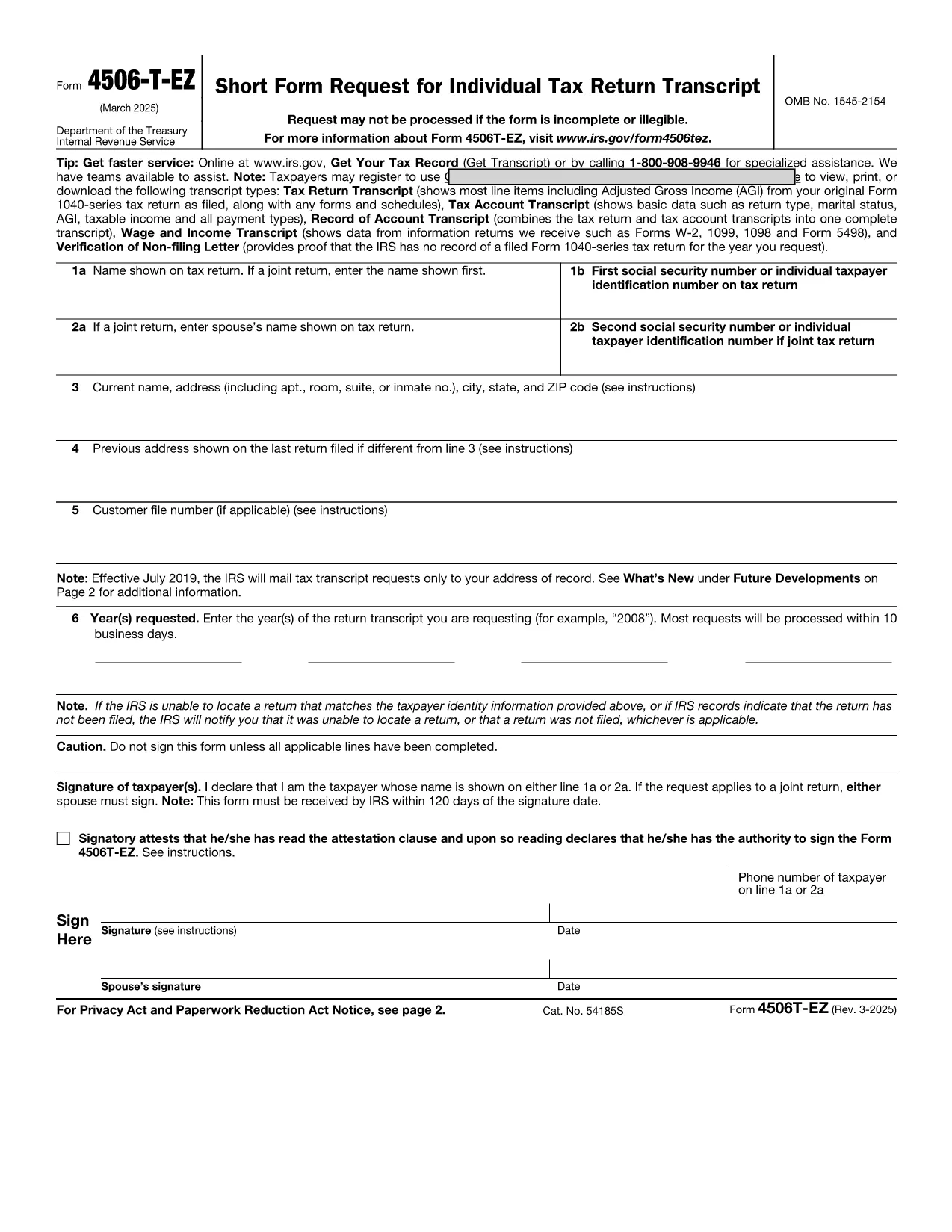
The IRS Form 4506‑T‑EZ (SP) is the Spanish‑language version of the short request for tax return transcripts. It allows individuals and businesses to obtain a copy of their tax return information, W‑2, 1099 data, or a verification of non‑filing directly from the Internal Revenue Service.

What Is Form 4506‑T‑EZ (SP)?

This one‑page form is designed for quick requests. You can use it to ask for:

  • Tax return transcripts
  • Account information
  • W‑2 and 1099 details
  • Verification of non‑filing

Key Sections of the Spanish Form

The form is divided into clear sections:

  1. Información del Contribuyente – Name, SSN, and address.
  2. Tipo de Solicitud – Choose the transcript type you need.
  3. Periodo Fiscal – Specify the tax year or period.
  4. Firma y Fecha – Your signature and date.

How to Complete the Form Using Formize

Instead of printing and scanning, simply click the “Fill out this form” button below. The Formize PDF Filler loads in your browser, letting you type directly into each field.

Common Mistakes to Avoid

  • Leaving the SSN blank or entering it with dashes.
  • Selecting the wrong transcript type.
  • Providing an incorrect tax‑year format (use MM/DD/YYYY).
  • Forgetting to sign the form – an unsigned form is rejected.

Where to Submit Your Completed Form

After you finish, you can:

  • Mail the printed copy to the address listed on the form.
  • Fax it to the IRS fax number for transcript requests.
  • Upload the signed PDF through the IRS “Get Transcript” portal (if available).

Need help? The IRS website provides additional guidance, but most users find the Formize fillable version fast and error‑free.

FAQ
  • Do I need to attach any supporting documents?

    No. Form 4506‑T‑EZ (SP) is a request only. Attachments are required only for the full Form 4506‑T when you need copies of the actual return.

  • Can I request multiple years on one form?

    The short form allows one tax year per submission. For multiple years, submit a separate form for each year.

  • Is the Formize filler secure?

    Yes. Formize uses SSL encryption, and the PDF never leaves your browser unless you choose to download or upload it.

  • How long does the IRS take to process the request?

    Standard processing is 5‑10 business days for transcript requests, but it can be longer during peak filing season.

  • What if I need a transcript for a business entity?

    Use Form 4506‑T (not the EZ version) and select the appropriate entity type on the form.

  • Do I have to file the form in Spanish?

    If you are submitting the Spanish version (SP), the IRS accepts it in Spanish. You may also file the English version if preferred.

  • Can I submit the form electronically?

    The IRS does not currently accept a fully electronic submission for 4506‑T‑EZ. You must mail, fax, or upload a signed PDF.

  • What is the difference between Form 4506‑T‑EZ and Form 4506‑T?

    The EZ version is shorter and only requests transcripts. The regular 4506‑T can request copies of the actual tax return and attachments.

  • Is there a fee to request a transcript?

    No. Transcript requests are free of charge.

  • Where can I find the official PDF?

    The official IRS PDF is linked below and is used by the Formize filler.

AKO

Ako bezplatne vyplniť 4506-T-EZ SP online v 4 jednoduchých krokoch:

  1. 1
    Open the Fillable Form
    Click the “Fill out this form” button on the page. The Formize PDF Filler app will launch in your browser.
  2. 2
    Enter Your Information
    Type directly into each field – name, SSN, address, transcript type, and tax year. The form saves your entries in real time.
  3. 3
    Review and Sign
    Check all entries for accuracy, then use the digital signature field to sign. If you prefer a handwritten signature, download, print, sign, and re‑upload.
  4. 4
    Submit or Download
    When you’re done, click “Save & Download” to get a PDF copy you can mail, fax, or upload to the IRS portal.
Aplikácia Formize PDF Filler
O

Daňové formuláre

4506-T-EZ SP je jedným z daňových formulárov, ktoré sú dokumentmi používanými na oznamovanie informácií súvisiacich s daňami príslušnému daňovému úradu. Existujú rôzne typy daňových formulárov vrátane federálnych, štátnych a miestnych daňových formulárov, ktoré sa môžu líšiť v závislosti od okolností a miesta daňovníka.

VLASTNOSTI

PDF Filler

Najjednoduchší spôsob, ako vyplniť 4506-T-EZ SP online

  • Rýchlo vyplňte 4506-T-EZ SP
    Hľadáte spôsob, ako rýchlo vyplniť 4506-T-EZ SP online? S našou online bezplatnou výplňou formulárov PDF budete vedieť, ako upraviť a vyplniť tento dokument PDF za menej ako minútu.
  • Ľahko použiteľný online editor PDF
    Nebaví vás tlačiť súbory PDF, aby ste ich mohli upravovať pred opätovným naskenovaním a odoslaním späť? Upravujte dokumenty PDF zadarmo online. Použite náš online editor PDF, aby ste ušetrili čas a papier.
  • Skvelé nástroje, všetky platformy
    Zaujíma vás, ako vyplniť 4506-T-EZ SP na počítači Mac, alebo ako možno použiť bezplatný výplň PDF? Naše online nástroje PDF fungujú na všetkých platformách.
  • Bezpečné ukladanie súborov
    Dokončené súbory „4506-T-EZ SP“ sú uložené v zabezpečenej databáze spravovanej hostingom Amazon Cloud. Svoje súbory môžete z nášho systému kedykoľvek odstrániť. V každom prípade sa tieto súbory automaticky vymažú po 24 hodinách.
  • Četovať s 4506-T-EZ SP
    Četujte s „4506-T-EZ SP“ na Chatize, čo je bezplatný pomocník na čítanie súborov PDF. Pýtajte sa otázky a získajte odpovede z „4506-T-EZ SP“. Stačí kliknúť na tlačidlo Rozhovor s dokumentom vyššie.

Odstrániť reláciu plnenia

Chcete odstrániť vybratú reláciu plnenia? V takom prípade sa stratí váš postup pri vypĺňaní formulára.

Odstrániť reláciu úprav

Chcete odstrániť vybratú reláciu úprav? V takom prípade sa stratí váš postup pri vytváraní a úprave formulára.