
Zvoľ jazyk

Schedule M (Form 8858) – Fillable PDF

  1. Krajina USA
  2. Jazyk Angličtina
  3. Aktivita dane
  4. oddelenie Internal Revenue Service
Schedule M (Form 8858) – Fillable PDF

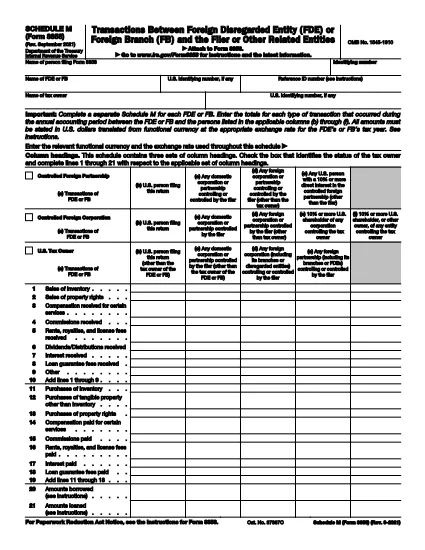
Schedule M (Form 8858) is the IRS attachment used to report transactions between a foreign disregarded entity (FDE) or foreign branch (FB) and the U.S. taxpayer who files Form 8858. Whether you’re reporting sales, purchases, loans, or capital contributions, Schedule M captures the details needed for proper tax compliance.

What Is Schedule M (Form 8858)?

Schedule M provides three distinct sets of column headings to cover different transaction types and entities. It requires you to report amounts in the functional currency of the foreign entity and then convert them to U.S. dollars using the appropriate exchange rate.

How to Complete Schedule M Online

Instead of downloading a static PDF and editing it in a separate program, simply click the "Fill out this form" button on this page. The Formize PDF Filler will load the fillable version of Schedule M, letting you enter data directly in your browser.

  • Step 1: Click the button and wait for the Formize PDF Filler to open.
  • Step 2: Select the appropriate entity type (FDE or FB) and the column that matches the transaction partner.
  • Step 3: Enter the transaction amount in the foreign currency, then input the exchange rate.
  • Step 4: Review the automatically calculated U.S. dollar total.
  • Step 5: Save the completed form and attach it to your Form 8858 filing.

Common Mistakes & Tips

Avoid these pitfalls to ensure a smooth filing:

  • Do not mix up the columns for "Related persons" and "Unrelated persons." Each column has a specific definition in the instructions.
  • Always use the exchange rate that applies to the transaction date, not an average rate, unless the instructions specifically allow it.
  • Complete a separate Schedule M for each FDE or FB you own. Consolidating multiple entities on one schedule will cause a rejection.
  • Double‑check that the functional currency is correctly identified; an incorrect currency can lead to mis‑reported amounts.

Download the Fillable PDF

When you’re ready to keep a copy for your records, you can download the official IRS fillable PDF directly from the link below.

FAQ
  • Do I need a separate Schedule M for each foreign entity?

    Yes. The IRS requires a distinct Schedule M for every foreign disregarded entity or foreign branch you own.

  • Can I use an average exchange rate for all transactions?

    Only if the instructions specifically allow it. Generally, you must use the rate that applies to the date of each transaction.

  • What is the difference between columns (b) and (c) on Schedule M?

    Column (b) reports transactions with the filer or related persons, while column (c) captures transactions with unrelated persons.

  • Is the PDF on Formize.com the official IRS version?

    Yes. The PDF linked below is the official IRS Schedule M (Form 8858) PDF, made fillable through Formize’s online editor.

  • What happens if I file Schedule M with errors?

    The IRS may reject your Form 8858 filing, causing delays and possible penalties. Double‑check all amounts, exchange rates, and entity classifications.

  • Do I need to attach supporting documents for each transaction?

    You do not attach supporting documents to Schedule M itself, but retain all records in case the IRS requests them during an audit.

AKO

Ako bezplatne vyplniť Form 8858 Schedule M online v 5 jednoduchých krokoch:

  1. 1
    Open the Fillable Form
    Click the "Fill out this form" button on the page. The Formize PDF Filler will load the Schedule M PDF directly in your browser.
  2. 2
    Enter Entity Information
    Select whether you are reporting a Foreign Disregarded Entity (FDE) or a Foreign Branch (FB) and fill in the identifying details.
  3. 3
    Record Transaction Details
    Enter each transaction amount in the foreign currency, choose the correct column (b‑f), and provide the applicable exchange rate.
  4. 4
    Review Calculations
    The filler automatically converts foreign amounts to U.S. dollars. Verify the totals before proceeding.
  5. 5
    Save and Attach
    Save the completed Schedule M as a PDF and attach it to your Form 8858 filing with the IRS.
Aplikácia Formize PDF Filler
O

Daňové formuláre

Form 8858 Schedule M je jedným z daňových formulárov, ktoré sú dokumentmi používanými na oznamovanie informácií súvisiacich s daňami príslušnému daňovému úradu. Existujú rôzne typy daňových formulárov vrátane federálnych, štátnych a miestnych daňových formulárov, ktoré sa môžu líšiť v závislosti od okolností a miesta daňovníka.

VLASTNOSTI

PDF Filler

Najjednoduchší spôsob, ako vyplniť Form 8858 Schedule M online

  • Rýchlo vyplňte Form 8858 Schedule M
    Hľadáte spôsob, ako rýchlo vyplniť Form 8858 Schedule M online? S našou online bezplatnou výplňou formulárov PDF budete vedieť, ako upraviť a vyplniť tento dokument PDF za menej ako minútu.
  • Ľahko použiteľný online editor PDF
    Nebaví vás tlačiť súbory PDF, aby ste ich mohli upravovať pred opätovným naskenovaním a odoslaním späť? Upravujte dokumenty PDF zadarmo online. Použite náš online editor PDF, aby ste ušetrili čas a papier.
  • Skvelé nástroje, všetky platformy
    Zaujíma vás, ako vyplniť Form 8858 Schedule M na počítači Mac, alebo ako možno použiť bezplatný výplň PDF? Naše online nástroje PDF fungujú na všetkých platformách.
  • Bezpečné ukladanie súborov
    Dokončené súbory „Form 8858 Schedule M“ sú uložené v zabezpečenej databáze spravovanej hostingom Amazon Cloud. Svoje súbory môžete z nášho systému kedykoľvek odstrániť. V každom prípade sa tieto súbory automaticky vymažú po 24 hodinách.
  • Četovať s Form 8858 Schedule M
    Četujte s „Form 8858 Schedule M“ na Chatize, čo je bezplatný pomocník na čítanie súborov PDF. Pýtajte sa otázky a získajte odpovede z „Form 8858 Schedule M“. Stačí kliknúť na tlačidlo Rozhovor s dokumentom vyššie.

Odstrániť reláciu plnenia

Chcete odstrániť vybratú reláciu plnenia? V takom prípade sa stratí váš postup pri vypĺňaní formulára.

Odstrániť reláciu úprav

Chcete odstrániť vybratú reláciu úprav? V takom prípade sa stratí váš postup pri vytváraní a úprave formulára.