
Zvoľ jazyk

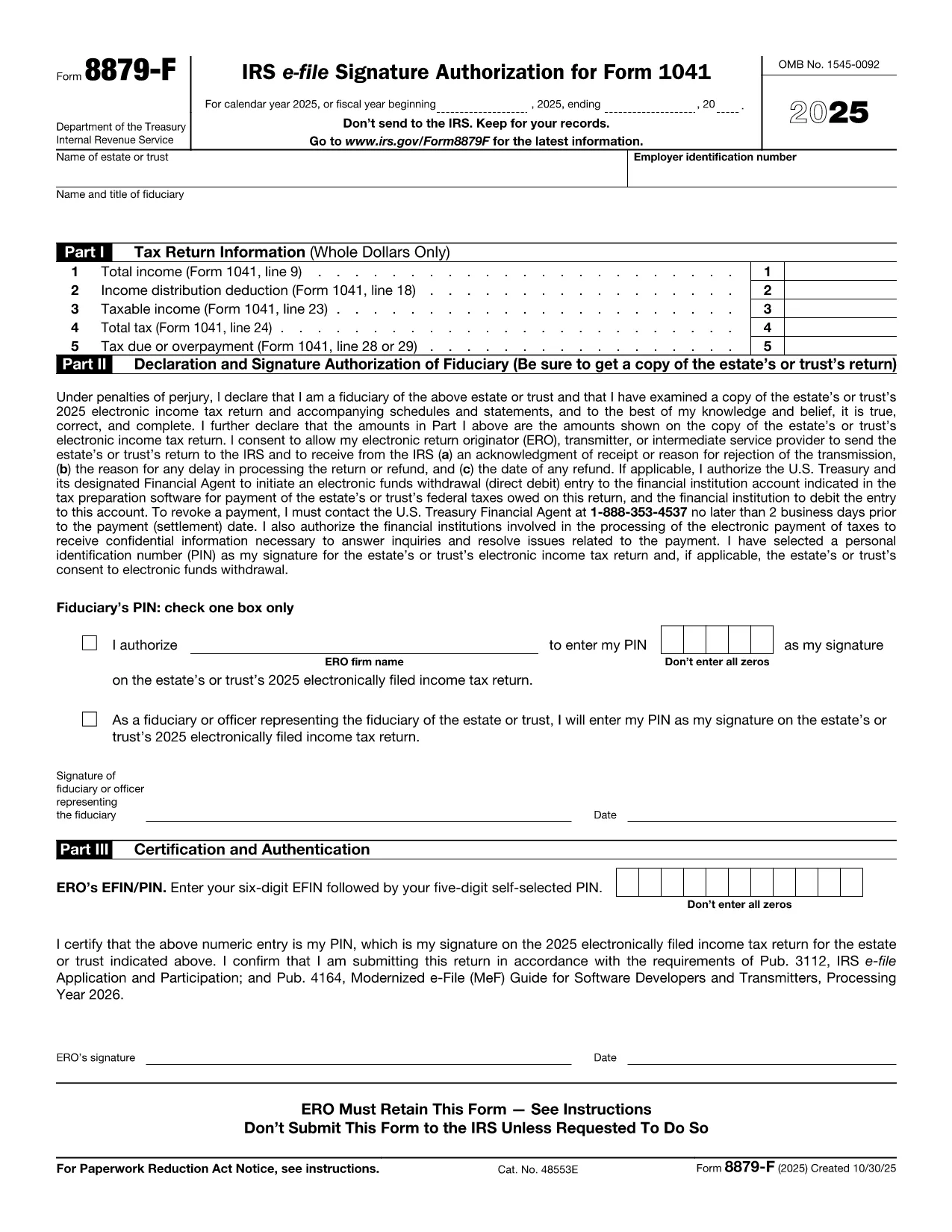
Form 8879‑F – Fillable IRS E‑File Signature Authorization

  1. Krajina USA
  2. Jazyk Angličtina
  3. Aktivita dane
  4. oddelenie Internal Revenue Service
Form 8879‑F – Fillable IRS E‑File Signature Authorization

Form 8879‑F, IRS E‑File Signature Authorization for Form 1041, is used by fiduciaries of estates and trusts to give their tax professional permission to electronically sign and file the income‑tax return (Form 1041). This one‑page, fillable PDF lets you securely provide the required information without printing or scanning.

What Is Form 8879‑F?

The form consists of three parts:

  • Part I – Tax Return Information: Copies key figures from the 1041 (total income, taxable income, tax due, etc.).
  • Part II – Declaration and Signature Authorization: The fiduciary declares under penalty of perjury that the return is true and authorizes the electronic return originator (ERO) to sign.
  • Part III – Certification and Authorization: The tax professional certifies that the return was reviewed and that the fiduciary’s PIN is correct.

How to Complete the Fillable PDF with Formize

Instead of downloading the PDF and editing it in a separate editor, you can fill it out directly on our site using the Formize PDF Filler app. Follow the steps below.

Common Mistakes & Tips for Fiduciaries

Being a fiduciary carries legal responsibility. Avoid these pitfalls:

  • Enter the exact Fiscal Year dates – a mismatch will cause the IRS to reject the filing.
  • Double‑check the EIN and trust name; typos trigger processing delays.
  • Use a five‑digit PIN that you can remember but is not easily guessable.
  • Sign the form only after you have reviewed the entire Form 1041 for accuracy.

Where to Submit the Completed Form

After you finish the fillable form, you can:

  • Save a PDF copy for your records.
  • Send the signed PDF to your tax preparer – they will upload it with the electronic return.
  • Retain the form for at least three years in case the IRS requests it.

Remember, the IRS only requires the form when the ERO specifically asks for it. Otherwise, keep it on file.

FAQ
  • Do I need to print Form 8879‑F after filling it online?

    No. The fillable PDF can be saved and sent electronically. Printing is only required if the IRS explicitly asks for a hard copy.

  • Can I use the same PIN for multiple tax years?

    Yes, but it’s recommended to change the PIN each year for added security.

  • What if my estate uses a fiscal year that isn’t January 1 – December 31?

    Enter the exact beginning and ending dates of the fiscal year in the top section of Part I. The IRS will reject the form if the dates don’t match the return.

  • Who is allowed to act as the Electronic Return Originator (ERO)?

    A licensed tax professional, an authorized e‑file service provider, or an intermediate service provider that the fiduciary has hired.

  • Is Form 8879‑F required for every Form 1041 filing?

    It is required only when the fiduciary authorizes an ERO to sign the return electronically. If you file a paper return, the form isn’t needed.

  • What happens if I make a mistake on the form?

    Correct the error in the Formize filler, re‑sign, and resend the updated PDF to your preparer. The IRS will not accept a form with incorrect data.

  • Can I submit Form 8879‑F directly to the IRS?

    No. The form is sent to the tax professional who includes it with the electronic filing. The IRS receives it as part of the e‑file package.

AKO

Ako bezplatne vyplniť Form 8879-F online v 5 jednoduchých krokoch:

  1. 1
    Open the Fillable Form
    Click the **"Fill out this form"** button on the page. The Formize PDF Filler app loads in your browser.
  2. 2
    Enter Required Information
    Fill in Part I with the figures from your Form 1041, then complete Part II and Part III. Use the drop‑down menus and date pickers for accurate entry.
  3. 3
    Set Your PIN
    Choose a five‑digit Personal Identification Number (PIN). You can let the ERO enter it for you or type it yourself.
  4. 4
    Review and Sign
    Review all fields for accuracy. Click the **"Sign"** button to apply an electronic signature that complies with IRS regulations.
  5. 5
    Save or Send
    After signing, download the completed PDF for your records or email it directly to your tax professional using the **"Send to preparer"** option.
Aplikácia Formize PDF Filler
O

Daňové formuláre

Form 8879-F je jedným z daňových formulárov, ktoré sú dokumentmi používanými na oznamovanie informácií súvisiacich s daňami príslušnému daňovému úradu. Existujú rôzne typy daňových formulárov vrátane federálnych, štátnych a miestnych daňových formulárov, ktoré sa môžu líšiť v závislosti od okolností a miesta daňovníka.

VLASTNOSTI

PDF Filler

Najjednoduchší spôsob, ako vyplniť Form 8879-F online

  • Rýchlo vyplňte Form 8879-F
    Hľadáte spôsob, ako rýchlo vyplniť Form 8879-F online? S našou online bezplatnou výplňou formulárov PDF budete vedieť, ako upraviť a vyplniť tento dokument PDF za menej ako minútu.
  • Ľahko použiteľný online editor PDF
    Nebaví vás tlačiť súbory PDF, aby ste ich mohli upravovať pred opätovným naskenovaním a odoslaním späť? Upravujte dokumenty PDF zadarmo online. Použite náš online editor PDF, aby ste ušetrili čas a papier.
  • Skvelé nástroje, všetky platformy
    Zaujíma vás, ako vyplniť Form 8879-F na počítači Mac, alebo ako možno použiť bezplatný výplň PDF? Naše online nástroje PDF fungujú na všetkých platformách.
  • Bezpečné ukladanie súborov
    Dokončené súbory „Form 8879-F“ sú uložené v zabezpečenej databáze spravovanej hostingom Amazon Cloud. Svoje súbory môžete z nášho systému kedykoľvek odstrániť. V každom prípade sa tieto súbory automaticky vymažú po 24 hodinách.
  • Četovať s Form 8879-F
    Četujte s „Form 8879-F“ na Chatize, čo je bezplatný pomocník na čítanie súborov PDF. Pýtajte sa otázky a získajte odpovede z „Form 8879-F“. Stačí kliknúť na tlačidlo Rozhovor s dokumentom vyššie.

Odstrániť reláciu plnenia

Chcete odstrániť vybratú reláciu plnenia? V takom prípade sa stratí váš postup pri vypĺňaní formulára.

Odstrániť reláciu úprav

Chcete odstrániť vybratú reláciu úprav? V takom prípade sa stratí váš postup pri vytváraní a úprave formulára.