
Zvoľ jazyk

Form 990 Schedule F – Fillable PDF Online

  1. Krajina USA
  2. Jazyk Angličtina
  3. Aktivita dane
  4. oddelenie Internal Revenue Service
Form 990 Schedule F – Fillable PDF Online

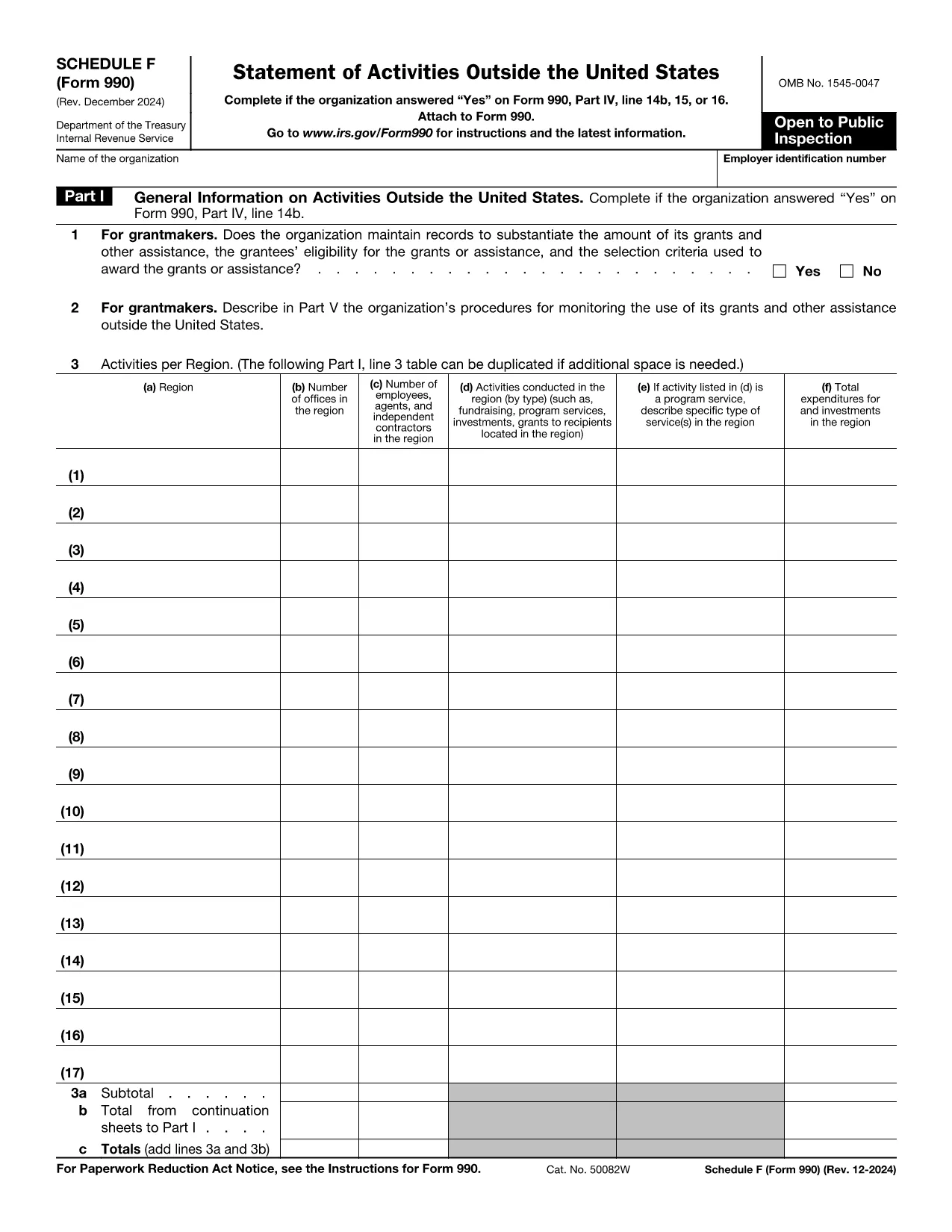
The IRS Form 990 Schedule F (Grant and Other Assistance to Organizations Outside the United States) is required for tax‑exempt organizations that reported a “Yes” on Form 990, Part IV, line 15. This schedule captures details of any grant, contribution, or assistance of $5,000 or more provided to foreign entities.

What Is Schedule F and Who Must File?

Schedule F is part of the annual Form 990 return. Non‑profit organizations that make significant foreign grants must complete this schedule. If your organization answered “Yes” to the foreign assistance question, you need to disclose each recipient, the amount, and the purpose of the assistance.

Key Sections of Schedule F Explained

  • Part I – General Information: Identify the foreign recipient and the type of assistance.
  • Part II – Grants and Other Assistance: List each grant over $5,000, including dates, amounts, and program descriptions.
  • Part III – Summary: Totals for each category and a certification statement.

How to Fill Out Schedule F Using Formize

Instead of downloading the PDF and editing it in a separate program, simply click the “Fill out this form” button on this page. The Formize PDF Filler app will load the official IRS Schedule F PDF, and you can complete every field directly in your browser.

Common Mistakes & Tips for Accurate Filing

  • Do not omit any foreign recipient that received $5,000 or more.
  • Provide clear, concise program descriptions – vague language can trigger IRS follow‑up.
  • Ensure totals in Part III match the sum of the individual entries in Part II.
  • Sign and date the certification; an unsigned schedule is considered incomplete.

Once you have finished, you can download the completed PDF, save a copy for your records, and attach it to your Form 990 filing.

Inštrukcie

FAQ
  • Do I need to file Schedule F if the grant is under $5,000?

    No. Schedule F is required only for foreign grants of $5,000 or more. Smaller amounts can be reported in the narrative section of Form 990.

  • Can I file Schedule F electronically?

    Yes. After completing the fillable PDF with Formize, you can upload the saved PDF as part of your electronic Form 990 submission.

  • What if I made a grant to an overseas subsidiary of a U.S. organization?

    If the recipient is a foreign entity and the assistance exceeds $5,000, it must be reported on Schedule F regardless of ownership structure.

  • Is a digital signature accepted on Schedule F?

    The IRS accepts electronic signatures on the PDF as long as the signature field is completed using a recognized PDF signing tool, such as the one built into Formize.

  • Where can I find the official instructions for Schedule F?

    The official IRS instructions are included in the PDF linked below. They provide detailed guidance on each line item and reporting requirements.

  • What common errors should I avoid?

    Common errors include omitting eligible foreign recipients, miscalculating totals, and forgetting to sign the certification. Use the checklist in the instructions to avoid these pitfalls.

  • Can I edit the PDF after I’ve downloaded it?

    Yes, but using Formize ensures the fields remain fillable and the document stays compliant with IRS formatting standards.

AKO

Ako bezplatne vyplniť Form 990 Schedule F online v 5 jednoduchých krokoch:

  1. 1
    Click the Fill Out Button
    Press the “Fill out this form” button on the page. Formize will open the official Schedule F PDF in a secure online editor.
  2. 2
    Wait for the Formize PDF Filler to Load
    The app loads the fillable fields automatically. This usually takes a few seconds.
  3. 3
    Complete Each Section
    Enter the required information for each grant, assistance, or foreign recipient. Use the on‑screen prompts for date formats and dollar amounts.
  4. 4
    Review and Save
    Double‑check totals and signatures, then click “Save” to store a copy in your browser or download the completed PDF.
  5. 5
    Attach to Your Form 990
    Include the finished Schedule F PDF with your annual Form 990 filing, either electronically or on paper.
Aplikácia Formize PDF Filler
O

Daňové formuláre

Form 990 Schedule F je jedným z daňových formulárov, ktoré sú dokumentmi používanými na oznamovanie informácií súvisiacich s daňami príslušnému daňovému úradu. Existujú rôzne typy daňových formulárov vrátane federálnych, štátnych a miestnych daňových formulárov, ktoré sa môžu líšiť v závislosti od okolností a miesta daňovníka.

VLASTNOSTI

PDF Filler

Najjednoduchší spôsob, ako vyplniť Form 990 Schedule F online

  • Rýchlo vyplňte Form 990 Schedule F
    Hľadáte spôsob, ako rýchlo vyplniť Form 990 Schedule F online? S našou online bezplatnou výplňou formulárov PDF budete vedieť, ako upraviť a vyplniť tento dokument PDF za menej ako minútu.
  • Ľahko použiteľný online editor PDF
    Nebaví vás tlačiť súbory PDF, aby ste ich mohli upravovať pred opätovným naskenovaním a odoslaním späť? Upravujte dokumenty PDF zadarmo online. Použite náš online editor PDF, aby ste ušetrili čas a papier.
  • Skvelé nástroje, všetky platformy
    Zaujíma vás, ako vyplniť Form 990 Schedule F na počítači Mac, alebo ako možno použiť bezplatný výplň PDF? Naše online nástroje PDF fungujú na všetkých platformách.
  • Bezpečné ukladanie súborov
    Dokončené súbory „Form 990 Schedule F“ sú uložené v zabezpečenej databáze spravovanej hostingom Amazon Cloud. Svoje súbory môžete z nášho systému kedykoľvek odstrániť. V každom prípade sa tieto súbory automaticky vymažú po 24 hodinách.
  • Četovať s Form 990 Schedule F
    Četujte s „Form 990 Schedule F“ na Chatize, čo je bezplatný pomocník na čítanie súborov PDF. Pýtajte sa otázky a získajte odpovede z „Form 990 Schedule F“. Stačí kliknúť na tlačidlo Rozhovor s dokumentom vyššie.

Odstrániť reláciu plnenia

Chcete odstrániť vybratú reláciu plnenia? V takom prípade sa stratí váš postup pri vypĺňaní formulára.

Odstrániť reláciu úprav

Chcete odstrániť vybratú reláciu úprav? V takom prípade sa stratí váš postup pri vytváraní a úprave formulára.