
Zvoľ jazyk

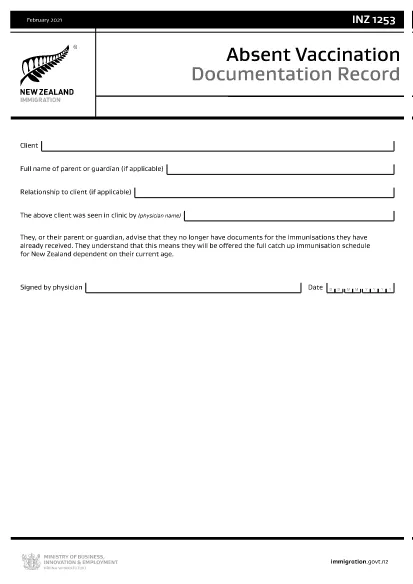
INZ1253 – Absent Vaccination Documentation Record (Fillable PDF)

  1. Jazyk Angličtina
  2. Krajina Nový Zéland
  3. Aktivita Zdravie
INZ1253 – Absent Vaccination Documentation Record (Fillable PDF)

The INZ1253 is the official Absent Vaccination Documentation Record used by Immigration New Zealand when an applicant cannot produce proof of previously received immunisations. This form allows the applicant (or a parent/guardian) to declare the missing records and request the appropriate catch‑up vaccination schedule.

What is the INZ1253 Form?

The form is required for anyone applying for a New Zealand visa or residency who does not have the original vaccination certificates. By completing INZ1253 you acknowledge that you will follow the full catch‑up immunisation schedule based on your age.

How to Complete the INZ1253 Online

Instead of downloading, printing, and scanning, you can fill out the form directly on our site:

  • Click the “Fill out this form” button below.
  • Wait a few seconds while the Formize PDF Filler app loads.
  • Enter the required information in the fillable fields (personal details, reason for missing records, etc.).
  • Save the completed PDF to your device or submit it directly to Immigration New Zealand.

Common Mistakes to Avoid

  • Leaving mandatory fields blank – the system will highlight any missing information before you can save.
  • Using an outdated version – always use the latest INZ1253 PDF provided below.
  • Incorrect date formats – follow the DD/MM/YYYY format as shown in the example.
  • Not signing the form – the electronic signature field must be completed before submission.

Where to Submit the Completed Form

After you have saved the filled PDF, attach it to your visa or residency application through the Immigration New Zealand online portal. If you are applying by paper, include the printed form with your supporting documents.

Need help? Review the FAQs below or contact Immigration New Zealand directly.

FAQ
  • Do I need to print the INZ1253 form after filling it online?

    No. The Formize filler creates a fully signed PDF that can be uploaded directly to the Immigration New Zealand portal.

  • Can I edit the form after I have saved it?

    Yes. Open the saved PDF again with the Formize filler to make any changes, then re‑save.

  • What if I don’t have any vaccination records at all?

    Select “No records available” in the form and provide a brief explanation. You will be scheduled for the full catch‑up immunisation program.

  • Is the electronic signature legally accepted?

    Immigration New Zealand accepts electronic signatures on the INZ1253 when the form is completed using a certified PDF filler like Formize.

  • How long does it take for Immigration New Zealand to process the form?

    Processing times vary, but most applicants receive a response within 5‑10 business days after submission.

AKO

Ako bezplatne vyplniť INZ1253 online v 4 jednoduchých krokoch:

  1. 1
    Open the Fillable Form
    Click the “Fill out this form” button on the page. The Formize PDF Filler will launch in your browser.
  2. 2
    Enter Your Details
    Complete each highlighted field – personal information, reason for missing vaccination records, and any additional notes.
  3. 3
    Save or Submit
    When all required fields are filled, click “Save PDF” to download the completed form or use the built‑in “Submit” button to send it directly to Immigration New Zealand.
  4. 4
    Confirm Receipt
    Check your email or the immigration portal for a confirmation that the form has been received.
Aplikácia Formize PDF Filler
O

Formuláre žiadosti o Medicare

Poskytnite ľuďom rýchly a jednoduchý spôsob, ako požiadať o výhody Medicare. S pomocou online šablón formulárov lekárskej starostlivosti sú teraz postupy, ako je vytvorenie nového záznamu pacienta alebo získanie viac informácií o anamnéze vášho pacienta, oveľa jednoduchšie.

VLASTNOSTI

PDF Filler

Najjednoduchší spôsob, ako vyplniť INZ1253 online

  • Rýchlo vyplňte INZ1253
    Hľadáte spôsob, ako rýchlo vyplniť INZ1253 online? S našou online bezplatnou výplňou formulárov PDF budete vedieť, ako upraviť a vyplniť tento dokument PDF za menej ako minútu.
  • Ľahko použiteľný online editor PDF
    Nebaví vás tlačiť súbory PDF, aby ste ich mohli upravovať pred opätovným naskenovaním a odoslaním späť? Upravujte dokumenty PDF zadarmo online. Použite náš online editor PDF, aby ste ušetrili čas a papier.
  • Skvelé nástroje, všetky platformy
    Zaujíma vás, ako vyplniť INZ1253 na počítači Mac, alebo ako možno použiť bezplatný výplň PDF? Naše online nástroje PDF fungujú na všetkých platformách.
  • Bezpečné ukladanie súborov
    Dokončené súbory „INZ1253“ sú uložené v zabezpečenej databáze spravovanej hostingom Amazon Cloud. Svoje súbory môžete z nášho systému kedykoľvek odstrániť. V každom prípade sa tieto súbory automaticky vymažú po 24 hodinách.
  • Četovať s INZ1253
    Četujte s „INZ1253“ na Chatize, čo je bezplatný pomocník na čítanie súborov PDF. Pýtajte sa otázky a získajte odpovede z „INZ1253“. Stačí kliknúť na tlačidlo Rozhovor s dokumentom vyššie.

Odstrániť reláciu plnenia

Chcete odstrániť vybratú reláciu plnenia? V takom prípade sa stratí váš postup pri vypĺňaní formulára.

Odstrániť reláciu úprav

Chcete odstrániť vybratú reláciu úprav? V takom prípade sa stratí váš postup pri vytváraní a úprave formulára.