
Zvoľ jazyk

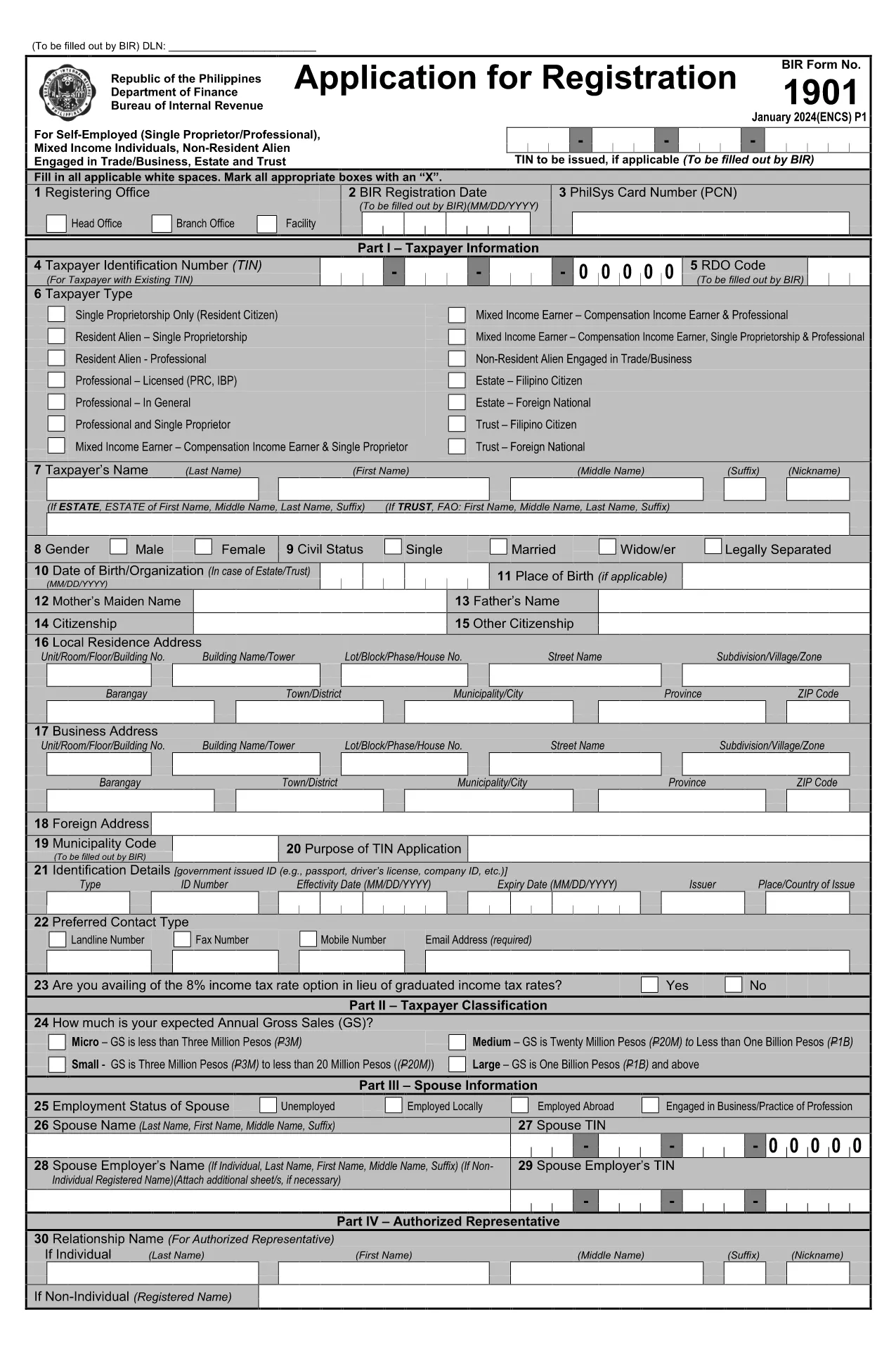
BIR Form 1901 – Fillable PDF Application Form

  1. Jazyk Angličtina
  2. Krajina Philippines
  3. oddelenie Bureau of Internal Revenue
  4. Aktivita dane
BIR Form 1901 – Fillable PDF Application Form

The BIR Form 1901 is the official application used in the Philippines to register a new business with the Bureau of Internal Revenue (BIR). This fillable PDF lets you enter all required information digitally, eliminating the need for paper copies and manual calculations.

What Is BIR Form 1901?

Form 1901, also known as the "Payment Order Form for New Business Registrant," captures essential details such as the Taxpayer Identification Number (TIN), branch code, RDO code, and the tax year. It is required for every new business entity before it can legally operate and issue official receipts.

How to Fill Out the BIR Form 1901 Online

Instead of downloading the file and opening it in a separate PDF editor, simply click the "Fill out this form" button on this page. The Formize PDF Filler app will load directly in your browser:

  1. Click Fill out this form and wait a few seconds for the Formize PDF Filler to appear.
  2. Enter your information in each highlighted field. The filler automatically validates TIN format and numeric fields.
  3. Use the Save button to download a completed copy to your device, or click Print to produce a hard‑copy for submission.

Common Mistakes to Avoid

  • Incorrect TIN or branch code: Double‑check numbers against your BIR Certificate of Registration.
  • Leaving mandatory fields blank: The Formize filler highlights missing entries before you can save.
  • Mismatched tax year: Ensure the year matches the fiscal year of your business start‑up.

Where to Submit the Completed Form

After filling out and saving the PDF, submit the original form to the BIR office that issued your RDO (Revenue District Office) code. You may also attach the electronic copy to your online BIR registration portal if you have one.

Download & Start Filling Instantly

Ready to begin? Click the button below and let Formize do the heavy lifting. No software download, no hassle—just a secure, browser‑based PDF filler.

FAQ
  • Who needs to file BIR Form 1901?

    All newly registered businesses, partnerships, and corporations in the Philippines must submit Form 1901 before they can issue official receipts.

  • Can I edit the form after I save it?

    Yes. Open the saved PDF in any PDF editor or re‑load the form through Formize to make changes before final submission.

  • Is there a fee to download or fill the form?

    No. The PDF download and the Formize filler are completely free.

  • What is the difference between the branch code and RDO code?

    The branch code identifies your specific BIR office location, while the RDO (Revenue District Office) code designates the larger district that oversees several branches.

  • Where do I submit the completed Form 1901?

    Submit the original printed form to the BIR office that issued your RDO code. An electronic copy can be uploaded to the BIR online portal if available.

  • What common errors cause rejection?

    Incorrect TIN, missing mandatory fields, and mismatched tax year are the top reasons for rejection. Use the Formize validator to avoid them.

  • Do I need a digital signature?

    A handwritten signature is required on the printed copy. For electronic submissions, a qualified digital signature accepted by BIR can be used.

  • How long does it take for the BIR to process the form?

    Processing time varies by office, but most RDOs complete verification within 3‑5 business days after receipt.

  • Can I use this form for an existing business?

    No. Existing businesses should use the appropriate renewal or amendment forms. Form 1901 is strictly for new registrations.

  • Is the PDF compatible with mobile devices?

    Yes. The Formize filler works on smartphones and tablets, allowing you to complete the form on the go.

AKO

Ako bezplatne vyplniť BIR Form 1901 online v 3 jednoduchých krokoch:

  1. 1
    Click the Fill‑out Button
    Press the "Fill out this form" button on the page. The Formize PDF Filler will open in a new browser window.
  2. 2
    Enter Your Information
    Complete each highlighted field. The filler validates numbers and dates automatically.
  3. 3
    Save or Print
    When all fields are filled, click "Save" to download the completed PDF or "Print" to get a hard copy for BIR submission.
Aplikácia Formize PDF Filler
O

Daňové formuláre

BIR Form 1901 je jedným z daňových formulárov, ktoré sú dokumentmi používanými na oznamovanie informácií súvisiacich s daňami príslušnému daňovému úradu. Existujú rôzne typy daňových formulárov vrátane federálnych, štátnych a miestnych daňových formulárov, ktoré sa môžu líšiť v závislosti od okolností a miesta daňovníka.

VLASTNOSTI

PDF Filler

Najjednoduchší spôsob, ako vyplniť BIR Form 1901 online

  • Rýchlo vyplňte BIR Form 1901
    Hľadáte spôsob, ako rýchlo vyplniť BIR Form 1901 online? S našou online bezplatnou výplňou formulárov PDF budete vedieť, ako upraviť a vyplniť tento dokument PDF za menej ako minútu.
  • Ľahko použiteľný online editor PDF
    Nebaví vás tlačiť súbory PDF, aby ste ich mohli upravovať pred opätovným naskenovaním a odoslaním späť? Upravujte dokumenty PDF zadarmo online. Použite náš online editor PDF, aby ste ušetrili čas a papier.
  • Skvelé nástroje, všetky platformy
    Zaujíma vás, ako vyplniť BIR Form 1901 na počítači Mac, alebo ako možno použiť bezplatný výplň PDF? Naše online nástroje PDF fungujú na všetkých platformách.
  • Bezpečné ukladanie súborov
    Dokončené súbory „BIR Form 1901“ sú uložené v zabezpečenej databáze spravovanej hostingom Amazon Cloud. Svoje súbory môžete z nášho systému kedykoľvek odstrániť. V každom prípade sa tieto súbory automaticky vymažú po 24 hodinách.
  • Četovať s BIR Form 1901
    Četujte s „BIR Form 1901“ na Chatize, čo je bezplatný pomocník na čítanie súborov PDF. Pýtajte sa otázky a získajte odpovede z „BIR Form 1901“. Stačí kliknúť na tlačidlo Rozhovor s dokumentom vyššie.

Odstrániť reláciu plnenia

Chcete odstrániť vybratú reláciu plnenia? V takom prípade sa stratí váš postup pri vypĺňaní formulára.

Odstrániť reláciu úprav

Chcete odstrániť vybratú reláciu úprav? V takom prípade sa stratí váš postup pri vytváraní a úprave formulára.