Zvoľ jazyk

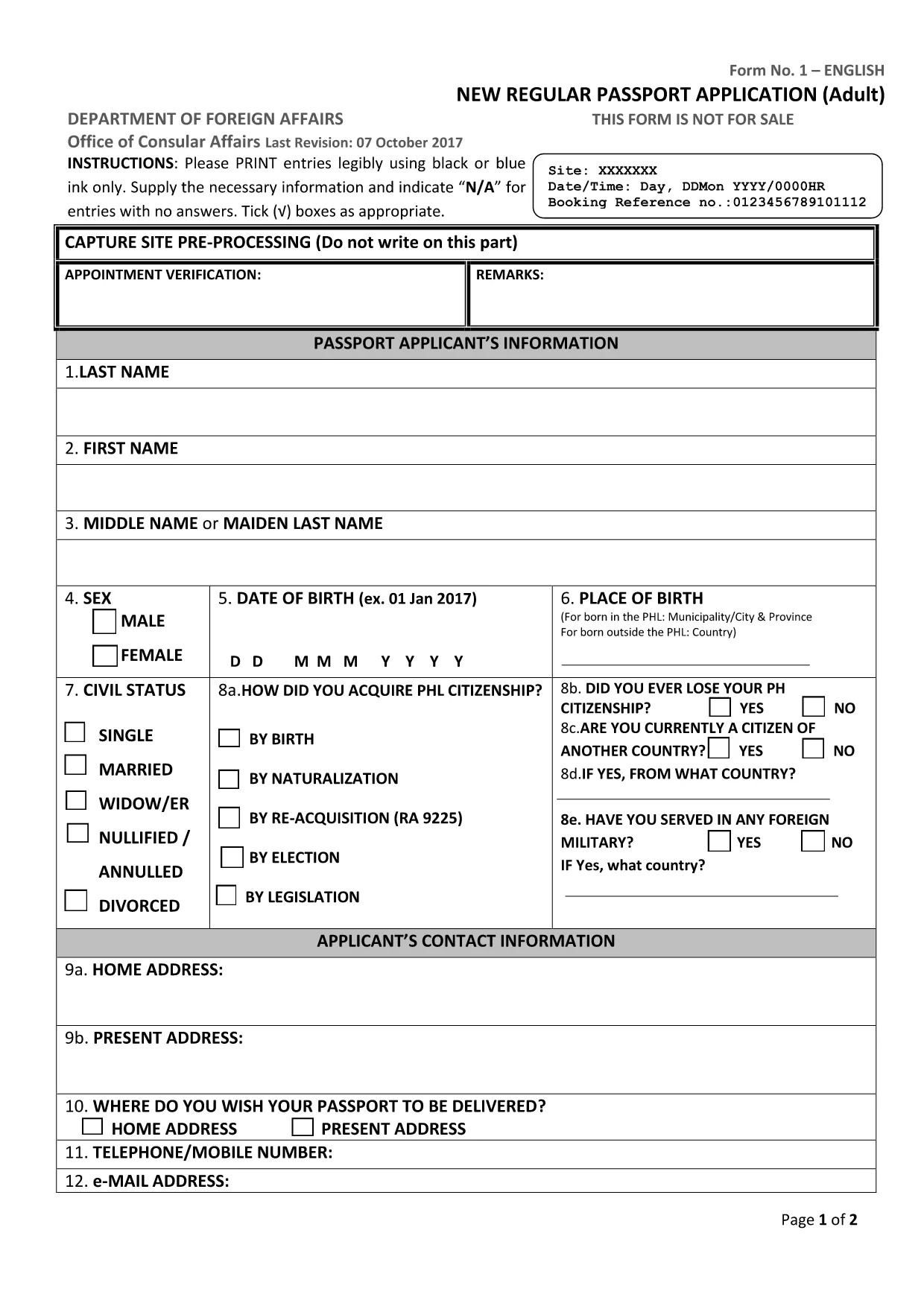
Philippine Passport Application Form (Fillable PDF)

  1. Jazyk Angličtina
  2. Krajina Philippines
  3. oddelenie Department of Foreign Affairs
  4. Aktivita Travel Documents
Philippine Passport Application Form (Fillable PDF)

Applying for a Philippine passport? The first step is a correctly filled application form. Our fillable PDF matches the official DFA document, so you can complete it online, print it, and bring it to your appointment without any hassle.

Why Use a Fillable PDF Form?

  • Fast & accurate: Type directly into the fields – no messy handwriting.
  • Save time: Edit, review, and correct entries before printing.
  • Secure: Your data stays on your device until you choose to print or submit.
  • Compatible with Formize: Click “Fill out this form” and the Formize PDF Filler loads instantly.

Step‑by‑Step Guide to Complete the Application

Follow these simple steps to finish your passport application using the Formize PDF Filler:

  1. Click the Fill out this form button on the page.
  2. Wait a few seconds while the Formize PDF Filler app loads.
  3. Enter your personal information in each field (use black or blue ink if you print later).
  4. Upload a digital photo that meets DFA specifications.
  5. Review every entry for accuracy – the filler highlights required fields.
  6. Save the completed form to your device or print it directly from the app.
  7. Bring the printed form, along with the required IDs and supporting documents, to your DFA appointment.

Common Mistakes to Avoid

  • Leaving required fields blank – the form will not save until they are filled.
  • Using a handwritten font in the PDF – type directly to keep the layout clean.
  • Submitting an outdated photo – follow the latest DFA photo guidelines.
  • Writing “N/A” in the wrong format – use capital letters without punctuation.

Where to Submit Your Completed Form

After printing, bring the accomplished form to the Department of Foreign Affairs (DFA) office where you booked your appointment. The DFA staff will verify the form, collect your fees, and process your passport.

Need a quick reminder of the required supporting documents? Check the DFA website or your appointment confirmation email.

FAQ
  • Is the PDF form official and up‑to‑date?

    Yes. The linked PDF is the current adult new‑application form used by the DFA as of 2024.

  • Can I fill out the form on a mobile device?

    The Formize PDF Filler works on most smartphones and tablets. For best results, use a larger screen when adding a photo.

  • Do I need to print the form after filling it online?

    The DFA requires a printed copy with your signature. Print the completed PDF on A4 paper before your appointment.

  • What if I make a mistake after printing?

    Minor errors can be corrected by crossing out the entry, writing “N/A” where needed, and signing the correction. For major errors, refill the PDF and re‑print.

  • How long does the Formize PDF Filler take to load?

    Typically 2–5 seconds on a standard broadband connection.

  • Is there a fee to use the Formize PDF Filler?

    No. Formize provides the filler for free; you only pay the DFA passport processing fees.

  • Can I save a partially completed form?

    Yes. Use the “Save” button in the filler to download a draft and return to it later.

  • What file format do I receive after completing the form?

    The completed document is saved as a standard PDF, ready for printing or electronic submission if required.

AKO

Ako bezplatne vyplniť philippine passport application form online v 5 jednoduchých krokoch:

  1. 1
    Open the Fillable Form
    Click the “Fill out this form” button on the page. The Formize PDF Filler loads in a new window.
  2. 2
    Enter Your Information
    Type your details into each field. Use black or blue text if you plan to print the form later.
  3. 3
    Add Your Photo
    Upload a digital passport‑size photo that complies with DFA specifications.
  4. 4
    Review and Save
    Check every entry, then save the completed PDF to your device or print it directly.
  5. 5
    Submit at DFA
    Bring the printed form and required IDs to your scheduled DFA appointment.
Aplikácia Formize PDF Filler
O

šablóny philippine passport application form

S tradičnou sadou funkcií na prezeranie a vypĺňanie dokumentu PDF v kombinácii s výhodami webovej aplikácie a responzívneho rozloženia môžete philippine passport application form dokončiť za pár minút.

VLASTNOSTI

PDF Filler

Najjednoduchší spôsob, ako vyplniť philippine passport application form online

  • Rýchlo vyplňte philippine passport application form
    Hľadáte spôsob, ako rýchlo vyplniť philippine passport application form online? S našou online bezplatnou výplňou formulárov PDF budete vedieť, ako upraviť a vyplniť tento dokument PDF za menej ako minútu.
  • Ľahko použiteľný online editor PDF
    Nebaví vás tlačiť súbory PDF, aby ste ich mohli upravovať pred opätovným naskenovaním a odoslaním späť? Upravujte dokumenty PDF zadarmo online. Použite náš online editor PDF, aby ste ušetrili čas a papier.
  • Skvelé nástroje, všetky platformy
    Zaujíma vás, ako vyplniť philippine passport application form na počítači Mac, alebo ako možno použiť bezplatný výplň PDF? Naše online nástroje PDF fungujú na všetkých platformách.
  • Bezpečné ukladanie súborov
    Dokončené súbory „philippine passport application form“ sú uložené v zabezpečenej databáze spravovanej hostingom Amazon Cloud. Svoje súbory môžete z nášho systému kedykoľvek odstrániť. V každom prípade sa tieto súbory automaticky vymažú po 24 hodinách.
  • Četovať s philippine passport application form
    Četujte s „philippine passport application form“ na Chatize, čo je bezplatný pomocník na čítanie súborov PDF. Pýtajte sa otázky a získajte odpovede z „philippine passport application form“. Stačí kliknúť na tlačidlo Rozhovor s dokumentom vyššie.

Odstrániť reláciu plnenia

Chcete odstrániť vybratú reláciu plnenia? V takom prípade sa stratí váš postup pri vypĺňaní formulára.

Odstrániť reláciu úprav

Chcete odstrániť vybratú reláciu úprav? V takom prípade sa stratí váš postup pri vytváraní a úprave formulára.