
Zvoľ jazyk

DL 520 – Employer Testing Program Application (California DMV)

  1. Jazyk Angličtina
  2. Krajina USA
  3. Aktivita Registrácia vozidla
  4. oddelenie California DMV
DL 520 – Employer Testing Program Application (California DMV)

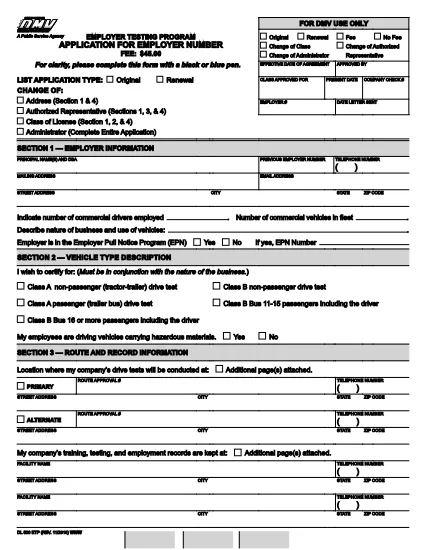
The DL 520 is the California Department of Motor Vehicles (DMV) application used by employers to obtain an employer number for the Employer Testing Program (ETP). This program allows qualified organizations to issue Certificates of Driving Skill (DL 170 ETP) to employees who operate motor vehicles in safety‑sensitive positions.

What is the DL 520 Form?

The DL 520 form collects essential information about your business, the types of testing you will conduct, and your compliance with California Vehicle Code sections related to employer‑run testing programs. Once approved, you receive an employer number that authorizes you to manage driver‑skill testing under the ETP.

Who Must Complete the DL 520?

  • Employers in California who need to test employees for driving‑skill certification (e.g., transportation, construction, utilities).
  • Companies that wish to issue DL 170 ETP certificates to qualified drivers.
  • Any organization that conducts mandatory drug, alcohol, or skills testing required by state law.

How to Fill Out the DL 520 Online with Formize

Instead of downloading, printing, and scanning, you can complete the form directly on our site:

  1. Click the “Fill out this form” button on the page.
  2. Wait a few seconds while the Formize PDF Filler app loads the fillable DL 520 PDF.
  3. Enter your employer information, testing procedures, and contact details in the highlighted fields.
  4. Review each section for accuracy; required fields are marked with an asterisk (*).
  5. When finished, click Save & Download to get a completed PDF you can email or print for submission.

The fillable PDF retains the official DMV layout, so the California DMV will accept it without any modifications.

Common Mistakes to Avoid

  • Leaving required fields blank – the DMV will reject the application.
  • Using an outdated version of the form – always use the latest PDF (linked above).
  • Incorrect employer number format – double‑check the 8‑digit number if you already have one.
  • Missing signatures – both the employer representative and the DMV inspector must sign.
  • Submitting a scanned image of a handwritten form – the fillable PDF ensures legibility.

Where to Submit the Completed Form

After saving your completed DL 520 PDF, mail or fax it to the address listed on the form’s last page. You may also deliver a printed copy to your local DMV office. Keep a copy for your records.

Need help? Review the FAQs below or contact your nearest California DMV office.

FAQ
  • Do I need to print the DL 520 after filling it online?

    The California DMV accepts a printable PDF. You can either submit the electronic file by fax or print a hard copy for mailing.

  • How long does it take to get an employer number after submitting DL 520?

    Processing typically takes 7‑10 business days once the DMV receives a complete and correctly signed application.

  • Can I use the DL 520 for multiple locations?

    Yes. The employer number applies to all locations under the same legal entity, but each site must follow the same testing procedures.

  • What if I make a mistake after downloading the completed PDF?

    You must correct the error on a new copy of the form. The DMV does not accept handwritten alterations on a submitted PDF.

  • Is there a filing fee for the DL 520 application?

    There is no fee to submit the DL 520 itself, but the DMV may charge fees for issuing the employer number and subsequent certificates.

  • Do I need a separate DL 520 for each type of test (drug, alcohol, skill)?

    A single DL 520 authorizes all testing types covered under the Employer Testing Program, provided they are described in the application.

AKO

Ako bezplatne vyplniť DL 520 online v 4 jednoduchých krokoch:

  1. 1
    Open the Fillable Form
    Click the “Fill out this form” button on the page. The Formize PDF Filler will load the DL 520 PDF automatically.
  2. 2
    Enter Your Information
    Type your employer name, address, testing procedures, and other required details into the highlighted fields.
  3. 3
    Review and Save
    Check every section for completeness, then click “Save & Download” to obtain a completed PDF ready for submission.
  4. 4
    Submit to the DMV
    Print the saved PDF (if required) and mail, fax, or deliver it to your local California DMV office as instructed on the form.
Aplikácia Formize PDF Filler
O

Registračné formuláre vozidla

DL 520 je jeden z registračných formulárov vozidla, ktoré sú dokumentmi používanými na registráciu motorového vozidla na príslušnom vládnom orgáne, zvyčajne na ministerstve pre motorové vozidlá (DMV) alebo na ekvivalentnom úrade. Tieto formuláre sa vyžadujú, keď si osoba kúpi nové alebo ojazdené vozidlo, prevedie vlastníctvo vozidla alebo sa s vozidlom presťahuje do novej jurisdikcie.

Konkrétne formuláre na registráciu vozidla sa môžu líšiť v závislosti od jurisdikcie, ale vo všeobecnosti vyžadujú nasledujúce informácie:

Informácie o vozidle: Zahŕňajú podrobnosti o vozidle, ako je značka, model, rok, identifikačné číslo vozidla (VIN) a stav počítadla kilometrov.

Informácie o vlastníkovi: Formulár bude vyžadovať informácie o vlastníkovi vozidla vrátane jeho mena, adresy, kontaktných informácií a čísla vodičského preukazu.

Preukázanie vlastníctva: V závislosti od okolností sa môže vyžadovať dôkaz o vlastníctve, ako napríklad osvedčenie o vlastníctve, kúpna zmluva alebo osvedčenie výrobcu o pôvode (v prípade nových vozidiel).

Informácie o poistení: Zvyčajne sa vyžaduje doklad o platnom poistení vozidla. To môže zahŕňať poskytnutie čísla poistnej zmluvy, dátumov krytia a podrobností o poisťovni.

Platba poplatkov: Registrácia vozidla zahŕňa platbu rôznych poplatkov, ako sú registračné poplatky, dane a prípadne ďalšie poplatky špecifické pre jurisdikciu.

Okrem týchto základných požiadaviek môžu mať niektoré jurisdikcie ďalšie požiadavky na formuláre alebo dokumentáciu. V určitých oblastiach môžu byť napríklad potrebné výsledky emisných testov, bezpečnostné kontroly alebo preukázanie trvalého pobytu.

Po vyplnení a odoslaní registračných formulárov vozidla vydá štátny orgán osvedčenie o evidencii, poznávacie značky a evidenčné nálepky. Z týchto dokladov vyplýva, že vozidlo je legálne registrované a oprávnené na prevádzku na verejných komunikáciách.

Je dôležité poznamenať, že požiadavky na registráciu vozidiel sa môžu v závislosti od jurisdikcie výrazne líšiť. Preto sa odporúča konzultovať s miestnym DMV alebo ekvivalentnou agentúrou špecifické formuláre a postupy platné pre vašu lokalitu.

VLASTNOSTI

PDF Filler

Najjednoduchší spôsob, ako vyplniť DL 520 online

  • Rýchlo vyplňte DL 520
    Hľadáte spôsob, ako rýchlo vyplniť DL 520 online? S našou online bezplatnou výplňou formulárov PDF budete vedieť, ako upraviť a vyplniť tento dokument PDF za menej ako minútu.
  • Ľahko použiteľný online editor PDF
    Nebaví vás tlačiť súbory PDF, aby ste ich mohli upravovať pred opätovným naskenovaním a odoslaním späť? Upravujte dokumenty PDF zadarmo online. Použite náš online editor PDF, aby ste ušetrili čas a papier.
  • Skvelé nástroje, všetky platformy
    Zaujíma vás, ako vyplniť DL 520 na počítači Mac, alebo ako možno použiť bezplatný výplň PDF? Naše online nástroje PDF fungujú na všetkých platformách.
  • Bezpečné ukladanie súborov
    Dokončené súbory „DL 520“ sú uložené v zabezpečenej databáze spravovanej hostingom Amazon Cloud. Svoje súbory môžete z nášho systému kedykoľvek odstrániť. V každom prípade sa tieto súbory automaticky vymažú po 24 hodinách.
  • Četovať s DL 520
    Četujte s „DL 520“ na Chatize, čo je bezplatný pomocník na čítanie súborov PDF. Pýtajte sa otázky a získajte odpovede z „DL 520“. Stačí kliknúť na tlačidlo Rozhovor s dokumentom vyššie.

Odstrániť reláciu plnenia

Chcete odstrániť vybratú reláciu plnenia? V takom prípade sa stratí váš postup pri vypĺňaní formulára.

Odstrániť reláciu úprav

Chcete odstrániť vybratú reláciu úprav? V takom prípade sa stratí váš postup pri vytváraní a úprave formulára.