Zvoľ jazyk

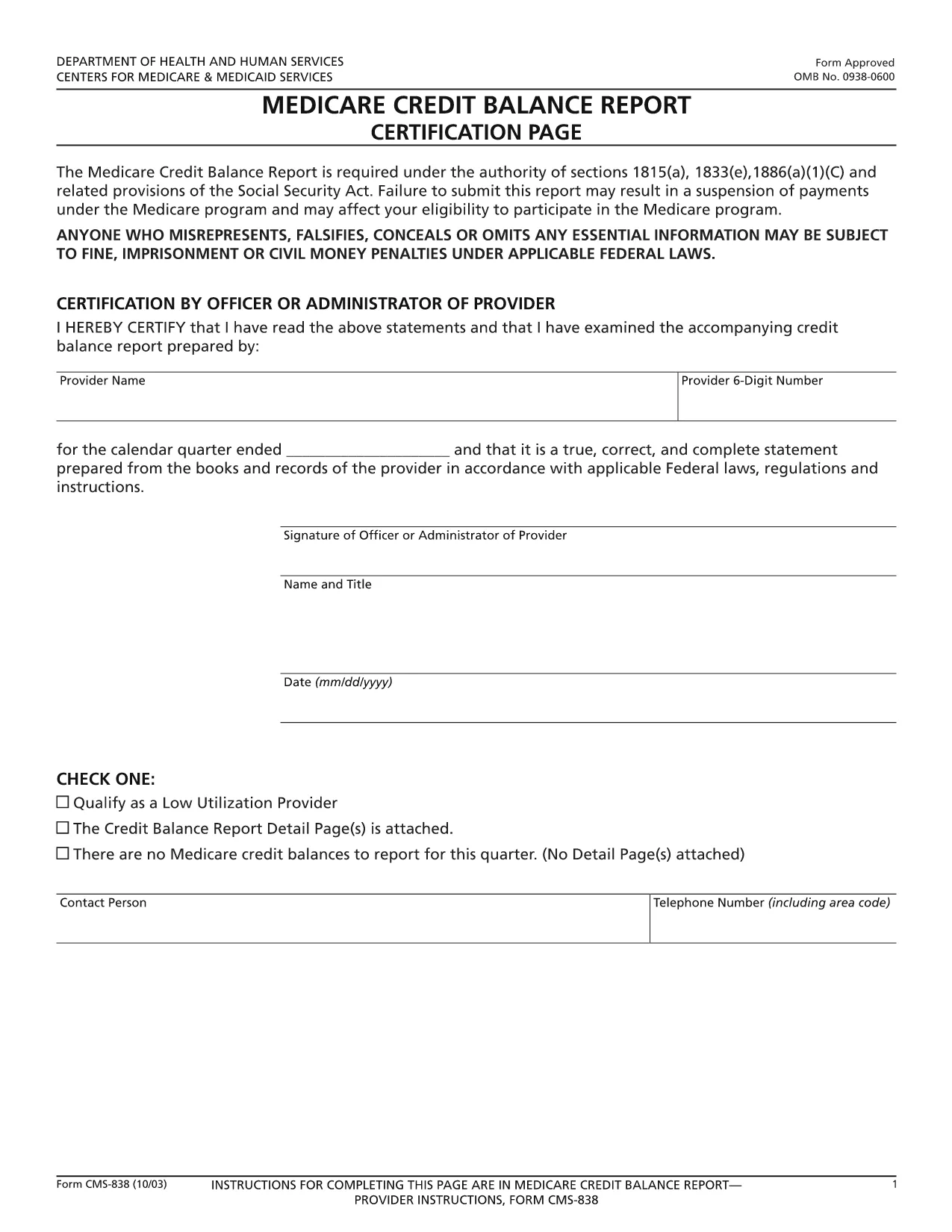
CMS‑838 Medicare Credit Balance Report – Fillable PDF

  1. Jazyk Angličtina
  2. Krajina USA
  3. oddelenie Centers for Medicare & Medicaid Services
  4. Aktivita Medicare
CMS‑838 Medicare Credit Balance Report – Fillable PDF

The CMS‑838 Medicare Credit Balance Report is the official form used by providers and suppliers to report excess or improper Medicare payments. Completing this form accurately helps you avoid penalties and ensures timely reimbursement.

What Is the CMS‑838 Form?

Form CMS‑838 captures detailed information about credit balances, over‑payments, and any adjustments that need to be reported back to the Centers for Medicare & Medicaid Services (CMS). It is a required filing for anyone who has received a Medicare credit balance during the reporting period.

Who Must File the CMS‑838?

  • Hospitals, clinics, and independent practice sites that have received Medicare credit balances.
  • Durable medical equipment (DME) suppliers and home health agencies.
  • Any Medicare‑eligible entity that identifies an over‑payment and must report it to CMS.

How to Complete the Fillable CMS‑838 Online

Instead of downloading the PDF and editing it in a separate program, simply click the “Fill out this form” button on this page. The Formize PDF Filler app will load the fillable version directly in your browser.

  1. Click Fill out this form and wait for the Formize editor to appear.
  2. Enter the required data in each field – the form validates entries in real time.
  3. Save your progress at any time; the app stores a secure copy in your browser.
  4. When finished, click Submit to download the completed PDF, then upload it to the CMS portal as instructed.

Common Mistakes to Avoid

  • Leaving mandatory fields blank: The Formize filler highlights missing required fields before you can submit.
  • Mismatched dates: Ensure the reporting period matches the dates on your credit balance statements.
  • Incorrect provider identifiers: Double‑check your NPI and TIN numbers.
  • Failing to attach supporting documentation: Upload any audit reports or reconciliation sheets as separate files when you submit to CMS.

Download the Fillable PDF

Ready to start? Click the button below to open the fillable CMS‑838 form instantly. No software download required – just a modern web browser.

FAQ
  • What is the purpose of the CMS‑838 form?

    The CMS‑838 reports any Medicare credit balances, over‑payments, or adjustments that a provider must return to CMS. It helps maintain compliance and prevents future penalties.

  • Can I edit the CMS‑838 after I download it?

    Yes, but using the Formize fillable version is recommended. It prevents formatting errors and ensures all required fields are completed before you submit.

  • Do I need a digital signature on the CMS‑838?

    CMS accepts a typed signature in the fillable PDF. After completing the form, you can add a digital signature within the Formize app or print, sign, and scan the document.

  • How often must the CMS‑838 be filed?

    The form is required each time a credit balance is identified. Most providers file it quarterly, but frequency depends on your organization’s payment cycle.

  • What supporting documents should I attach?

    Include reconciliation statements, audit reports, and any correspondence with Medicare that explains the credit balance. Attach them as separate PDFs when you submit to the CMS portal.

  • Is there a fee to use the Formize PDF filler?

    No. Formize offers the fillable CMS‑838 at no cost. You only need an internet connection and a modern web browser.

AKO

Ako bezplatne vyplniť CMS-838 online v 4 jednoduchých krokoch:

  1. 1
    Open the Fillable Form
    Click the “Fill out this form” button on the page. The Formize PDF Filler app loads the CMS‑838 directly in your browser.
  2. 2
    Enter Required Information
    Complete each highlighted field. Real‑time validation ensures numbers, dates, and identifiers are entered correctly.
  3. 3
    Save and Review
    Use the “Save” option to store a draft. Review all entries, paying special attention to mandatory sections.
  4. 4
    Download and Submit
    When the form is complete, click “Download PDF” to save a copy, then upload it to the CMS portal as instructed in your provider handbook.
Aplikácia Formize PDF Filler
O

šablóny CMS-838

S tradičnou sadou funkcií na prezeranie a vypĺňanie dokumentu PDF v kombinácii s výhodami webovej aplikácie a responzívneho rozloženia môžete CMS-838 dokončiť za pár minút.

VLASTNOSTI

PDF Filler

Najjednoduchší spôsob, ako vyplniť CMS-838 online

  • Rýchlo vyplňte CMS-838
    Hľadáte spôsob, ako rýchlo vyplniť CMS-838 online? S našou online bezplatnou výplňou formulárov PDF budete vedieť, ako upraviť a vyplniť tento dokument PDF za menej ako minútu.
  • Ľahko použiteľný online editor PDF
    Nebaví vás tlačiť súbory PDF, aby ste ich mohli upravovať pred opätovným naskenovaním a odoslaním späť? Upravujte dokumenty PDF zadarmo online. Použite náš online editor PDF, aby ste ušetrili čas a papier.
  • Skvelé nástroje, všetky platformy
    Zaujíma vás, ako vyplniť CMS-838 na počítači Mac, alebo ako možno použiť bezplatný výplň PDF? Naše online nástroje PDF fungujú na všetkých platformách.
  • Bezpečné ukladanie súborov
    Dokončené súbory „CMS-838“ sú uložené v zabezpečenej databáze spravovanej hostingom Amazon Cloud. Svoje súbory môžete z nášho systému kedykoľvek odstrániť. V každom prípade sa tieto súbory automaticky vymažú po 24 hodinách.
  • Četovať s CMS-838
    Četujte s „CMS-838“ na Chatize, čo je bezplatný pomocník na čítanie súborov PDF. Pýtajte sa otázky a získajte odpovede z „CMS-838“. Stačí kliknúť na tlačidlo Rozhovor s dokumentom vyššie.

Odstrániť reláciu plnenia

Chcete odstrániť vybratú reláciu plnenia? V takom prípade sa stratí váš postup pri vypĺňaní formulára.

Odstrániť reláciu úprav

Chcete odstrániť vybratú reláciu úprav? V takom prípade sa stratí váš postup pri vytváraní a úprave formulára.