
Zvoľ jazyk

Form D4 – District of Columbia Employee Withholding Allowance Certificate

  1. Krajina USA
  2. Jazyk Angličtina
  3. Aktivita dane
  4. oddelenie District of Columbia Office of Tax and Revenue
Form D4 – District of Columbia Employee Withholding Allowance Certificate

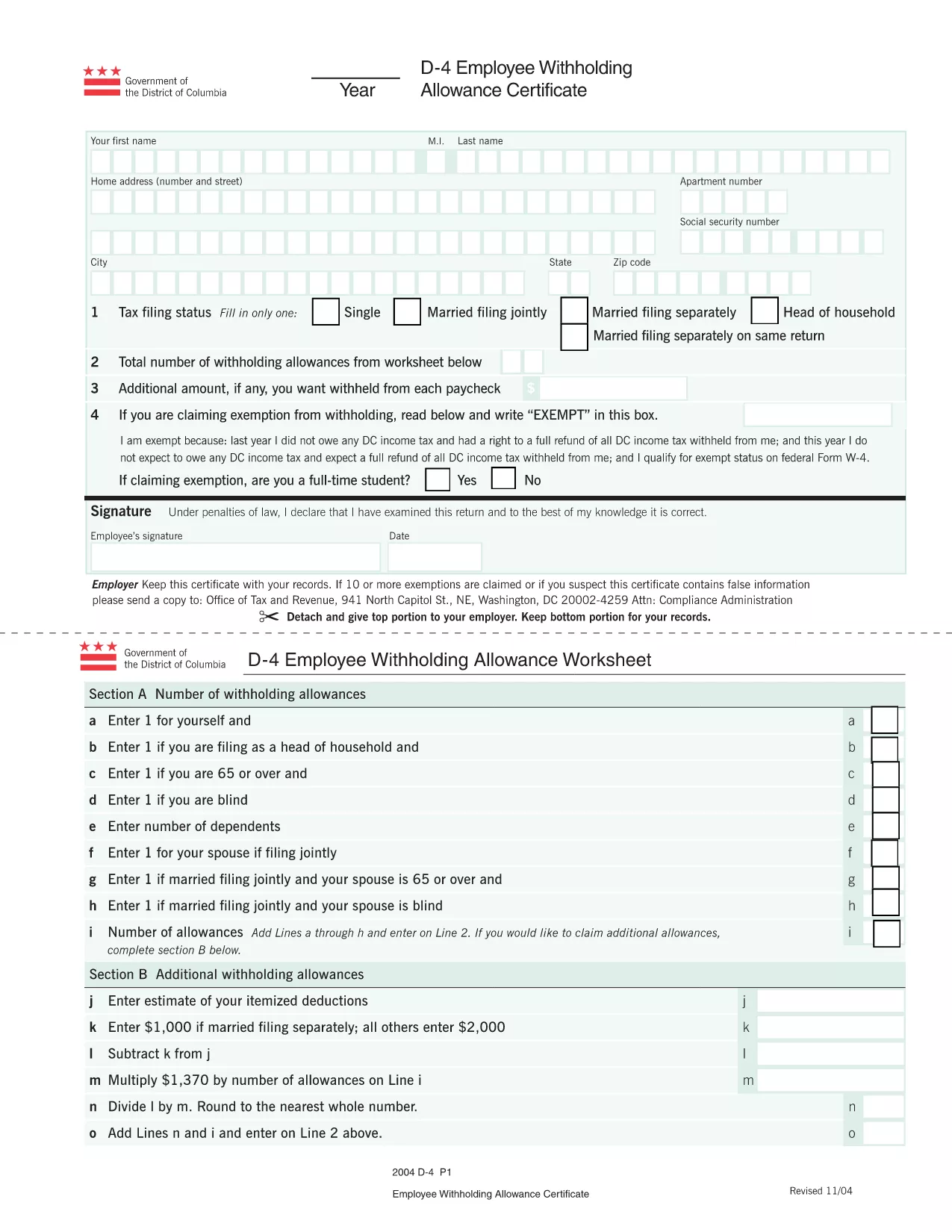
The Form D4 is the official District of Columbia Employee Withholding Allowance Certificate. Employers use it to determine the correct amount of DC income tax to withhold from an employee’s paycheck. By offering a fillable PDF version, Formize lets you complete the form quickly, securely, and without installing any software.

What is Form D4?

Form D4 records the number of withholding allowances you claim for DC tax purposes. It is required when you start a new job in the District of Columbia or when your personal tax situation changes. The form is recognized by the DC Office of Tax and Revenue and must be signed and returned to your employer.

How to Fill the D4 Form Online with Formize

Instead of downloading the PDF, opening a desktop editor, and printing it, simply click the “Fill out this form” button on this page. The Formize PDF Filler will load in your browser, allowing you to type directly into each field, save your progress, and download a completed copy.

Common Mistakes to Avoid

  • Leaving fields blank: Every required box must be completed; otherwise your employer may withhold tax at the maximum rate.
  • Incorrect Social Security Number: Double‑check the nine‑digit number to avoid processing delays.
  • Using the wrong filing year: The top of the form indicates the tax year—make sure it matches the current year.
  • Signing with a printed name only: Use a digital signature or type your name in the signature field; a handwritten signature is not needed when using Formize.

Where to Submit Your Completed D4

After you save the completed PDF, send it to your employer’s payroll department via email or upload it to the company’s secure portal. Keep a copy for your records in case the employer requests it later.

FAQs About the D4 Form

Below are the most common questions people ask about Form D4.

FAQ
  • Do I need to print Form D4 after filling it online?

    No. The fillable PDF can be saved and sent electronically. Most employers accept a digital copy.

  • How often should I update my D4 form?

    Update the form whenever your personal tax situation changes—e.g., marriage, divorce, or a change in dependents.

  • Can I use the same D4 form for multiple employers?

    Yes, as long as the information remains accurate for the current tax year.

  • What if I make a mistake after submitting?

    Submit a new, corrected D4 form to your employer. The updated form supersedes the previous one.

  • Is Form D4 required for part‑time or seasonal workers?

    Yes. Any employee who earns taxable wages in DC must submit a completed Form D4.

AKO

Ako bezplatne vyplniť Form D4 online v 4 jednoduchých krokoch:

  1. 1
    Click the Fill Button
    Press the “Fill out this form” button on this page. The Formize PDF Filler app will open in a new tab.
  2. 2
    Enter Your Information
    Type directly into each field—personal details, Social Security Number, and number of withholding allowances.
  3. 3
    Save and Review
    Use the “Save” icon to download a copy of the completed form. Review all entries for accuracy before submitting.
  4. 4
    Submit to Your Employer
    Email or upload the saved PDF to your employer’s payroll department as instructed.
Aplikácia Formize PDF Filler
O

Daňové formuláre

Form D4 je jedným z daňových formulárov, ktoré sú dokumentmi používanými na oznamovanie informácií súvisiacich s daňami príslušnému daňovému úradu. Existujú rôzne typy daňových formulárov vrátane federálnych, štátnych a miestnych daňových formulárov, ktoré sa môžu líšiť v závislosti od okolností a miesta daňovníka.

VLASTNOSTI

PDF Filler

Najjednoduchší spôsob, ako vyplniť Form D4 online

  • Rýchlo vyplňte Form D4
    Hľadáte spôsob, ako rýchlo vyplniť Form D4 online? S našou online bezplatnou výplňou formulárov PDF budete vedieť, ako upraviť a vyplniť tento dokument PDF za menej ako minútu.
  • Ľahko použiteľný online editor PDF
    Nebaví vás tlačiť súbory PDF, aby ste ich mohli upravovať pred opätovným naskenovaním a odoslaním späť? Upravujte dokumenty PDF zadarmo online. Použite náš online editor PDF, aby ste ušetrili čas a papier.
  • Skvelé nástroje, všetky platformy
    Zaujíma vás, ako vyplniť Form D4 na počítači Mac, alebo ako možno použiť bezplatný výplň PDF? Naše online nástroje PDF fungujú na všetkých platformách.
  • Bezpečné ukladanie súborov
    Dokončené súbory „Form D4“ sú uložené v zabezpečenej databáze spravovanej hostingom Amazon Cloud. Svoje súbory môžete z nášho systému kedykoľvek odstrániť. V každom prípade sa tieto súbory automaticky vymažú po 24 hodinách.
  • Četovať s Form D4
    Četujte s „Form D4“ na Chatize, čo je bezplatný pomocník na čítanie súborov PDF. Pýtajte sa otázky a získajte odpovede z „Form D4“. Stačí kliknúť na tlačidlo Rozhovor s dokumentom vyššie.

Odstrániť reláciu plnenia

Chcete odstrániť vybratú reláciu plnenia? V takom prípade sa stratí váš postup pri vypĺňaní formulára.

Odstrániť reláciu úprav

Chcete odstrániť vybratú reláciu úprav? V takom prípade sa stratí váš postup pri vytváraní a úprave formulára.