
Zvoľ jazyk

New York DMV Form DS‑7 – Driver Review Request (Fillable PDF)

  1. Jazyk Angličtina
  2. Krajina USA
  3. Aktivita Vodičský preukaz
  4. Štát New York
New York DMV Form DS‑7 – Driver Review Request (Fillable PDF)

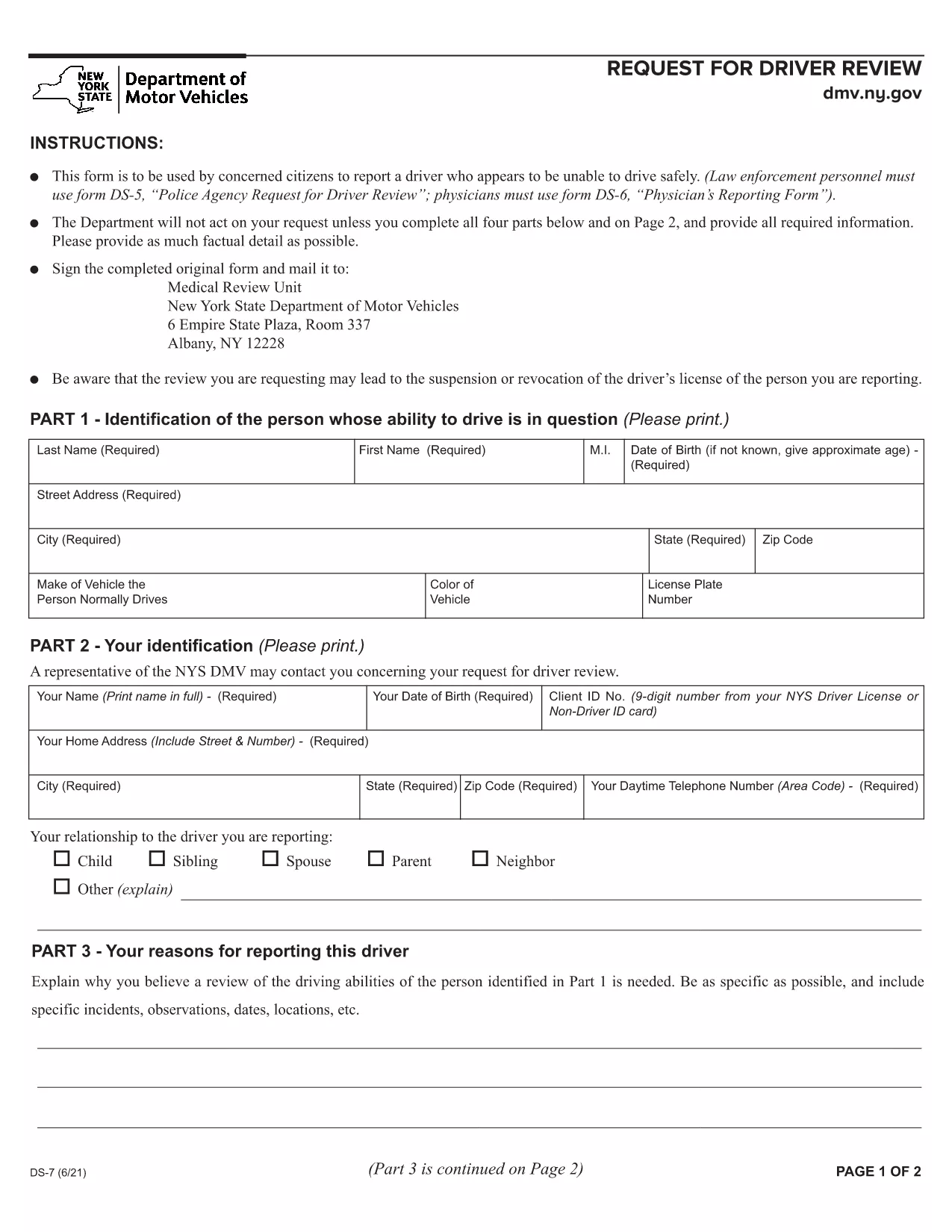
The New York Department of Motor Vehicles (DMV) requires a completed Form DS‑7 when a citizen wants to report a driver who may be unsafe on the road. This form is used by law‑enforcement, physicians, and concerned citizens to initiate a driver safety review.

Our online fillable PDF lets you complete the entire DS‑7 directly in your browser—no extra software needed. Simply click the “Fill out this form” button, wait for the Formize PDF Filler to load, and start entering your information.

Below you’ll find a quick overview of the form, detailed instructions, and tips to avoid common errors.

What Is Form DS‑7?

Form DS‑7, titled “Request for Driver Review,” collects detailed information about the driver’s behavior, vehicle details, and incident description. The DMV uses this data to determine whether a formal investigation or licensing action is required.

How to Fill Out DS‑7 Online

Follow the step‑by‑step guide in the How To section. The online filler automatically validates required fields, so you won’t miss any critical information.

Common Mistakes to Avoid

  • Leaving any required field blank – the filler will highlight missing sections.
  • Using vague descriptions – provide specific dates, times, and locations.
  • Submitting without a signature – you can sign digitally within the filler.

Submit Your Completed Form

After completing the form, click the “Submit” button to download a signed PDF. Mail or fax the PDF to the address listed on the last page of the form, or bring a printed copy to any DMV office.

Download the Fillable PDF

If you prefer to work offline, you can download the official fillable PDF directly from the New York DMV website.

FAQ
  • Who can submit Form DS‑7?

    Any concerned citizen, law‑enforcement officer, or medical professional can submit a DS‑7 to request a driver safety review.

  • Is the online filler free to use?

    Yes, Formize provides a free, secure fillable PDF experience for the DS‑7 form.

  • Can I save my progress and return later?

    The filler allows you to save a draft locally on your computer and resume editing at any time before final submission.

  • Do I need to print the form after filling it out?

    Printing is optional. You can submit the signed PDF electronically by mail or fax, or bring a printed copy to a DMV office.

  • What happens after I submit the DS‑7?

    The DMV reviews the information, may contact the driver for additional details, and determines whether a formal investigation or license action is needed.

  • How long does the review process take?

    Processing times vary, but the DMV typically acknowledges receipt within 10 business days and may take several weeks for a full review.

  • Can I attach supporting documents?

    Yes, you can attach photos, police reports, or medical records as separate PDF files when you mail or fax the completed DS‑7.

  • Is there a fee to file Form DS‑7?

    No, filing a DS‑7 request is free of charge.

AKO

Ako bezplatne vyplniť DS-7 form online v 4 jednoduchých krokoch:

  1. 1
    Open the Fillable Form
    Click the “Fill out this form” button on the page. The Formize PDF Filler app will load in a new tab.
  2. 2
    Enter Your Information
    Complete each section—driver details, incident description, and witness information. Required fields are marked with an asterisk.
  3. 3
    Add a Digital Signature
    Use the built‑in signature tool to sign the form electronically. This satisfies the DMV’s signature requirement.
  4. 4
    Download and Submit
    After saving, click “Download PDF.” Print the document or send the PDF by mail/fax to the DMV address shown on the form.
Aplikácia Formize PDF Filler
O

Formuláre žiadosti o vodičský preukaz

Vo väčšine krajín je povinné mať vodičský preukaz predtým, ako môžete vyraziť na cestu. Získanie vodičského preukazu je dôležitým míľnikom pre každého, kto chce riadiť auto.

DS-7 form je jedným z formulárov žiadosti o vodičský preukaz, čo sú dokumenty používané na zhromažďovanie informácií od ľudí, ktorí chcú požiadať o vodičský preukaz. Zvyčajne obsahuje kolónky pre meno žiadateľa, dátum narodenia, IČO, kontaktné údaje, ale aj históriu a prax vodičského preukazu.

VLASTNOSTI

PDF Filler

Najjednoduchší spôsob, ako vyplniť DS-7 form online

  • Rýchlo vyplňte DS-7 form
    Hľadáte spôsob, ako rýchlo vyplniť DS-7 form online? S našou online bezplatnou výplňou formulárov PDF budete vedieť, ako upraviť a vyplniť tento dokument PDF za menej ako minútu.
  • Ľahko použiteľný online editor PDF
    Nebaví vás tlačiť súbory PDF, aby ste ich mohli upravovať pred opätovným naskenovaním a odoslaním späť? Upravujte dokumenty PDF zadarmo online. Použite náš online editor PDF, aby ste ušetrili čas a papier.
  • Skvelé nástroje, všetky platformy
    Zaujíma vás, ako vyplniť DS-7 form na počítači Mac, alebo ako možno použiť bezplatný výplň PDF? Naše online nástroje PDF fungujú na všetkých platformách.
  • Bezpečné ukladanie súborov
    Dokončené súbory „DS-7 form“ sú uložené v zabezpečenej databáze spravovanej hostingom Amazon Cloud. Svoje súbory môžete z nášho systému kedykoľvek odstrániť. V každom prípade sa tieto súbory automaticky vymažú po 24 hodinách.
  • Četovať s DS-7 form
    Četujte s „DS-7 form“ na Chatize, čo je bezplatný pomocník na čítanie súborov PDF. Pýtajte sa otázky a získajte odpovede z „DS-7 form“. Stačí kliknúť na tlačidlo Rozhovor s dokumentom vyššie.

Odstrániť reláciu plnenia

Chcete odstrániť vybratú reláciu plnenia? V takom prípade sa stratí váš postup pri vypĺňaní formulára.

Odstrániť reláciu úprav

Chcete odstrániť vybratú reláciu úprav? V takom prípade sa stratí váš postup pri vytváraní a úprave formulára.