
Zvoľ jazyk

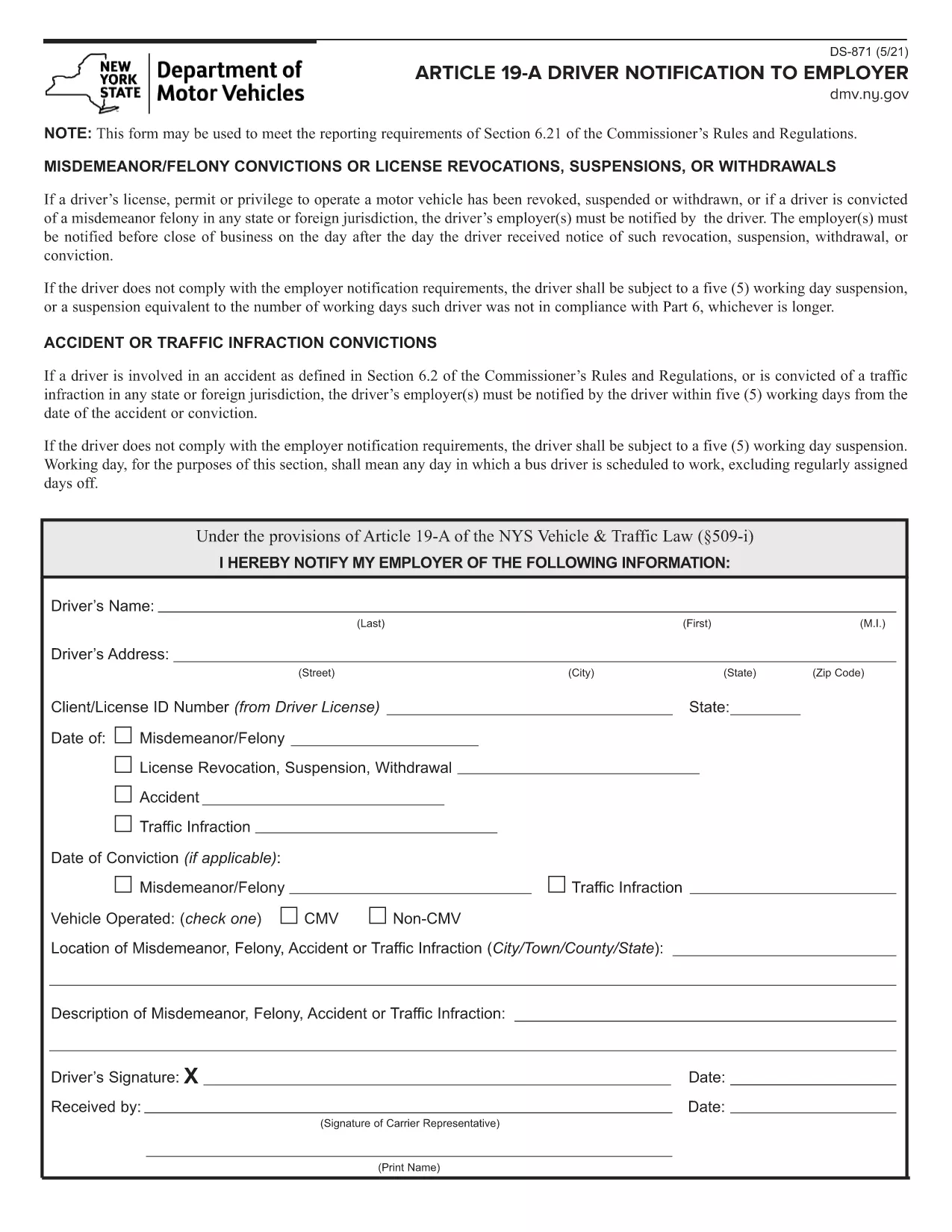
DS-871 Driver Notification to Employer (Fillable PDF)

  1. Jazyk Angličtina
  2. Krajina USA
  3. Aktivita Vodičský preukaz
  4. Štát New York
DS-871 Driver Notification to Employer (Fillable PDF)

The DS-871 is the New York State Department of Motor Vehicles (DMV) form used by drivers to notify their employer of a suspension, revocation, or restriction under Article 19‑A. Employers need this documentation to stay compliant with state regulations.

This page offers a fillable PDF version of the DS-871, so you can complete the form directly in your browser without printing, scanning, or using a separate PDF editor. The Formize PDF Filler loads instantly, preserves your data, and lets you download a clean, signed copy ready for submission.

Below you’ll find a quick overview of the form, step‑by‑step instructions for filling it out online, common pitfalls to watch for, and guidance on where to send the finished document.

FAQ
  • What is the purpose of Form DS‑871?

    DS‑871 satisfies the New York DMV’s requirement that drivers notify their employer of any license suspension, revocation, or restriction under Article 19‑A.

  • Do I need a printer to use the fillable PDF?

    No. The form is fully editable online via the Formize PDF Filler. You only need to print a copy if your employer specifically requests a hard copy.

  • Can I save my progress and finish later?

    Yes. The Formize app lets you download a draft PDF that retains your entered data, so you can reopen it later and continue editing.

  • Is an electronic signature accepted?

    Most New York DMV employers accept an electronic signature created with the Formize signature tool. Check with your HR department if a wet‑ink signature is required.

  • Where should I send the completed DS‑871?

    Send the completed form to your employer’s HR or safety department. Keep a copy for your records in case the DMV requests proof of notification.

  • What if I make a mistake after submitting?

    Download a new copy of the fillable PDF, correct the error, and resend the updated version. The DMV does not require a specific form revision number.

  • Is there a filing fee for DS‑871?

    No. The DS‑871 is a free notification form; there is no charge to download or submit it.

  • Do I need to attach additional documents?

    Only attach supporting documents if your employer requests proof of the suspension (e.g., a copy of the DMV notice).

AKO

Ako bezplatne vyplniť DS-871 online v 4 jednoduchých krokoch:

  1. 1
    Open the Fillable Form
    Click the **Fill out this form** button on this page. The Formize PDF Filler app will load the DS‑871 PDF directly in your browser.
  2. 2
    Enter Your Information
    Type your name, license number, employer details, and the reason for the notification into the highlighted fields. All data is saved automatically as you type.
  3. 3
    Review and Sign
    Check each field for accuracy. Use the built‑in signature tool to add your electronic signature if required.
  4. 4
    Download or Email
    When you’re satisfied, click **Download PDF** to save a copy or **Email PDF** to send it straight to your employer.
Aplikácia Formize PDF Filler
O

Formuláre žiadosti o vodičský preukaz

Vo väčšine krajín je povinné mať vodičský preukaz predtým, ako môžete vyraziť na cestu. Získanie vodičského preukazu je dôležitým míľnikom pre každého, kto chce riadiť auto.

DS-871 je jedným z formulárov žiadosti o vodičský preukaz, čo sú dokumenty používané na zhromažďovanie informácií od ľudí, ktorí chcú požiadať o vodičský preukaz. Zvyčajne obsahuje kolónky pre meno žiadateľa, dátum narodenia, IČO, kontaktné údaje, ale aj históriu a prax vodičského preukazu.

VLASTNOSTI

PDF Filler

Najjednoduchší spôsob, ako vyplniť DS-871 online

  • Rýchlo vyplňte DS-871
    Hľadáte spôsob, ako rýchlo vyplniť DS-871 online? S našou online bezplatnou výplňou formulárov PDF budete vedieť, ako upraviť a vyplniť tento dokument PDF za menej ako minútu.
  • Ľahko použiteľný online editor PDF
    Nebaví vás tlačiť súbory PDF, aby ste ich mohli upravovať pred opätovným naskenovaním a odoslaním späť? Upravujte dokumenty PDF zadarmo online. Použite náš online editor PDF, aby ste ušetrili čas a papier.
  • Skvelé nástroje, všetky platformy
    Zaujíma vás, ako vyplniť DS-871 na počítači Mac, alebo ako možno použiť bezplatný výplň PDF? Naše online nástroje PDF fungujú na všetkých platformách.
  • Bezpečné ukladanie súborov
    Dokončené súbory „DS-871“ sú uložené v zabezpečenej databáze spravovanej hostingom Amazon Cloud. Svoje súbory môžete z nášho systému kedykoľvek odstrániť. V každom prípade sa tieto súbory automaticky vymažú po 24 hodinách.
  • Četovať s DS-871
    Četujte s „DS-871“ na Chatize, čo je bezplatný pomocník na čítanie súborov PDF. Pýtajte sa otázky a získajte odpovede z „DS-871“. Stačí kliknúť na tlačidlo Rozhovor s dokumentom vyššie.

Odstrániť reláciu plnenia

Chcete odstrániť vybratú reláciu plnenia? V takom prípade sa stratí váš postup pri vypĺňaní formulára.

Odstrániť reláciu úprav

Chcete odstrániť vybratú reláciu úprav? V takom prípade sa stratí váš postup pri vytváraní a úprave formulára.