
Zvoľ jazyk

NY DMV MV-TEENS Fillable PDF – Teen Driver Notification Enrollment

  1. Jazyk Angličtina
  2. Krajina USA
  3. Aktivita Vodičský preukaz
  4. Štát New York
NY DMV MV-TEENS Fillable PDF – Teen Driver Notification Enrollment

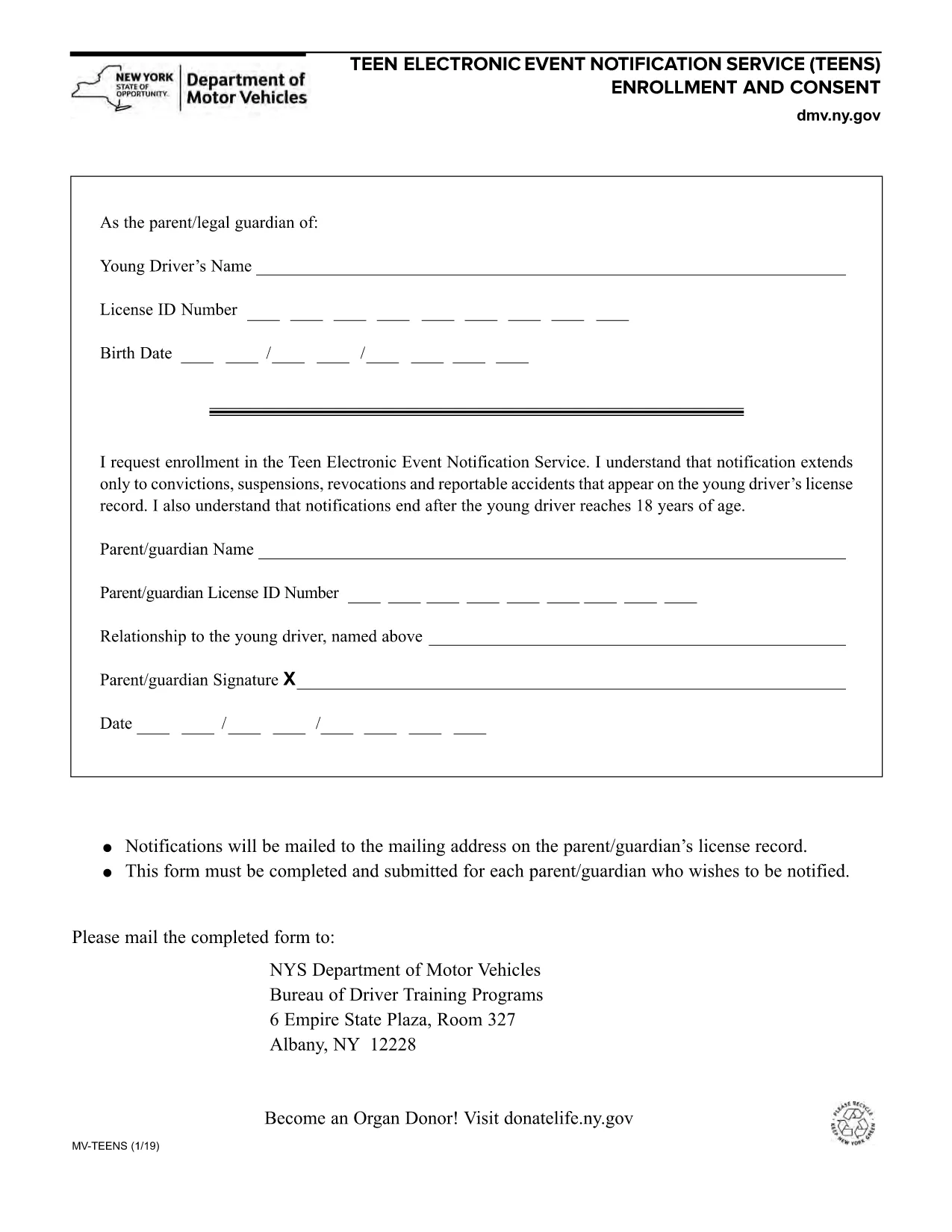
The MV-TEENS form is the official New York Department of Motor Vehicles (DMV) application for the Teen Electronic Event Notification Service. By enrolling, parents or legal guardians receive electronic alerts for convictions, suspensions, revocations, and reportable accidents that appear on a teen driver’s license record until the driver turns 18.

This fillable PDF is hosted on Formize, allowing you to complete the entire form directly in your browser—no printer, scanner, or PDF editor required. Simply click the “Fill out this form” button, let the Formize PDF Filler load, and start entering the required information.

Below you’ll find step‑by‑step instructions, tips to avoid common errors, and answers to the most frequently asked questions about the MV-TEENS form.

FAQ
  • Who can enroll in the MV-TEENS service?

    A parent or legal guardian of a driver under 18 years old can enroll on the teen’s behalf.

  • Is there a fee to submit the MV-TEENS form?

    No. The MV-TEENS enrollment is free of charge.

  • What types of notifications will I receive?

    You will receive electronic alerts for convictions, suspensions, revocations, and reportable accidents recorded on the teen’s license.

  • How long does the enrollment stay active?

    Notifications stop automatically when the teen driver reaches 18 years of age.

  • Can I edit the form after I’ve submitted it?

    Once submitted, you must complete a new MV-TEENS form to make changes.

  • Do I need a New York State driver’s license to use this form?

    Yes, the form is only for drivers licensed in New York State.

  • What if I don’t have internet access to fill the form online?

    You can download the PDF, print it, fill it out by hand, and mail it to the address listed on the form.

  • How will I receive the notifications?

    Notifications are sent via email to the address you provide on the form.

AKO

Ako bezplatne vyplniť MV-TEENS online v 5 jednoduchých krokoch:

  1. 1
    Open the Fillable Form
    Click the “Fill out this form” button on the page. The Formize PDF Filler app will load in a new window.
  2. 2
    Enter Required Information
    Complete each field: driver’s name, date of birth, license number, parent/guardian contact details, and consent statements.
  3. 3
    Review for Accuracy
    Use the built‑in preview to double‑check all entries. Correct any mistakes before proceeding.
  4. 4
    Submit or Save
    When finished, click “Submit” to generate a completed PDF you can download, email, or print. You may also choose “Save” to keep an editable copy.
  5. 5
    Confirmation
    A confirmation screen will appear with a reference number. Keep this number for future correspondence with the NY DMV.
Aplikácia Formize PDF Filler
O

Formuláre žiadosti o vodičský preukaz

Vo väčšine krajín je povinné mať vodičský preukaz predtým, ako môžete vyraziť na cestu. Získanie vodičského preukazu je dôležitým míľnikom pre každého, kto chce riadiť auto.

MV-TEENS je jedným z formulárov žiadosti o vodičský preukaz, čo sú dokumenty používané na zhromažďovanie informácií od ľudí, ktorí chcú požiadať o vodičský preukaz. Zvyčajne obsahuje kolónky pre meno žiadateľa, dátum narodenia, IČO, kontaktné údaje, ale aj históriu a prax vodičského preukazu.

VLASTNOSTI

PDF Filler

Najjednoduchší spôsob, ako vyplniť MV-TEENS online

  • Rýchlo vyplňte MV-TEENS
    Hľadáte spôsob, ako rýchlo vyplniť MV-TEENS online? S našou online bezplatnou výplňou formulárov PDF budete vedieť, ako upraviť a vyplniť tento dokument PDF za menej ako minútu.
  • Ľahko použiteľný online editor PDF
    Nebaví vás tlačiť súbory PDF, aby ste ich mohli upravovať pred opätovným naskenovaním a odoslaním späť? Upravujte dokumenty PDF zadarmo online. Použite náš online editor PDF, aby ste ušetrili čas a papier.
  • Skvelé nástroje, všetky platformy
    Zaujíma vás, ako vyplniť MV-TEENS na počítači Mac, alebo ako možno použiť bezplatný výplň PDF? Naše online nástroje PDF fungujú na všetkých platformách.
  • Bezpečné ukladanie súborov
    Dokončené súbory „MV-TEENS“ sú uložené v zabezpečenej databáze spravovanej hostingom Amazon Cloud. Svoje súbory môžete z nášho systému kedykoľvek odstrániť. V každom prípade sa tieto súbory automaticky vymažú po 24 hodinách.
  • Četovať s MV-TEENS
    Četujte s „MV-TEENS“ na Chatize, čo je bezplatný pomocník na čítanie súborov PDF. Pýtajte sa otázky a získajte odpovede z „MV-TEENS“. Stačí kliknúť na tlačidlo Rozhovor s dokumentom vyššie.

Odstrániť reláciu plnenia

Chcete odstrániť vybratú reláciu plnenia? V takom prípade sa stratí váš postup pri vypĺňaní formulára.

Odstrániť reláciu úprav

Chcete odstrániť vybratú reláciu úprav? V takom prípade sa stratí váš postup pri vytváraní a úprave formulára.