
Zvoľ jazyk

DI-17 Classroom Instruction Attendance Roster (Fillable PDF)

  1. Krajina USA
  2. Jazyk Angličtina
  3. Aktivita Vodičský preukaz
  4. Štát Virginia
DI-17 Classroom Instruction Attendance Roster (Fillable PDF)

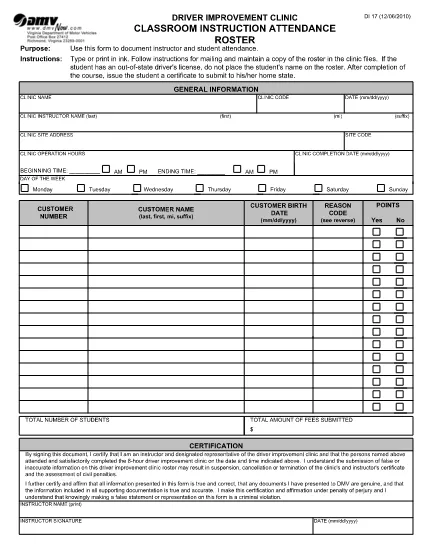
The DI-17 is the Virginia Department of Motor Vehicles (DMV) form used to record attendance for classroom driver‑education instruction. Schools, driving instructors, and training programs must submit this roster within 24 hours of completing a class.

What Is the DI-17 Form?

DI-17 captures essential details such as the instructor’s name, student information, dates of instruction, and the specific curriculum covered. It ensures compliance with Virginia DMV regulations and helps verify that learners have met the required training hours before taking the road‑skills test.

How to Complete the DI-17 Online

With Formize’s fillable PDF technology you can complete the DI‑17 directly in your browser—no extra software needed. Follow the simple steps below:

  • Click the Fill out this form button on this page.
  • Wait for the Formize PDF Filler app to load (usually a few seconds).
  • Enter all required fields exactly as they appear on the original paper form.
  • Use the Save button to store a copy on your device or in the cloud.
  • When finished, click Download to get the completed PDF ready for submission.

Common Errors to Avoid

Even a small mistake can delay processing. Keep these tips in mind:

  • Incorrect dates: Verify the class date matches the DMV’s calendar.
  • Missing signatures: Both the instructor and each student must sign.
  • Illegible handwriting: The fillable fields ensure clear, legible text.
  • Wrong form version: Use the latest DI‑17 PDF provided by the Virginia DMV (the link below is always up‑to‑date).

Submit Your Completed DI-17

After saving the filled PDF, upload it to the Virginia DMV Extranet portal or email it according to your organization’s instructions. The DMV requires receipt within 24 hours of the class.

Why Use Formize Fillable PDF

Formize turns static PDFs into interactive, web‑based forms. Benefits include:

  • Instant access: No downloads or installations.
  • Data accuracy: Built‑in validation reduces entry errors.
  • Secure storage: Your completed form is saved locally or to cloud storage of your choice.
  • Compliance‑ready: The PDF matches the official DMV layout exactly.

Ready to start? Click the button below and fill out the DI‑17 in seconds.

FAQ
  • What is the purpose of the DI‑17 form?

    The DI‑17 records attendance for classroom driver‑education instruction and verifies that students have completed the required training before taking the road‑skills test.

  • Can I fill out the DI‑17 on a mobile device?

    Yes. Formize’s fillable PDF works on smartphones and tablets with any modern browser.

  • Do I need Adobe Acrobat to complete the DI‑17?

    No. The Formize PDF Filler runs entirely in the browser, eliminating the need for separate PDF editors.

  • How soon must the DI‑17 be submitted after a class?

    Virginia DMV requires the completed DI‑17 to be submitted within 24 hours of the class date.

  • What if I make a mistake after saving the form?

    Open the saved PDF again in the Formize filler, correct the error, and re‑save before submitting.

  • Is the DI‑17 form free to download?

    Yes. The official DI‑17 PDF is provided by the Virginia DMV at no cost.

  • Do I need a DMV account to use the fillable version?

    No. You can fill out and download the PDF without a DMV login; however, submission through the Extranet may require an authorized account.

  • Can I print the completed DI‑17 after filling it online?

    Absolutely. After saving, you can print the PDF for your records or to submit a hard copy if required.

AKO

Ako bezplatne vyplniť DI-17 online v 5 jednoduchých krokoch:

  1. 1
    Click the Fill‑out Button
    On this page, press the “Fill out this form” button to launch the Formize PDF Filler.
  2. 2
    Wait for the Filler to Load
    The web app loads the DI‑17 PDF in a few seconds. No download or installation is required.
  3. 3
    Enter Required Information
    Complete each fillable field with accurate data—dates, instructor name, student details, and signatures.
  4. 4
    Review and Save
    Double‑check all entries, then click Save to store a copy on your device or cloud storage.
  5. 5
    Download or Submit
    Download the finished PDF and upload it to the Virginia DMV Extranet portal, or follow your organization’s submission guidelines.
Aplikácia Formize PDF Filler
O

Formuláre žiadosti o vodičský preukaz

DI-17 je jedným z formulárov vodičského preukazu, čo sú dokumenty používané v procese získania alebo obnovenia vodičského preukazu, čo je oficiálny dokument vydaný vládou, ktorý jednotlivcom umožňuje riadiť motorové vozidlo na verejných komunikáciách. Tieto formuláre sa môžu líšiť v závislosti od jurisdikcie, ale vo všeobecnosti zahŕňajú nasledujúce:

Formulár žiadosti: Tento formulár sa používa na žiadosť o vodičský preukaz a zvyčajne vyžaduje osobné informácie, ako je meno, adresa, dátum narodenia a číslo sociálneho poistenia.

Identifikačná dokumentácia: Spolu s formulárom žiadosti sa od jednotlivcov zvyčajne vyžaduje, aby poskytli špecifické identifikačné dokumenty na preukázanie ich totožnosti, trvalého pobytu a legálnej prítomnosti v krajine. Môžu zahŕňať platný cestovný pas, rodný list, kartu sociálneho zabezpečenia alebo iný identifikačný doklad vydaný štátom.

Doklad o bydlisku: Mnohé jurisdikcie vyžadujú od žiadateľov dôkaz o bydlisku, napríklad účet za energie, nájomnú zmluvu alebo výpis z bankového účtu, aby si overili svoju adresu.

Formulár lekárskej prehliadky: Niektoré jurisdikcie môžu vyžadovať lekársku prehliadku, aby sa zabezpečilo, že žiadateľ spĺňa nevyhnutné fyzické a duševné požiadavky na bezpečnú jazdu. Tento formulár zvyčajne vypĺňa lekár.

Formulár ukončenia vzdelávania vodiča: Od vodičov, ktorí prvýkrát prichádzajú, sa môže vyžadovať ukončenie programu vzdelávania vodiča. K žiadosti o vodičský preukaz je často potrebný formulár alebo osvedčenie o úspešnom absolvovaní.

Formulár testu zraku: Test zraku sa bežne vykonáva počas procesu žiadosti o vodičský preukaz. Očný odborník alebo poverený personál posúdi zrakovú ostrosť žiadateľa a vyplní požadovaný formulár.

Tieto formuláre sú zvyčajne dostupné na miestnom ministerstve pre motorové vozidlá (DMV) alebo na ekvivalentnej vládnej agentúre zodpovednej za udeľovanie vodičských oprávnení. Je dôležité skontrolovať špecifické požiadavky a formuláre platné pre vašu jurisdikciu, pretože sa môžu líšiť.

VLASTNOSTI

PDF Filler

Najjednoduchší spôsob, ako vyplniť DI-17 online

  • Rýchlo vyplňte DI-17
    Hľadáte spôsob, ako rýchlo vyplniť DI-17 online? S našou online bezplatnou výplňou formulárov PDF budete vedieť, ako upraviť a vyplniť tento dokument PDF za menej ako minútu.
  • Ľahko použiteľný online editor PDF
    Nebaví vás tlačiť súbory PDF, aby ste ich mohli upravovať pred opätovným naskenovaním a odoslaním späť? Upravujte dokumenty PDF zadarmo online. Použite náš online editor PDF, aby ste ušetrili čas a papier.
  • Skvelé nástroje, všetky platformy
    Zaujíma vás, ako vyplniť DI-17 na počítači Mac, alebo ako možno použiť bezplatný výplň PDF? Naše online nástroje PDF fungujú na všetkých platformách.
  • Bezpečné ukladanie súborov
    Dokončené súbory „DI-17“ sú uložené v zabezpečenej databáze spravovanej hostingom Amazon Cloud. Svoje súbory môžete z nášho systému kedykoľvek odstrániť. V každom prípade sa tieto súbory automaticky vymažú po 24 hodinách.
  • Četovať s DI-17
    Četujte s „DI-17“ na Chatize, čo je bezplatný pomocník na čítanie súborov PDF. Pýtajte sa otázky a získajte odpovede z „DI-17“. Stačí kliknúť na tlačidlo Rozhovor s dokumentom vyššie.

Odstrániť reláciu plnenia

Chcete odstrániť vybratú reláciu plnenia? V takom prípade sa stratí váš postup pri vypĺňaní formulára.

Odstrániť reláciu úprav

Chcete odstrániť vybratú reláciu úprav? V takom prípade sa stratí váš postup pri vytváraní a úprave formulára.