
Zvoľ jazyk

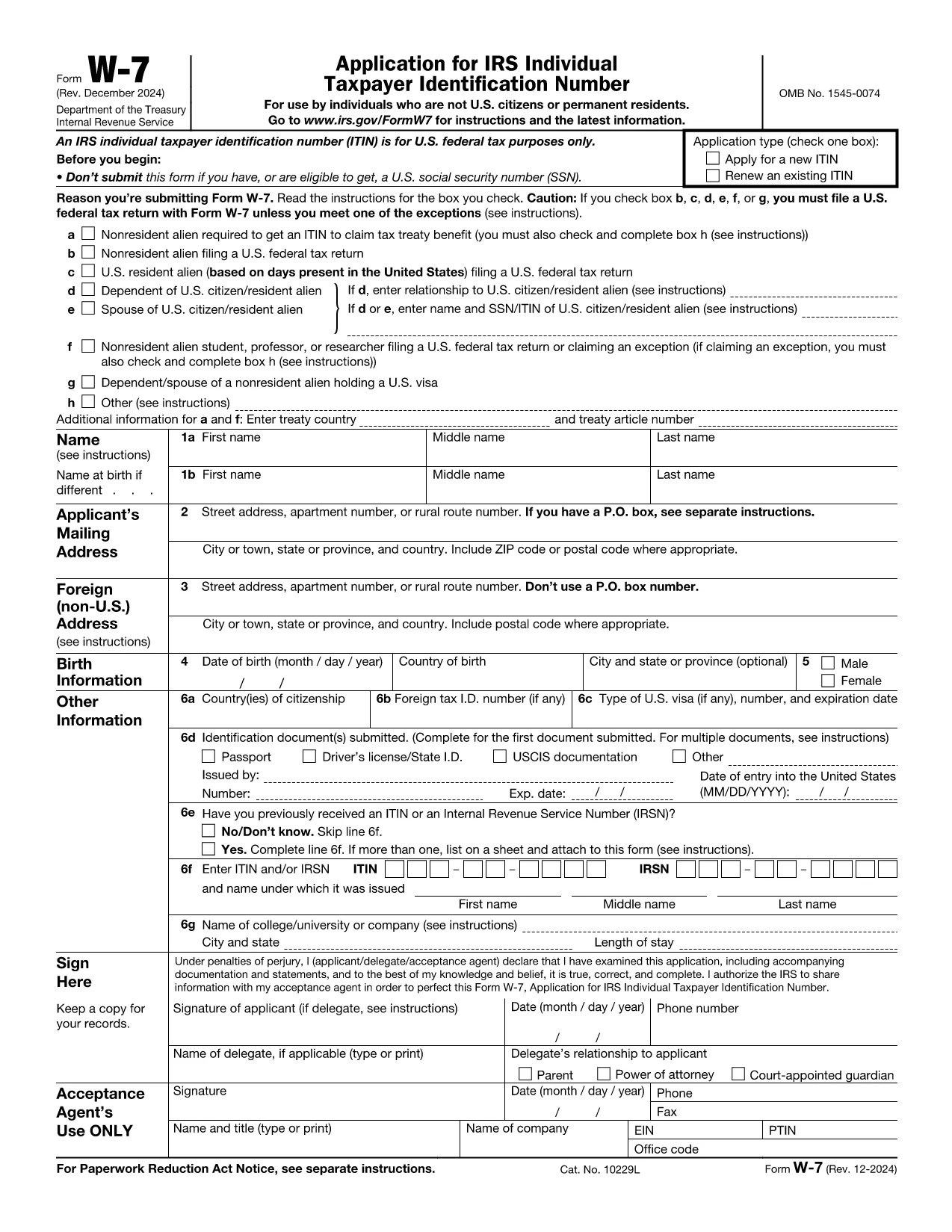
IRS Form W‑7 – Application for an Individual Taxpayer Identification Number (ITIN)

  1. Krajina USA
  2. Jazyk Angličtina
  3. Aktivita dane
  4. oddelenie IRS
IRS Form W‑7 – Application for an Individual Taxpayer Identification Number (ITIN)

Form W‑7 is the official Application for an Individual Taxpayer Identification Number (ITIN) issued by the United States Internal Revenue Service (IRS). Taxpayers who are not eligible for a Social Security Number but need a federal tax identification number use this form.

What Is IRS Form W‑7?

The W‑7 form allows foreign individuals, residents, and certain dependents to obtain an ITIN so they can file U.S. tax returns, claim treaty benefits, or be listed on a tax return. The PDF is fully fillable, but editing it locally can be cumbersome.

Why Use Formize’s Fillable PDF?

  • Instant online filling – No need to download, install a PDF editor, or print the form.
  • Secure cloud processing – Your data stays encrypted while the Formize PDF Filler loads.
  • Auto‑save and review – Make changes, preview the completed document, and download a final PDF ready for mailing.

Step‑by‑Step Guide to Complete the Form Online

Follow the simple steps below to fill out Form W‑7 directly on this page.

Common Mistakes & Tips for a Successful Submission

Avoid these pitfalls to prevent delays:

  • Do not leave any required field blank – the online filler will highlight missing items.
  • Ensure the name on the form matches the identification document exactly.
  • Attach a clear, legible copy of the supporting document (passport, national ID, etc.).
  • Sign the form electronically if your PDF viewer allows it; otherwise, print, sign, and scan.

Where to Send Your Completed Form

After you download the finished PDF, mail it with the required documentation to:

Internal Revenue Service
ITIN Operation
P.O. Box 149342
Austin, TX 78714-9342
USA

Or submit through an IRS-authorized Acceptance Agent.

FAQ
  • Who needs an ITIN?

    Non‑U.S. residents, foreign nationals, and dependents who are not eligible for a Social Security Number but must file a U.S. tax return or be listed on one.

  • Can I submit Form W‑7 electronically?

    The IRS currently requires a paper submission. You can fill it out online with Formize, then download and mail the completed PDF.

  • What documents must I attach?

    A valid, original passport is the most common. If you don’t have a passport, you can provide a combination of a national ID, birth certificate, and a US visa.

  • How long does the IRS take to process an ITIN?

    Processing usually takes 6‑10 weeks after the IRS receives a complete application.

  • Do I need to renew my ITIN?

    ITINs that have not been used on a tax return for three consecutive years will expire. Renewal is done using the same Form W‑7.

  • Is there a fee to apply for an ITIN?

    There is no fee to the IRS, but if you use an Acceptance Agent, they may charge a service fee.

  • Can I correct a mistake after mailing?

    If you discover an error, you must submit a new, complete Form W‑7 with the correct information.

  • What if I lose my ITIN?

    You can request a copy of your ITIN by calling the IRS at 1‑800‑829‑1040 or by submitting a new Form W‑7.

  • Is Form W‑7 the same as a Social Security Number?

    No. An ITIN is for tax purposes only and does not provide work authorization or Social Security benefits.

  • Will Formize store my personal data?

    Formize processes the PDF in a secure, temporary session and does not retain any personal information after you download the completed form.

AKO

Ako bezplatne vyplniť IRS Form W-7 online v 5 jednoduchých krokoch:

  1. 1
    Click the "Fill out this form" button
    Locate the bright orange "Fill out this form" button on the page and click it. The Formize PDF Filler app will open in a new tab.
  2. 2
    Wait for the Formize PDF Filler to load
    The online filler loads the IRS Form W‑7 automatically. This usually takes a few seconds.
  3. 3
    Enter your information
    Complete each required field. The filler will highlight any missing or incorrect entries.
  4. 4
    Upload supporting documents
    Use the "Attach File" option to add a scanned copy of your passport or other ID as required by the IRS.
  5. 5
    Review and download
    When you’re satisfied, click "Save & Download" to get a PDF ready for mailing to the IRS.
Aplikácia Formize PDF Filler
O

Daňové formuláre

IRS Form W-7 je jedným z daňových formulárov, ktoré sú dokumentmi používanými na oznamovanie informácií súvisiacich s daňami príslušnému daňovému úradu. Existujú rôzne typy daňových formulárov vrátane federálnych, štátnych a miestnych daňových formulárov, ktoré sa môžu líšiť v závislosti od okolností a miesta daňovníka.

VLASTNOSTI

PDF Filler

Najjednoduchší spôsob, ako vyplniť IRS Form W-7 online

  • Rýchlo vyplňte IRS Form W-7
    Hľadáte spôsob, ako rýchlo vyplniť IRS Form W-7 online? S našou online bezplatnou výplňou formulárov PDF budete vedieť, ako upraviť a vyplniť tento dokument PDF za menej ako minútu.
  • Ľahko použiteľný online editor PDF
    Nebaví vás tlačiť súbory PDF, aby ste ich mohli upravovať pred opätovným naskenovaním a odoslaním späť? Upravujte dokumenty PDF zadarmo online. Použite náš online editor PDF, aby ste ušetrili čas a papier.
  • Skvelé nástroje, všetky platformy
    Zaujíma vás, ako vyplniť IRS Form W-7 na počítači Mac, alebo ako možno použiť bezplatný výplň PDF? Naše online nástroje PDF fungujú na všetkých platformách.
  • Bezpečné ukladanie súborov
    Dokončené súbory „IRS Form W-7“ sú uložené v zabezpečenej databáze spravovanej hostingom Amazon Cloud. Svoje súbory môžete z nášho systému kedykoľvek odstrániť. V každom prípade sa tieto súbory automaticky vymažú po 24 hodinách.
  • Četovať s IRS Form W-7
    Četujte s „IRS Form W-7“ na Chatize, čo je bezplatný pomocník na čítanie súborov PDF. Pýtajte sa otázky a získajte odpovede z „IRS Form W-7“. Stačí kliknúť na tlačidlo Rozhovor s dokumentom vyššie.

Odstrániť reláciu plnenia

Chcete odstrániť vybratú reláciu plnenia? V takom prípade sa stratí váš postup pri vypĺňaní formulára.

Odstrániť reláciu úprav

Chcete odstrániť vybratú reláciu úprav? V takom prípade sa stratí váš postup pri vytváraní a úprave formulára.