
Zvoľ jazyk

Pennsylvania MV-150 Vehicle Registration Form – Fillable PDF

  1. Jazyk Angličtina
  2. Krajina USA
  3. oddelenie PennDOT
  4. Aktivita Registrácia vozidla
Pennsylvania MV-150 Vehicle Registration Form – Fillable PDF

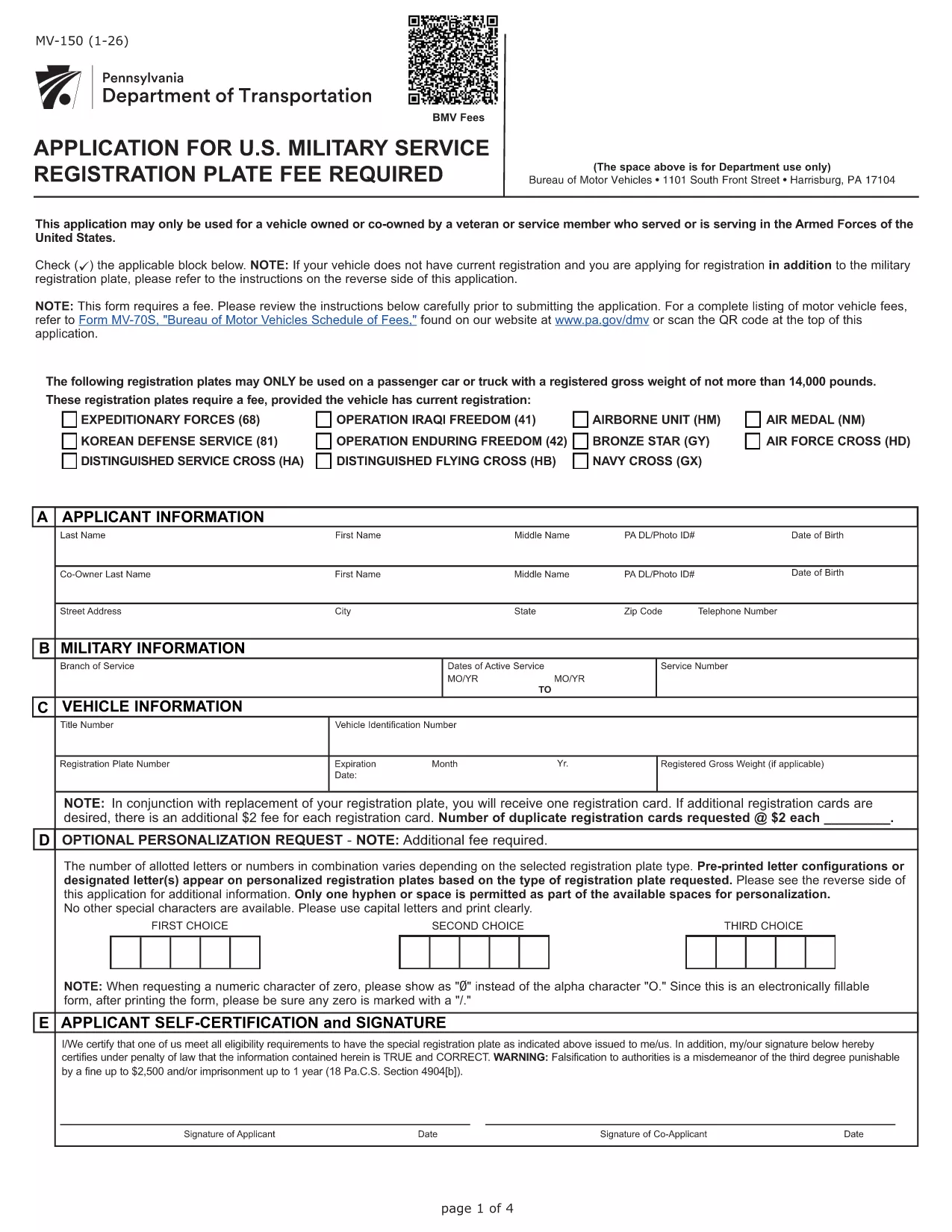
The MV-150 is Pennsylvania’s official vehicle registration application used by the Department of Transportation (PennDOT). Whether you are registering a new vehicle, renewing a plate, or updating ownership information, the MV-150 must be completed accurately and submitted with the appropriate fee.

What Is the MV-150 Form?

The MV-150 collects essential details about the vehicle, the owner, and any lienholders. It is required for:

  • Initial registration of a newly purchased vehicle
  • Renewal of an existing registration
  • Transfer of ownership
  • Adding or removing a license plate

How to Complete the MV-150 Online with Formize

Instead of downloading the PDF and editing it with a separate program, you can fill it out directly on our page using the Formize PDF Filler app:

  1. Click the "Fill out this form" button below the description.
  2. Wait a few seconds while the Formize PDF Filler loads the MV-150.
  3. Enter your information in each fillable field – the interface is intuitive and saves your progress automatically.
  4. Review the entered data, then click Submit to download the completed PDF.
  5. Print the filled PDF and attach it to your payment (check or money order) before mailing it to PennDOT.

Common Mistakes & Tips for a Smooth Submission

  • Incorrect VIN or Plate Number: Double‑check the Vehicle Identification Number (VIN) and license plate details before submitting.
  • Missing Signature: The owner’s signature is required; use the signature field in Formize or print and sign the downloaded PDF.
  • Wrong Fee Amount: Verify the current registration fee on the PennDOT website; attaching an incorrect payment may delay processing.
  • Incomplete Owner Information: Provide full name, address, and phone number; partial entries cause the form to be returned.

Where to Submit Your Completed MV-150

After filling out the form, mail the printed PDF together with your payment to:

Pennsylvania Department of Transportation
Bureau of Motor Vehicles
1101 North Front Street
Harrisburg, PA 17120

For faster processing, you may also take the completed form to any PennDOT Driver & Vehicle Service Center.

Frequently Asked Questions

Below are answers to the most common questions about the MV-150.

FAQ
  • Do I need a PennDOT account to use the Formize filler?

    No. The Formize filler works directly in your browser without any login or account.

  • Can I save my progress and finish the form later?

    Yes. The filler automatically stores your entries locally. When you return, click "Load saved data" to continue.

  • Is the MV-150 form free to download?

    The PDF itself is provided by PennDOT at no cost. You only pay the registration fee when you submit the form.

  • What if I make a mistake after downloading the PDF?

    Print a new copy using the Formize filler, correct the error, and submit the updated version. Avoid hand‑editing the PDF with external editors.

  • How long does it take for PennDOT to process my MV-150?

    Processing typically takes 7‑10 business days after receipt, provided all information and payment are correct.

  • Can I submit the MV-150 electronically?

    PennDOT currently requires a printed, signed form with payment. Electronic submission is not accepted for this form.

  • What fee should I include with my MV-150?

    Visit the PennDOT fee schedule page for the latest registration fees based on vehicle type and weight.

  • Do I need to attach the MV-140 with the MV-150?

    If you are renewing registration, you must also submit the MV-140 (Request for Registration) along with the MV-150.

AKO

Ako bezplatne vyplniť MV-150 online v 5 jednoduchých krokoch:

  1. 1
    Open the Fillable Form
    Click the "Fill out this form" button on the page. The Formize PDF Filler will load the MV-150 automatically.
  2. 2
    Enter Your Information
    Fill in each field – owner details, vehicle data, and lienholder information if applicable. The app saves your entries in real time.
  3. 3
    Review and Download
    Check all entries for accuracy, then click the "Download Completed PDF" button to get a printable version of the filled form.
  4. 4
    Print and Sign
    Print the completed PDF, sign where required, and attach it to your payment.
  5. 5
    Mail to PennDOT
    Send the package to the PennDOT address listed on the page or bring it to a local Driver & Vehicle Service Center.
Aplikácia Formize PDF Filler
O

Registračné formuláre vozidla

MV-150 je jeden z formulárov DMV, tiež známy ako formuláre oddelenia motorových vozidiel, čo sú dokumenty používané pri rôznych transakciách a procesoch súvisiacich s motorovými vozidlami. DMV je vládna agentúra zodpovedná za udeľovanie vodičských oprávnení, registráciu vozidiel a presadzovanie zákonov o motorových vozidlách. Konkrétne dostupné formuláre DMV sa môžu líšiť podľa jurisdikcie, ale tu je niekoľko bežných príkladov:

Formuláre vodičského preukazu: Tieto formuláre sa používajú na podanie žiadosti o vodičský preukaz alebo na vyžiadanie zmien alebo obnovenia. Zvyčajne vyžadujú osobné údaje, doklad totožnosti a môžu obsahovať sekcie pre lekárske informácie alebo históriu jazdy.

Formuláre na registráciu vozidla: Tieto formuláre sa používajú na registráciu motorového vozidla na DMV. Požadujú informácie o vozidle, podrobnosti o vlastníctve a doklad o poistení.

Formuláre prevodu vlastníctva: Pri kúpe alebo predaji vozidla sa tieto formuláre používajú na prevod vlastníctva z jednej strany na druhú. Vyžadujú informácie o kupujúcom, predajcovi, podrobnostiach o vozidle a môžu zahŕňať aj kúpnu zmluvu.

Formuláre o uvoľnení zodpovednosti za vozidlo: Pri predaji alebo prevode vlastníctva vozidla tieto formuláre informujú DMV, že predajca už nie je zodpovedný za vozidlo. Pomáha chrániť predajcu pred zodpovednosťou za nehody alebo incidenty týkajúce sa vozidla po predaji.

Formuláre na obnovenie ŠPZ a registrácie: Tieto formuláre sa používajú na obnovenie registrácie vozidla alebo žiadosť o nové ŠPZ. Zvyčajne vyžadujú informácie o registrovanom vlastníkovi, aktuálne registračné údaje a zaplatenie príslušných poplatkov.

Formuláre žiadosti o záznamy o jazde: Tieto formuláre umožňujú jednotlivcom vyžiadať si záznamy o jazde od DMV, ktoré poskytujú informácie o priestupkoch pri vedení vozidla, stave preukazu a ďalšie relevantné podrobnosti.

Špeciálne alebo prispôsobené formuláre ŠPZ: Tieto formuláre sa používajú na prihlásenie sa na prispôsobené alebo špeciálne ŠPZ, ktoré jednotlivcom umožňujú prispôsobiť si ŠPZ špecifickými znakmi alebo vzormi.

Toto je len niekoľko príkladov z mnohých formulárov, ktoré môžu byť dostupné prostredníctvom DMV. Špecifické formuláre a požiadavky sa môžu líšiť v závislosti od jurisdikcie, takže je dôležité, aby ste si pozreli miestnu webovú stránku DMV alebo navštívili kanceláriu DMV, aby ste získali správne formuláre pre vaše konkrétne potreby.

VLASTNOSTI

PDF Filler

Najjednoduchší spôsob, ako vyplniť MV-150 online

  • Rýchlo vyplňte MV-150
    Hľadáte spôsob, ako rýchlo vyplniť MV-150 online? S našou online bezplatnou výplňou formulárov PDF budete vedieť, ako upraviť a vyplniť tento dokument PDF za menej ako minútu.
  • Ľahko použiteľný online editor PDF
    Nebaví vás tlačiť súbory PDF, aby ste ich mohli upravovať pred opätovným naskenovaním a odoslaním späť? Upravujte dokumenty PDF zadarmo online. Použite náš online editor PDF, aby ste ušetrili čas a papier.
  • Skvelé nástroje, všetky platformy
    Zaujíma vás, ako vyplniť MV-150 na počítači Mac, alebo ako možno použiť bezplatný výplň PDF? Naše online nástroje PDF fungujú na všetkých platformách.
  • Bezpečné ukladanie súborov
    Dokončené súbory „MV-150“ sú uložené v zabezpečenej databáze spravovanej hostingom Amazon Cloud. Svoje súbory môžete z nášho systému kedykoľvek odstrániť. V každom prípade sa tieto súbory automaticky vymažú po 24 hodinách.
  • Četovať s MV-150
    Četujte s „MV-150“ na Chatize, čo je bezplatný pomocník na čítanie súborov PDF. Pýtajte sa otázky a získajte odpovede z „MV-150“. Stačí kliknúť na tlačidlo Rozhovor s dokumentom vyššie.

Odstrániť reláciu plnenia

Chcete odstrániť vybratú reláciu plnenia? V takom prípade sa stratí váš postup pri vypĺňaní formulára.

Odstrániť reláciu úprav

Chcete odstrániť vybratú reláciu úprav? V takom prípade sa stratí váš postup pri vytváraní a úprave formulára.