
Zvoľ jazyk

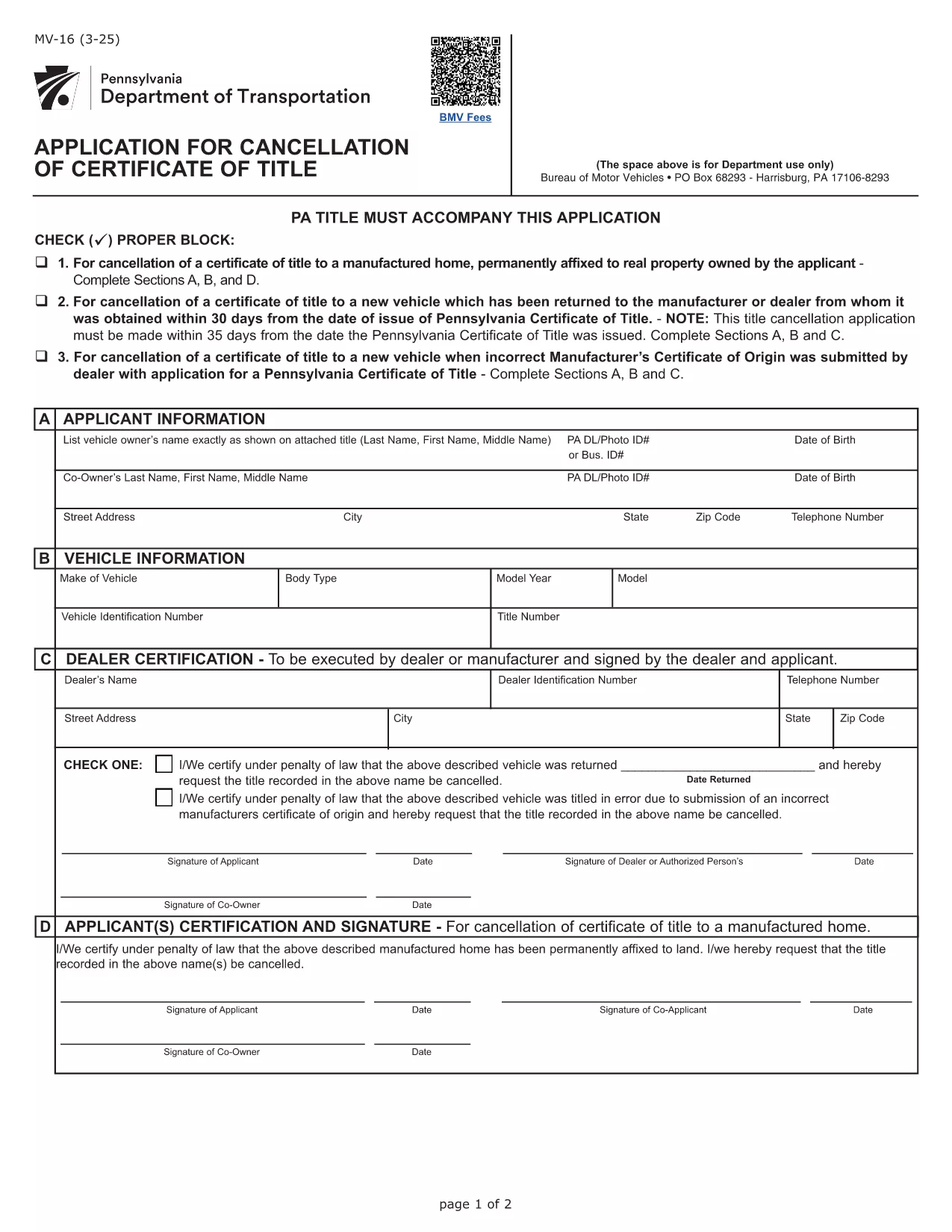
Form MV-16 – Certificate of Title Application (Fillable PDF)

  1. Jazyk Angličtina
  2. Krajina USA
  3. Aktivita Registrácia vozidla
  4. oddelenie Pennsylvania Department of Transportation
Form MV-16 – Certificate of Title Application (Fillable PDF)

Form MV-16 is the official Pennsylvania application used to obtain a Certificate of Title for a motor vehicle. Whether you’re transferring ownership, correcting a title error, or applying for a new title, this fillable PDF lets you complete the process quickly and accurately.

What is Form MV-16?

The MV-16 form is issued by the Pennsylvania Department of Transportation (PennDOT). It collects vital information such as the vehicle identification number (VIN), owner details, lienholder information, and the type of title request. The form must be signed by the owner (or authorized representative) and, when applicable, the lienholder.

How to Fill Form MV-16 Online

Instead of downloading the PDF and editing it manually, simply click the "Fill out this form" button on this page. The Formize PDF Filler app will load the MV-16 PDF directly in your browser, allowing you to:

  • Enter text into each field with a mouse click.
  • Upload required supporting documents.
  • Save your progress and return later.
  • Download a completed, printable PDF.

Common Mistakes to Avoid

  • Incorrect VIN: Double‑check the Vehicle Identification Number; a single digit error can delay processing.
  • Missing signatures: All required signatures must be electronic or printed and signed before submission.
  • Out‑of‑date addresses: Ensure the mailing address matches the one on file with PennDOT.
  • Unclear lienholder information: Provide the full legal name and address of the lienholder if a loan exists.

Where to Submit the Completed Form

After filling out and saving the PDF, you can submit it in one of three ways:

  1. Mail the printed form to your local PennDOT office.
  2. Upload the PDF through PennDOT’s online portal (if you have an account).
  3. Deliver it in person at a Pennsylvania Department of Revenue (DOR) office.

Following these steps will help ensure a smooth title issuance process.

FAQ
  • What is the purpose of Form MV-16?

    Form MV-16 is used to apply for a new or corrected Certificate of Title for a vehicle registered in Pennsylvania.

  • Can I submit the MV-16 form electronically?

    Yes. After filling the form with Formize, you can upload the completed PDF to PennDOT’s online portal or email it if the agency allows electronic submissions.

  • Do I need a notary for the MV-16 form?

    A notary is not required unless a lienholder or another party specifically requests notarization. Check the instructions on the form for any special cases.

  • How long does it take to receive a new title after submitting MV-16?

    Processing times vary by office, but most PennDOT locations issue a new title within 7‑14 business days after receiving a complete application.

  • What supporting documents are required with MV-16?

    You’ll typically need a valid driver’s license, proof of ownership (bill of sale or previous title), and any lien release documents if applicable.

  • Is there a fee to file Form MV-16?

    Yes. PennDOT charges a title fee, which is listed on the form’s fee schedule. Payment can be made by check, money order, or credit card when submitting.

AKO

Ako bezplatne vyplniť Form MV-16 online v 5 jednoduchých krokoch:

  1. 1
    Click the Fill button
    Press the "Fill out this form" button on this page. The Formize PDF Filler will open the MV-16 PDF directly in your browser.
  2. 2
    Enter all required information
    Complete each field—VIN, owner name, address, lienholder details, and the purpose of the title request. Use dropdowns and checkboxes where provided.
  3. 3
    Review and sign
    Double‑check for errors, then add your electronic signature or print, sign, and scan the document if a handwritten signature is required.
  4. 4
    Save or download
    Click "Save" to store the filled form in your account, or download the completed PDF to your computer.
  5. 5
    Submit to PennDOT
    Print and mail, upload through PennDOT’s portal, or deliver in person as described in the submission section.
Aplikácia Formize PDF Filler
O

Registračné formuláre vozidla

Ak vlastníte alebo si prenajímate motorové vozidlo, príves alebo loď, musíte splniť určité povinnosti, aby bolo vaše vozidlo legálne registrované a bezpečné.

Form MV-16 je jeden z registračných formulárov vozidla, čo sú dokumenty, ktoré sa používajú na registráciu motorového vozidla na príslušnom štátnom alebo provinčnom úrade. Tieto formuláre sa zvyčajne vyžadujú, keď si osoba kúpi nové alebo ojazdené vozidlo alebo keď sa s vozidlom presťahuje do nového štátu alebo provincie.

Presné požiadavky a formuláre potrebné na registráciu vozidla sa môžu líšiť podľa miesta, ale vo všeobecnosti tento proces zahŕňa poskytnutie informácií o vozidle, vlastníkovi a prípadných záložných právach k vozidlu.

Po predložení registračných formulárov a poplatkov vydá štátny alebo krajský úrad majiteľovi vozidla osvedčenie o evidencii alebo poznávaciu značku. Táto registrácia umožňuje legálne prevádzkovanie vozidla na verejných komunikáciách a diaľniciach.

VLASTNOSTI

PDF Filler

Najjednoduchší spôsob, ako vyplniť Form MV-16 online

  • Rýchlo vyplňte Form MV-16
    Hľadáte spôsob, ako rýchlo vyplniť Form MV-16 online? S našou online bezplatnou výplňou formulárov PDF budete vedieť, ako upraviť a vyplniť tento dokument PDF za menej ako minútu.
  • Ľahko použiteľný online editor PDF
    Nebaví vás tlačiť súbory PDF, aby ste ich mohli upravovať pred opätovným naskenovaním a odoslaním späť? Upravujte dokumenty PDF zadarmo online. Použite náš online editor PDF, aby ste ušetrili čas a papier.
  • Skvelé nástroje, všetky platformy
    Zaujíma vás, ako vyplniť Form MV-16 na počítači Mac, alebo ako možno použiť bezplatný výplň PDF? Naše online nástroje PDF fungujú na všetkých platformách.
  • Bezpečné ukladanie súborov
    Dokončené súbory „Form MV-16“ sú uložené v zabezpečenej databáze spravovanej hostingom Amazon Cloud. Svoje súbory môžete z nášho systému kedykoľvek odstrániť. V každom prípade sa tieto súbory automaticky vymažú po 24 hodinách.
  • Četovať s Form MV-16
    Četujte s „Form MV-16“ na Chatize, čo je bezplatný pomocník na čítanie súborov PDF. Pýtajte sa otázky a získajte odpovede z „Form MV-16“. Stačí kliknúť na tlačidlo Rozhovor s dokumentom vyššie.

Odstrániť reláciu plnenia

Chcete odstrániť vybratú reláciu plnenia? V takom prípade sa stratí váš postup pri vypĺňaní formulára.

Odstrániť reláciu úprav

Chcete odstrániť vybratú reláciu úprav? V takom prípade sa stratí váš postup pri vytváraní a úprave formulára.