Zvoľ jazyk

USCIS Form I‑129 – Fillable PDF Online

  1. Krajina USA
  2. Jazyk Angličtina
  3. oddelenie Občianstvo a imigračné služby USA
USCIS Form I‑129 – Fillable PDF Online

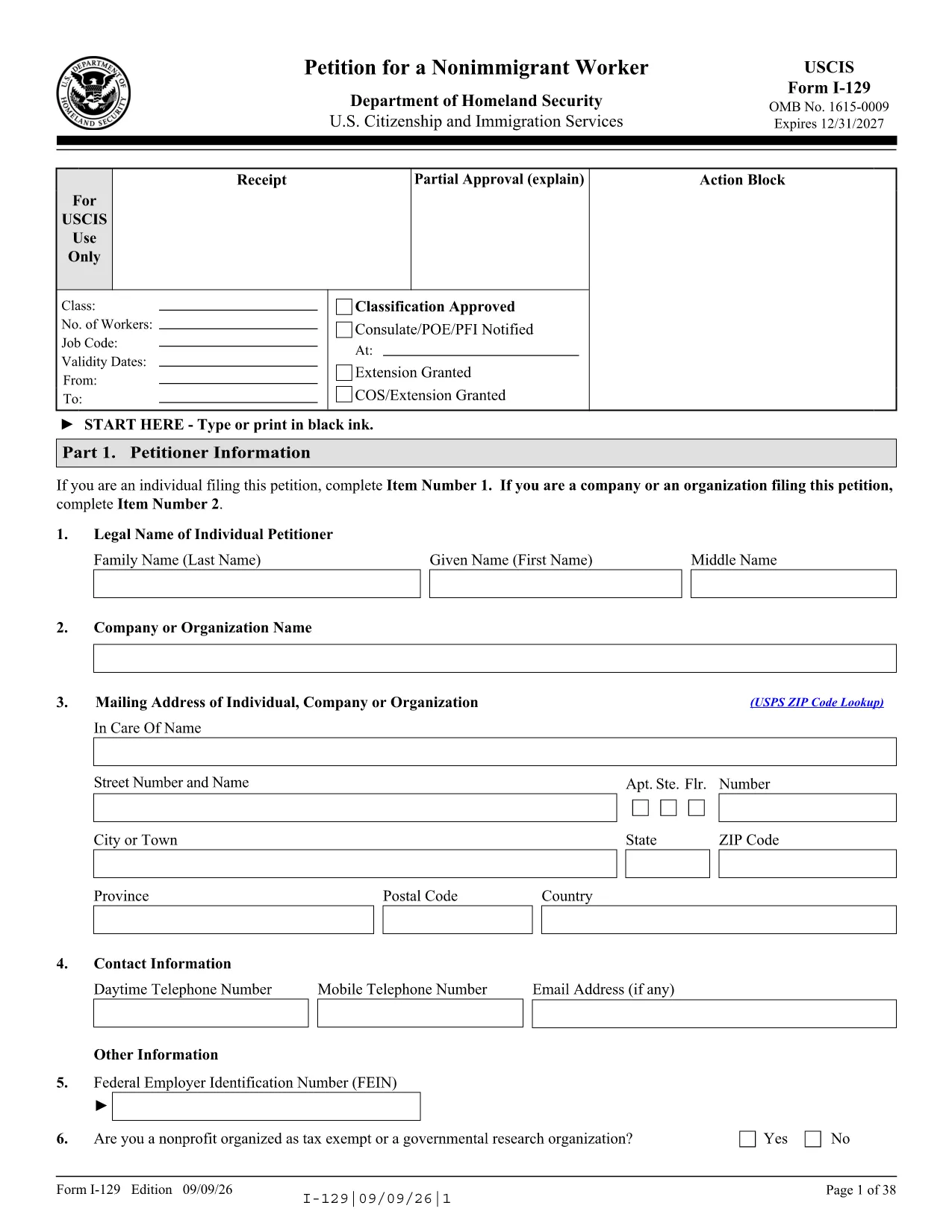
The USCIS Form I‑129 (Petition for a Nonimmigrant Worker) is the official document used by employers to request a visa for foreign workers in categories such as H‑1B, L‑1, O‑1, and many others. Formize makes this government form available as a secure, fillable PDF that you can complete directly in your browser—no extra software required.

Our online Formize PDF Filler loads the exact edition of the form published by USCIS, ensuring that every field, page number, and edition date matches the official version. This helps you avoid costly re‑submission delays.

Below you’ll find a quick overview of the form, step‑by‑step instructions for completing it online, and tips to keep your petition error‑free.

What Is Form I‑129?

Form I‑129 is used to petition for:

  • Temporary workers (H‑1B, H‑2A, H‑2B, H‑3)
  • Intracompany transferees (L‑1A, L‑1B)
  • Individuals with extraordinary ability (O‑1, O‑2)
  • Artists, athletes, and entertainers (P‑1, P‑2, P‑3)
  • Religious workers (R‑1)

The form also serves to request extensions, changes of status, or a new classification for an existing employee.

How to Fill Out Form I‑129 Online

Simply click the "Fill out this form" button on this page. The Formize PDF Filler app will load the official I‑129 PDF. Follow the on‑screen prompts, save your progress, and download the completed file when you’re finished.

Common Mistakes to Avoid

  • Using the wrong edition – USCIS only accepts the edition dated 09/09/26 after November 9 2026. Our PDF is always the current edition.
  • Missing signatures – Every petitioner and, where required, the beneficiary must sign the appropriate sections.
  • Incorrect fee amounts – Verify the latest fee schedule (Form I‑129 includes a biometric fee for H‑1B/L‑1 petitions).
  • Illegible handwriting – Fillable fields ensure clear, machine‑readable text.

Submission & Filing Instructions

After completing the form, download the PDF and print it if you are filing by mail. Attach the required supporting documents and send it to the USCIS filing address that matches your petition category. If you are filing electronically, upload the PDF directly through your USCIS online account.

Need the official PDF? You can also download it directly from USCIS using the link below.

FAQ
  • What edition of Form I‑129 should I use?

    USCIS accepts the 09/09/26 edition after November 9 2026. Our online PDF always reflects the current accepted edition.

  • Can I edit the PDF after I download it?

    Yes, but the fillable version provided by Formize eliminates the need for additional editing tools. All fields are editable before you download the final copy.

  • Do I need a digital signature for Form I‑129?

    USCIS requires a handwritten signature on the printed form for mailed petitions. For electronic filing, you can sign using the USCIS online signature process.

  • How do I know which filing address to use?

    The filing address depends on the visa category and the beneficiary’s location. Refer to the USCIS Direct Filing Addresses page for the most up‑to‑date locations.

  • What fee should I include with my I‑129 petition?

    Fees vary by classification and may include a biometric entry‑exit fee for H‑1B and L‑1 petitions. Check the latest fee schedule on the USCIS website before submitting.

  • Is there a size limit for the PDF when filing online?

    USCIS allows PDF files up to 25 MB for online submission. The fillable I‑129 PDF is well under this limit.

  • Can I use this form for a change of status?

    Yes. Form I‑129 is also used to request a change or extension of status for eligible nonimmigrant categories.

  • What should I do if I make a mistake after filing?

    Submit a corrected Form I‑129 with a cover letter explaining the error. Include the receipt number of the original petition.

AKO

Ako bezplatne vyplniť USCIS Form I-129 online v 5 jednoduchých krokoch:

  1. 1
    Open the Fillable Form
    Click the "Fill out this form" button on this page. The Formize PDF Filler loads the official USCIS I‑129 PDF in your browser.
  2. 2
    Enter Your Information
    Complete each field using the on‑screen prompts. The fillable fields ensure correct formatting and prevent stray marks.
  3. 3
    Save Your Progress
    Use the "Save" button anytime to download a backup copy. You can return later without losing data.
  4. 4
    Download the Completed PDF
    When all sections are filled, click "Download" to save the final PDF. Print it if you are filing by mail, or upload it to your USCIS online account.
  5. 5
    Submit Your Petition
    Attach the completed I‑129 PDF with the required supporting documents and send it to the correct USCIS filing address or upload it electronically.
Aplikácia Formize PDF Filler
O

šablóny USCIS Form I-129

S tradičnou sadou funkcií na prezeranie a vypĺňanie dokumentu PDF v kombinácii s výhodami webovej aplikácie a responzívneho rozloženia môžete USCIS Form I-129 dokončiť za pár minút.

VLASTNOSTI

PDF Filler

Najjednoduchší spôsob, ako vyplniť USCIS Form I-129 online

  • Rýchlo vyplňte USCIS Form I-129
    Hľadáte spôsob, ako rýchlo vyplniť USCIS Form I-129 online? S našou online bezplatnou výplňou formulárov PDF budete vedieť, ako upraviť a vyplniť tento dokument PDF za menej ako minútu.
  • Ľahko použiteľný online editor PDF
    Nebaví vás tlačiť súbory PDF, aby ste ich mohli upravovať pred opätovným naskenovaním a odoslaním späť? Upravujte dokumenty PDF zadarmo online. Použite náš online editor PDF, aby ste ušetrili čas a papier.
  • Skvelé nástroje, všetky platformy
    Zaujíma vás, ako vyplniť USCIS Form I-129 na počítači Mac, alebo ako možno použiť bezplatný výplň PDF? Naše online nástroje PDF fungujú na všetkých platformách.
  • Bezpečné ukladanie súborov
    Dokončené súbory „USCIS Form I-129“ sú uložené v zabezpečenej databáze spravovanej hostingom Amazon Cloud. Svoje súbory môžete z nášho systému kedykoľvek odstrániť. V každom prípade sa tieto súbory automaticky vymažú po 24 hodinách.
  • Četovať s USCIS Form I-129
    Četujte s „USCIS Form I-129“ na Chatize, čo je bezplatný pomocník na čítanie súborov PDF. Pýtajte sa otázky a získajte odpovede z „USCIS Form I-129“. Stačí kliknúť na tlačidlo Rozhovor s dokumentom vyššie.

Odstrániť reláciu plnenia

Chcete odstrániť vybratú reláciu plnenia? V takom prípade sa stratí váš postup pri vypĺňaní formulára.

Odstrániť reláciu úprav

Chcete odstrániť vybratú reláciu úprav? V takom prípade sa stratí váš postup pri vytváraní a úprave formulára.