Zvoľ jazyk

Application Form to Renew Your Green Card (Form I‑90)

  1. Krajina USA
  2. Jazyk Angličtina
  3. oddelenie Občianstvo a imigračné služby USA
  4. Aktivita imigrácia
Application Form to Renew Your Green Card (Form I‑90)

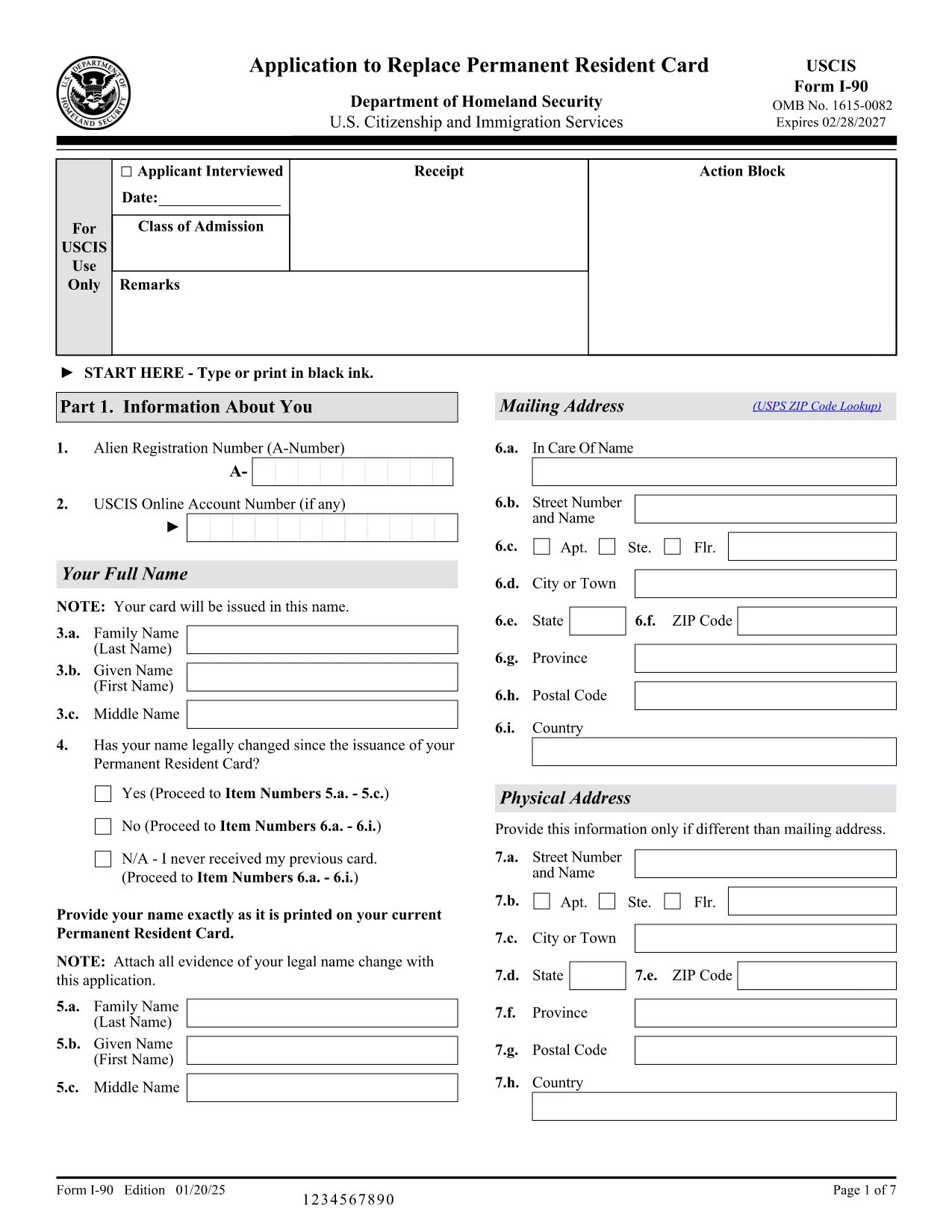
Renewing your Permanent Resident Card (Green Card) is simple when you have the right form and a reliable online filler. Form I‑90, the Application to Replace Permanent Resident Card, is the official USCIS document used by lawful permanent residents to replace an expired, lost, or damaged Green Card.

This page provides a direct, fillable PDF version of Form I‑90, step‑by‑step instructions, and answers to the most common questions. All you need to do is click Fill out this form and let the Formize PDF Filler load the document for you.

What Is Form I‑90 and Who Needs It?

Form I‑90 is required for anyone who needs a new Green Card because:

  • The card is expiring within six months.
  • The card was lost, stolen, or damaged.
  • Personal information (name, gender, etc.) has changed.

Conditional residents must use a different form (I‑751 or I‑829), but all other permanent residents use I‑90.

How to Complete the Fillable I‑90 Form Online

Follow the simple steps below. No PDF editor is required – the Formize PDF Filler handles everything in your browser.

Common Mistakes to Avoid When Filing

Even a small error can delay processing. Watch out for:

  • Using an outdated edition of the form (check the edition date at the bottom of each page).
  • Leaving required fields blank.
  • Signing the form with a scanned image instead of a digital signature.
  • Submitting the form without the required filing fee.

Where to Submit Your Completed Application

You have two options:

  1. Online filing: Create a USCIS online account, upload the completed PDF, and pay the fee electronically.
  2. Paper filing: Print the completed form, attach supporting documents, and mail it to the USCIS Lockbox address listed in the form instructions.

Helpful Resources and FAQs

For additional guidance, visit the USCIS I‑90 page or use the Formize help section on this page.

FAQ
  • Do I need to fill out Form I‑90 if my Green Card is only a few months from expiration?

    Yes. USCIS recommends filing the renewal up to six months before the card expires to avoid a lapse in proof of status.

  • Can I file Form I‑90 online instead of using the PDF?

    Absolutely. USCIS offers an online filing option, but the fillable PDF is useful if you prefer to submit a paper application or need a copy for your records.

  • What fee is required to file Form I‑90?

    As of the latest edition, the filing fee is $455 plus an $85 biometrics fee, payable online or by check/money order if filing by mail.

  • How long does it take to receive a new Green Card after filing?

    Processing times vary by service center, but most applicants receive their new card within 6‑8 months after USCIS receives a complete application.

  • What should I do if I lose my receipt notice after filing?

    Log into your USCIS online account to retrieve the receipt number, or contact USCIS Customer Service with your personal details for assistance.

  • Do conditional residents use Form I‑90?

    No. Conditional residents must file Form I‑751 (for marriage‑based) or Form I‑829 (for investor‑based) to remove conditions before renewing their card.

  • Is the fillable PDF compatible with mobile devices?

    Yes. The Formize PDF Filler works on most modern smartphones and tablets, allowing you to complete the form on the go.

AKO

Ako bezplatne vyplniť I-90 form online v 4 jednoduchých krokoch:

  1. 1
    Open the Fillable Form
    Click the "Fill out this form" button on this page. The Formize PDF Filler app will load the I‑90 PDF directly in your browser.
  2. 2
    Enter Your Information
    Complete each field using your keyboard. The filler validates entries in real time, so you’ll know instantly if something is missing or incorrectly formatted.
  3. 3
    Review and Sign
    After all sections are filled, review the entire form, add a digital signature, and save the completed PDF to your computer.
  4. 4
    Submit Your Application
    Upload the saved PDF to your USCIS online account or print it for paper filing. Remember to include the filing fee and any required supporting documents.
Aplikácia Formize PDF Filler
O

šablóny I-90 form

S tradičnou sadou funkcií na prezeranie a vypĺňanie dokumentu PDF v kombinácii s výhodami webovej aplikácie a responzívneho rozloženia môžete I-90 form dokončiť za pár minút.

VLASTNOSTI

PDF Filler

Najjednoduchší spôsob, ako vyplniť I-90 form online

  • Rýchlo vyplňte I-90 form
    Hľadáte spôsob, ako rýchlo vyplniť I-90 form online? S našou online bezplatnou výplňou formulárov PDF budete vedieť, ako upraviť a vyplniť tento dokument PDF za menej ako minútu.
  • Ľahko použiteľný online editor PDF
    Nebaví vás tlačiť súbory PDF, aby ste ich mohli upravovať pred opätovným naskenovaním a odoslaním späť? Upravujte dokumenty PDF zadarmo online. Použite náš online editor PDF, aby ste ušetrili čas a papier.
  • Skvelé nástroje, všetky platformy
    Zaujíma vás, ako vyplniť I-90 form na počítači Mac, alebo ako možno použiť bezplatný výplň PDF? Naše online nástroje PDF fungujú na všetkých platformách.
  • Bezpečné ukladanie súborov
    Dokončené súbory „I-90 form“ sú uložené v zabezpečenej databáze spravovanej hostingom Amazon Cloud. Svoje súbory môžete z nášho systému kedykoľvek odstrániť. V každom prípade sa tieto súbory automaticky vymažú po 24 hodinách.
  • Četovať s I-90 form
    Četujte s „I-90 form“ na Chatize, čo je bezplatný pomocník na čítanie súborov PDF. Pýtajte sa otázky a získajte odpovede z „I-90 form“. Stačí kliknúť na tlačidlo Rozhovor s dokumentom vyššie.

Odstrániť reláciu plnenia

Chcete odstrániť vybratú reláciu plnenia? V takom prípade sa stratí váš postup pri vypĺňaní formulára.

Odstrániť reláciu úprav

Chcete odstrániť vybratú reláciu úprav? V takom prípade sa stratí váš postup pri vytváraní a úprave formulára.