Zvoľ jazyk

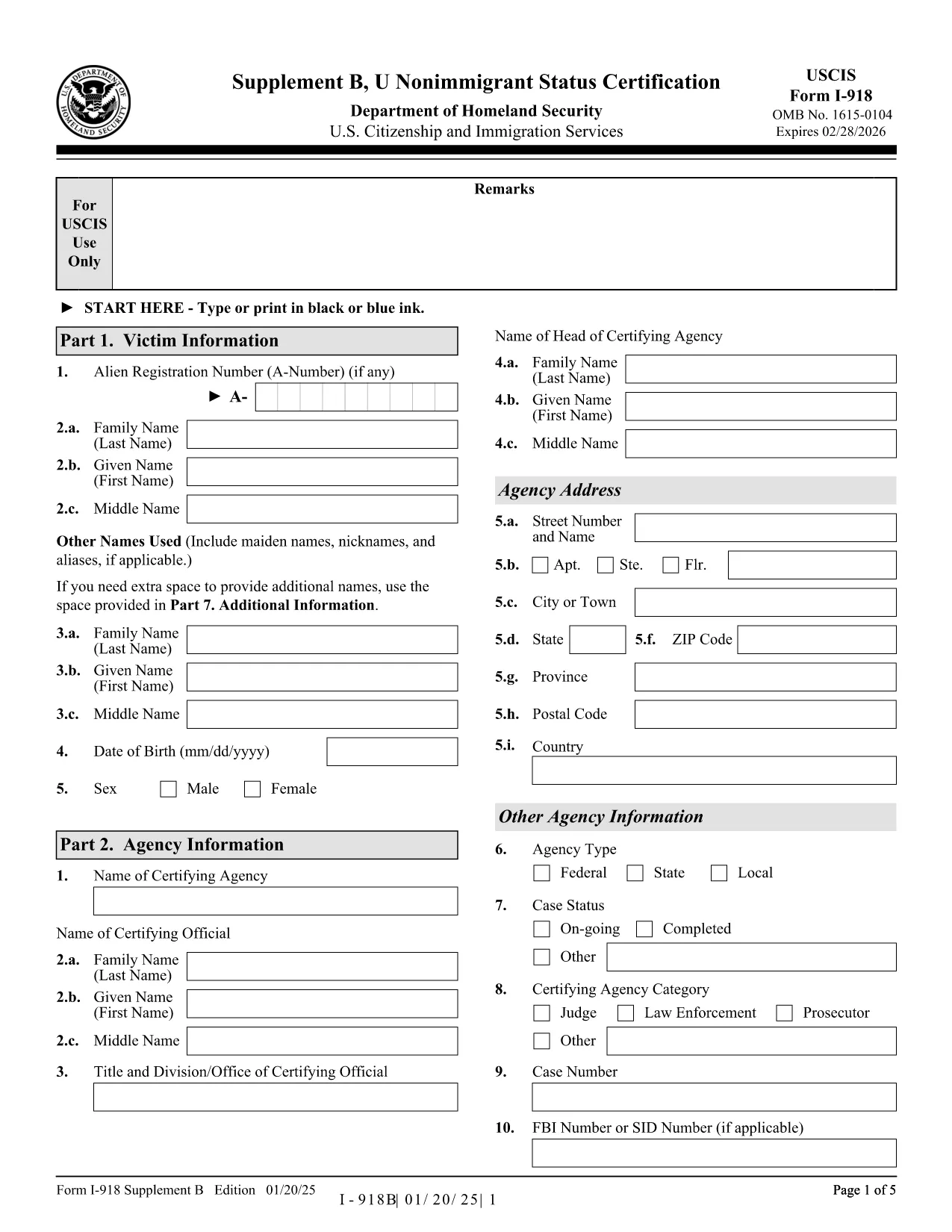
I-918 Supplement B – U Nonimmigrant Status Certification (Fillable PDF)

  1. Krajina USA
  2. Jazyk Angličtina
  3. oddelenie Občianstvo a imigračné služby USA
I-918 Supplement B – U Nonimmigrant Status Certification (Fillable PDF)

The Form I-918 Supplement B (U Nonimmigrant Status Certification) is used by a designated certifying official to confirm that a victim of a qualifying crime is eligible for U‑visa status. This form is a crucial part of the U‑visa petition (Form I-918) and must be completed accurately before submission to USCIS.

What Is Form I-918 Supplement B?

This supplement collects detailed information about the victim, the crime, and the law‑enforcement agency’s certification that the victim has been helpful, is willing to cooperate, and suffers substantial physical or mental abuse. The form is signed by a certifying official from a law‑enforcement agency, a prosecutor, or an authorized non‑governmental organization.

How to Complete the Fillable I-918 Supplement B Online

Instead of downloading, printing, and scanning, you can fill the form directly in your browser:

  1. Click the "Fill out this form" button on this page.
  2. The Formize PDF Filler app will load the official I-918 Supplement B PDF.
  3. Enter all required information in the highlighted fields. The filler automatically saves your progress.
  4. When you reach the signature field, use the built‑in e‑signature tool or print, sign, and scan the final page.
  5. Download the completed PDF and attach it to your Form I-918 petition package.

Common Mistakes to Avoid When Filling the Form

  • Leaving optional fields blank when the instructions require "N/A".
  • Using an incorrect date format (MM/DD/YYYY) – USCIS rejects inconsistent dates.
  • Failing to include the victim’s full legal name exactly as it appears on other immigration documents.
  • Not providing the certifying official’s title and agency contact information.
  • Submitting a scanned signature that is unreadable or cropped.

Where to Submit the Certified Form

After completing the fillable PDF, attach it to your Form I-918 packet and mail it to the USCIS lockbox address listed in the official instructions. If you are filing with an immigration attorney, give them the completed PDF for final review.

Download the Official PDF

For reference or offline use, you can also download the official, unfilled PDF directly from USCIS:

Download I-918 Supplement B (PDF)

Using Formize’s fillable version saves time, reduces errors, and ensures the document is USCIS‑compliant.

FAQ
  • Who can sign Form I-918 Supplement B?

    A designated certifying official – such as a law‑enforcement officer, prosecutor, or authorized non‑governmental organization – must sign and certify the victim’s eligibility.

  • Can I submit a partially completed Supplement B?

    No. USCIS will reject the petition if any required field is missing or left incomplete.

  • Do I need to attach supporting documents to Supplement B?

    Only attach the supplementary evidence required by the main Form I-918 (e.g., police reports, medical records). The certification itself does not need extra attachments.

  • Is an electronic signature accepted?

    USCIS accepts electronic signatures on the fillable PDF as long as they are clear and legible. For added assurance, many users print, sign, and scan the signature page.

  • What if the certifying official’s information changes after signing?

    The official must provide an updated, signed Supplement B. Do not amend a previously signed form.

  • How long does it take USCIS to process the certification?

    The certification is reviewed as part of the overall I-918 petition. Processing times vary, but the certification itself does not add separate processing time.

  • Can I fill out the form on a mobile device?

    Yes. The Formize PDF Filler works on most modern smartphones and tablets, but a desktop provides a clearer view for detailed fields.

  • Is there a fee to download the fillable PDF?

    No. The fillable version is free on Formize. USCIS does not charge a fee for the Supplement B itself; the fee is attached to Form I-918.

AKO

Ako bezplatne vyplniť I-918 Supplement B online v 5 jednoduchých krokoch:

  1. 1
    Open the Fillable Form
    Click the "Fill out this form" button on this page to launch the Formize PDF Filler.
  2. 2
    Enter All Required Information
    Fill each highlighted field with accurate data. The filler auto‑saves as you type.
  3. 3
    Add the Certifying Official’s Signature
    Use the built‑in e‑signature tool, or print, sign, and re‑upload the signed page.
  4. 4
    Download the Completed PDF
    When the form is complete, click "Download" to save the certified PDF to your computer.
  5. 5
    Attach to Your I-918 Petition
    Include the completed Supplement B with Form I-918 and mail the packet to the USCIS lockbox address.
Aplikácia Formize PDF Filler
O

šablóny I-918 Supplement B

S tradičnou sadou funkcií na prezeranie a vypĺňanie dokumentu PDF v kombinácii s výhodami webovej aplikácie a responzívneho rozloženia môžete I-918 Supplement B dokončiť za pár minút.

VLASTNOSTI

PDF Filler

Najjednoduchší spôsob, ako vyplniť I-918 Supplement B online

  • Rýchlo vyplňte I-918 Supplement B
    Hľadáte spôsob, ako rýchlo vyplniť I-918 Supplement B online? S našou online bezplatnou výplňou formulárov PDF budete vedieť, ako upraviť a vyplniť tento dokument PDF za menej ako minútu.
  • Ľahko použiteľný online editor PDF
    Nebaví vás tlačiť súbory PDF, aby ste ich mohli upravovať pred opätovným naskenovaním a odoslaním späť? Upravujte dokumenty PDF zadarmo online. Použite náš online editor PDF, aby ste ušetrili čas a papier.
  • Skvelé nástroje, všetky platformy
    Zaujíma vás, ako vyplniť I-918 Supplement B na počítači Mac, alebo ako možno použiť bezplatný výplň PDF? Naše online nástroje PDF fungujú na všetkých platformách.
  • Bezpečné ukladanie súborov
    Dokončené súbory „I-918 Supplement B“ sú uložené v zabezpečenej databáze spravovanej hostingom Amazon Cloud. Svoje súbory môžete z nášho systému kedykoľvek odstrániť. V každom prípade sa tieto súbory automaticky vymažú po 24 hodinách.
  • Četovať s I-918 Supplement B
    Četujte s „I-918 Supplement B“ na Chatize, čo je bezplatný pomocník na čítanie súborov PDF. Pýtajte sa otázky a získajte odpovede z „I-918 Supplement B“. Stačí kliknúť na tlačidlo Rozhovor s dokumentom vyššie.

Odstrániť reláciu plnenia

Chcete odstrániť vybratú reláciu plnenia? V takom prípade sa stratí váš postup pri vypĺňaní formulára.

Odstrániť reláciu úprav

Chcete odstrániť vybratú reláciu úprav? V takom prípade sa stratí váš postup pri vytváraní a úprave formulára.