
Zvoľ jazyk

MV205 Notice of Total‑Loss Payoff – Owner‑Retained Salvage Vehicle

  1. Jazyk Angličtina
  2. Krajina USA
  3. Aktivita Registrácia vozidla
  4. Štát Montana
MV205 Notice of Total‑Loss Payoff – Owner‑Retained Salvage Vehicle

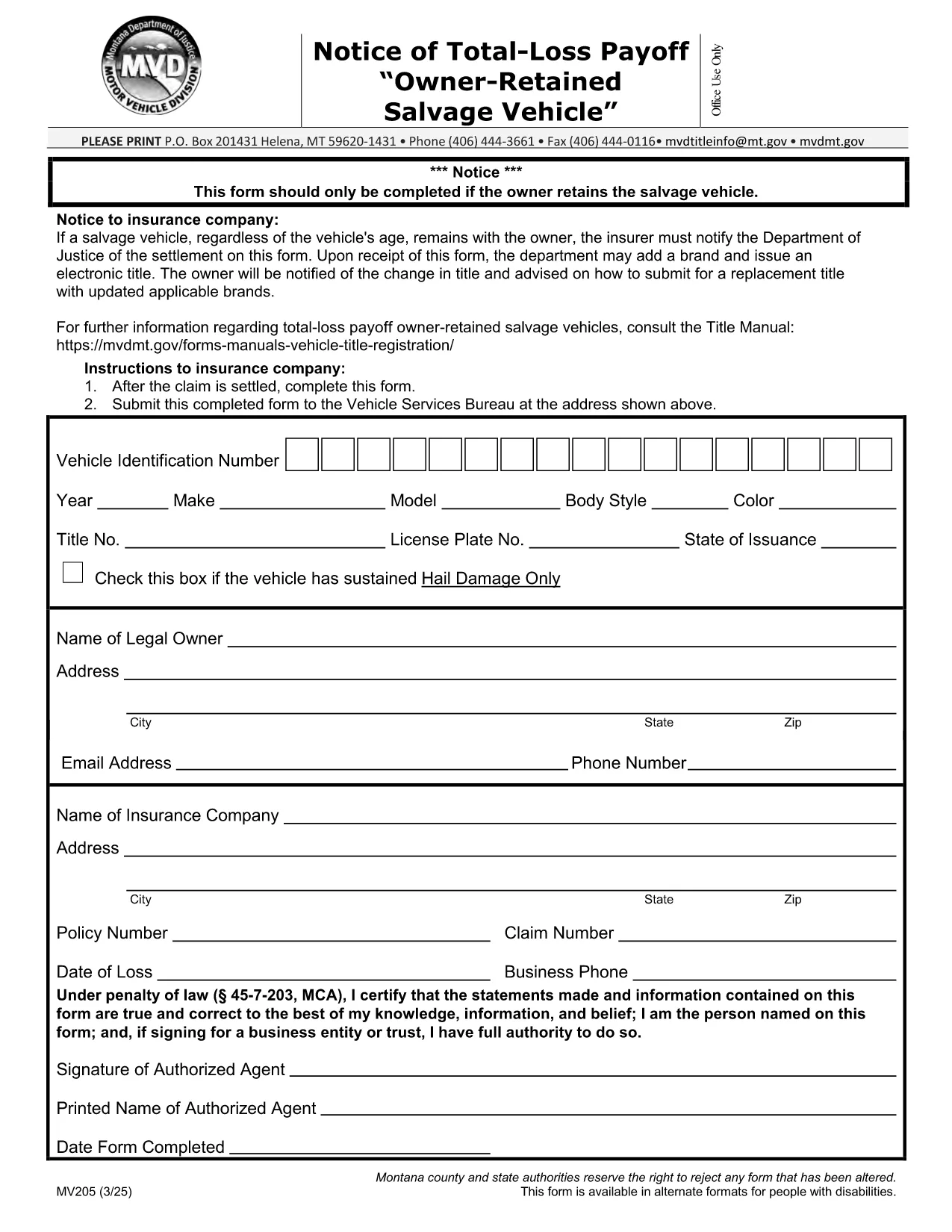
The MV205 Notice of Total‑Loss Payoff is the official document used when a salvage vehicle remains with its owner after a total‑loss settlement. Insurance companies must notify the Department of Motor Vehicles (DMV) using this form, and the owner may be required to surrender the certificate of ownership.

What Is the MV205 Form?

The MV205 captures essential details about the vehicle, the insurance settlement, and the owner’s intent to retain the salvage. It is required by most state motor vehicle agencies, including Montana, to ensure proper title handling and to prevent fraudulent title transfers.

How to Complete the MV205 Online with Formize

Instead of downloading, printing, and scanning, you can fill the MV205 directly in your browser. Follow these simple steps:

  1. Click the "Fill out this form" button on this page.
  2. Wait a few seconds while the Formize PDF Filler app loads.
  3. Enter the required information in each fillable field (vehicle VIN, insurer details, payout amount, etc.).
  4. Use the built‑in eSignature tool to sign the form electronically.
  5. Click Save & Download to get a completed PDF, or choose Send via Email to forward it directly to your insurance company or DMV.

Common Mistakes & Tips for a Successful Submission

  • Incorrect VIN: Double‑check the Vehicle Identification Number; a single digit error can delay processing.
  • Missing insurer information: Include the insurer’s name, claim number, and contact details exactly as they appear on the settlement statement.
  • Signature errors: Use the eSignature tool; a handwritten signature scanned later may be rejected.
  • Leaving optional fields blank: If a field is marked "optional," you may leave it empty, but be sure all required fields are completed.
  • Submitting the wrong version: Use the official MV205 PDF provided below to avoid outdated formats.

Where to Send the Completed Form

After you finish the online fill, send the PDF to the address listed on the form. Typically, this is the state Department of Motor Vehicles or the specific office handling title transfers. Some states also accept electronic submissions through their online portal—check your local DMV website for details.

Need help? Review the FAQs below or contact your insurance provider for clarification on the settlement amount.

FAQ
  • Who needs to file the MV205 form?

    Any vehicle owner whose insurance company has paid a total‑loss settlement and who intends to keep the salvage vehicle must file the MV205 with the state DMV.

  • Can I submit the MV205 electronically?

    Many states accept an electronically signed PDF. Check your local DMV website; otherwise, print the completed form and mail it to the address shown on the form.

  • What happens if I forget to include the insurer’s claim number?

    The DMV may reject the form, causing processing delays. Always include the full claim number as it appears on the settlement statement.

  • Do I need to surrender my current certificate of ownership?

    Yes, the DMV typically requires you to surrender the existing certificate of ownership when you submit the MV205 for a salvage vehicle.

  • Is the Formize filler free to use?

    Formize offers free filling and e‑signing for most state forms, including MV205. No download or installation is required.

  • How long does it take the DMV to process the MV205?

    Processing time varies by state, but most DMVs complete the review within 7‑10 business days after receiving a correctly completed form.

  • Can I correct a mistake after I’ve submitted the MV205?

    If you notice an error, contact your DMV immediately. In most cases, you’ll need to submit a corrected MV205 with a brief explanation.

  • Is the MV205 the same as a title transfer form?

    No. The MV205 notifies the DMV of a total‑loss payoff for a retained salvage vehicle. A separate title transfer form is required to change ownership.

AKO

Ako bezplatne vyplniť MV205 form online v 5 jednoduchých krokoch:

  1. 1
    Open the Fillable Form
    Click the "Fill out this form" button on the page. The Formize PDF Filler will open in a new tab.
  2. 2
    Load the Formize PDF Filler
    Wait a few seconds while the secure online editor loads the MV205 PDF.
  3. 3
    Enter All Required Information
    Type the VIN, insurer details, payout amount, and any other required fields directly into the fillable boxes.
  4. 4
    Add Your Electronic Signature
    Use the built‑in eSignature tool to sign the form. This signature is legally binding.
  5. 5
    Save or Send the Completed Form
    Click "Save & Download" to keep a copy, or choose "Send via Email" to forward the completed MV205 to your DMV or insurance company.
Aplikácia Formize PDF Filler
O

Registračné formuláre vozidla

MV205 form je jeden z registračných formulárov vozidla, ktoré sú dokumentmi používanými na registráciu motorového vozidla na príslušnom vládnom orgáne, zvyčajne na ministerstve pre motorové vozidlá (DMV) alebo na ekvivalentnom úrade. Tieto formuláre sa vyžadujú, keď si osoba kúpi nové alebo ojazdené vozidlo, prevedie vlastníctvo vozidla alebo sa s vozidlom presťahuje do novej jurisdikcie.

Konkrétne formuláre na registráciu vozidla sa môžu líšiť v závislosti od jurisdikcie, ale vo všeobecnosti vyžadujú nasledujúce informácie:

Informácie o vozidle: Zahŕňajú podrobnosti o vozidle, ako je značka, model, rok, identifikačné číslo vozidla (VIN) a stav počítadla kilometrov.

Informácie o vlastníkovi: Formulár bude vyžadovať informácie o vlastníkovi vozidla vrátane jeho mena, adresy, kontaktných informácií a čísla vodičského preukazu.

Preukázanie vlastníctva: V závislosti od okolností sa môže vyžadovať dôkaz o vlastníctve, ako napríklad osvedčenie o vlastníctve, kúpna zmluva alebo osvedčenie výrobcu o pôvode (v prípade nových vozidiel).

Informácie o poistení: Zvyčajne sa vyžaduje doklad o platnom poistení vozidla. To môže zahŕňať poskytnutie čísla poistnej zmluvy, dátumov krytia a podrobností o poisťovni.

Platba poplatkov: Registrácia vozidla zahŕňa platbu rôznych poplatkov, ako sú registračné poplatky, dane a prípadne ďalšie poplatky špecifické pre jurisdikciu.

Okrem týchto základných požiadaviek môžu mať niektoré jurisdikcie ďalšie požiadavky na formuláre alebo dokumentáciu. V určitých oblastiach môžu byť napríklad potrebné výsledky emisných testov, bezpečnostné kontroly alebo preukázanie trvalého pobytu.

Po vyplnení a odoslaní registračných formulárov vozidla vydá štátny orgán osvedčenie o evidencii, poznávacie značky a evidenčné nálepky. Z týchto dokladov vyplýva, že vozidlo je legálne registrované a oprávnené na prevádzku na verejných komunikáciách.

Je dôležité poznamenať, že požiadavky na registráciu vozidiel sa môžu v závislosti od jurisdikcie výrazne líšiť. Preto sa odporúča konzultovať s miestnym DMV alebo ekvivalentnou agentúrou špecifické formuláre a postupy platné pre vašu lokalitu.

VLASTNOSTI

PDF Filler

Najjednoduchší spôsob, ako vyplniť MV205 form online

  • Rýchlo vyplňte MV205 form
    Hľadáte spôsob, ako rýchlo vyplniť MV205 form online? S našou online bezplatnou výplňou formulárov PDF budete vedieť, ako upraviť a vyplniť tento dokument PDF za menej ako minútu.
  • Ľahko použiteľný online editor PDF
    Nebaví vás tlačiť súbory PDF, aby ste ich mohli upravovať pred opätovným naskenovaním a odoslaním späť? Upravujte dokumenty PDF zadarmo online. Použite náš online editor PDF, aby ste ušetrili čas a papier.
  • Skvelé nástroje, všetky platformy
    Zaujíma vás, ako vyplniť MV205 form na počítači Mac, alebo ako možno použiť bezplatný výplň PDF? Naše online nástroje PDF fungujú na všetkých platformách.
  • Bezpečné ukladanie súborov
    Dokončené súbory „MV205 form“ sú uložené v zabezpečenej databáze spravovanej hostingom Amazon Cloud. Svoje súbory môžete z nášho systému kedykoľvek odstrániť. V každom prípade sa tieto súbory automaticky vymažú po 24 hodinách.
  • Četovať s MV205 form
    Četujte s „MV205 form“ na Chatize, čo je bezplatný pomocník na čítanie súborov PDF. Pýtajte sa otázky a získajte odpovede z „MV205 form“. Stačí kliknúť na tlačidlo Rozhovor s dokumentom vyššie.

Odstrániť reláciu plnenia

Chcete odstrániť vybratú reláciu plnenia? V takom prípade sa stratí váš postup pri vypĺňaní formulára.

Odstrániť reláciu úprav

Chcete odstrániť vybratú reláciu úprav? V takom prípade sa stratí váš postup pri vytváraní a úprave formulára.