
Zvoľ jazyk

Nevada DMV VP-193 Registration Services Transmittal Form (Fillable PDF)

  1. Jazyk Angličtina
  2. Krajina USA
  3. Aktivita Registrácia vozidla
  4. Štát Nevada
Nevada DMV VP-193 Registration Services Transmittal Form (Fillable PDF)

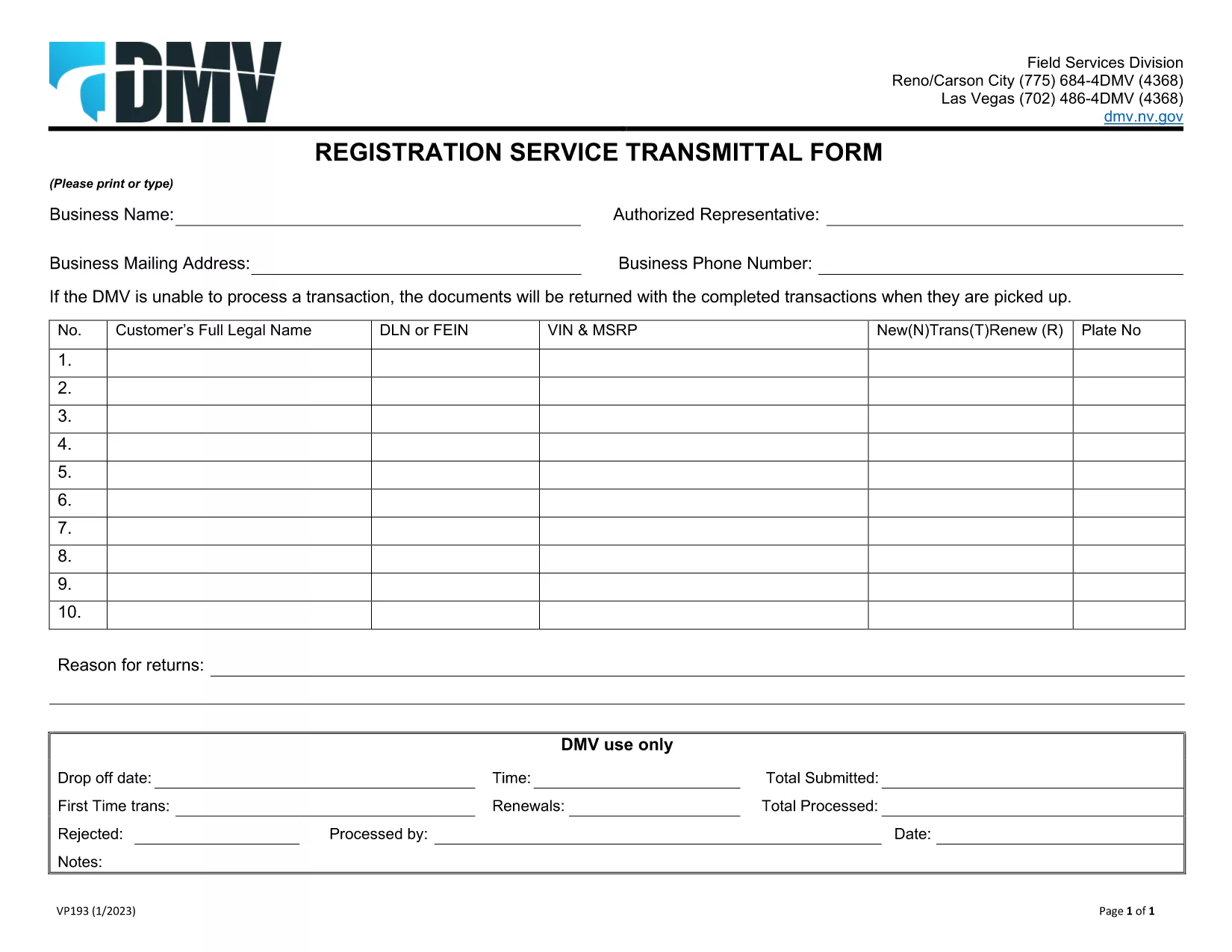
The VP-193 Registration Services Transmittal Form is the official Nevada DMV document used to transmit registration‑related information between dealers, lenders, and the Department of Motor Vehicles. Whether you are a vehicle dealer, a lien holder, or an individual preparing a registration packet, this fillable PDF saves you time and ensures compliance.

What Is the VP-193 Form?

VP-193 serves as a cover sheet for registration packages. It captures essential data such as the business name, authorized representative, mailing address, and the specific registration services requested. The form must be printed or typed, signed in person, and submitted with the supporting registration documents.

How to Complete the VP-193 Online

With Formize’s integrated PDF filler you can fill out the VP-193 directly in your browser—no download‑and‑install needed. Follow the simple steps below:

  • Click the Fill out this form button on this page.
  • Wait a few seconds while the Formize PDF Filler app loads.
  • Enter the required information in each field. Required fields are highlighted in red.
  • Review the completed form for accuracy.
  • Save a copy to your computer or cloud storage, then print and sign in person.

Common Mistakes to Avoid

  • Leaving required fields blank – the DMV will reject the package.
  • Using a digital signature – the form must be signed with a wet ink signature.
  • Incorrect business address – double‑check mailing address formats.
  • Mismatched VIN or plate numbers – ensure the numbers match the accompanying registration documents.

Where to Submit the Completed Form

After printing and signing, include the VP-193 with your registration packet and mail it to the address listed on the form, or deliver it in person to any Nevada DMV office. For expedited processing, you may also submit the package at a DMV “Express” window.

Need a printable version? Download the official VP-193 PDF and start filling it out now.

FAQ
  • Do I need a digital signature on the VP‑193?

    No. The Nevada DMV requires a wet‑ink signature. Use the online filler for data entry, then print and sign manually.

  • Can I submit the VP‑193 electronically?

    The form must be printed and signed before submission. Electronic submission is not accepted for this transmittal form.

  • What if I make a mistake after printing?

    Cross out the error with a single line, initial it, and write the correct information. For major errors, re‑fill the form using Formize and print a new copy.

  • Is the VP‑193 required for every vehicle registration?

    Only when a dealer, lender, or third party is transmitting registration services on behalf of the vehicle owner.

  • How long does it take for the DMV to process a VP‑193 package?

    Standard processing usually takes 7‑10 business days after receipt. Expedited services are available at select DMV locations.

  • Do I need to include supporting documents with the VP‑193?

    Yes. Attach the vehicle title, registration application, proof of insurance, and any lien release documents required for your transaction.

AKO

Ako bezplatne vyplniť VP-193 online v 5 jednoduchých krokoch:

  1. 1
    Click the Fill‑out Button
    Press the “Fill out this form” button on this page to launch the Formize PDF Filler.
  2. 2
    Wait for the Filler to Load
    A few seconds later the fillable PDF will appear in the browser window.
  3. 3
    Enter All Required Information
    Complete each highlighted field with accurate business and registration details.
  4. 4
    Review, Save, and Print
    Check your entries, save a digital copy, then print the form for a wet‑ink signature.
  5. 5
    Submit to the Nevada DMV
    Attach the signed VP‑193 to your registration packet and mail or deliver it to the DMV.
Aplikácia Formize PDF Filler
O

Registračné formuláre vozidla

VP-193 je jeden z registračných formulárov vozidla, ktoré sú dokumentmi používanými na registráciu motorového vozidla na príslušnom vládnom orgáne, zvyčajne na ministerstve pre motorové vozidlá (DMV) alebo na ekvivalentnom úrade. Tieto formuláre sa vyžadujú, keď si osoba kúpi nové alebo ojazdené vozidlo, prevedie vlastníctvo vozidla alebo sa s vozidlom presťahuje do novej jurisdikcie.

Konkrétne formuláre na registráciu vozidla sa môžu líšiť v závislosti od jurisdikcie, ale vo všeobecnosti vyžadujú nasledujúce informácie:

Informácie o vozidle: Zahŕňajú podrobnosti o vozidle, ako je značka, model, rok, identifikačné číslo vozidla (VIN) a stav počítadla kilometrov.

Informácie o vlastníkovi: Formulár bude vyžadovať informácie o vlastníkovi vozidla vrátane jeho mena, adresy, kontaktných informácií a čísla vodičského preukazu.

Preukázanie vlastníctva: V závislosti od okolností sa môže vyžadovať dôkaz o vlastníctve, ako napríklad osvedčenie o vlastníctve, kúpna zmluva alebo osvedčenie výrobcu o pôvode (v prípade nových vozidiel).

Informácie o poistení: Zvyčajne sa vyžaduje doklad o platnom poistení vozidla. To môže zahŕňať poskytnutie čísla poistnej zmluvy, dátumov krytia a podrobností o poisťovni.

Platba poplatkov: Registrácia vozidla zahŕňa platbu rôznych poplatkov, ako sú registračné poplatky, dane a prípadne ďalšie poplatky špecifické pre jurisdikciu.

Okrem týchto základných požiadaviek môžu mať niektoré jurisdikcie ďalšie požiadavky na formuláre alebo dokumentáciu. V určitých oblastiach môžu byť napríklad potrebné výsledky emisných testov, bezpečnostné kontroly alebo preukázanie trvalého pobytu.

Po vyplnení a odoslaní registračných formulárov vozidla vydá štátny orgán osvedčenie o evidencii, poznávacie značky a evidenčné nálepky. Z týchto dokladov vyplýva, že vozidlo je legálne registrované a oprávnené na prevádzku na verejných komunikáciách.

Je dôležité poznamenať, že požiadavky na registráciu vozidiel sa môžu v závislosti od jurisdikcie výrazne líšiť. Preto sa odporúča konzultovať s miestnym DMV alebo ekvivalentnou agentúrou špecifické formuláre a postupy platné pre vašu lokalitu.

VLASTNOSTI

PDF Filler

Najjednoduchší spôsob, ako vyplniť VP-193 online

  • Rýchlo vyplňte VP-193
    Hľadáte spôsob, ako rýchlo vyplniť VP-193 online? S našou online bezplatnou výplňou formulárov PDF budete vedieť, ako upraviť a vyplniť tento dokument PDF za menej ako minútu.
  • Ľahko použiteľný online editor PDF
    Nebaví vás tlačiť súbory PDF, aby ste ich mohli upravovať pred opätovným naskenovaním a odoslaním späť? Upravujte dokumenty PDF zadarmo online. Použite náš online editor PDF, aby ste ušetrili čas a papier.
  • Skvelé nástroje, všetky platformy
    Zaujíma vás, ako vyplniť VP-193 na počítači Mac, alebo ako možno použiť bezplatný výplň PDF? Naše online nástroje PDF fungujú na všetkých platformách.
  • Bezpečné ukladanie súborov
    Dokončené súbory „VP-193“ sú uložené v zabezpečenej databáze spravovanej hostingom Amazon Cloud. Svoje súbory môžete z nášho systému kedykoľvek odstrániť. V každom prípade sa tieto súbory automaticky vymažú po 24 hodinách.
  • Četovať s VP-193
    Četujte s „VP-193“ na Chatize, čo je bezplatný pomocník na čítanie súborov PDF. Pýtajte sa otázky a získajte odpovede z „VP-193“. Stačí kliknúť na tlačidlo Rozhovor s dokumentom vyššie.

Odstrániť reláciu plnenia

Chcete odstrániť vybratú reláciu plnenia? V takom prípade sa stratí váš postup pri vypĺňaní formulára.

Odstrániť reláciu úprav

Chcete odstrániť vybratú reláciu úprav? V takom prípade sa stratí váš postup pri vytváraní a úprave formulára.