
Zvoľ jazyk

BLC‑54C Blue Emergency Light Permit Application (Fillable PDF)

  1. Jazyk Angličtina
  2. Krajina USA
  3. Aktivita Registrácia vozidla
  4. Štát New Jersey
BLC‑54C Blue Emergency Light Permit Application (Fillable PDF)

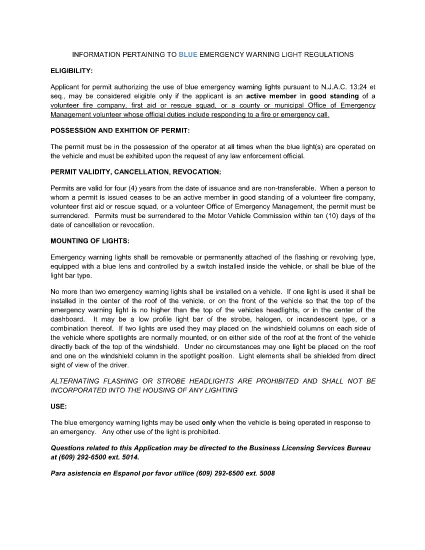
The BLC‑54C is the New Jersey Motor Vehicle Commission (MVC) application that authorizes volunteers to use blue emergency warning lights on their vehicles. Whether you’re a firefighter, first‑aid squad member, rescue team volunteer, or an authorized municipal emergency manager, this fillable PDF lets you complete the permit request quickly and accurately.

Why use Formize? Our built‑in PDF filler loads directly in your browser, so you never need to download, print, edit, and re‑scan the form. Fill, sign, and download the completed PDF in minutes.

Below you’ll find everything you need to know about the BLC‑54C form, from eligibility to step‑by‑step online completion.

Who Needs the BLC‑54C Form?

Active members of volunteer fire companies, first‑aid squads, rescue squads, and municipal Office of Emergency Management personnel who respond to fire or emergency calls are required to hold a blue‑light permit.

Eligibility Requirements

  • Must be an active volunteer in good standing with a recognized emergency organization.
  • Must have documented duties that include responding to fire or emergency calls.
  • Municipal officials (mayor, chief executive) must certify the organization’s need for the permit.

How to Complete the Form Online

Follow the simple steps in the “How‑To” section below. The Formize PDF Filler automatically validates required fields, so you’ll know instantly if something is missing.

Common Mistakes to Avoid

  • Leaving the “Signature” field blank – use the e‑sign feature.
  • Submitting outdated contact information – double‑check phone and email.
  • Failing to attach supporting documentation (e.g., letter from the fire department).

Submitting Your Completed Application

After you download the filled PDF, print it and attach any required attachments, then submit it to the New Jersey MVC office as instructed on the form.

FAQ
  • What is the BLC‑54C form used for?

    It is the official New Jersey application that authorizes volunteers to install and operate blue emergency warning lights on their vehicles.

  • Who is eligible to apply?

    Active volunteers in good standing with fire companies, first‑aid squads, rescue squads, or municipal emergency management offices that respond to emergencies.

  • Can I submit the form electronically?

    The form must be printed and mailed or delivered to the NJ MVC after it is completed and signed. The online filler only streamlines data entry.

  • Do I need a separate signature from my organization?

    Yes. The form requires a signature from an authorized official (mayor, chief executive, or department head) confirming the applicant’s role.

  • How long does the permit processing take?

    Processing times vary, but the MVC typically reviews applications within 10‑14 business days after receipt.

  • Is there a fee for the BLC‑54C permit?

    Yes, the MVC charges a nominal fee. Refer to the fee schedule on the form or the MVC website for the current amount.

  • What happens if I operate a blue light without this permit?

    Operating blue emergency lights without a valid permit can result in fines, vehicle registration suspension, and possible criminal charges.

  • Can I use the same form for other states?

    No. The BLC‑54C is specific to New Jersey. Other states have their own separate applications.

AKO

Ako bezplatne vyplniť BLC-54C online v 5 jednoduchých krokoch:

  1. 1
    Open the Fillable Form
    Click the “Fill out this form” button on this page. The Formize PDF Filler app will load directly in your browser.
  2. 2
    Enter Your Information
    Complete each field – the filler highlights required sections and validates data in real time.
  3. 3
    Add Your Signature
    Use the built‑in e‑sign tool to apply a legally binding signature.
  4. 4
    Download the Completed PDF
    When all fields are filled, click “Download” to save the completed BLC‑54C form to your device.
  5. 5
    Print and Submit
    Print the downloaded PDF, attach any supporting documents, and submit it to the New Jersey MVC as instructed.
Aplikácia Formize PDF Filler
O

Registračné formuláre vozidla

Ak vlastníte alebo si prenajímate motorové vozidlo, príves alebo loď, musíte splniť určité povinnosti, aby bolo vaše vozidlo legálne registrované a bezpečné.

BLC-54C je jeden z registračných formulárov vozidla, čo sú dokumenty, ktoré sa používajú na registráciu motorového vozidla na príslušnom štátnom alebo provinčnom úrade. Tieto formuláre sa zvyčajne vyžadujú, keď si osoba kúpi nové alebo ojazdené vozidlo alebo keď sa s vozidlom presťahuje do nového štátu alebo provincie.

Presné požiadavky a formuláre potrebné na registráciu vozidla sa môžu líšiť podľa miesta, ale vo všeobecnosti tento proces zahŕňa poskytnutie informácií o vozidle, vlastníkovi a prípadných záložných právach k vozidlu.

Po predložení registračných formulárov a poplatkov vydá štátny alebo krajský úrad majiteľovi vozidla osvedčenie o evidencii alebo poznávaciu značku. Táto registrácia umožňuje legálne prevádzkovanie vozidla na verejných komunikáciách a diaľniciach.

VLASTNOSTI

PDF Filler

Najjednoduchší spôsob, ako vyplniť BLC-54C online

  • Rýchlo vyplňte BLC-54C
    Hľadáte spôsob, ako rýchlo vyplniť BLC-54C online? S našou online bezplatnou výplňou formulárov PDF budete vedieť, ako upraviť a vyplniť tento dokument PDF za menej ako minútu.
  • Ľahko použiteľný online editor PDF
    Nebaví vás tlačiť súbory PDF, aby ste ich mohli upravovať pred opätovným naskenovaním a odoslaním späť? Upravujte dokumenty PDF zadarmo online. Použite náš online editor PDF, aby ste ušetrili čas a papier.
  • Skvelé nástroje, všetky platformy
    Zaujíma vás, ako vyplniť BLC-54C na počítači Mac, alebo ako možno použiť bezplatný výplň PDF? Naše online nástroje PDF fungujú na všetkých platformách.
  • Bezpečné ukladanie súborov
    Dokončené súbory „BLC-54C“ sú uložené v zabezpečenej databáze spravovanej hostingom Amazon Cloud. Svoje súbory môžete z nášho systému kedykoľvek odstrániť. V každom prípade sa tieto súbory automaticky vymažú po 24 hodinách.
  • Četovať s BLC-54C
    Četujte s „BLC-54C“ na Chatize, čo je bezplatný pomocník na čítanie súborov PDF. Pýtajte sa otázky a získajte odpovede z „BLC-54C“. Stačí kliknúť na tlačidlo Rozhovor s dokumentom vyššie.

Odstrániť reláciu plnenia

Chcete odstrániť vybratú reláciu plnenia? V takom prípade sa stratí váš postup pri vypĺňaní formulára.

Odstrániť reláciu úprav

Chcete odstrániť vybratú reláciu úprav? V takom prípade sa stratí váš postup pri vytváraní a úprave formulára.