
Zvoľ jazyk

MVR-7 Fillable PDF – North Carolina DMV Form

  1. Jazyk Angličtina
  2. Krajina USA
  3. Aktivita Registrácia vozidla
  4. Štát Severná Karolina
MVR-7 Fillable PDF – North Carolina DMV Form

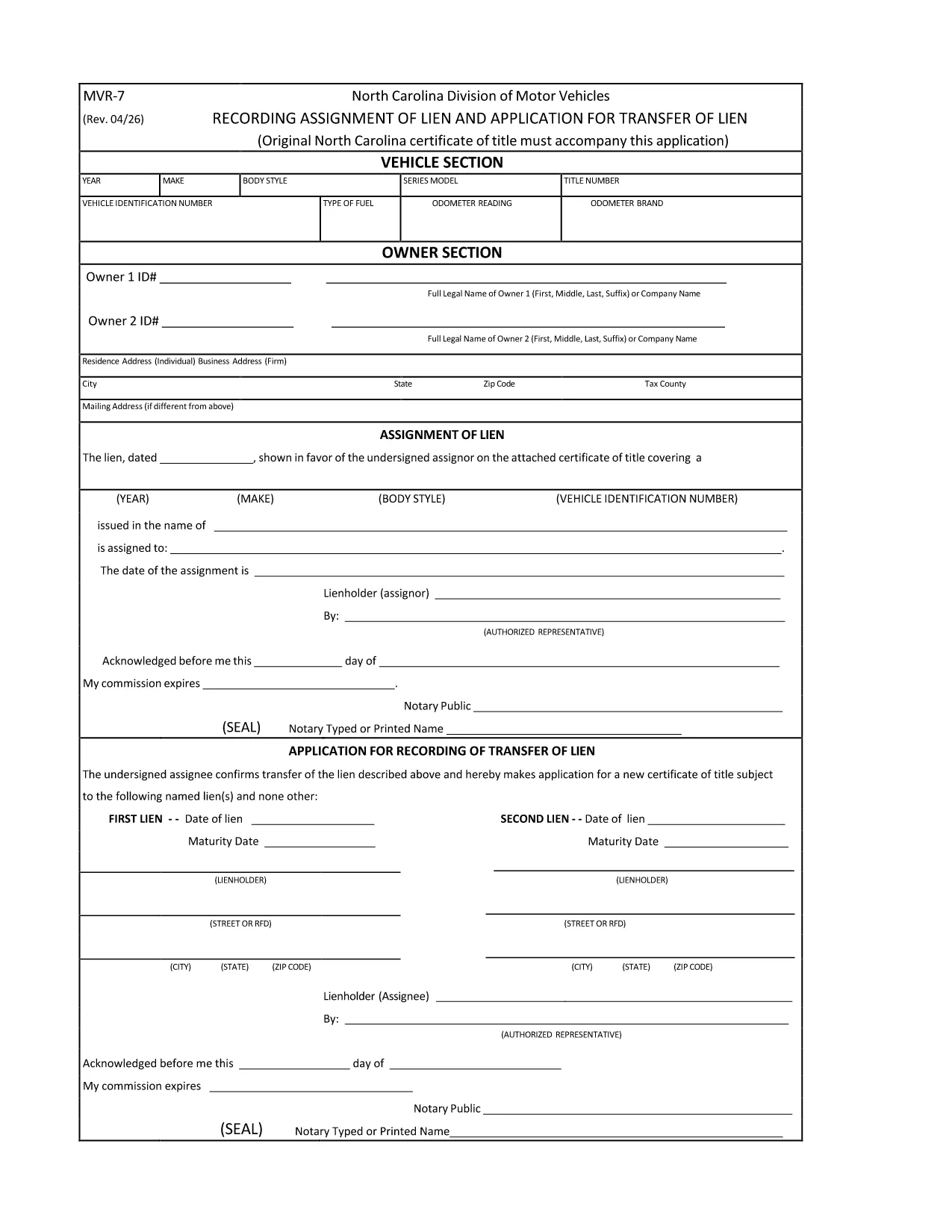
The MVR-7 is the North Carolina Department of Transportation (NCDOT) vehicle registration application used for new titles, transfers, and other title‑related actions. Historically you had to print, hand‑write, and mail the form, but with Formize you can fill it out instantly in a secure, browser‑based PDF filler.

What Is the MVR-7 Form?

The MVR-7 collects essential vehicle information such as VIN, make, model, year, odometer reading, and ownership details. It is required when you:

  • Apply for a new title for a newly purchased vehicle.
  • Transfer ownership of a used vehicle.
  • Correct title information or remove a lien.

How to Complete the MVR-7 Online with Formize

Follow these simple steps to fill out the form without printing a single page:

  1. Click the "Fill out this form" button below.
  2. The Formize PDF Filler app loads in your browser. All fields become interactive.
  3. Enter the required information, use the dropdowns where available, and upload any supporting documents.
  4. When finished, click Save & Download to get a completed PDF you can print or email to the NCDOT.

Common Mistakes to Avoid

  • Incorrect VIN: Double‑check the 17‑character VIN; a single typo can delay processing.
  • Missing signatures: Both buyer and seller must sign; the Formize app lets you add a digital signature.
  • Odometer disclosure errors: Provide the exact mileage at the time of sale; do not round.
  • Leaving optional fields blank: If a field is marked "required" by the NCDOT, the Formize validator will alert you before you can save.

Where to Submit the Completed MVR-7

After downloading the filled PDF, you have two options:

  • In‑person: Bring the form to any North Carolina DMV office.
  • Mail: Send it to the address listed on the form along with any required fees.

Using Formize ensures the PDF meets the NCDOT’s formatting standards, reducing the chance of a rejection.

FAQ
  • Is the MVR-7 form available as a fillable PDF?

    Yes. The original PDF from NCDOT can be used with Formize, which turns it into a fully interactive, fillable document.

  • Can I submit the MVR-7 electronically?

    North Carolina still requires a printed copy with signatures, but you can fill it out electronically, print, sign, and mail it.

  • Do I need a PDF editor to use the Formize filler?

    No. Formize works entirely in your web browser—no additional software or Adobe Acrobat is required.

  • How long does it take to fill out the MVR-7 with Formize?

    Most users complete the form in 5‑10 minutes, depending on how many details need to be entered.

  • What should I do if I make a mistake after saving?

    Open the saved PDF again with Formize, edit the incorrect fields, and re‑save. The app preserves all previous entries.

  • Are there any fees for using Formize?

    Formize’s online filler is free for standard PDF forms like the MVR‑7. Fees only apply for the DMV processing itself.

AKO

Ako bezplatne vyplniť MVR-7 online v 3 jednoduchých krokoch:

  1. 1
    Click the Fill‑out Button
    Press the "Fill out this form" button on the page. The Formize PDF Filler will open in a new tab.
  2. 2
    Enter Your Information
    All fields become editable. Type the required data, select options from dropdowns, and upload any supporting documents.
  3. 3
    Save and Download
    When every field is complete, click "Save & Download". The finished MVR‑7 PDF is ready to print or email to the NCDOT.
Aplikácia Formize PDF Filler
O

Registračné formuláre vozidla

Ak vlastníte alebo si prenajímate motorové vozidlo, príves alebo loď, musíte splniť určité povinnosti, aby bolo vaše vozidlo legálne registrované a bezpečné.

MVR-7 je jeden z registračných formulárov vozidla, čo sú dokumenty, ktoré sa používajú na registráciu motorového vozidla na príslušnom štátnom alebo provinčnom úrade. Tieto formuláre sa zvyčajne vyžadujú, keď si osoba kúpi nové alebo ojazdené vozidlo alebo keď sa s vozidlom presťahuje do nového štátu alebo provincie.

Presné požiadavky a formuláre potrebné na registráciu vozidla sa môžu líšiť podľa miesta, ale vo všeobecnosti tento proces zahŕňa poskytnutie informácií o vozidle, vlastníkovi a prípadných záložných právach k vozidlu.

Po predložení registračných formulárov a poplatkov vydá štátny alebo krajský úrad majiteľovi vozidla osvedčenie o evidencii alebo poznávaciu značku. Táto registrácia umožňuje legálne prevádzkovanie vozidla na verejných komunikáciách a diaľniciach.

VLASTNOSTI

PDF Filler

Najjednoduchší spôsob, ako vyplniť MVR-7 online

  • Rýchlo vyplňte MVR-7
    Hľadáte spôsob, ako rýchlo vyplniť MVR-7 online? S našou online bezplatnou výplňou formulárov PDF budete vedieť, ako upraviť a vyplniť tento dokument PDF za menej ako minútu.
  • Ľahko použiteľný online editor PDF
    Nebaví vás tlačiť súbory PDF, aby ste ich mohli upravovať pred opätovným naskenovaním a odoslaním späť? Upravujte dokumenty PDF zadarmo online. Použite náš online editor PDF, aby ste ušetrili čas a papier.
  • Skvelé nástroje, všetky platformy
    Zaujíma vás, ako vyplniť MVR-7 na počítači Mac, alebo ako možno použiť bezplatný výplň PDF? Naše online nástroje PDF fungujú na všetkých platformách.
  • Bezpečné ukladanie súborov
    Dokončené súbory „MVR-7“ sú uložené v zabezpečenej databáze spravovanej hostingom Amazon Cloud. Svoje súbory môžete z nášho systému kedykoľvek odstrániť. V každom prípade sa tieto súbory automaticky vymažú po 24 hodinách.
  • Četovať s MVR-7
    Četujte s „MVR-7“ na Chatize, čo je bezplatný pomocník na čítanie súborov PDF. Pýtajte sa otázky a získajte odpovede z „MVR-7“. Stačí kliknúť na tlačidlo Rozhovor s dokumentom vyššie.

Odstrániť reláciu plnenia

Chcete odstrániť vybratú reláciu plnenia? V takom prípade sa stratí váš postup pri vypĺňaní formulára.

Odstrániť reláciu úprav

Chcete odstrániť vybratú reláciu úprav? V takom prípade sa stratí váš postup pri vytváraní a úprave formulára.