
Zvoľ jazyk

Virginia MVDB-61 Dealer Qualification Form (Fillable PDF)

  1. Jazyk Angličtina
  2. Krajina USA
  3. Aktivita Registrácia vozidla
  4. Štát Virginia
Virginia MVDB-61 Dealer Qualification Form (Fillable PDF)

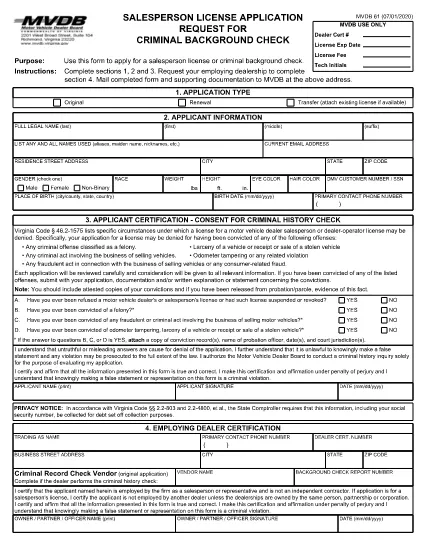
The MVDB-61 is the official Virginia Motor Vehicle Dealer Qualification form required for anyone applying to become a dealer operator or salesperson. This fillable PDF lets you complete the application quickly, securely, and without printing a single page.

What Is the MVDB-61 Form?

MVDB‑61 collects personal information, business details, and background data needed by the Virginia Department of Motor Vehicles (DMV) to assess your eligibility for a dealer license. The form is also used when you need a background check for a salesperson license.

How to Fill Out MVDB-61 Online

Instead of downloading, printing, and scanning, simply click the "Fill out this form" button on this page. The Formize PDF Filler app will load the MVDB‑61 document directly in your browser:

  • Step 1: Click the button and wait a few seconds for the filler to appear.
  • Step 2: Complete sections 1, 2, and 3 with your personal and business information.
  • Step 3: If you are a salesperson, have your employing dealership fill out section 4.
  • Step 4: Review all entries, add your electronic signature, and click Save or Download.
  • Step 5: Print the completed PDF (optional) and mail it with supporting documents to the address shown on the form, or submit it electronically if your DMV office accepts e‑submissions.

Common Mistakes to Avoid

  • Leaving any required field blank – the filler will highlight missing data.
  • Using an outdated address for the DMV – verify the current mailing address on the official Virginia DMV website.
  • Forgetting the $50 non‑refundable test fee when applying for the Dealer Qualification Test.
  • Submitting a scanned copy of a printed form with illegible handwriting.

Where to Submit Your Completed Form

After you finish the fillable PDF, mail the form and any required attachments to:

Virginia Department of Motor Vehicles
2020 West Broad Street
Richmond, VA 23220

If you are taking the Dealer Qualification Test, bring the completed MVDB‑61 and the $50 fee to any DMV Customer Service Center.

Benefits of Using Formize’s Fillable PDF

  • Instant validation of required fields.
  • Secure electronic signature without printing.
  • Save a copy for your records with one click.
  • Accessible on desktop, tablet, and mobile browsers.

Start your dealer qualification journey now—click the button below and let Formize handle the paperwork for you.

FAQ
  • What is the purpose of the MVDB‑61 form?

    MVDB‑61 is used to apply for a Virginia motor vehicle dealer operator or salesperson license and to schedule the Dealer Qualification Test.

  • Can I fill out MVDB‑61 on a mobile device?

    Yes. The Formize PDF Filler works on smartphones, tablets, and desktop browsers, allowing you to complete the form anywhere.

  • Do I need to pay a fee when submitting MVDB‑61?

    A non‑refundable $50 fee is required when you take the Dealer Qualification Test. The fee is paid at the DMV Customer Service Center.

  • What happens if I make a mistake on the form?

    The fillable PDF highlights missing or incorrectly formatted fields. You can correct any errors before saving or printing the final document.

  • Is an electronic signature accepted?

    Yes. The Virginia DMV accepts electronic signatures on the MVDB‑61 when submitted via the official fillable PDF.

  • Where can I find the official mailing address for the DMV?

    The current mailing address is 2020 West Broad Street, Richmond, VA 23220. Always verify on the Virginia DMV website for any updates.

AKO

Ako bezplatne vyplniť MVDB-61 online v 5 jednoduchých krokoch:

  1. 1
    Open the Fillable Form
    Click the "Fill out this form" button on the page. The Formize PDF Filler will load the MVDB‑61 document directly in your browser.
  2. 2
    Complete Required Sections
    Enter your personal, business, and background information in sections 1‑3. If you are a salesperson, have your dealership fill out section 4.
  3. 3
    Add Your Signature
    Use the built‑in e‑signature field to sign electronically. No printing required.
  4. 4
    Save or Download
    Click "Save" to store the completed form in your cloud storage, or "Download" to get a PDF copy for your records.
  5. 5
    Submit to the DMV
    Mail the printed form with supporting documents and the $50 test fee to the Virginia DMV address, or bring it to a DMV Customer Service Center for the qualification test.
Aplikácia Formize PDF Filler
O

Registračné formuláre vozidla

MVDB-61 je jeden z registračných formulárov vozidla, ktoré sú dokumentmi používanými na registráciu motorového vozidla na príslušnom vládnom orgáne, zvyčajne na ministerstve pre motorové vozidlá (DMV) alebo na ekvivalentnom úrade. Tieto formuláre sa vyžadujú, keď si osoba kúpi nové alebo ojazdené vozidlo, prevedie vlastníctvo vozidla alebo sa s vozidlom presťahuje do novej jurisdikcie.

Konkrétne formuláre na registráciu vozidla sa môžu líšiť v závislosti od jurisdikcie, ale vo všeobecnosti vyžadujú nasledujúce informácie:

Informácie o vozidle: Zahŕňajú podrobnosti o vozidle, ako je značka, model, rok, identifikačné číslo vozidla (VIN) a stav počítadla kilometrov.

Informácie o vlastníkovi: Formulár bude vyžadovať informácie o vlastníkovi vozidla vrátane jeho mena, adresy, kontaktných informácií a čísla vodičského preukazu.

Preukázanie vlastníctva: V závislosti od okolností sa môže vyžadovať dôkaz o vlastníctve, ako napríklad osvedčenie o vlastníctve, kúpna zmluva alebo osvedčenie výrobcu o pôvode (v prípade nových vozidiel).

Informácie o poistení: Zvyčajne sa vyžaduje doklad o platnom poistení vozidla. To môže zahŕňať poskytnutie čísla poistnej zmluvy, dátumov krytia a podrobností o poisťovni.

Platba poplatkov: Registrácia vozidla zahŕňa platbu rôznych poplatkov, ako sú registračné poplatky, dane a prípadne ďalšie poplatky špecifické pre jurisdikciu.

Okrem týchto základných požiadaviek môžu mať niektoré jurisdikcie ďalšie požiadavky na formuláre alebo dokumentáciu. V určitých oblastiach môžu byť napríklad potrebné výsledky emisných testov, bezpečnostné kontroly alebo preukázanie trvalého pobytu.

Po vyplnení a odoslaní registračných formulárov vozidla vydá štátny orgán osvedčenie o evidencii, poznávacie značky a evidenčné nálepky. Z týchto dokladov vyplýva, že vozidlo je legálne registrované a oprávnené na prevádzku na verejných komunikáciách.

Je dôležité poznamenať, že požiadavky na registráciu vozidiel sa môžu v závislosti od jurisdikcie výrazne líšiť. Preto sa odporúča konzultovať s miestnym DMV alebo ekvivalentnou agentúrou špecifické formuláre a postupy platné pre vašu lokalitu.

VLASTNOSTI

PDF Filler

Najjednoduchší spôsob, ako vyplniť MVDB-61 online

  • Rýchlo vyplňte MVDB-61
    Hľadáte spôsob, ako rýchlo vyplniť MVDB-61 online? S našou online bezplatnou výplňou formulárov PDF budete vedieť, ako upraviť a vyplniť tento dokument PDF za menej ako minútu.
  • Ľahko použiteľný online editor PDF
    Nebaví vás tlačiť súbory PDF, aby ste ich mohli upravovať pred opätovným naskenovaním a odoslaním späť? Upravujte dokumenty PDF zadarmo online. Použite náš online editor PDF, aby ste ušetrili čas a papier.
  • Skvelé nástroje, všetky platformy
    Zaujíma vás, ako vyplniť MVDB-61 na počítači Mac, alebo ako možno použiť bezplatný výplň PDF? Naše online nástroje PDF fungujú na všetkých platformách.
  • Bezpečné ukladanie súborov
    Dokončené súbory „MVDB-61“ sú uložené v zabezpečenej databáze spravovanej hostingom Amazon Cloud. Svoje súbory môžete z nášho systému kedykoľvek odstrániť. V každom prípade sa tieto súbory automaticky vymažú po 24 hodinách.
  • Četovať s MVDB-61
    Četujte s „MVDB-61“ na Chatize, čo je bezplatný pomocník na čítanie súborov PDF. Pýtajte sa otázky a získajte odpovede z „MVDB-61“. Stačí kliknúť na tlačidlo Rozhovor s dokumentom vyššie.

Odstrániť reláciu plnenia

Chcete odstrániť vybratú reláciu plnenia? V takom prípade sa stratí váš postup pri vypĺňaní formulára.

Odstrániť reláciu úprav

Chcete odstrániť vybratú reláciu úprav? V takom prípade sa stratí váš postup pri vytváraní a úprave formulára.