
Zvoľ jazyk

Wisconsin MV2849 Title Branding Notification – Free Fillable PDF

  1. Jazyk Angličtina
  2. Krajina USA
  3. Aktivita Registrácia vozidla
  4. Štát Wisconsin
Wisconsin MV2849 Title Branding Notification – Free Fillable PDF

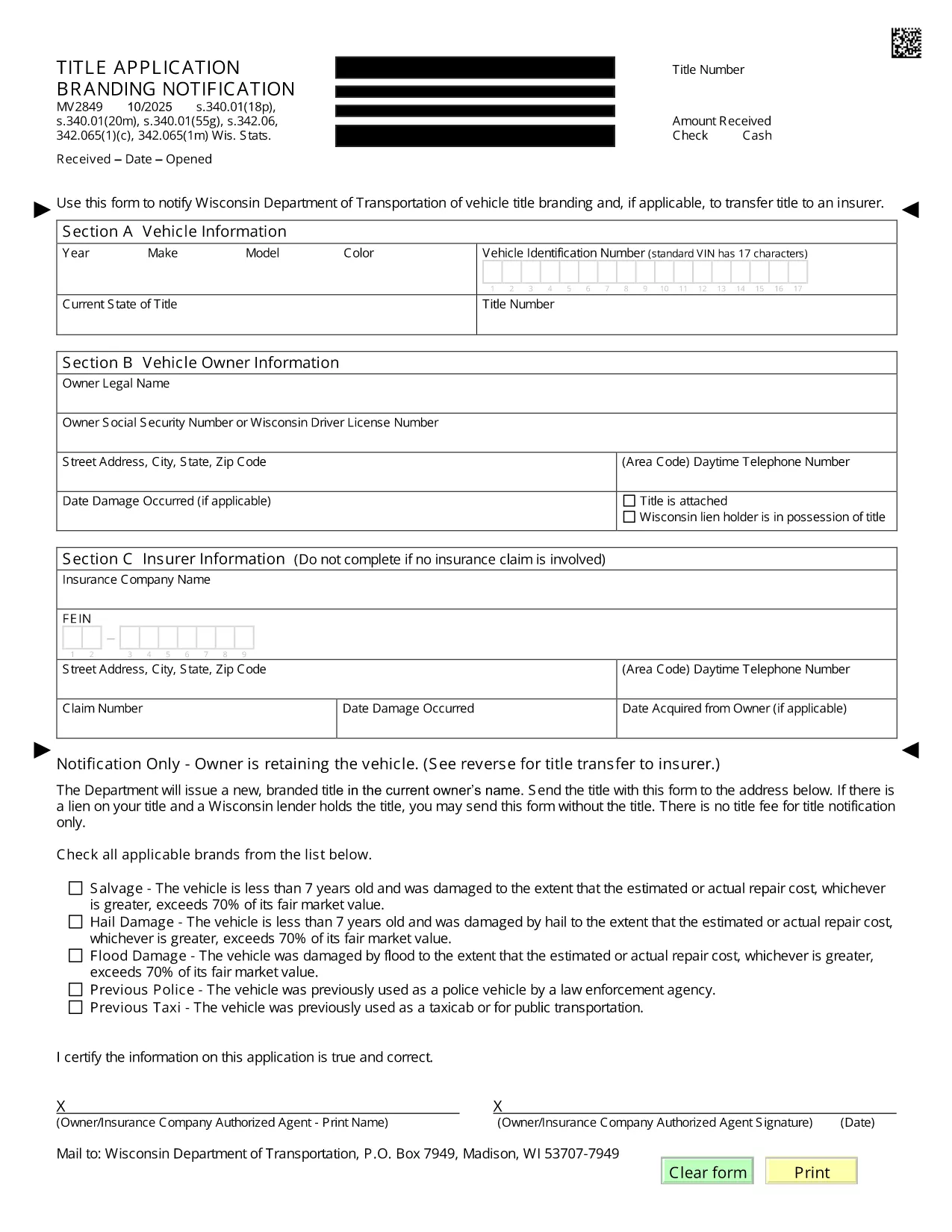
The MV2849 is the Wisconsin Department of Transportation’s official form for notifying the state of a vehicle title branding change and, when required, transferring the title to an insurer. This fillable PDF is now available directly on Formize, so you can complete it without printing or scanning.

What is Form MV2849?

Form MV2849 – Title Branding Notification – is used to record any branding (e.g., salvage, rebuilt, junk) that appears on a vehicle’s title. The form also serves as a request to transfer the title to an insurance company when the vehicle is declared a total loss.

When and Who Should Use MV2849

  • Dealers who receive a branded title from a previous owner.
  • Insurance adjusters processing a total‑loss claim.
  • Vehicle owners who need to update the branding status on their title.

How to Complete the MV2849 Online

Follow the simple steps below – no PDF editor needed:

  1. Click the "Fill out this form" button on this page.
  2. Wait for the Formize PDF Filler app to load (a few seconds).
  3. Enter the required information in each field. The form auto‑saves as you type.
  4. Review the completed form for accuracy.
  5. Submit directly to WisDOT or download a copy for your records.

Common Mistakes to Avoid

  • Leaving the VIN blank: The Vehicle Identification Number is mandatory.
  • Incorrect branding code: Use the exact code listed on the existing title.
  • Missing insurer information: Provide the insurer’s name and policy number when transferring the title.

Where to Submit the Completed Form

After filling out the MV2849, you can:

  • Mail the printed form to the Wisconsin Department of Transportation, Vehicle Titling Division.
  • Deliver it in person at any WisDOT DMV office.
  • Attach the PDF to an email if your insurer accepts electronic submissions.

Need help? Contact WisDOT’s Vehicle Titling hotline at 1‑800‑534‑6386.

FAQ
  • Do I need to print the MV2849 after filling it online?

    No. You can submit the completed PDF electronically to your insurer or print it only if WisDOT requires a hard copy.

  • Is the Formize filler secure?

    Yes. All data is processed in your browser and never stored on our servers unless you choose to save a copy.

  • Can I edit the form after I submit it?

    Once submitted to WisDOT, the form cannot be edited. Make sure all information is correct before clicking Submit.

  • What is the branding code and where do I find it?

    The branding code appears on your current title (e.g., "S" for salvage, "R" for rebuilt). Enter the exact code in the designated field.

  • Do I need a signature on the PDF?

    A digital signature is accepted. Use the signature field in the Formize filler, then print and sign if a physical copy is required.

  • How long does it take WisDOT to process the MV2849?

    Processing typically takes 5‑7 business days after receipt of a complete form.

AKO

Ako bezplatne vyplniť MV2849 online v 5 jednoduchých krokoch:

  1. 1
    Open the Fillable Form
    Click the "Fill out this form" button on this page. The Formize PDF Filler loads instantly.
  2. 2
    Enter Required Information
    Type the VIN, owner details, branding code, and insurer information into the highlighted fields.
  3. 3
    Review for Accuracy
    Use the built‑in preview to double‑check every entry before submitting.
  4. 4
    Submit or Download
    Choose to submit the form directly to WisDOT or download a PDF copy for mailing.
  5. 5
    Save a Confirmation
    After submission, save the confirmation page or email receipt for your records.
Aplikácia Formize PDF Filler
O

Registračné formuláre vozidla

Ak vlastníte alebo si prenajímate motorové vozidlo, príves alebo loď, musíte splniť určité povinnosti, aby bolo vaše vozidlo legálne registrované a bezpečné.

MV2849 je jeden z registračných formulárov vozidla, čo sú dokumenty, ktoré sa používajú na registráciu motorového vozidla na príslušnom štátnom alebo provinčnom úrade. Tieto formuláre sa zvyčajne vyžadujú, keď si osoba kúpi nové alebo ojazdené vozidlo alebo keď sa s vozidlom presťahuje do nového štátu alebo provincie.

Presné požiadavky a formuláre potrebné na registráciu vozidla sa môžu líšiť podľa miesta, ale vo všeobecnosti tento proces zahŕňa poskytnutie informácií o vozidle, vlastníkovi a prípadných záložných právach k vozidlu.

Po predložení registračných formulárov a poplatkov vydá štátny alebo krajský úrad majiteľovi vozidla osvedčenie o evidencii alebo poznávaciu značku. Táto registrácia umožňuje legálne prevádzkovanie vozidla na verejných komunikáciách a diaľniciach.

VLASTNOSTI

PDF Filler

Najjednoduchší spôsob, ako vyplniť MV2849 online

  • Rýchlo vyplňte MV2849
    Hľadáte spôsob, ako rýchlo vyplniť MV2849 online? S našou online bezplatnou výplňou formulárov PDF budete vedieť, ako upraviť a vyplniť tento dokument PDF za menej ako minútu.
  • Ľahko použiteľný online editor PDF
    Nebaví vás tlačiť súbory PDF, aby ste ich mohli upravovať pred opätovným naskenovaním a odoslaním späť? Upravujte dokumenty PDF zadarmo online. Použite náš online editor PDF, aby ste ušetrili čas a papier.
  • Skvelé nástroje, všetky platformy
    Zaujíma vás, ako vyplniť MV2849 na počítači Mac, alebo ako možno použiť bezplatný výplň PDF? Naše online nástroje PDF fungujú na všetkých platformách.
  • Bezpečné ukladanie súborov
    Dokončené súbory „MV2849“ sú uložené v zabezpečenej databáze spravovanej hostingom Amazon Cloud. Svoje súbory môžete z nášho systému kedykoľvek odstrániť. V každom prípade sa tieto súbory automaticky vymažú po 24 hodinách.
  • Četovať s MV2849
    Četujte s „MV2849“ na Chatize, čo je bezplatný pomocník na čítanie súborov PDF. Pýtajte sa otázky a získajte odpovede z „MV2849“. Stačí kliknúť na tlačidlo Rozhovor s dokumentom vyššie.

Odstrániť reláciu plnenia

Chcete odstrániť vybratú reláciu plnenia? V takom prípade sa stratí váš postup pri vypĺňaní formulára.

Odstrániť reláciu úprav

Chcete odstrániť vybratú reláciu úprav? V takom prípade sa stratí váš postup pri vytváraní a úprave formulára.