
Välj språk

Tax File Number (TFN) Declaration Form – Fillable PDF

  1. Land Australien
  2. Språk engelsk
  3. Aktivitet Skatter
  4. Avdelning Australian Taxation Office
Tax File Number (TFN) Declaration Form – Fillable PDF

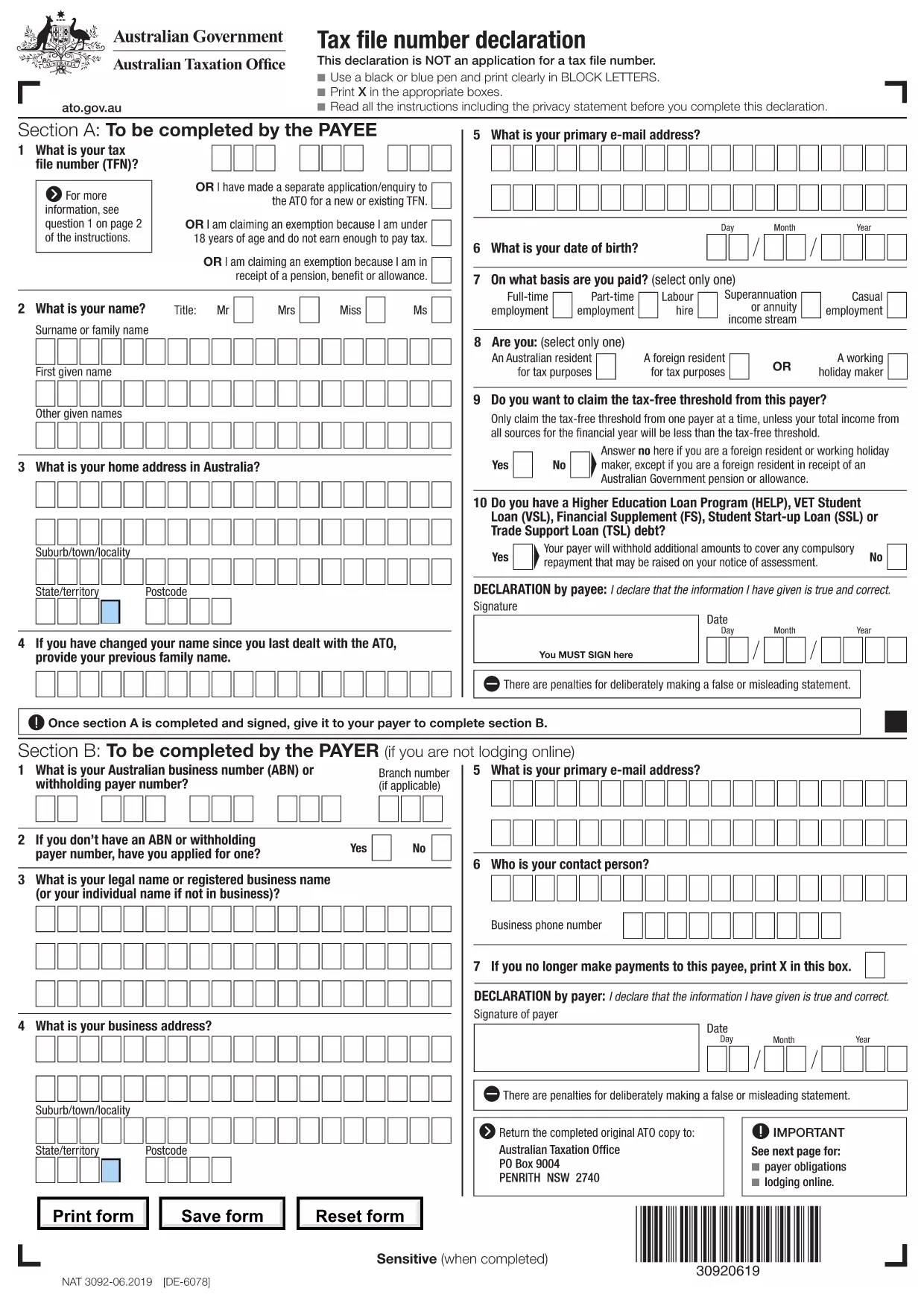
The Australian Tax File Number (TFN) Declaration is required whenever you start a new job, sign up for government benefits, or need to provide your tax details to a payer. Our fillable PDF version lets you complete the form quickly, securely, and without printing.

Why Use a Fillable TFN Declaration Form

Traditional paper forms are prone to errors, lost pages, and delays. A fillable PDF ensures:

  • Accurate data entry – each field validates the information you type.
  • Instant submission – save and upload the completed form directly to your employer or agency.
  • Eco‑friendly – no need for paper copies unless you choose to print.

How to Complete the TFN Declaration Online

Simply click the "Fill out this form" button on this page. The Formize PDF Filler app will load in your browser, presenting the exact fields from the official ATO declaration.

Common Mistakes & Tips

  • Double‑check your TFN – a single digit error can delay payments.
  • Enter your full legal name exactly as it appears on your Australian passport or birth certificate.
  • Use the drop‑down menus for residency status to avoid invalid entries.
  • Save your progress frequently; the filler auto‑saves to your device.

Download & Save Your Completed Form

When you finish, click Save to download a secured copy of the filled PDF. You can then email it, upload it to a portal, or keep it for your records.

Legal Requirements & Privacy

The TFN Declaration is a legal document. All information you provide is stored locally in your browser and never transmitted to third parties by Formize. Keep the completed PDF in a safe location and only share it with authorized payers.

FAQ
  • What is a Tax File Number (TFN) Declaration?

    It is a standard ATO form used to provide your TFN and personal details to an employer, government agency, or financial institution.

  • Do I need to print the form after filling it online?

    No. The filled PDF can be saved and emailed directly to the requester. Print only if the recipient specifically asks for a hard copy.

  • Is my personal information safe in the Formize PDF Filler?

    Yes. All data stays on your device; Formize does not store or transmit your information to any third party.

  • Can I edit the form after I have saved it?

    You can reopen the saved PDF in Formize PDF Filler to make changes, as long as the file has not been password‑protected.

  • What should I do if I make a mistake while filling the form?

    Use the filler’s Undo button or simply delete the incorrect entry and re‑type the correct information before saving.

  • Is this the official ATO TFN Declaration form?

    Yes. The PDF is the exact version provided by the Australian Taxation Office and is kept up‑to‑date.

  • Do I need an Adobe Acrobat subscription to use the fillable PDF?

    No. Formize PDF Filler works in any modern browser without additional software.

  • Can I use this form for a non‑Australian employer?

    The TFN Declaration is specific to Australian tax law. International employers requiring an Australian TFN should accept this form.

HUR

Så här fyller du i tax file number declaration gratis, online i 5 enkla steg:

  1. 1
    Click "Fill out this form"
    Press the button on this page to launch the Formize PDF Filler directly in your browser.
  2. 2
    Wait for the filler to load
    The app loads the official TFN Declaration PDF and activates all fillable fields.
  3. 3
    Enter your information
    Complete each section – personal details, TFN, residency status, and employer information. The filler validates your entries in real time.
  4. 4
    Save the completed PDF
    When all required fields are filled, click the Save button to download a secure copy of the filled form.
  5. 5
    Submit to your employer or agency
    Email or upload the saved PDF to the requesting organization, or print it if a hard copy is required.
Formize PDF Filler app
HANDLA OM

Skatteformulär

tax file number declaration är ett av skatteformulären som är dokument som används för att rapportera information om skatter till relevant skattemyndighet. Det finns olika typer av skatteformulär, inklusive federala, statliga och lokala skatteformulär, som kan variera beroende på skattebetalarens omständigheter och plats.

FUNKTIONER

PDF-fyllare

Det enklaste sättet att fylla i tax file number declaration online

  • Fyll snabbt i tax file number declaration
    Letar du efter ett sätt att snabbt fylla tax file number declaration online? Med vår online gratis PDF-formulärfyllare vet du hur du redigerar och fyller i detta pdf-dokument på mindre än en minut.
  • Lätt att använda online PDF-redigerare
    Är du trött på att skriva ut PDF-filer så att du kan redigera dem innan du skannar om och skickar tillbaka dem? Redigera PDF-dokument gratis online. Använd vår online pdf-redigerare för att spara tid och papper.
  • Bra verktyg, alla plattformar
    Undrar du hur man fyller i tax file number declaration på en Mac, eller kanske hur man använder ett PDF-fyllmedel gratis? Våra online PDF-verktyg fungerar på alla plattformar.
  • Säker fillagring
    Färdiga "tax file number declaration"-filer lagras i en säker databas som hanteras av Amazon Cloud-hosting. Du kan ta bort dina filer från vårt system när som helst. I alla fall raderas dessa filer automatiskt efter 24 timmar.
  • Chatta med tax file number declaration
    Chatta med "tax file number declaration" på Chatize som är en gratis PDF-läsare. Ställ frågor och få svar från "tax file number declaration". Klicka bara på knappen Chatta med dokument ovan.

Ta bort fyllningssession

Ta bort den valda fyllningssessionen? I det här fallet kommer dina framsteg i att fylla i formuläret att gå förlorade.

Ta bort redigeringssession

Vill du ta bort den valda redigeringssessionen? I det här fallet kommer dina framsteg i att skapa och redigera formuläret att gå förlorade.