
Välj språk

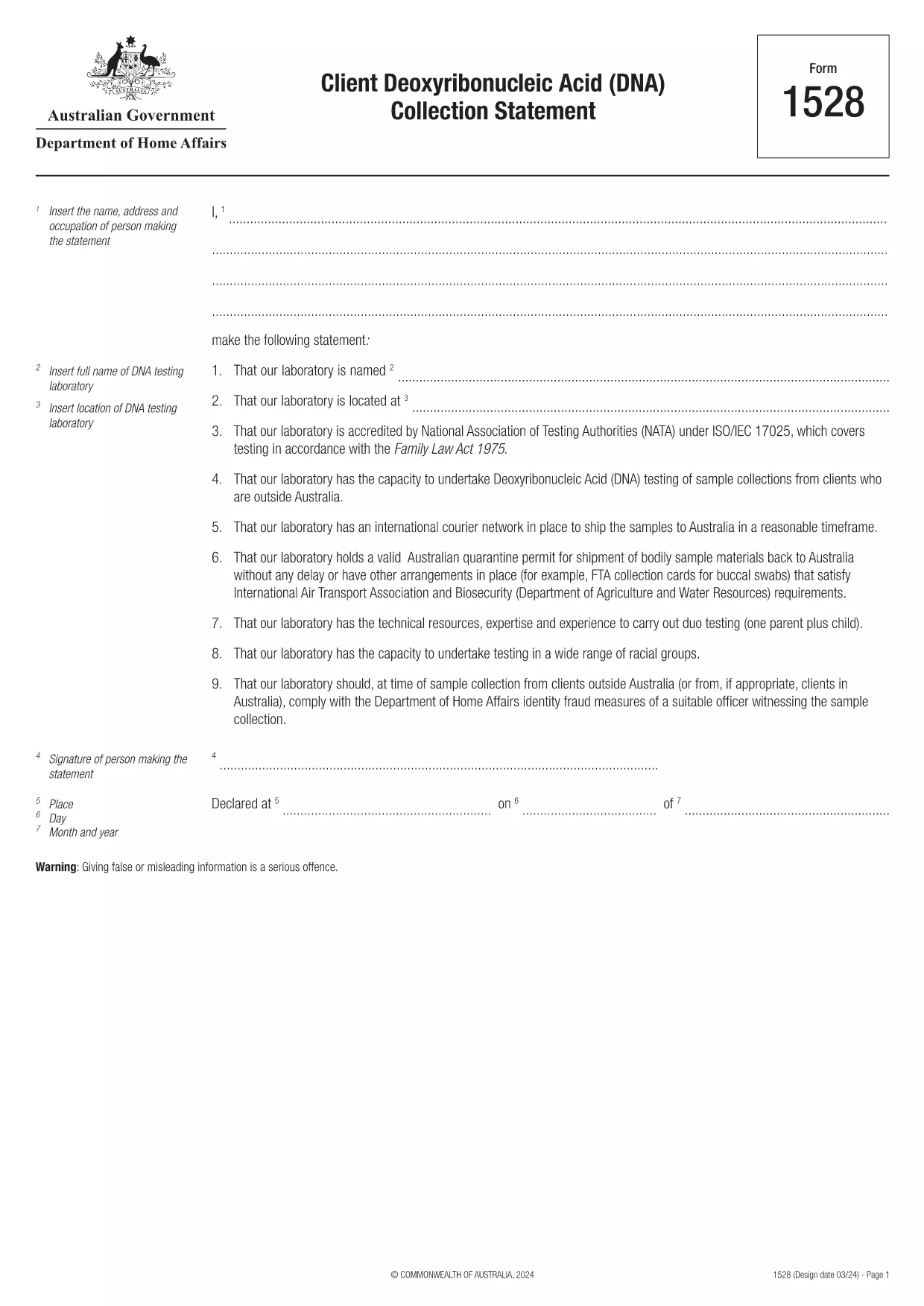
Form 1528 – Client DNA Collection Statement (Fillable PDF)

  1. Land Australien
  2. Språk engelsk
  3. Aktivitet Karaktär eller identitet
Form 1528 – Client DNA Collection Statement (Fillable PDF)

Form 1528 is the official Client Deoxyribonucleic Acid (DNA) Collection Statement required by the Australian Department of Home Affairs. The form captures the name, address and occupation of the person making the statement, as well as details of the DNA testing laboratory.

What Is Form 1528?

This form is used when an individual must provide a DNA sample for immigration, visa, or forensic purposes. It must be completed by the person providing the sample and signed by an authorised DNA testing laboratory.

How to Fill Out Form 1528 with Formize

Instead of printing, scanning, or editing the PDF manually, simply click the “Fill out this form” button on this page. The Formize PDF Filler app will load the fillable version, letting you enter data, add signatures, and save the completed document in seconds.

Common Mistakes & Tips

  • Leave no blank fields – the Department rejects forms with empty required sections.
  • Use the exact laboratory name and address as it appears on the lab’s official letterhead.
  • Check date formats – use DD/MM/YYYY throughout.
  • Sign electronically only after all information is verified; a digital signature is accepted.

Where to Submit the Completed Form

After you download the completed PDF, you can upload it through your online visa portal, email it to the requesting officer, or deliver a printed copy to the nearest Australian Visa Application Centre.

Need More Help?

For detailed guidance, review the instructions on the Department of Home Affairs website or contact your DNA testing laboratory for clarification on laboratory‑specific fields.

FAQ
  • Is an electronic signature accepted on Form 1528?

    Yes. The Department of Home Affairs accepts a clear electronic signature created with the Formize PDF Filler.

  • Can I print the form after filling it online?

    Absolutely. After completing the form, you can download the PDF and print a hard copy if you prefer a physical submission.

  • What if I make a mistake after saving the form?

    Open the saved PDF again in Formize, edit the incorrect fields, and re‑save. The fillable PDF allows unlimited edits before final submission.

  • Do I need to attach any supporting documents?

    Typically, the DNA laboratory will provide a separate certification letter. Attach that letter alongside the completed Form 1528 when you submit your application.

  • How long does it take to process Form 1528?

    Processing time varies by case, but the Department generally reviews the statement within 5‑10 business days after receipt.

  • Is there a fee for using Formize’s PDF filler?

    Formize offers a free basic fillable version for Form 1528. Advanced features such as bulk signing require a paid plan, but are not needed for a single submission.

  • Can I fill out Form 1528 on a mobile device?

    Yes. The Formize PDF Filler works on smartphones and tablets, allowing you to complete the form anywhere.

  • What format should I use when uploading the completed form?

    Upload the final document as a PDF file. Ensure the file size does not exceed the portal’s limit (usually 5 MB).

HUR

Så här fyller du i Form 1528 gratis, online i 5 enkla steg:

  1. 1
    Open the Fillable Form
    Click the “Fill out this form” button on the page. The Formize PDF Filler app will launch in a new tab with the fillable version of Form 1528.
  2. 2
    Enter Your Information
    Type the required details – personal data, laboratory name, and address – directly into the highlighted fields.
  3. 3
    Add Electronic Signatures
    Use the signature tool to sign the statement and, if required, the laboratory representative’s signature.
  4. 4
    Review & Validate
    Double‑check every field for accuracy, especially dates and laboratory information.
  5. 5
    Download or Submit
    When you’re satisfied, click “Save & Download” to get the completed PDF, or use the built‑in “Submit” button to send it directly to the Home Affairs portal.
Formize PDF Filler app
HANDLA OM

Karaktärs- eller identitetsformulär

Form 1528 är ett av dokument eller formulär som är relaterade till att fastställa eller verifiera en individs identitet. Dessa formulär kräver vanligtvis personlig information och dokumentation för att bekräfta en persons identitet. Här är några exempel på formulär som vanligtvis förknippas med identitetsverifiering:

Identitetsverifieringsformulär: Dessa formulär används av organisationer, t.ex. arbetsgivare, statliga myndigheter eller finansiella institutioner, för att verifiera individers identitet. De begär vanligtvis personlig information, såsom namn, adress, födelsedatum och personnummer, och kan kräva stöddokumentation som ett statligt utfärdat ID, pass eller födelsebevis.

formulär för adressbevis: Dessa formulär används för att verifiera en individs bostadsadress. De kan kräva att personen tillhandahåller en elräkning, kontoutdrag, hyresavtal eller andra dokument som visar deras nuvarande adress.

Auktoriseringsformulär för bakgrundskontroll: När en organisation utför en bakgrundskontroll av en individ kräver de ofta att personen fyller i ett formulär som godkänner kontrollen. Dessa formulär kan be om personlig information, inklusive namn, födelsedatum och personnummer, vilket hjälper till att fastställa personens identitet.

Intygsformulär för identitetsstöld: I fall av identitetsstöld kan offren behöva fylla i ett formulär för identitetsstöld. Det här formuläret hjälper individer att rapportera bedräglig användning av sin identitet och ger en juridisk dokumentation av incidenten.

Det är viktigt att notera att de specifika formerna och kraven för att fastställa eller verifiera identitet kan variera beroende på sammanhanget, såsom syftet, jurisdiktionen eller organisationen. Se alltid de specifika formulär som tillhandahålls av organisationen eller institutionen som begär identitetsverifiering för den mest korrekta och aktuella informationen.

FUNKTIONER

PDF-fyllare

Det enklaste sättet att fylla i Form 1528 online

  • Fyll snabbt i Form 1528
    Letar du efter ett sätt att snabbt fylla Form 1528 online? Med vår online gratis PDF-formulärfyllare vet du hur du redigerar och fyller i detta pdf-dokument på mindre än en minut.
  • Lätt att använda online PDF-redigerare
    Är du trött på att skriva ut PDF-filer så att du kan redigera dem innan du skannar om och skickar tillbaka dem? Redigera PDF-dokument gratis online. Använd vår online pdf-redigerare för att spara tid och papper.
  • Bra verktyg, alla plattformar
    Undrar du hur man fyller i Form 1528 på en Mac, eller kanske hur man använder ett PDF-fyllmedel gratis? Våra online PDF-verktyg fungerar på alla plattformar.
  • Säker fillagring
    Färdiga "Form 1528"-filer lagras i en säker databas som hanteras av Amazon Cloud-hosting. Du kan ta bort dina filer från vårt system när som helst. I alla fall raderas dessa filer automatiskt efter 24 timmar.
  • Chatta med Form 1528
    Chatta med "Form 1528" på Chatize som är en gratis PDF-läsare. Ställ frågor och få svar från "Form 1528". Klicka bara på knappen Chatta med dokument ovan.

Ta bort fyllningssession

Ta bort den valda fyllningssessionen? I det här fallet kommer dina framsteg i att fylla i formuläret att gå förlorade.

Ta bort redigeringssession

Vill du ta bort den valda redigeringssessionen? I det här fallet kommer dina framsteg i att skapa och redigera formuläret att gå förlorade.