Välj språk

Form 3 – Fillable PDF for Crew Reporting

  1. Språk engelsk
  2. Land Australien
  3. Avdelning Customs
  4. Aktivitet Travel Documentation
Form 3 – Fillable PDF for Crew Reporting

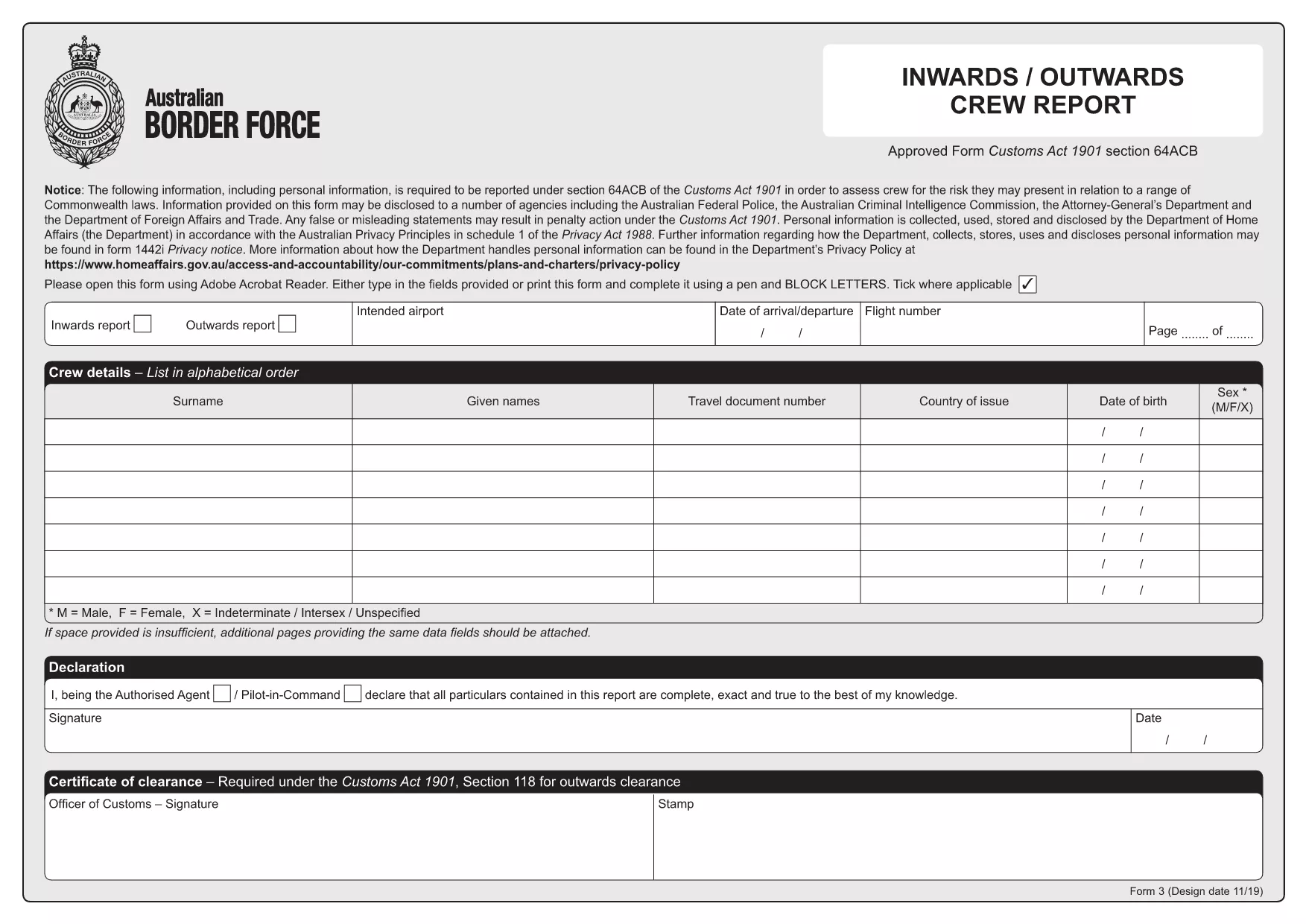
The Form 3 is the Australian Customs crew‑reporting document required for all inbound and outbound flights under section 64ACB of the Customs Act 1901. It captures personal details, travel document numbers, and a declaration of clearance for each crew member.

With Formize you can download the official Form 3 PDF and fill it directly in your browser—no Adobe Reader or other software needed.

What Is Form 3?

Form 3 serves as a statutory record for customs authorities, helping them verify that all crew members have the appropriate travel documentation and have been cleared for entry or exit. The form includes sections for:

  • Full name and rank
  • Passport or travel document details
  • Nationality and date of birth
  • Customs declaration and signature

How to Fill Form 3 Online

Follow these simple steps to complete the form instantly:

  1. Click the “Fill out this form” button on this page.
  2. The Formize PDF Filler app loads the fillable Form 3 in a secure viewer.
  3. Enter the required information in each field. The form auto‑saves as you type.
  4. When finished, click **Submit** to download a completed PDF or email it directly to the customs office.

Common Mistakes to Avoid

  • Leaving mandatory fields blank – the filler will highlight missing data before you can submit.
  • Using an expired passport number – double‑check the document numbers for each crew member.
  • Incorrect date format – use DD/MM/YYYY as required by Australian customs.

Where to Submit the Completed Form

After saving the filled PDF, email it to the customs liaison officer at your airline or upload it through the airline’s internal portal. Keep a copy for your records in case the authorities request a re‑submission.

Need help? The Formize filler includes tooltips on every field and a quick‑reference guide at the top of the form.

FAQ
  • Do I need Adobe Reader to fill Form 3?

    No. Formize’s online PDF filler works in any modern browser, so you can complete the form without installing any software.

  • Can I edit the form after I submit it?

    Once you download the completed PDF, you can open it in any PDF editor to make minor corrections, but the official submission should be the version saved from Formize.

  • Is the Formize filler secure?

    Yes. All data is processed locally in your browser and never stored on our servers unless you choose to upload or email the file.

  • What if I make a mistake while filling the form?

    The filler highlights required fields and provides real‑time validation. You can simply click the field, correct the entry, and continue.

  • Where should I send the completed Form 3?

    Email the finished PDF to your airline’s customs liaison officer or upload it through the airline’s internal portal as instructed by your employer.

  • Is there a printable version of Form 3?

    Yes. After you finish filling the form, click “Download” to get a printable PDF that matches the original official layout.

HUR

Så här fyller du i Form 3 PDF gratis, online i 4 enkla steg:

  1. 1
    Open the Fillable Form
    Click the “Fill out this form” button on the page. The Formize PDF Filler loads the official Form 3 directly in your browser.
  2. 2
    Enter Crew Details
    Type each crew member’s name, rank, passport number, and other required information into the highlighted fields. The form auto‑saves as you go.
  3. 3
    Validate and Submit
    When all fields are completed, the filler checks for missing or incorrect data. Click “Submit” to download the completed PDF or email it to the customs officer.
  4. 4
    Save a Copy
    Store the saved PDF on your device or cloud storage for future reference and compliance audits.
Formize PDF Filler app
HANDLA OM

Form 3 PDF mall

Med den traditionella uppsättningen funktioner för att visa och fylla i ett PDF-dokument, kombinerat med fördelarna med en webbapplikation och responsiv layout, kan du slutföra Form 3 PDF på några minuter.

FUNKTIONER

PDF-fyllare

Det enklaste sättet att fylla i Form 3 PDF online

  • Fyll snabbt i Form 3 PDF
    Letar du efter ett sätt att snabbt fylla Form 3 PDF online? Med vår online gratis PDF-formulärfyllare vet du hur du redigerar och fyller i detta pdf-dokument på mindre än en minut.
  • Lätt att använda online PDF-redigerare
    Är du trött på att skriva ut PDF-filer så att du kan redigera dem innan du skannar om och skickar tillbaka dem? Redigera PDF-dokument gratis online. Använd vår online pdf-redigerare för att spara tid och papper.
  • Bra verktyg, alla plattformar
    Undrar du hur man fyller i Form 3 PDF på en Mac, eller kanske hur man använder ett PDF-fyllmedel gratis? Våra online PDF-verktyg fungerar på alla plattformar.
  • Säker fillagring
    Färdiga "Form 3 PDF"-filer lagras i en säker databas som hanteras av Amazon Cloud-hosting. Du kan ta bort dina filer från vårt system när som helst. I alla fall raderas dessa filer automatiskt efter 24 timmar.
  • Chatta med Form 3 PDF
    Chatta med "Form 3 PDF" på Chatize som är en gratis PDF-läsare. Ställ frågor och få svar från "Form 3 PDF". Klicka bara på knappen Chatta med dokument ovan.

Ta bort fyllningssession

Ta bort den valda fyllningssessionen? I det här fallet kommer dina framsteg i att fylla i formuläret att gå förlorade.

Ta bort redigeringssession

Vill du ta bort den valda redigeringssessionen? I det här fallet kommer dina framsteg i att skapa och redigera formuläret att gå förlorade.