
Välj språk

Application Form of Registration – Fillable PDF

  1. Språk engelsk
  2. Land Australien
  3. Avdelning Transport for NSW
  4. Aktivitet Fordonsregistrering
Application Form of Registration – Fillable PDF

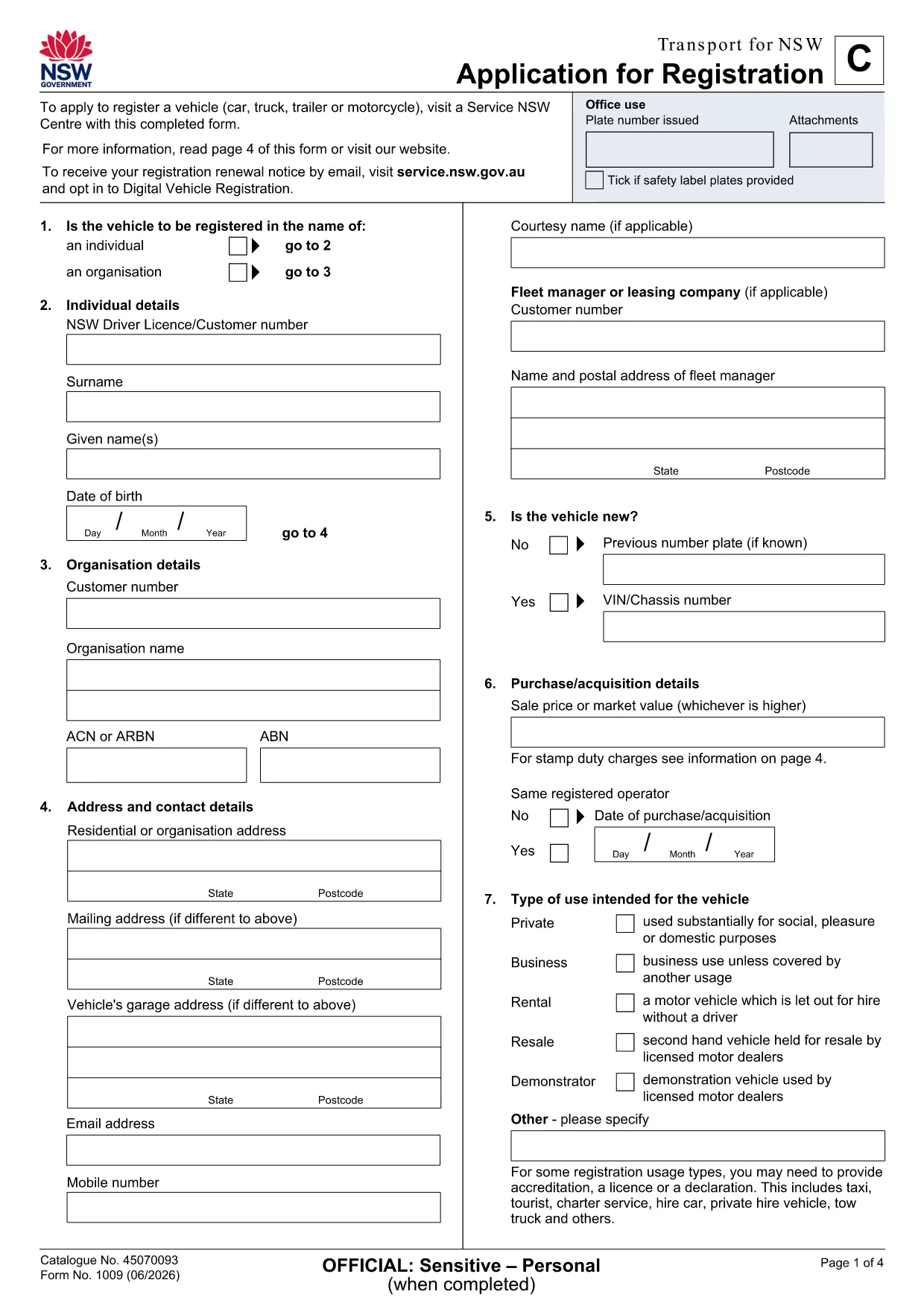
Looking for a quick, hassle‑free way to submit your application form of registration in New South Wales? The fillable PDF provided by Transport for NSW lets you enter data directly on your screen, save a draft, and print a clean copy for submission.

Our Formize PDF Filler loads the form instantly in your browser—no extra software needed. Just click the button, fill the fields, and download the completed document.

How to Fill the Application Form of Registration Online

  1. Click the Fill out this form button on the page.
  2. Wait a few seconds while the Formize PDF Filler app loads the registration PDF.
  3. Enter your personal details, vehicle information, and any supporting data in the highlighted fields.
  4. Use the built‑in validation to catch missing or incorrectly formatted entries.
  5. When you’re done, click Save & Download to get a completed PDF ready for printing or email.

Key Sections & Required Information

  • Applicant Details – full name, address, contact number, and driver licence number.
  • Vehicle Information – make, model, VIN, and registration number.
  • Supporting Documents – proof of identity, insurance, and any exemption letters.
  • Declaration & Signature – electronic signature box that complies with NSW regulations.

Common Mistakes to Avoid When Completing the Form

  • Leaving mandatory fields blank – the filler will highlight them in red.
  • Using non‑standard fonts or special characters in names – stick to alphanumeric characters.
  • Uploading outdated supporting documents – ensure PDFs are current and legible.
  • Forgetting to sign the electronic declaration – an unsigned form will be rejected.

Download & Print the PDF in One Click

After saving, you can instantly download the filled PDF, print it on plain A4 paper, and attach any required attachments before delivering it to your local Transport for NSW office.

Need a hard copy? The Formize app also offers a Print button that sends the document directly to your printer with the correct margins.

FAQ
  • Do I need Adobe Acrobat to fill this form?

    No. The Formize PDF Filler works in any modern browser, so you can complete the form without installing additional software.

  • Can I save a draft and finish later?

    Yes. Use the **Save Draft** button in the filler to download a partially completed PDF, then reopen it later to finish.

  • Is the electronic signature legally accepted?

    Transport for NSW accepts the electronic signature generated by Formize, as it complies with NSW electronic signing standards.

  • What file format will I receive after completion?

    You will receive a standard PDF file that can be printed, emailed, or stored on your device.

  • What should I do if I encounter an error while filling the form?

    Refresh the page and reopen the form. If the problem persists, check your internet connection or try a different browser.

  • Are there any fees for using the fillable PDF?

    The PDF download and online filling are free. Any processing fees are determined by Transport for NSW, not by Formize.

HUR

Så här fyller du i application form of registration gratis, online i 4 enkla steg:

  1. 1
    Open the Fillable Form
    Click the **Fill out this form** button on the page. The Formize PDF Filler app will open the registration PDF directly in your browser.
  2. 2
    Enter Your Information
    Type your details into each highlighted field. The app validates entries in real time, so you’ll know immediately if something is missing.
  3. 3
    Save and Download
    When all required sections are complete, press **Save & Download**. The completed PDF is saved to your device, ready to print or email.
  4. 4
    Print or Submit Electronically
    Print the saved PDF on A4 paper and attach any supporting documents, or email the file to the address indicated on the form.
Formize PDF Filler app
HANDLA OM

Formulär för registrering av fordon

Om du äger eller leasar ett motorfordon, trailer eller båt måste du uppfylla vissa skyldigheter för att hålla ditt fordon lagligt registrerat och säkert.

application form of registration är en av fordonsregistreringsformulären som är dokument som används för att registrera ett motorfordon hos den relevanta staten eller provinsmyndigheten. Dessa formulär krävs vanligtvis när en person köper ett nytt eller begagnat fordon eller när de flyttar till en ny stat eller provins med ett fordon.

De exakta kraven och formulären som behövs för fordonsregistrering kan variera beroende på plats, men i allmänhet innebär processen att tillhandahålla information om fordonet, ägaren och eventuella panträtter på fordonet.

När registreringsformulären och avgifterna har lämnats in, kommer staten eller provinsmyndigheten att utfärda ett registreringsbevis eller registreringsskylt till fordonets ägare. Denna registrering gör att fordonet kan köras lagligt på allmänna vägar och motorvägar.

FUNKTIONER

PDF-fyllare

Det enklaste sättet att fylla i application form of registration online

  • Fyll snabbt i application form of registration
    Letar du efter ett sätt att snabbt fylla application form of registration online? Med vår online gratis PDF-formulärfyllare vet du hur du redigerar och fyller i detta pdf-dokument på mindre än en minut.
  • Lätt att använda online PDF-redigerare
    Är du trött på att skriva ut PDF-filer så att du kan redigera dem innan du skannar om och skickar tillbaka dem? Redigera PDF-dokument gratis online. Använd vår online pdf-redigerare för att spara tid och papper.
  • Bra verktyg, alla plattformar
    Undrar du hur man fyller i application form of registration på en Mac, eller kanske hur man använder ett PDF-fyllmedel gratis? Våra online PDF-verktyg fungerar på alla plattformar.
  • Säker fillagring
    Färdiga "application form of registration"-filer lagras i en säker databas som hanteras av Amazon Cloud-hosting. Du kan ta bort dina filer från vårt system när som helst. I alla fall raderas dessa filer automatiskt efter 24 timmar.
  • Chatta med application form of registration
    Chatta med "application form of registration" på Chatize som är en gratis PDF-läsare. Ställ frågor och få svar från "application form of registration". Klicka bara på knappen Chatta med dokument ovan.

Ta bort fyllningssession

Ta bort den valda fyllningssessionen? I det här fallet kommer dina framsteg i att fylla i formuläret att gå förlorade.

Ta bort redigeringssession

Vill du ta bort den valda redigeringssessionen? I det här fallet kommer dina framsteg i att skapa och redigera formuläret att gå förlorade.